Parsing NASA Thermodynamic Data
AIM: To write a code in Matlab to the parse the NASA thermodynamic data file and then calculate the thermodynamic properties of varoius gas species.
OBEJECTIVE:
1) To write a function that extracts the 14 co-efficients and calculates the enthalpy, entropy and specific heats for all the species in NASA thermodynamic data file "THERMO.dat".
The NASA polynomial have the form as shown below:

Where R is the universal gas constant and T is the temperture.
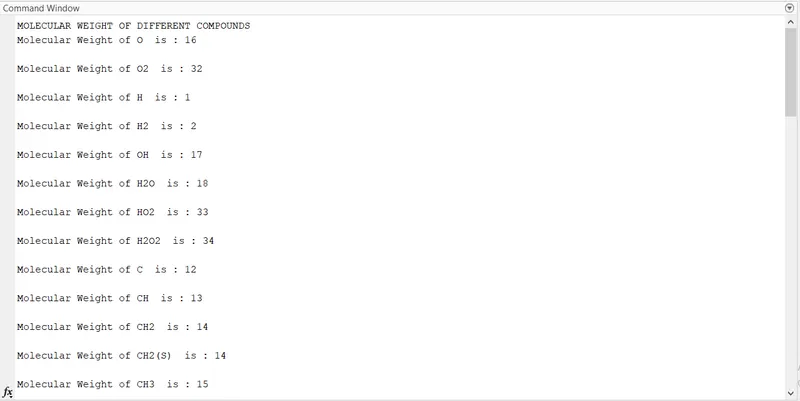
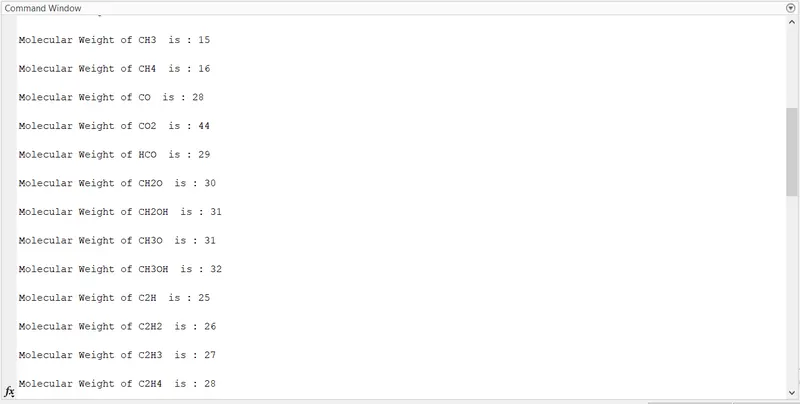
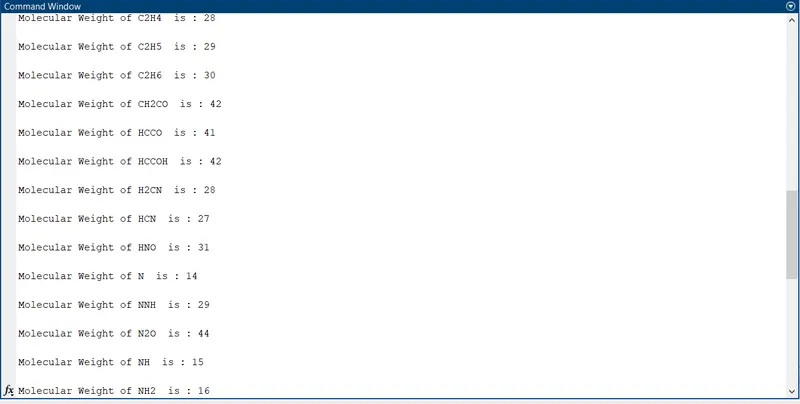
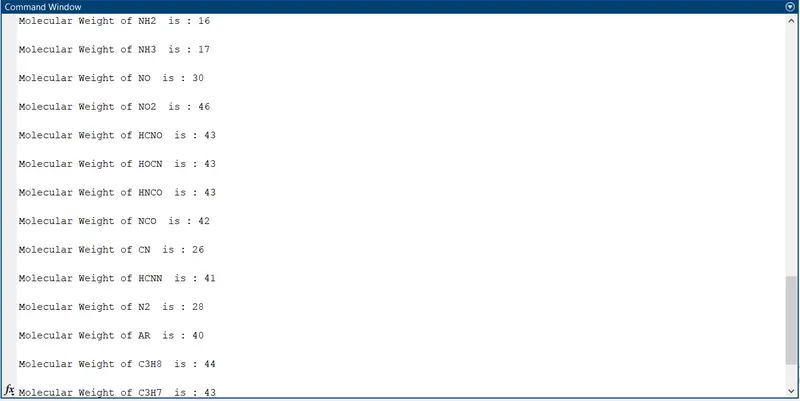
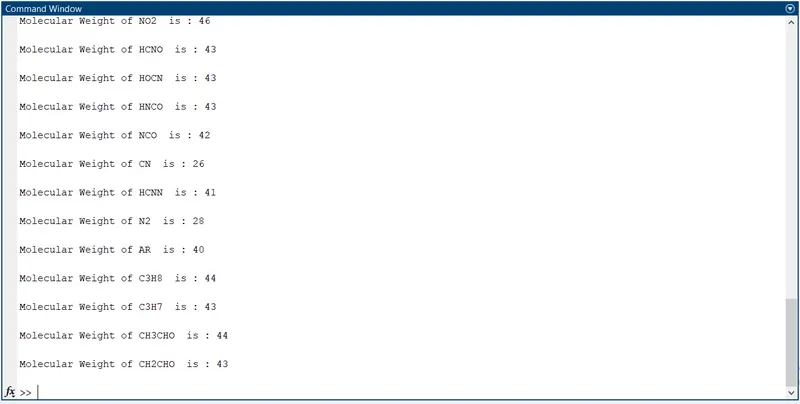
2) Calculate the molecular weight of each species and display it in the command window.
3) Plot the Cp, Enthalpy and Entropy for the local temperature range (low temperature : high temperature) specific for each species.
4) Save the plots as images with appropriate names and dump them in separate folders for each species with suitable name automatically.
5) Attach screenshot of the window where all the folders are saved.
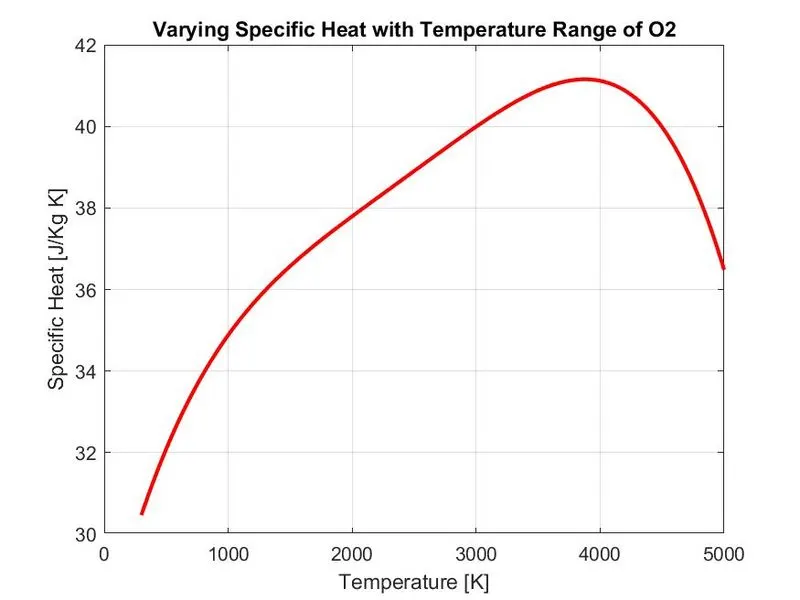
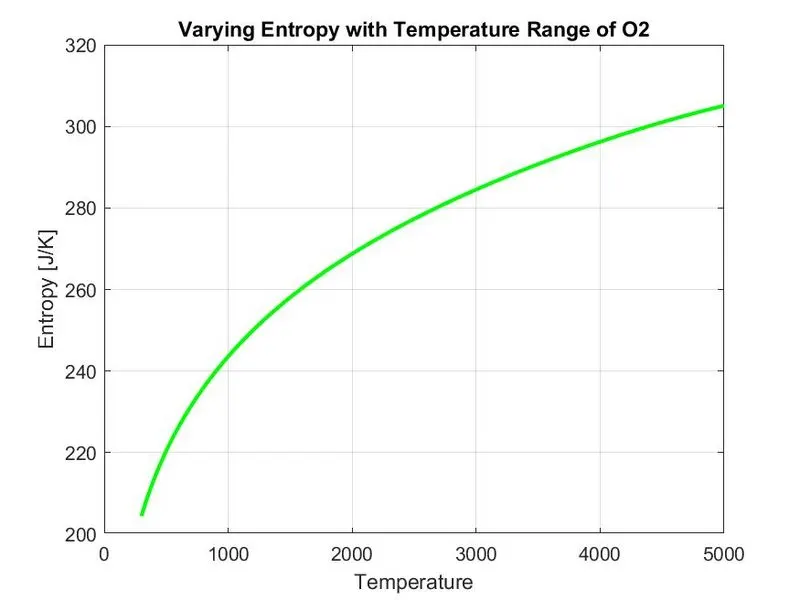
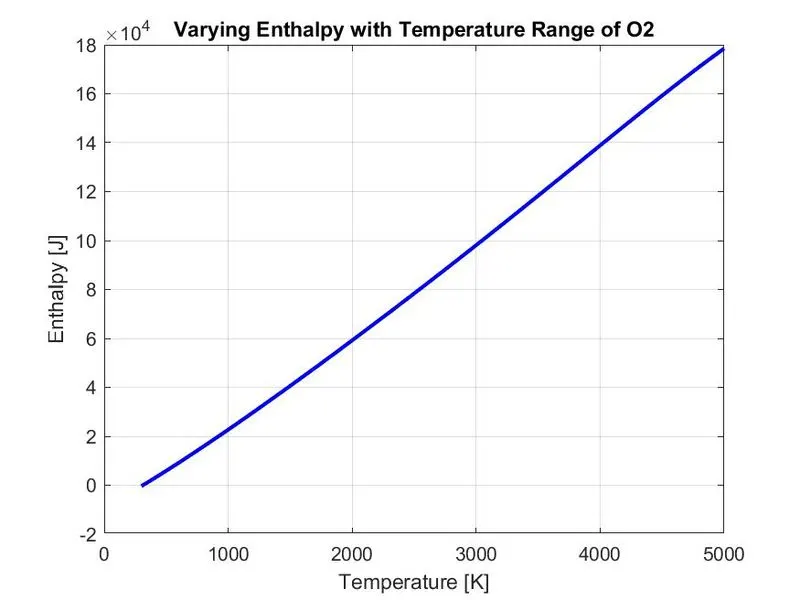
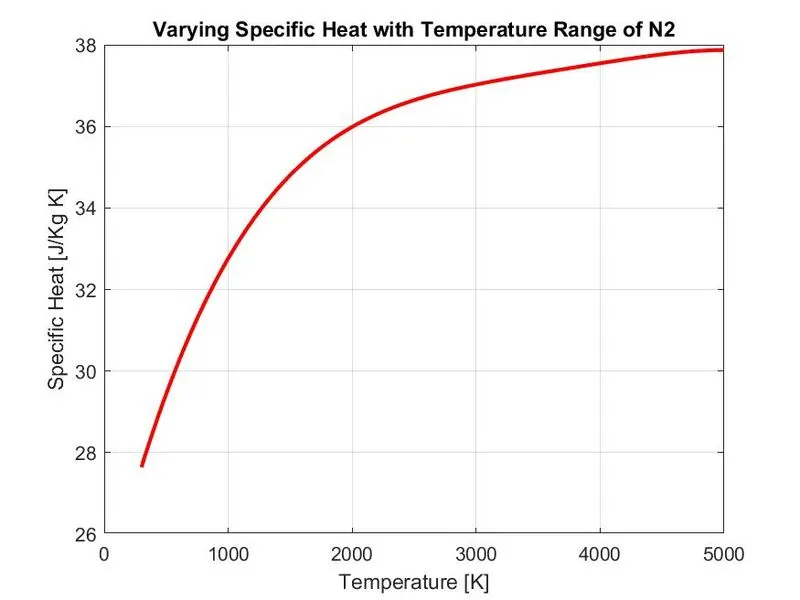
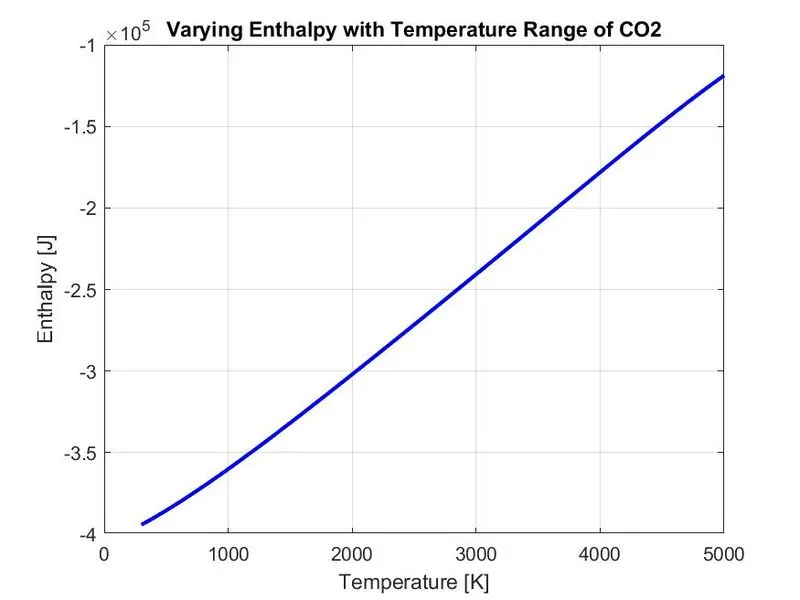
6) Plots for o2, N2 and Co2 species.
FILE PARSING:
File Parsing refers to reading in a data stream and building a memory model of the content of that data. Parsing splits a file or other input into pieces of data that can be easily stored or manipulated
Step(1) - Define the function. Step(2) - Create an Input Parser object. Step(3) - Add inputs to the scheme. Step(4) - Set properties to adjust parsing. Step(5) - Parse the inputs. Step(6) - Use the inputs in function. Step(7) - Calling Function.
NASA THERMODYNAMIC FILE:
"THERMO.dat" file is a data file containing 14 coefficients for 53 different elements given by NASA. These coefficients are utilized to calculate the specific heat, enthalpy, entropy for a paticular element. Each element has its own range of local temperature.
LIST OF ELEMENTS CONTAINED IN NASA THERMODYNAMIC FILE:
Ar C C2H C2H2 C2H3 C2H4
C2H5 C2H6 C3H7 C3H8 CH CH2
CH2(S) CH2CHO CH2CO CH2O CH2OH CH3
CH3CHO CH3O CH3OH CH4 CN CO
CO2 H H2 H2CN H2O H2O2
HCCO CCOH HCN HCNN HCNO HCO
HNCO HNO HO2 HOCN N N2
N2O NCO NH NH2 NH3 NNH
NO NO2 O O2 OH
Enthalpy, Entropy and Specific Heat:
Enthalpy, Entropy and Specific heat of various species values at different temperatures are required extensively to analyze the thermodynamic process.
For example, if the combustion process is considered in a cylinder, these quantities are required to observe how the combustion is going on and how efficient it will be. It eventually allow seeking the scope of improvement in the process. Similarly in the other process like refrigeration, air - conditioning, nozzle flow, etc. these quantities are widely involved to observed the phenomenon.
NASA came up with the polynomials that can be used to evaluate the thermodynamic properties such as Cp, H and S. They have documented the coefficients that are required to evaluate these polynomials for 1000+ species.
The NASA polynomials have the form:
Cp/R = a1 + a2 T + a3 T^2 + a4 T^3 + a5 T^4
H/RT = a1 + a2 T/2 + a3 T^2/3 + a4 T^3/4 + a5 T^4/5 + a6/T
S/R = a1 lnT +a2 T + a3 T^2/2 + a4 T^3/3 + a5 T^4/4 + a7
Where R is the universal gas constant, T is the temperature and a1,a2,a3,a4,a5,a6 and a7 are the numerical coefficients supplied in the thermodynamic file. The first 7 coefficients are High-temperature coefficients (above 1000 K) and the second 7 coefficients are Low-temperature coefficients (below 1000 K).
FUNCTION CODE OF MAIN CODE:
1) Specific Heat
Specific heat is the quantity of heat required to raise the temperature of one gram of a substance by one Celsius degree. The SI unit of specific heat is joule per kelvin per kilogram.
EXAMPLE : The specific heat of water is 1 calorie (or 4,186 joules) per gram per Celsius degree.
Equation dealing with Specific heat is: Cp = Q/m*T, where Q is heat required, m is mass of the substance, T is temperature raised.
Here we use the NASA Thermodynamic equation to find the Specific heat:
Cp = (a1 + a2 T + a3 T^2 + a4 T^3 + a5 T^4)*R
FUNCTION CODE:
%SPECIFIC HEAT CALCULATION
function cp = project_specific_heat(a1,a2,a3,a4,a5,a8,a9,a10,a11,a12,temp,R,global_mid_temp)
         if temp <= global_mid_temp                                                          %Comparing with global temperature.
             cp = (a8 + a9*temp + (a10*(temp).^2) + (a11*(temp).^3) + (a12*(temp).^4))*R;    %If 'if' condition is true it will excute the next line otherwise will excute the 'else' part.
         else
             cp = (a1 + a2*temp + (a3*(temp).^2) + (a4*(temp).^3) + (a5*(temp).^4))*R;

end
2) Entropy
Entropy is the measure of a system’s thermal energy per unit temperature that is unavailable for doing useful work, because work is obtained from ordered molecular motion. In other words entropy is also defined as the measure of the molecular disorder, or randomness, of a system.
For reversible machines, entropy change eqaution can be formed as: △S = Q/T0, where △S is change in entropy, Q is heat, T0 is temperature at an instant. The SI unit of entropy if Joules per Kelvin.
S = (a1 lnT +a2 T + a3 T^2/2 + a4 T^3/3 + a5 T^4/4 + a7)*R
FUNCTION CODE:
%ENTROPY CALCULATION FUNCTION
function S = project_entropy(a1,a2,a3,a4,a5,a7,a8,a9,a10,a11,a12,a14,temp,R,global_mid_temp)
        if temp <= global_mid_temp                                                              %Comparing with global temperature.
            S = (a8.*log(temp) + (a9*temp) + (a10*((temp).^2)./2) + (a11*((temp).^3)./3) + (a12*((temp).^4)./4) + a14)*R;        %If 'if' condition is true it will excute the next line otherwise will excute the 'else' part.
        else
            S = (a1.*log(temp) + (a2*temp) + (a3*((temp).^2)./2) + (a4*((temp).^3)./3) + (a5*((temp).^4)./4) + a7)*R;
end
3) Enthalpy
Enthalpy is the property of a thermodynamic system, and is defined as the sum of the system's internal energy and the product of its pressure and volume and enthalpy is a state function. SI unit of enthalpy is Joule.
Equation dealing with Enthalpy is H = E +PV, where H is Enthalpy, E is Internal Energy, P is pressure, V is volume.
Here we use the NASA Thermodynamic equation to find the Enthalpy:
H = (a1 + a2 T/2 + a3 T^2/3 + a4 T^3/4 + a5 T^4/5 + a6/T)*R*T
FUNCTION CODE:
%ENTHALPY CALCULATION FUNCTION
function H = project_enthalpy(a1,a2,a3,a4,a5,a6,a8,a9,a10,a11,a12,a13,temp,R,global_mid_temp)
         if temp <= global_mid_temp                                                           %Comparing with global temperature.
             H = (a8 + ((a9*temp)/2) + ((a10*(temp).^2)/3) + ((a11*(temp).^3)/4) + ((a12*(temp).^4)/5) + (a13./temp))*R.*temp;  %If 'if' condition is true it will excute the next line otherwise will excute the 'else' part.
         else
             H = (a1 + ((a2*temp)/2) + ((a3*(temp).^2)/3) + ((a4*(temp).^3)/4) + ((a5*(temp).^4)/5) + (a6./temp))*R.*temp;

end
4) Molecular Weight
The molecular mass is mass of the given molecule: it is measured in daltons. Different molecules of the same compounds may have different molecular masses because they contain different isotopes of an element.
FUNCTION CODE:
%MOLECULAR WEIGHT CALCULATION FUNCTION
function Molecularweight = Molecular_weight(species_sp)

         %Initializing the values
         atomic_name = ['H','C','O','N','A'];
         atomic_weight = [1 12 16 14 40];
         Molecularweight = 0;


       for i = 1:length(species_sp)                                        %Passing the length of 'species_sp'.
             for j = 1:length(atomic_name)                                 %Passing the length of 'atomic_name'.
                   if strcmpi(species_sp(i),atomic_name(j))                %Comparing the strings of 'species_sp' and 'atomic_name' and if it is true then will execute the very next line otherwise not.
                      Molecularweight = Molecularweight + atomic_weight(j);
                          position = j;                                    %Storing 'j' value in 'position'.
                   end
             end
           n = str2num(species_sp(i));                                     %Converting string 'species_sp' of 'ith' value to number and stored in 'n'.
           if n>1
              Molecularweight = Molecularweight + atomic_weight(position)*(n-1); %To calculate the numbers in the compounds.
           end
       end

       %Printing Molecular weight every time of every species.
       fprintf('Molecular Weight of %s ',species_sp);
       fprintf(' is : ');
       fprintf('%d',Molecularweight);
       fprintf('n n');
end
MAIN CODE:
close all
clc

%mkdir 'C:UsersqwertyDesktopvishnuSkillLyncMatlab'                          %Making Directory

f1 = fopen('THERMO.dat','r');                                              %Opening the file 'THERMO.dat' using 'fopen('filename','persmission')' and stored into f1.
gt = fgetl(f1);                                                            %Reading the very next of the file using 'fgetl(filename)' which is "THERMO" in the file.

global_temp = fgetl(f1);                                                   %Reading the next line of the file (i.e) "300.000 1000.000 5000.000" which is a string and stored in 'global_temp'.

t = strsplit(global_temp);                                                 %The stored string is spilted using 'strspilt(str,demiliter)'.(i.e)"'300.000' '1000.000' '5000.000'".

global_low_temp = str2double(t{2});                                        %The "300.000" is stored in 'global_low_temp' using 'str2double' which converts string to double value and '{}' is used because since the 't' contains cell array which can carry different types whereas a normal array can carry a single type only.
global_mid_temp = str2double(t{3});                                        %The "1000.000" is stored in 'global_mid_temp' using 'str2double' which converts string to double value and '{}' is used because since the 't' contains cell array which can carry different types whereas a normal array can carry a single type only.
global_high_temp = str2double(t{4});                                       %The "5000.000" is stored in 'global_high_temp' using 'str2double' which converts string to double value and '{}' is used because since the 't' contains cell array which can carry different types whereas a normal array can carry a single type only.

%Intializing
temp = linspace(global_low_temp,global_high_temp,1000);                    %Obtaining the temperature range.
R = 8.314;                                                                 %'R' which is gas constant.

fprintf('MOLECULAR WEIGHT OF DIFFERENT COMPOUNDS AND ELEMENTSn')                       %Printing headline of the Molecular weight which will be printed on the command window.

for i = 1:3
    gt = fgetl(f1);                                                        %Just ignoring the next line.
end

%Using 'for' loop to calculate very elements properties.
for i = 1:53                                                               %Since there are 53 elements.
   gt = fgetl(f1);                                                         %Reading the next line and stored in 'gt'.
   A = strsplit(gt,' ');                                                   %Now spliting the text using 'strsplit' which is stored in 'gt' and stored in 'A' which will be cell type array.
   species_sp = (A{1});                                                    %Now storing the each element name in 'species_sp', here we use '{}' since 'A' is cell type array and ignoring rest text.

   line_1 = fgetl(f1);                                                     %Reading the next line and stored in 'line_1'.
   a = strfind(line_1,'E');                                                %Finding the "E" character in the data using 'strfind(str,pat)' and stored in 'a'.

   %EXTRACTING HIGHER AND LOWER TEMPERATURE COEFFICIENTS

   %Extracting First Seven Coefficients (i.e) High-Temperature Coefficient.
   a1 = line_1(1:a(1)+3);                                                     %Storing the first coefficient in 'a1' which is a string.
   a1 = str2double(a1);                                                       %Converted 'a1' to double using 'str2double' and overwritten in 'a1'.
   a2 = line_1(a(1)+4:a(2)+3);                                                %Storing the second coefficient in 'a2' which is a string.
   a2 = str2double(a2);                                                       %Converted 'a2' to double using 'str2double' and overwritten in 'a2'.
   a3 = line_1(a(2)+4:a(3)+3);                                                %Storing the third coefficient in 'a3' which is a string.
   a3 = str2double(a3);                                                       %Converted 'a3' to double using 'str2double' and overwritten in 'a3'.
   a4 = line_1(a(3)+4:a(4)+3);                                                %Storing the fourth coefficient in 'a4' which is a string.
   a4 = str2double(a4);                                                       %Converted 'a4' to double using 'str2double' and overwritten in 'a4'.
   a5 = line_1(a(4)+4:a(5)+3);                                                %Storing the fifth coefficient in 'a5' which is a string.
   a5 = str2double(a5);                                                       %Converted 'a5' to double using 'str2double' and overwritten in 'a5'.

   line_2 = fgetl(f1);                                                     %Reading the next line and stored in 'line_2'.
   b = strfind(line_2,'E');                                                %Finding the "E" character in the data using 'strfind(str,pat)' and stored in 'b'.
   a6 = line_2(1:b(1)+3);                                                     %Storing the sixth coefficient in 'a6' which is a string.
   a6 = str2double(a6);                                                       %Converted 'a6' to double using 'str2double' and overwritten in 'a6'.
   a7 = line_2(b(1)+4:b(2)+3);                                                %Storing the seventh coefficient in 'a7' which is a string.
   a7 = str2double(a7);                                                       %Converted 'a7' to double using 'str2double' and overwritten in 'a7'.

   %Extracting Second Seven Coefficients (i.e) Low-Temperature Coefficient.
   a8 = line_2(b(2)+4:b(3)+3);                                                %Storing the eighth coefficient in 'a8' which is a string.
   a8 = str2double(a8);                                                       %Converted 'a8' to double using 'str2double' and overwritten in 'a8'.
   a9 = line_2(b(3)+4:b(4)+3);                                                %Storing the nineth coefficient in 'a9' which is a string.
   a9 = str2double(a9);                                                       %Converted 'a9' to double using 'str2double' and overwritten in 'a9'.
   a10 = line_2(b(4)+4:b(5)+3);                                               %Storing the tenth coefficient in 'a10' which is a string.
   a10 = str2double(a10);                                                     %Converted 'a10' to double using 'str2double' and overwritten in 'a10'.

   line_3 = fgetl(f1);                                                     %Reading the next line and stored in 'line_3'.
   c = strfind(line_3,'E');                                                %Finding the "E" character in the data using 'strfind(str,pat)' and stored in 'c'.
   a11 = line_3(1:c(1)+3);                                                    %Storing the eleventh coefficient in 'a11' which is a string.
   a11 = str2double(a11);                                                     %Converted 'a11' to double using 'str2double' and overwritten in 'a11'
   a12 = line_3(c(1)+4:c(2)+3);                                               %Storing the twelth coefficient in 'a12' which is a string.
   a12 = str2double(a12);                                                     %Converted 'a12' to double using 'str2double' and overwritten in 'a12'.
   a13 = line_3(c(2)+4:c(3)+3);                                               %Storing the thirteenth coefficient in 'a13' which is a string.
   a13 = str2double(a13);                                                     %Converted 'a13' to double using 'str2double' and overwritten in 'a13'.
   a14 = line_3(c(3)+4:c(4)+3);                                               %Storing the fourteenth coefficient in 'a14' which is a string.
   a14 = str2double(a14);                                                     %Converted 'a14' to double using 'str2double' and overwritten in 'a14'.

   cp = project_specific_heat(a1,a2,a3,a4,a5,a8,a9,a10,a11,a12,temp,R,global_mid_temp);  %Calculation of specific heat.

   H = project_enthalpy(a1,a2,a3,a4,a5,a6,a8,a9,a10,a11,a12,a13,temp,R,global_mid_temp); %Calculation of Enthalpy.

   S = project_entropy(a1,a2,a3,a4,a5,a7,a8,a9,a10,a11,a12,a14,temp,R,global_mid_temp);  %Calculation of Entropy.

   Molecularweight = Molecular_weight(species_sp);                         %Calculation of Molecular Weight.

   %Saving as a folder.
   cur_dir = pwd;                                                          %'pwd' is used to identify current folder.
   %mkdir(species_sp);                                                      %'mkdir' is used to make new folder.
   cd(species_sp)                                                          %'cd' is used to chnage current folder.

  %Ploting Specific Heat V/S Temperature.
  figure(1)
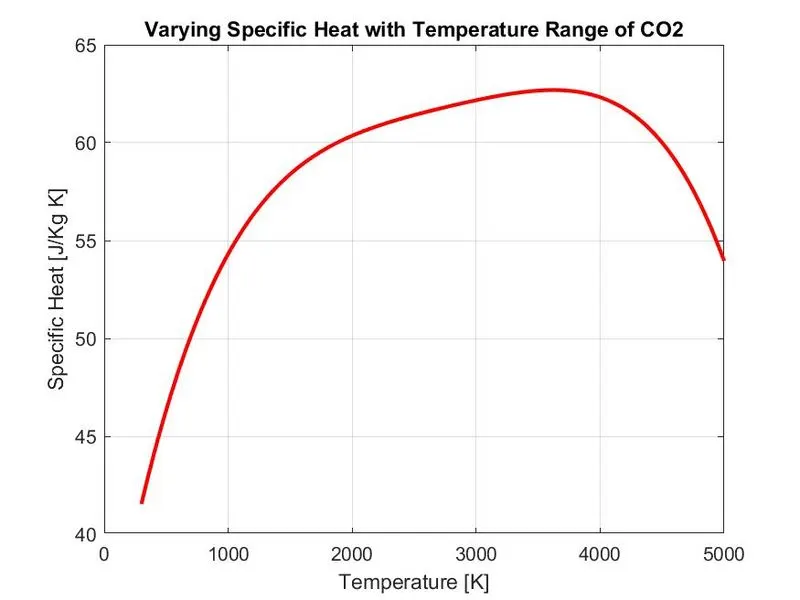
  plot(temp,cp,'linewidth',2,'color','r');
  xlabel('Temperature [K]')
  ylabel('Specific Heat [J/Kg K]')
  title(sprintf('Varying Specific Heat with Temperature Range of %s',species_sp))
  grid on
  saveas(figure(1),'Specific heat.jpg')                                    %Saving the plot in the respective species folder as 'Specific heat.jgp'.

  %Ploting Enthalpy V/S Temperature.
  figure(2)
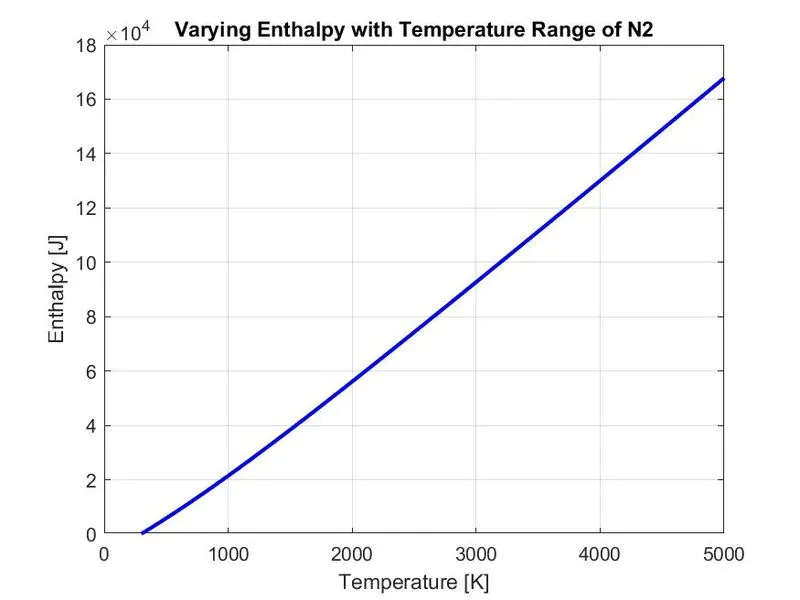
  plot(temp,H,'linewidth',2,'color','b')
  xlabel('Temperature [K]')
  ylabel('Enthalpy [J]')
  title(sprintf('Varying Enthalpy with Temperature Range of %s',species_sp))
  grid on
  saveas(figure(2),'Enthalpy.jpg')                                         %Saving the plot in the respective species folder as 'Enthalpy.jpg'.

  %Ploting Entropy V/S Temperature.
  figure(3)
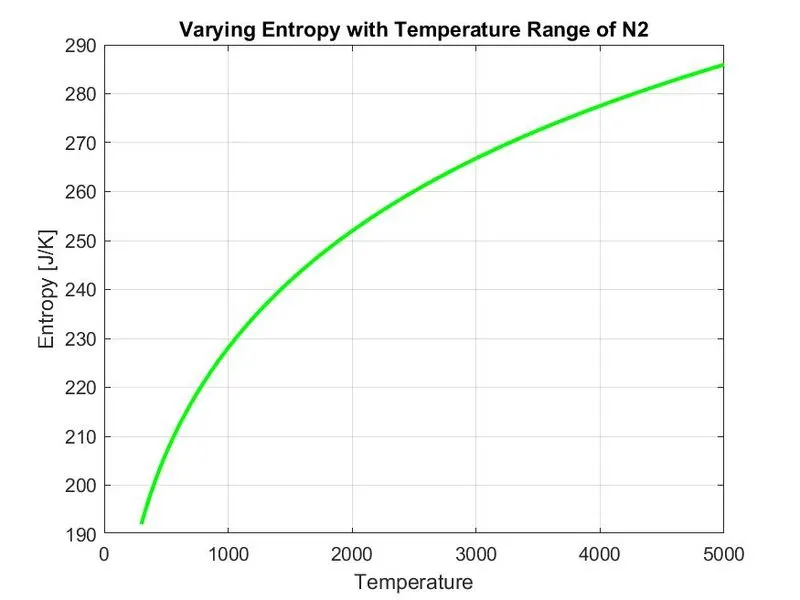
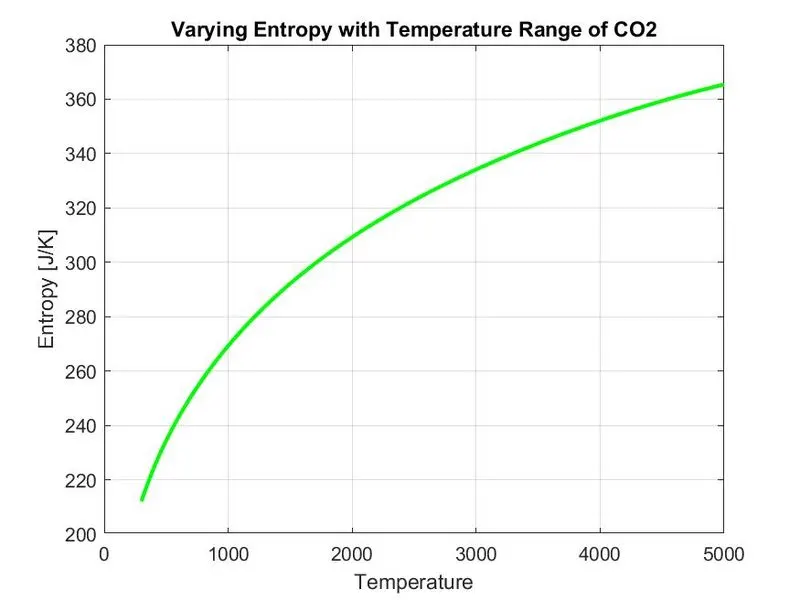
  plot(temp,S,'linewidth',2,'color','g')
  xlabel('Temperature')
  ylabel('Entropy [J/K]')
  title(sprintf('Varying Entropy with Temperature Range of %s',species_sp))
  grid on
  saveas(figure(3),'Entropy.jpg')                                          %Saving the plot in the respective species folder as 'Entropy.jpg'.
  cd(cur_dir)                                                              %Going back to the previous directory.
end
CODE EXPLAINED:
1) 'close all' - close all the plots and figures.
2) 'clc' - clears the command window.
3) 'mkdir' helps to make a directory with location address.
4) Now opening the text file 'THERMO.dat' using 'fopen' and reading it using read command 'r'.
6) Obtaining the temperature range from the 'THERMO.dat' file, using 'strsplit' to split the temperature into a particular string cell.
7) Converting string to double using 'str2double'.
8) Intializing the temperature using 'linspace()' and Universal Gas Constant 'R'.
9) Skipped the next three comment lines using 'for & end' loops.
10) Reading all the 53 species to plot specific heat(cp), enthalpy(H) and entropy(S), with temperature values, and to find the molecular weights.
11) Used 'for' to loop read 53 species.
12) Used 'strfind' to find the string 'E'.
13) Extracted higher and lower temperature coefficients by reading line by line from the 'THERMO.dat' file.
14) Calling Specific heat, Enthalpy, Entropy and Molecular weight functions.
15) Creating a file in the name of each species using 'mkdir'.
16) Ploting Specific heat v/s temperature, Entropy v/s temperature, Enthalpy v/s temperature.
17) Saving each plot in the respective folders using 'saveas()' command.
SYNTAX USED DURING CODING:
'mkdir' = Make new directory
'fopen' = Open a file to obtain information from the file
'fgetl' = Read line from the line
'strspilt' = Split the string at specified delimiter
'str2double' = Converting string to double precision value
'strfind' = Finding one string with another
'pwd' = Identify current directory
'cd' = Change Working directory
'saveas' = Save figure to specific file format
OUTPUT OF MOLECULAR WEIGHTS:
MOLECULAR WEIGHT OF DIFFERENT COMPOUNDS AND ELEMENTS
Molecular Weight of O  is : 16

Molecular Weight of O2  is : 32

Molecular Weight of H  is : 1

Molecular Weight of H2  is : 2

Molecular Weight of OH  is : 17

Molecular Weight of H2O  is : 18

Molecular Weight of HO2  is : 33

Molecular Weight of H2O2  is : 34

Molecular Weight of C  is : 12

Molecular Weight of CH  is : 13

Molecular Weight of CH2  is : 14

Molecular Weight of CH2(S)  is : 14

Molecular Weight of CH3  is : 15

Molecular Weight of CH4  is : 16

Molecular Weight of CO  is : 28

Molecular Weight of CO2  is : 44

Molecular Weight of HCO  is : 29

Molecular Weight of CH2O  is : 30

Molecular Weight of CH2OH  is : 31

Molecular Weight of CH3O  is : 31

Molecular Weight of CH3OH  is : 32

Molecular Weight of C2H  is : 25

Molecular Weight of C2H2  is : 26

Molecular Weight of C2H3  is : 27

Molecular Weight of C2H4  is : 28

Molecular Weight of C2H5  is : 29

Molecular Weight of C2H6  is : 30

Molecular Weight of CH2CO  is : 42

Molecular Weight of HCCO  is : 41

Molecular Weight of HCCOH  is : 42

Molecular Weight of H2CN  is : 28

Molecular Weight of HCN  is : 27

Molecular Weight of HNO  is : 31

Molecular Weight of N  is : 14

Molecular Weight of NNH  is : 29

Molecular Weight of N2O  is : 44

Molecular Weight of NH  is : 15

Molecular Weight of NH2  is : 16

Molecular Weight of NH3  is : 17

Molecular Weight of NO  is : 30

Molecular Weight of NO2  is : 46

Molecular Weight of HCNO  is : 43

Molecular Weight of HOCN  is : 43

Molecular Weight of HNCO  is : 43

Molecular Weight of NCO  is : 42

Molecular Weight of CN  is : 26

Molecular Weight of HCNN  is : 41

Molecular Weight of N2  is : 28

Molecular Weight of AR  is : 40

Molecular Weight of C3H8  is : 44

Molecular Weight of C3H7  is : 43

Molecular Weight of CH3CHO  is : 44

Molecular Weight of CH2CHO  is : 43

>>
ATTACHMENTS:
Screenshots of the window where all the folders are saved:

RESULT:
Specific Heat, Entropy, Enthalpy Plots for O2, N2, CO2 species:
1) Plots of O2
a) Variation of Specific Heat with Temperature of O2
b) Variation of Entropy with Temperature of O2
c) Variation of Enthaply with Temperature of O2
2) Plots of N2
a) Variation of Specific Heat with Temperature of N2
b) Variation of Entropy with Temperature of N2
c) Variation of Enthaply with Temperature of N2
3) Plots of CO2
a) Variation of Specific Heat with Temperature of CO2
b) Variation of Entropy with Temperature of CO2
c) Variation of Enthaply with Temperature of CO2
OUTPUT OF MOLECULAR WEIGHTS SHOWN IN COMMAND WINDOW:
CONCLUSION:
Using MATLAB code, the necessary coefficient which required for the evaluation of various thermodynamic properties for different species were extracted form NASA Thermodynamic "THERMO.dat" data file. The Specific Heat, Entropy, Enthalpy, for all the species were calculated and plotted against the local temperature range and Molecular weight is also calculated for all the species.
GOOGLE DRIVE LINK FOR FOLDERS:
https://drive.google.com/drive/folders/1bJfUZ489WA84FUGuuLTVeyeKF1hSgmYM?usp=sharing
REFERENCE:
https://in.mathworks.com/help/matlab/ref/mkdir.html
https://in.mathworks.com/help/matlab/ref/saveas.html
https://in.mathworks.com/help/matlab/ref/sprintf.html
https://in.mathworks.com/help/matlab/ref/cd.html?searchHighlight=cd&s_tid=srchtitle
https://ntrs.nasa.gov/citations/19940013151
http://combustion.berkeley.edu/gri-mech/data/nasa_plnm.html
https://in.mathworks.com/help/matlab/ref/pwd.html?searchHighlight=pwd&s_tid=srchtitle
https://in.mathworks.com/help/matlab/ref/str2double.html?searchHighlight=str2double&s_tid=srchtitle