Robot Arm
Aim- To simulate the forward kinematics of a 2R Robotic Arm.
Introduction-
Forward kinematics refers to the use of the kinematic equations of a robot to compute the position of the end-effector from specified values for the joint parameters. The kinematics equations of the robot are used in robotics, computer games, and animation.
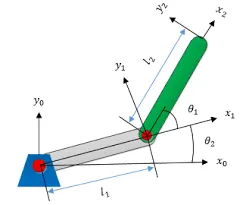
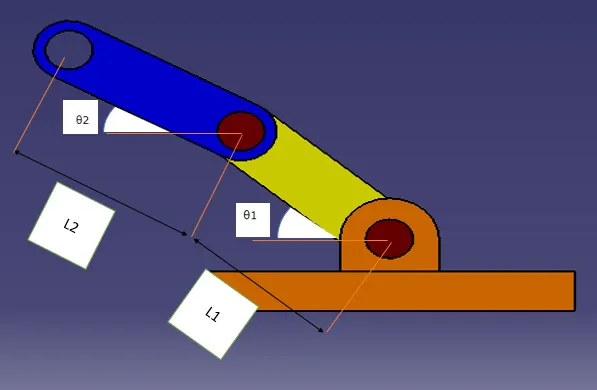
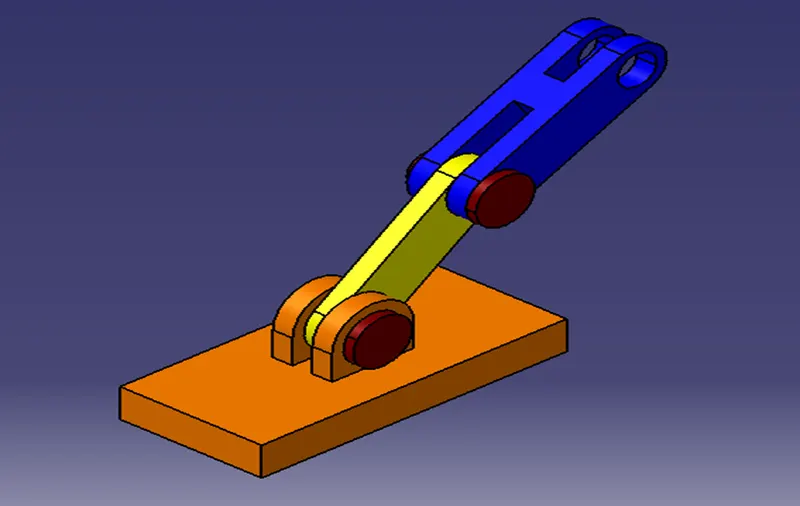
Designed using catia v5 to represent Robot arm
L1 and L2 are the length of the arms
From the figure we can get to know axis which is required for simulation
x0=(0)
y0=(0)
x1=L1*cosd(θ1)
y1=L1*sind(θ1)
x2=x1+L2*cosd(θ2)
y2=y1+L2*sind(θ2)
code
clear all
close all
clc
%intial condition

l1=1
l2=0.5

theta1=linspace(0,90,10)
theta2=linspace(0 ,90,10)

ct=1
for i=1:length(theta1)
    THETA1=theta1(i)
    for j=1:length(theta2)
        THETA2=theta2(j)

x0=0
y0=0

x1=l1*cosd(THETA1)
y1=l1*sind(THETA1)

x2=x1+l2*cosd(THETA2)
y2=y1+l2*sind(THETA2)


 %plotting
plot([x0 x1],[y0 y1],[x1 x2],[y1 y2],'linewidth',3)
axis([ -0.1 1.6 0 1.6])
pause(0.03)
M(ct)=getframe(gcf);
ct=ct+1;

    end
end

%creating animation and saving the file
movie(M)
videofile= VideoWriter('forward_kinematics_2.avi' ,'uncompressed AVI');
open(videofile)
writeVideo(videofile,M)
close (videofile)
code explanation
- clear all (This clears your workspace) ,
- close all(closes all figures) and
- clc (clears the command window).
Initial condition
- L1=1 length of the arm 1
L2=0.5 length of the arm 2
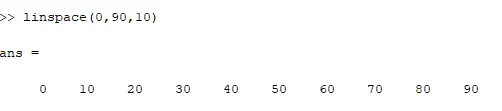
- theta1&2=linspace(0,90,10)
(Linspace-Generate linearly spaced vector for the teta1)
- ct=1 & ct=ct+1
In computer programming a loop counter is the variable that controls the iterations of a loop and here after each for loop the counter is incrementing.
- A "For" Loop is used to repeat a specific block of code a known number of times. In hear we are repeating the θ value from 0 at first thereafter 10, 20 , 30 degree and so on.
- i=1:length(theta1) it means same as 1:10
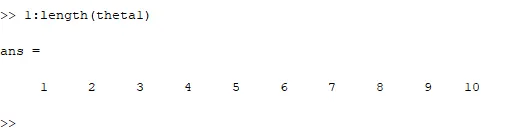
- THETA1=theta1(i)
in here (i) takes each value from 1 to 10 as it is in the for loop.
- similarly
j=1:length(theta2)
j has to be considered different loop counter variable
- positions of the links can be decided by this axis points
x0=0
y0=0
x1=l1*cosd(THETA1)
y1=l1*sind(THETA1)
x2=x1+l2*cosd(THETA2)
y2=y1+l2*sind(THETA2)
- plot([x0 x1],[y0 y1],[x1 x2],[y1 y2],'linewidth',3)
plot command is used for graphical representation
linewidth thickens the size of the curve or line
- axis([ -0.1 1.6 0 1.6])
Set axis limits and aspect ratios
- pause(0.03)
Pause playback or recording
- M(ct)=getframe(gcf)
captures the figure for each counter. (gcf mean get current frame)
- movie(M)
Play recorded movie frames
- videofile= VideoWriter('forward_kinematics.avi' ,'uncompressed AVI');
Use a VideoWriter object to create a video file from an array or MATLAB movie in the name forward_kinematics in a uncompressed manner.
- open
opens the specified file
- writeVideo(videofile,M)
saves/Write video data to file
- close (videofile)
closes the video file
error encountered
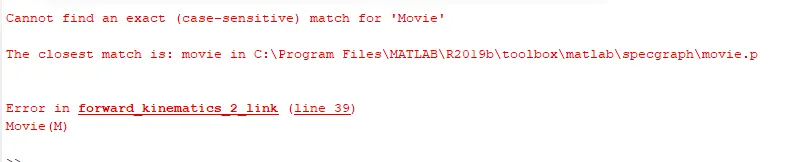
By changing Movie to movie the code worked fine(MATLAB is case sensitive)
Result
the link below navigates to the animation of the two link robot arm.
https://drive.google.com/file/d/1r0Zj4aRNQkylt2RDUiacdO5ODOMe3qnr/view?usp=sharing
https://youtu.be/KzrdKVEaaIo
Similarly
To simulate the forward kinematics of a 3link Robotic Arm.
code and the result
clear all
close all
clc
%intial condition

l1=1
l2=0.5

l3=0.2

theta1=linspace(0,90,10)

theta2=linspace(0 ,90,10)
theta3 =linspace(0,90 ,10)

ct=1
for i=1:length(theta1)
    THETA1=theta1(i)
    for j=1:length(theta2)
        THETA2=theta2(j)
        for  k=1:length(theta1)
    THETA3=theta1(k)

x0=0
y0=0

x1=l1*cosd(THETA1)
y1=l1*sind(THETA1)

x2=x1+l2*cosd(THETA2)
y2=y1+l2*sind(THETA2)

x3=x2+l3*cosd(THETA3)
y3=y2+l3*sind(THETA3)

%plotting
plot([x0 x1],[y0 y1],[x1 x2],[y1 y2],[x2 x3],[y2 y3],'linewidth',3)
axis([ -1 2 0 2])
pause(0.03)
M(ct)=getframe(gcf);
ct=ct+1;
        end
    end
end

%creating animation and saving the file
movie(M)
videofile= VideoWriter('forward_kinematics.avi' ,'uncompressed AVI');
open(videofile)
writeVideo(videofile,M)
close (videofile)
the link below navigates to the animation of the Three link robot arm.
https://youtu.be/tn7W9In0ryw
https://drive.google.com/file/d/1r0fI4PDvcJwKVkZbWqY5w2LD763YV-Q2/view?usp=sharing