Forward Kinematics of a 2R Robotic Arm Manipulator
AIM:
To simulate the forward kinematics of a 2R Robotic Arm Manipulator using MATLAB
Content:
The programming language used here is MATLAB, which is denoted by m
Program to simulate the forward kinematics of a 2R robotic arm manipulator:
% Forward Kinematics of a 2R Robotic arm manipulator
clear all
close all
clc

% Inputs
l1 = 1;
l2 = 0.5;

theta1 = linspace(0,90,10);
theta2 = linspace(0,90,10);

ct=1;

for i = 1:length(theta1)
    THETA1 = theta1(i);
    for j = 1:length(theta2)
        THETA2 = theta2(j);
        x0 = 0;
        y0 = 0;

        x1 = l1*cosd(THETA1);
        y1 = l1*sind(THETA1);

        x2 = x1 + l2*cosd(THETA2);
        y2 = y1 + l2*sind(THETA2);

% Plotting
plot([x0 x1],[y0 y1],[x1 x2],[y1 y2],'linewidth',3)
axis([0 1.5 0 1.5])
pause(0.03)
M(ct) = getframe(gcf);
ct = ct+1;

    end
end

movie(M)
videofile = VideoWriter('forward_kinematics.avi', 'Uncompressed AVI');
open(videofile)
writeVideo(videofile,M)
close(videofile
Explanation:
This program is based on the theory of Kinematics of linkages to compute the position of the end effector or end manipulator
The 2R Robotic arm manipulator contains two links and two rotational joints.
clear all(clears all data stored to a variable)
close all(closes all open MATLAB figure windows)
clc(clears the command window)
%Inputs
(length of link1)l1 = 1;
(length of link2)l2 = 0.5;
(angle of link1)theta1 = linspace(0,90,10);
(angle of link2)theta2 = linspace(0,90,10);
linspace is used to define the length of the vector and the function calculates the interval
ct = 1;
ct = 1 the value 1 indicates the initial position or initial degree
for i = 1:length(theta1);
THETA1 = theta1(i);
THETA1 is a variable assigned for theta1(i)
for j = 1:length(theta2);
THETA2 = theta2(j);
THETA2 is a variable assigned for theta2(j)
Both theta1(i) and theta2(j) contains ten values each.
For loop is a conditional iterative statement which is used to check for certain conditions and then repeatedly execute a codes as long as the conditions are met.
As mentioned in the linspace both arms changes its position from 0 to 90 degrees for the intervals of ten values
For each 10 degrees of the movement of arm1, the arm2 takes the movement continuously for the ten intervals between o and 90 degrees and the process getting repeated for the rest of the values which means to attain the final position of the arm1,arm2.
%Coordinates
Finding values of coordinates using trigonometry based on an angle of theta1 and theta2
x0 = 0;
y0 = 0;
With respect to the origin(starting point or base of the first link) the value of x0 is zero and y0 is zero
(End point of the first link ōr starting point of the second link)x1 = l1*cosd(THETA1);
(End point of the first link ōr starting point of the second link)y1 = l1*sind(THETA1);
(End point of the second link)x2 = x1 + l2*cosd(THETA2);
(End point of the second link)y2 = y1 + l2*sind(THETA2);
Instead of using cos(theta) and sin(theta) we use cosd(theta) and sind(theta) respectively because we use angles in degrees. MATLAB gives values in radians if we are using cos(theta) and sin(theta)
%Plotting
plot([x0 x1],[y0 y1],[x1 x2],[y1 y2],'linewidth',3);
plot is used to create a graphical representation of data that we provided
axis([0 2 0 2]);
axis refers to range of x and y axis
pause(0.03)
Pauses execution for 0.03 seconds
M(ct) = getframe(gcf);
getframe is used in a for loop to record multiple frames into a single array
gcf refers to get current figure
ct = ct+1;
ct+1 after completing the first iteration it directs the interation process to the second position of the first link followed by the movement of the second link to complete another 10 degrees of movements.
end(to terminate the process)
end(to terminate the process)
To create the video file for the animation we use these commands
Movie(M)
movie is used to stitches all the images and play the movie denoted by M,where M is the output from getframe
Videofile = VideoWriter(‘Forward Kinematics.avi’, ‘Uncompressed AVI’);
VideoWriter to create a video file from an array
Open(Videofile)
To open the video file
writeVideo(Videofile,M)
writeVideo writes data from an array to the Videofile
close(Videofile)
To close the video file
Errors that I'm facing while writing the program:
From the below image i had encountered the error of the profile name
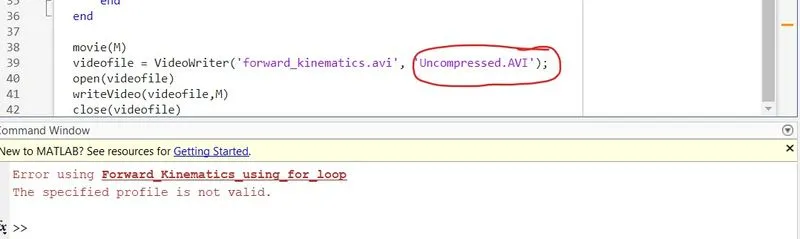
From the below image this can be rectified by eliminating the dot(.) and providing the space in the profile name
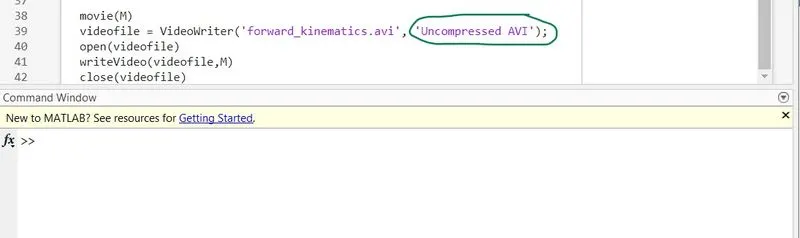
Here I'll be sharing the YouTube link for the Simulation of Forward Kinematics of a 2R Robotic arm manipulator:
Conclusion:
Simulation works perfectly as per the instructions provided.
With reference to this program, I'm trying to make some changes in the programming part to add one more robotic arm, and finally, the results are amazing as I had expected.