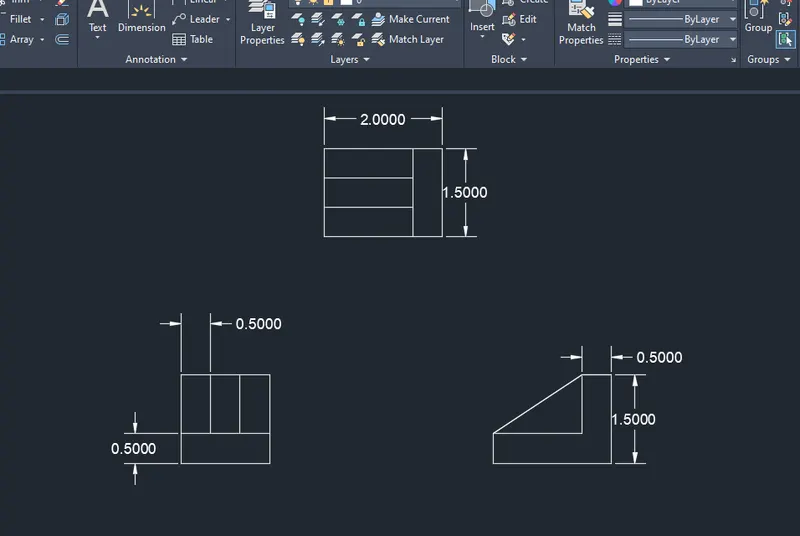
Drafting of various geometries using Chamfer, Fillet tool in AutoCad
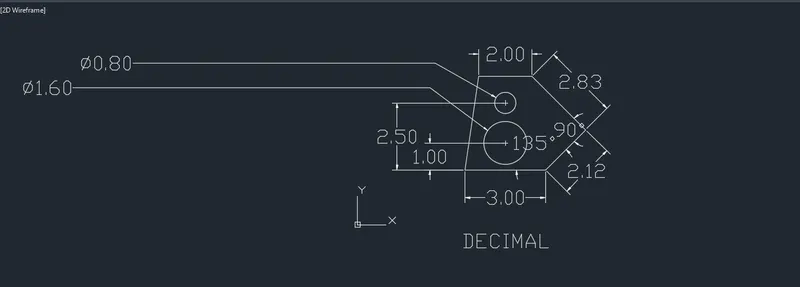
AIM: To draw the geometries using Chamfer, fillet tool in Autocad.
Commands used: Line, circle, chamfer, fillet, mirror, trim, move, rotate, annotate.
Procedure:
1.New sheet- units- decimal-precision 0.00- meter-ok.
2.Limits- 0,0 and 420,210.
3. zoom-All.
4. Select Line tool and draw the lengths starting from base of 3.00 units , now give line command @2.12<45, @2.83<135, @2.00<180, and close.
5. Draw the first circle at x=1.50 and y=1.00 of diameter 1.20 units. Similarly, draw another circle at x=1.50 and y=2.50 of diameter 0.80 units.
6.Annotate and give dimension to all the line segments and circles.
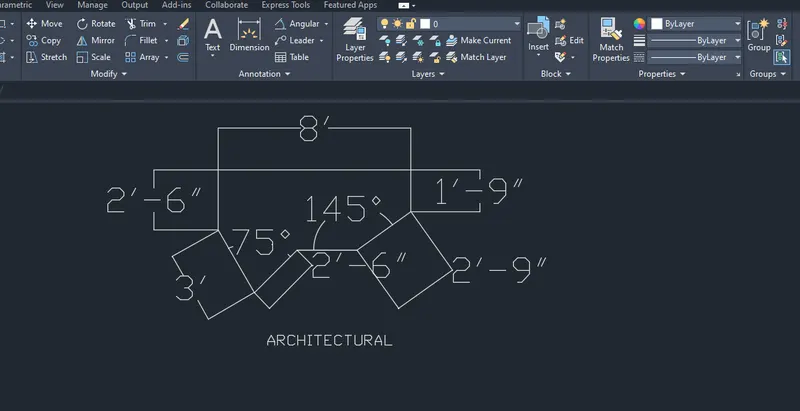
1.New sheet- units- architectural-precision 0'-0"- feet-ok.
2.Limits- 0'-0",0'-0"and 12"-0",9'-0".
3. zoom-All.
4. Select Line tool and draw the lengths starting from top line segment of 8' , now give line command positioning the cursor at 270 degrees with ortho ON , 1'-9" enter.
5.Give line command positioning the cursor at 270 degrees with ortho ON at first end and draw 2'-5" enter.
6. Draw the line at 315degree of 3', at 90degree 2'-6". Now, draw the line 2'-10" at 225degrees and join the lines.
7.Annotate and give dimension to all the line segments.
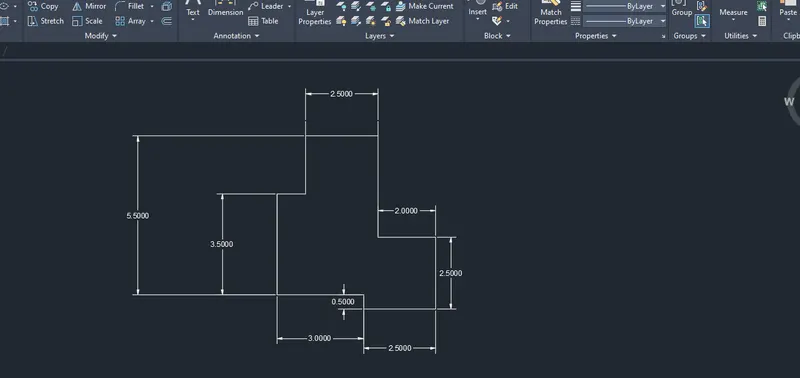
1.New sheet- units- decimal-precision 0.0000- meter-ok.
2.Limits- 0,0 and 420,210.
3. zoom-All.
4. Select Line tool and draw the lengths starting from base of 2.5000 units , now give line command @2<270, @0.5<180, @3.00<270, @3<0,@0.5<270, @2.5<0, @2.5<90,@2<180 and close.
5.Annotate and give dimension to all the line segments and circles
1.New sheet- units- decimal-precision 0.0000- meter-ok.
2.Limits- 0,0 and 420,210.
3. zoom-All.
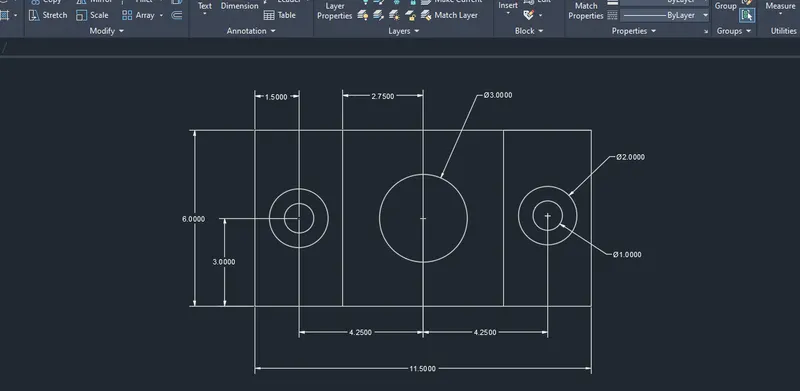
4. Select Line tool and draw the lengths starting from base of 11.50 units , now give line command @6<90, @11.50<180, and close. Draw the vertical lines at 2.75 from the centre of the rectangle on both sides.
5. Draw concentric circles with centre at x=1.50 and y=3.00 of diameter 1.00 and 2.00 . Copy the circles toward 4.25 right from the of the rectangle.
6. Draw another circle at centre of the rectangle of diameter 3.00.
7.Annotate and give dimension to all the line segments and circles.
1.New sheet- units- decimal-precision 0.0000- meter-ok.
2.Limits- 0,0 and 420,210.
3. zoom-All.
4. Select Line tool and draw the lengths starting from base of 1.5000 units,Draw offset at 0.5000. Taking the total length 1.5000 doraw an outer boundary and take offset of 0.5000 for the vertical segments. Follow the steps to draw 2.0000 ht geometry anf rotate towards left. Using Line command draw the L shape geomtrey and connect to make the triagular portion.
5.Annotate and give dimension to all the line segments and circles.