Drafting of various geometries using Chamfer, Fillet tool in AutoCad
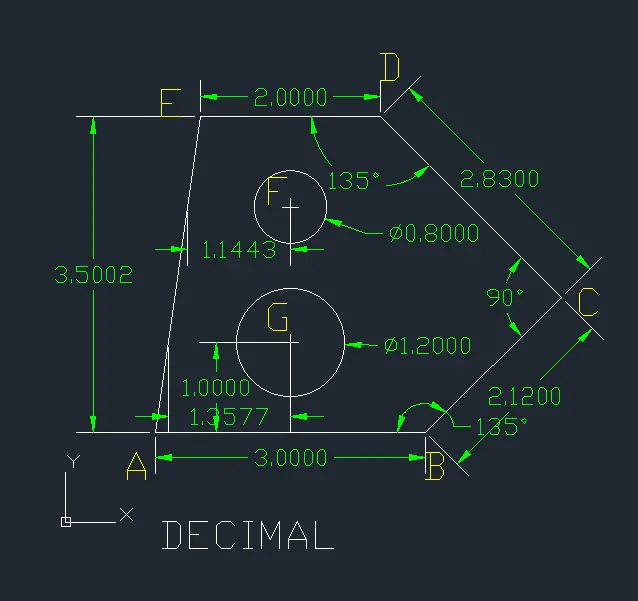
1. AIM : To create decimal drawing with 2 circle
Step - 1
- Start with line command (L)
- Unit and Grid set 1 and 1
- Line specify 1st point : 1,1 (Point A)
- Specify 2nd point : X direction 3.00 (Point B)
- Specify 3rd point : @2.12 < 45 (Point C)
- Specify 4th point : @ 2.83< 135 (Point D)
- Specify 5th point : -X direction 2.00 (Point E)
- Close
- Next start with 'C' (circle) command
- Line specify point : 2.5,2 (Point F) and make circle with 1.20 diameter
- Next start with 'C' (circle) command
- Line specify point : 2.5,3.5 (Point G) and make circle with 0.80 diameter
RESULT :
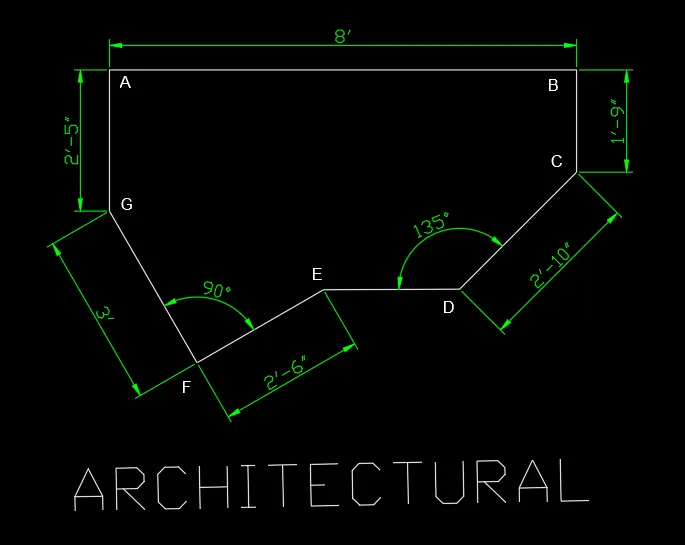
2. AIM : To create Architectural line drawing
Step
- Start with line command (L)
- Unit and Grid set 1" and 1"
- Line specify 1st point : 1,1 (Point A)
- Specify 2nd point : X direction 8' (Point B)
- Specify 3rd point : -Y direction 1'-9" (Point C)
- Specify 4th point : @ 2'10"< 225 (Point D)
- Next start with Point A and make point in -Y direction 2'-5" (Point G)
- Specify next point : @ 3'< 300 (Point F)
- Specify next point : @ 2'6"< 30 (Point E)
- Close with Point D
RESULT :
3. AIM : To create Engineering drawing one circle and one rectangle with champhar
Step - 1
- Unit and Grid set 1" and 1"
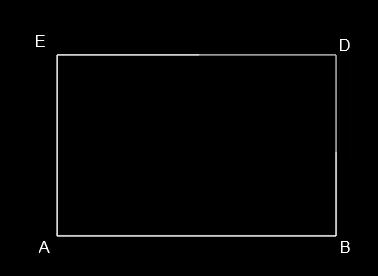
- Start with REC command
- Specify 1st point : 1,1 (Point A)
- Make a rectangular box 5'0.1", 3'3.0" and make point ABCD
Result Step-1
Step - 2
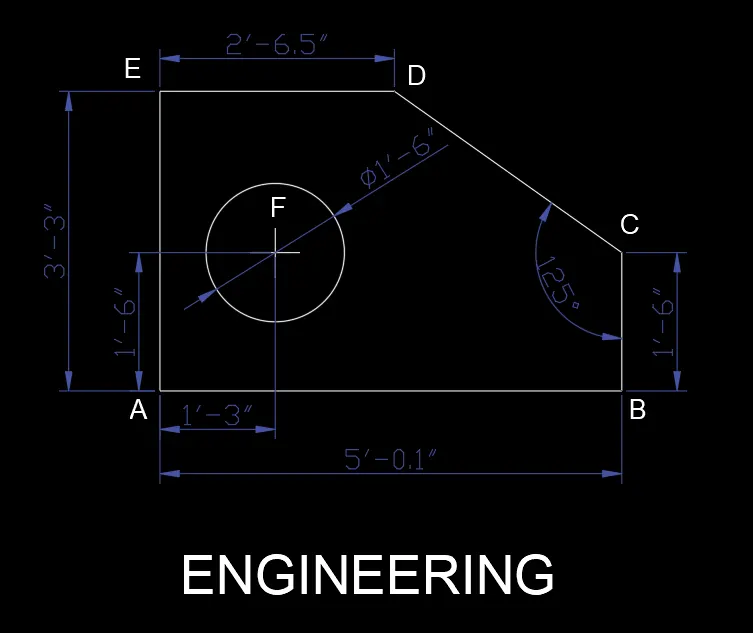
- Start with Chamfer command(CHA) and distance
- Chamfer distance 2'5.6" and 1'9" to Point C
- Make a new point after chamfer ABCDE
- Next start with 'C' command
- Specify 1st point : 1,1
- Specify point : 1'4",1'7" and make a circle with 1'-6.0" diameter and make point F
RESULT :
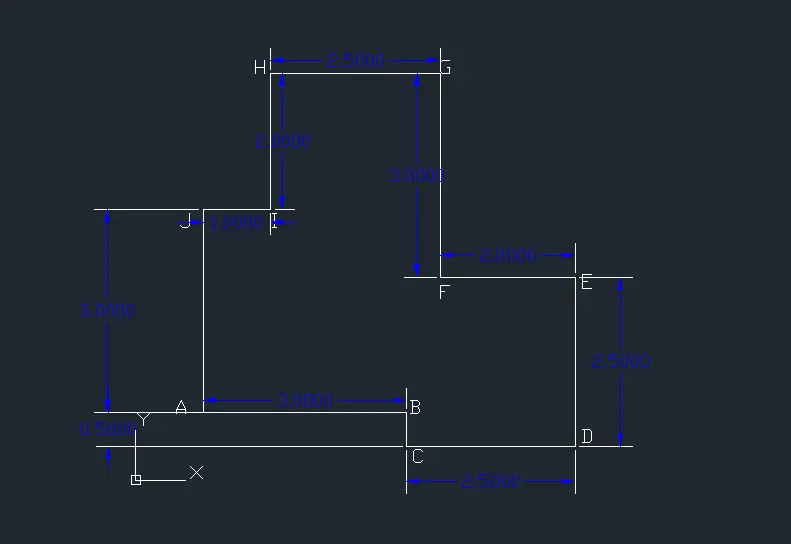
4. AIM : To create a line drawing multiple rectagle
Step
- Unit and Grid set 1 and 1 (Decimal)
- Start with (L) command
- Specify 1st point : 1,1 (Point A)
- Specify 2nd point : X direction 3.00 (Point B)
- Specify 3rd point : -Y direction 0.50 (Point C)
- Specify 4th point : X direction 2.50 (Point D)
- Specify 5th point : Y direction 2.50 (Point E)
- Specify 6th point : -X direction 2.00 (Point F)
- Specify 7th point : Y direction 3.00 (Point G)
- Specify 8th point : -X direction 2.50 (Point H)
- Specify 9th point : -Y direction 2.00 (Point I)
- Specify 10th point : -X direction 1.00 (Point J)
- Close
RESULT
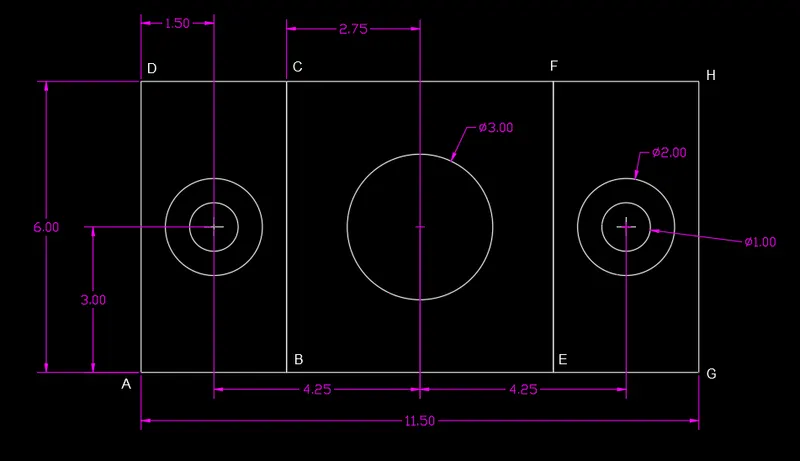
5. AIM : To create a drawing with four circle and three rectangle
Step
- Unit and Grid set 1 and 1 (Decimal)
- Start with (REC) command
- Specify 1st point : 1,1 (Point A)
- Make a rectangular box @3,6 and mark point ABCD
- Next Start with (C) command
- Make a circle with 1.0 Diameter in centre point of box ABCD
- Offset circle with 0.5 in outer side of circle 2.0 diameter
- Copy rectangular box with both circle 1.0 diameter and 2.0 diameter and paste in X direction distance 8.50
- Start with (REC) command
- Make a Rectangular box with Point BCEF
- Next start with Command 'C'
- Make a centre point in box BCEF and make a circle with 3.0 diameter
RESULT :
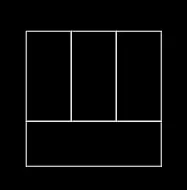
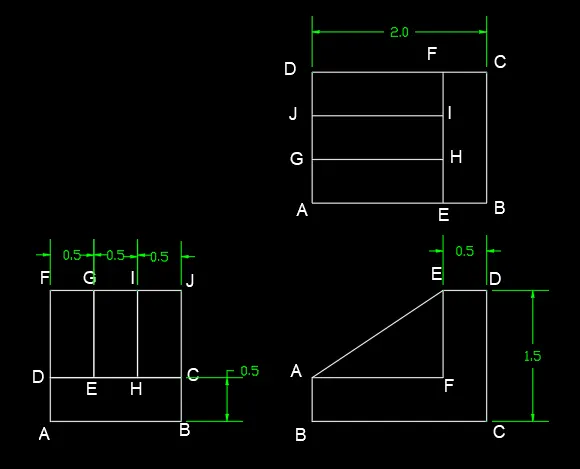
6. AIM : To create a line drawing eight ractangle, one trangle and one mirror of L
Step - 1
- Unit and Grid set 1 and 1 (Decimal)
- Start with (REC) command
- Specify 1st point : 1,1 (Point A)
- Make a rectangular box of @1.5,0.5 and make the point ABCD
- Next start with (REC) command
- Make a rectangular box with point D of size @0.5,1.0 and make the point DEFG
- Copy command (CO) with of (Box-DEFG) and paste in X direction E point and H point
Result Step-1
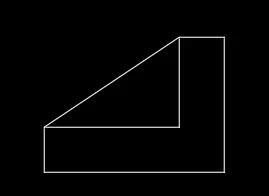
Step - 2
- Unit and Grid set 1 and 1
- Start with (L) command
- Specify 1st point : 4,1.5 (Point A)
- Specify 2nd point : -Y direction 0.5 (Point B)
- Specify 3rd point : X direction 2.0 (Point C)
- Specify 4th point : Y direction 1.5 (Point D)
- Specify 5th point : -X direction 0.5 (Point E)
- Specify 6th point : -Y direction 1.0 (Point F)
- Close
- Next start with L command with point A and join with point E
Result Step-2
Step - 3
- Unit and Grid set 1 and 1
- Start with (REC) command
- Specify 1st point : 4,3.5 (Point A)
- Make a rectangular box of @2.0,1.5 and make the point ABCD
- Explode box ABCD with command X
- Offset line BC to 0.5 in -X direction and make point EF
- Offset line AB to 0.5 in Y direction and make point GH and again offset Y direction and make point IJ
- Trimmed all extra line as per drawing
Final RESULT :
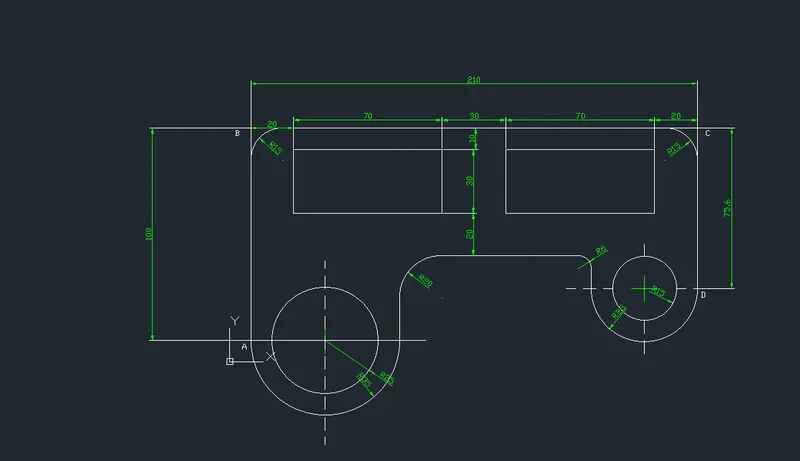
7. AIM : To create line drawing with two rectangle, two circle and two half circle
Step
- Unit and Grid set 1 and 1 (Decimal)
- Start with (L) command
- Specify 1st point : 1,1
- Specify 2nd point : Y direction 100 and markded A B
- Specify 3nd point : X direction 210 and marked B C
- Specify 3nd point : -Y direction 75 and marked C D
- Start with offset (O) command for makeing 2 rectangular box
- Offset AB line to X direction 20 next 70 next 30 next 70
- Offset BC line to -Y direction 10 next 30 and trimmed all extra line as per drawing
- Offset BC line to -Y direction 60
- Start (PL) command with point A
- Create half circle with R35 in X direction
- Create a circle of 50 Diameter with centre point of Redius R35
- Start (PL) command with point D
- Create half circle with R25 in X direction
- Create a circle of 30 Diameter with centre point of Redius R25
- Fillet (F) command with Radius R6, R15, R20 as per drawing
RESULT :
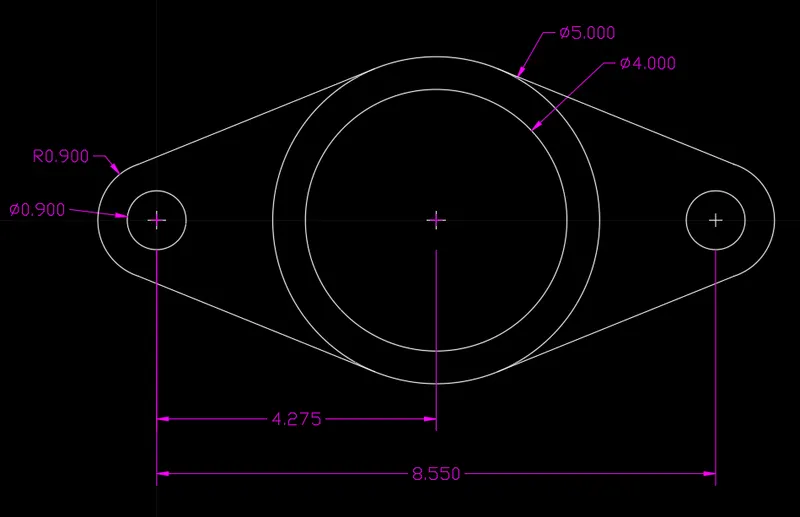
8. AIM : To create line drawing with four circle
Step
- Unit and Grid set 1 and 1 (Decimal)
- Start with (C) command
- Create a 0.90 diameter circle and 0.90 radius circle in same point
- Create a size of 4 diameter circle and 5 diameter circle on distance of 4.275 in X direction in same point
- Tangent line with 0.90 radius circle and 5 diameter circle
- Mirror tangent line
- Mirror circle (0.90 diameter, 0.90 radius and both tangent line)
RESULT :
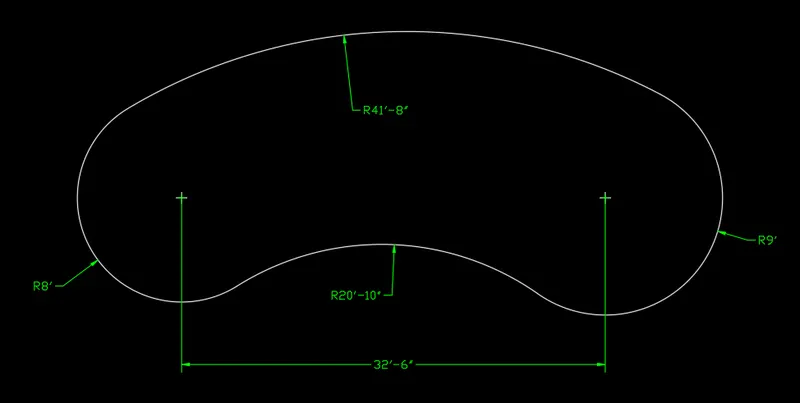
9. AIM : To create line drawing with 2 circle and tan tan tangent
Step
- Unit and Grid set 1" and 1"
- Start with (C) command
- Create a 8' radius circle and 9' radius circle
- Distance between both circle point 32'-6"
- Tan Tan radius 41'-8" with 8' radius circle and 9' radius circle in Y direction
- Tan Tan radius 20'-10" with 8' radius circle and 9' radius circle in -Y direction
- Trimmed all extra line as per drawing
RESULT :
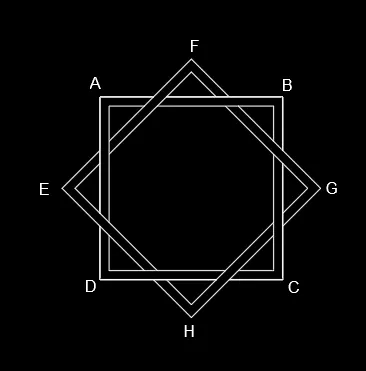
10. AIM : To create adrawing 4 squire boxes (2 in 90 degree and 2 45 degree) in same point
Step
- Unit and Grid set 1 and 1 (Decimal)
- Start with (REC) command
- Specify 1st point : 1,1 (Point A)
- Create a rectangular box @4,4 (Asumed size) and make point ABCD
- Start with offset command (O) with box and offset 0.25 (asumed)
- Next copy and rotate on same centre point both box with 45 degree and make the point EFGH
- Explode all and
- Trim the all extra line as per drawinng.
RESULT :
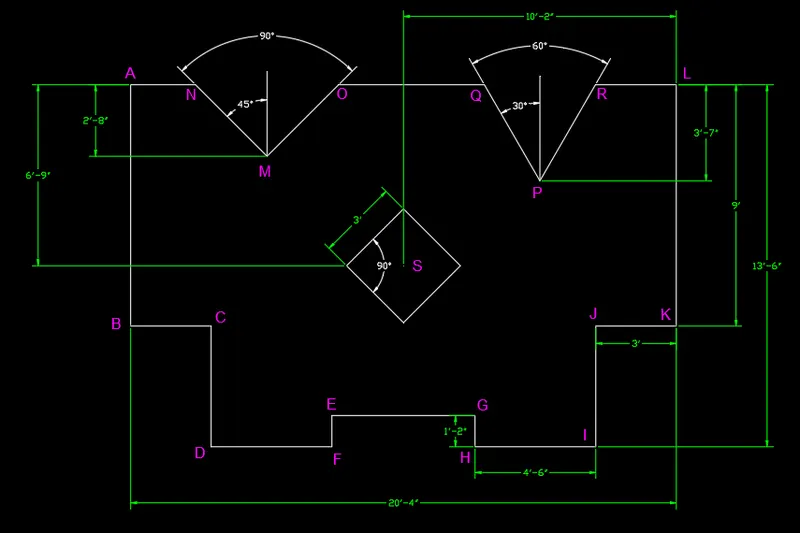
11. AIM : To create line drawing with one squre box and 2 angle drawing 60 degree and 90 degree
Step
- Unit and Grid set 1" and 1" (Engineering)
- Start with (PL) command
- Specify 1st point : 1,1 (Point A)
- Specify 2nd point : -Y direction 9' (Point B)
- Specify 3rd point : X direction 3' (Point C)
- Specify 4th point : -Y direction 4'6" (Point D)
- Specify 5th point : X direction 4'6" (Point E)
- Specify 6th point : Y direction 1'2" (Point F)
- Specify 7th point : X direction 5'4" (Point G)
- Specify 8th point : -Y direction 1'2" (Point H)
- Specify 9th point : X direction 4'6" (Point I)
- Specify 10th point : Y direction 4'6" (Point J)
- Specify 11th point : X direction 3' (Point K)
- Specify 12th point : Y direction 9' (Point L)
- Close in -X direction Point A
- Next Strat with Point command (P) 1,1
- Make point @5'1",-2'8" and make point M
- Start with ray command (RAY) 1st 45 degree and 2nd 135 degree and make point N, O
- Trimmed all extra line as per drawing
- Next Strat with Point command (P) 1,1
- Make point @15'3",-3'7" and make point P
- Start with ray command (RAY) 1st 60 degree and 2nd 120 degree and make point Q, R
- Trimmed all extra line as per drawing
- Start from A point and command POINT.
- Create point @10'2",-6'9" and make point S
- Start with REC command
- Make a box @3',3' and rotate with 45 degree from centre point S
RESULT :
C