DISTANCE MEASUREMENT USING ULTRASONIC SENSOR -28015.
DISTANCE MEASUREMENT USING ULTRASONIC SENSOR -28015.
AIM:
To measure the distance of an object using an Ultrasonic Sensor - 28015 and to smoothen the output using the moving average filter technique.
Requirements:
Arduino UNO
Ultrasonic sensor - 28015
Sensor specifications:
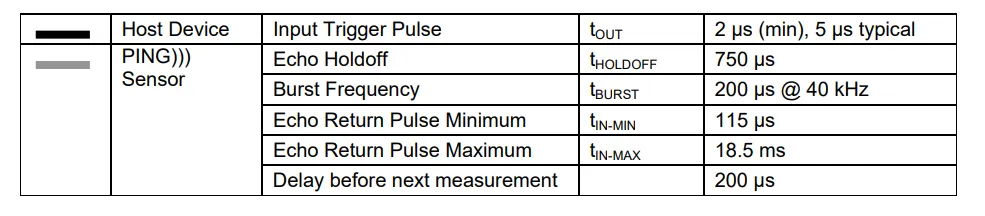
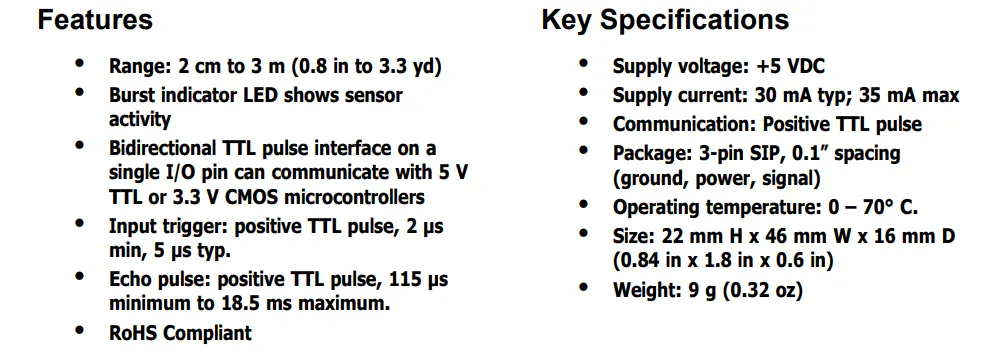
Code:
// C++ code
//Ultrasonic sensor readings with moving average to smoothen the output
int pin = 5;
const int num_of_readings = 5;
int distance[num_of_readings];
int distance_in_cm = 0;
volatile int total = 0;
volatile int index = 0;
void setup()
{
Serial.begin(9600);
for(int i=0;i<num_of_readings;i++)
{
distance[i]=0;
}
}
void loop()
{
//The same pin of 28015 is used to trigger the pulse and also receive the data
pinMode(pin, OUTPUT);
digitalWrite(pin,LOW); //To ensure a clean pulse initially the pin (acting like a trigger pin) is kept at low
delay(2);
digitalWrite(pin,HIGH);
delay(5); // Refer to the datasheet a typical 5-microsecond trigger pulse is to be generated.
pinMode(pin,INPUT);
int duration = pulseIn(5,HIGH); //The pin now acts like a echo pin
distance_in_cm = duration/29/2; //calculated based on speed of sound 340m/s.
moving_average(distance_in_cm);
}
void moving_average(int x)
{
//We use a circular wrap method to subtract the oldest value.
// subtracting the oldest value..
total = total - distance[index];
Serial.print("total ");
Serial.println(total);
total = total + x;
distance[index] = x;
index = (index+1) % num_of_readings; //incrementing the index and index stays between 0 and 4
int average = total/num_of_readings;
Serial.print("Sensor_value ");
Serial.println(x);
Serial.print("Moving average ");
Serial.println(average);
}
Output:
The reading observed at the steady state (i.e. observing the value of the sensor after a few seconds when any changes in the position of the object are to be measured) is the distance between the object and the sensor.
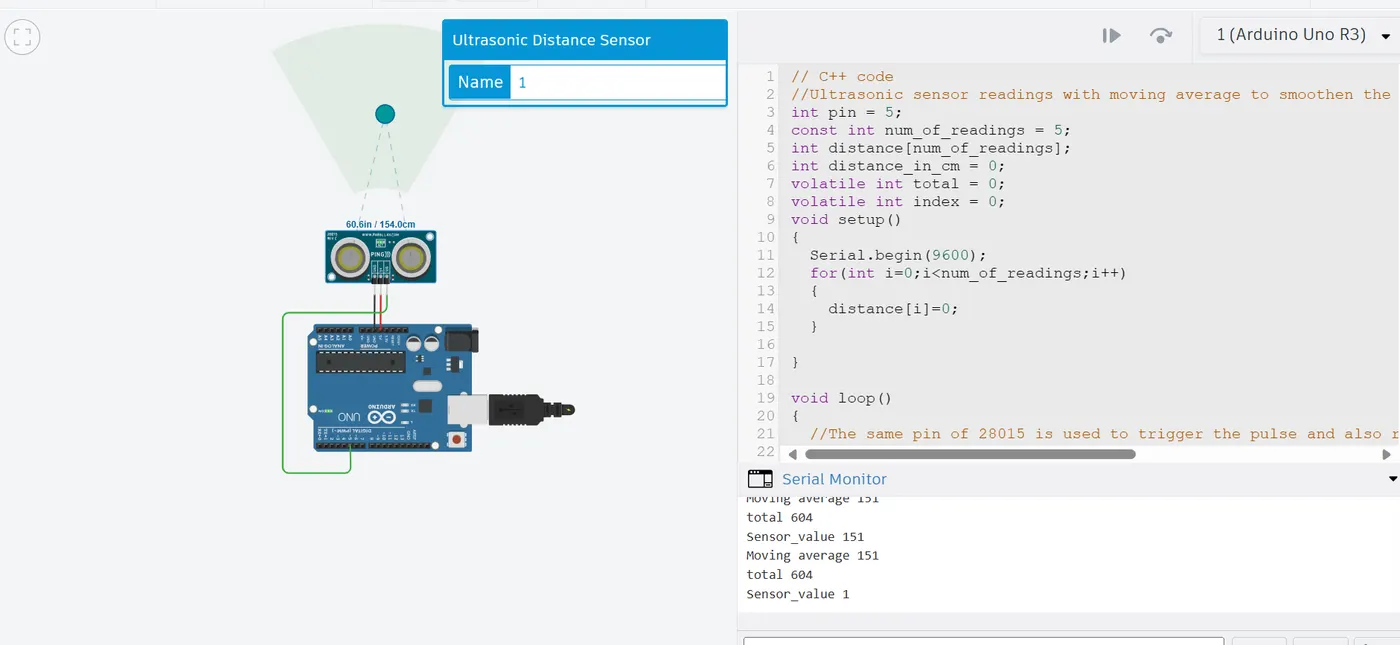
From the above figure, it can be seen the actual distance is 154 cm and the calculated distance in the steady state is 151 cm.
Result:
Thus the usage of Ultrasonic sensor-28015 with Arduino UNO is successfully depicted.
References:
The link to the tinkercad file is attached below.