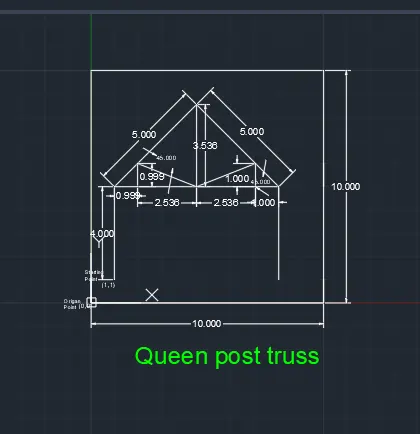
Creation of geometries by Coordinate system methods using AutoCad
Introduction:-
1.AutoCAD was dired from a program that began in 1977and than released in 1979 called interact CAD also referred to in early autodesk documents as micro CAD which was written prior to autodesk's than marinchip software partners formation by autodesk co-founder Michael riddle
2.The first version autodesk was demonstrated at the 1982 comdex and released that december autoCAD supported CP/M-80 computers as autodesk's flahship product by march 1986 autoCAD had become the most ubiquitous CAD program world wide
3.The Native file formate of autoCAD is DWG this and to a lesser extent its interchange file format DXF have become a standard autoCAD has included support for DWF a format develped and promoted by autodesk for publishing CAD data
- Vertical Integration of autoCAD:-
1.The 2021 release marked the 35th major release of autoCAD for windows autodesk has also developed a few Vertical programs for discipline -specific enhancements such as
1.AutoCAD advance steel
2.AutoCAD archetecture
3.AutoCAD electrical
4.AutoCAD ecscad
5.AutoCAD map 3D
6.AutoCAD mech
7.AutoCAD MED
8.AutoCAD structural Detailing
9.AutoCAD utility design
10.AutoCAD P&1D
11AutoCAD plant 3D
12.AutoCAD civil 3D
AutoCAD v/s AutoCAD LT:-
1.AutoCAD LT is the lower cost version of autoCAD with reduce capabilities first released in november 1993 Autodesk develoed AutoCAD LT to have an entry level CAD package to compete in the lower price level
2.while there are hundreds of small differences between the full auto CAD package and autoCAD LT there are a few recognized major difference in the software's feature
3D capabilities:-
1.AutoCAD LT Lacks the ability to create visualize and render 3D models As well as 3D printing
Network licensing :-
1.AutoCAD LT can not be used on multipale machines over a network
Customization :-
1.AutoCAD LT dose not support customization with LISP, ARX, NET and VBA
2.Management and automation capabilities with sheet set manegar and action reaction
3.CAD standards manegment tools
-AutoCAD 360:-
1.autoCAD 360 (formely autocad ws) is an acount based mobile and web application enableing registered users to view edit and shere AutoCAD files via mobile device and web using a limioted autoCAd feature set and using cloud stored drawing files
-Student versions:-
1.Auto CAD is licensed for free to students educations and educational institutions with a 12 months renewable license available the student virsion of AutoCAD is functionally identical to the full commercial version with one exception DWG files created or edited by a student version have an internal bit flay set (the "educational flag") objects created in the student virsion cannot be used for commerical use
Application :-
1.AutoCAd is used in industry by
1.Architects
2.Engineers (Civil, mechenical , electrical )
3.Graphic designers
4.City planners
5.Other professionals
Aim:- Create the geometries from P1 to P2 using all the coordinates system methods. You need to use the Line tool to create the geometries. Where required you need to use the circle tool.
Introduction:-First of all open the CAD application and take the new drawing than go to the new sheet and besic setting in the CAD applicatin
Procedur in Details:-
1.Absolute coordinates system:-
1. Grid spacing X- direction 1and Y-dirrection 1 And than Grid specing 10
2.take the linne command L -enter And take starting poin (2,1)
2. then second point X-direction 8 and y-direction is 1 then (8,1)
3.third point x-direction is 8 and y-direction is 2 than (8,2)
4.Fourth point x-direction is 3 and y-direction is 2 than (3,2)
5.Than next point x-direction is 3 and y-direction is 6 than (3,6)
6.than next point x-direction is 8 and y-direction is 6 than (8,6)
7.than next point x-direction is 8 and y-direction is 7 than (8,7)
8.than next point x-direction is 2 and y-direction is 7 than (2,7)
9.than the first starting point (2,1) in the close this is the complete
Result :- 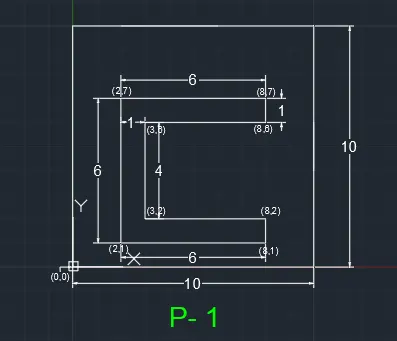
2.Relative rectangular coordinate
Procedur in Details:-
1.Choose the line tool
2.line specify first point : (2,1) Start point
3.specify next point or [ undo]: @ 6,0
.Second point Dx =6, Dy =0
4.specify next point or [ undo]: @ 0,1
Third point Dx =0, Dy = 1
5.specify next point or [ undo]: @ -5,0
Fourth point Dx =-5, Dy =0,
6.specify next point or [ undo]: @ 0,4
Fifth point Dx =0, Dy =4,
7.specify next point or [ undo]: @ 5,0
sixth point Dx =5, Dy = 0,
8.specify next point or [ undo]: @ 0,1
seventh point Dx =0, Dy = 1,
9.specify next point or [ undo]: @ -6,0
Eieghth point Dx =-6, Dy = 0,
10.specify next point or [Close/undo]
Result - 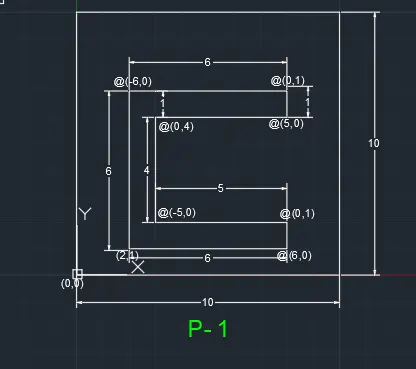
2.Relative polar coordinate system:-
Procedur in Details:-
1. choose the line tool : Start point (2,1)
2.specify next point or [ undo]: @ 6<90
3.specify next point or [ undo]: @ 6<0
4.specify next point or [ undo]: @ 1<270
5.specify next point or [ undo]: @ 5<180
6.specify next point or [ undo]: @ 4<270
7.specify next point or [ undo]: @ 5<0
8.specify next point or [ undo]: @ 1<270
9.specify next point or [Close/undo]
Result :-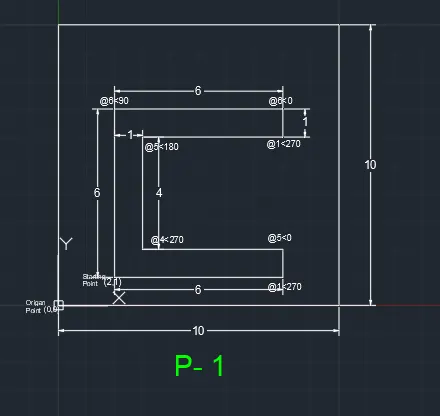
Direct distance entry :-
1. choose the line tool : Start point (2,1)
3.Start next point or [undo] Position the cursor and than enter distance 6
4.Start next point or [undo] Position the cursor and than enter distance 1
5.Start next point or [undo] Position the cursor and than enter distance 5
6.Start next point or [undo] Position the cursor and than enter distance 4
7.Start next point or [undo] Position the cursor and than enter distance 5
8.Start next point or [undo] Position the cursor and than enter distance 1
9.Start next point or [undo] Position the cursor and than enter distance 6
10.specify next point or [Close/undo]
Result - 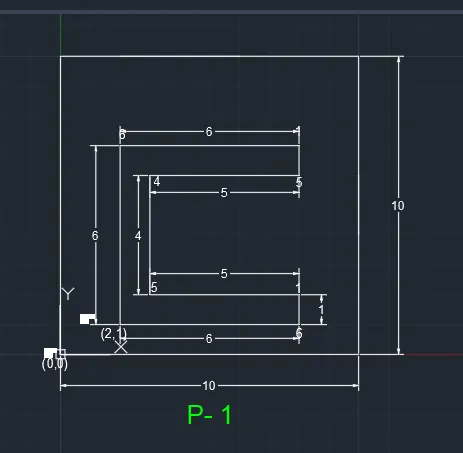
1.Absolute coordinates system:-
Procedur in Details:-
1. Grid spacing X- direction 1and Y-dirrection 1 And than Grid specing 10
2.take the linne command L -enter And take starting poin (2,1)
3. then second point X-direction 5 and y-direction is 1 then (5,1)
4.third point x-direction is 5 and y-direction is 5 than (5,5)
5.Fourth point x-direction is 6 and y-direction is 5 than (6,5)
6.Than next point x-direction is 6 and y-direction is 1 than (6,1)
7.than next point x-direction is 9 and y-direction is 1 than (9,1)
8.than next point x-direction is 7 and y-direction is 8 than (7,8)
9.than next point x-direction is 4 and y-direction is 8 than (4,8)
10 .than the first starting point (2,1) in the close this is the complete
Result - 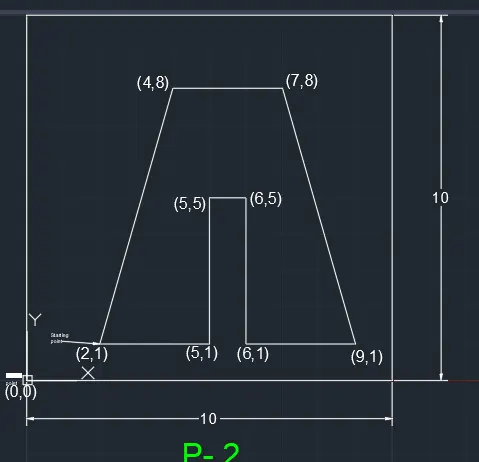
2.Relative Rectangular coordinate system:-
Procedur in Details:-
1.Choose the line tool
2.line specify first point : (2,1) Start point
3.specify next point or [ undo]: @ 3,0
.Second point Dx =3, Dy =0
4.specify next point or [ undo]: @ 0,4
Third point Dx =0, Dy = 4
5.specify next point or [ undo]: @ 1,0
Fourth point Dx =1, Dy =0,
6.specify next point or [ undo]: @ 0,-4
Fifth point Dx =0, Dy =-4,
7.specify next point or [ undo]: @ 3,0
sixth point Dx =3, Dy = 0,
8.specify next point or [ undo]: @ -2,7
seventh point Dx =-2, Dy = 7,
9.specify next point or [ undo]: @ 3,0
Eieghth point Dx =3, Dy = 0,
10.specify next point or [Close/undo]
Result -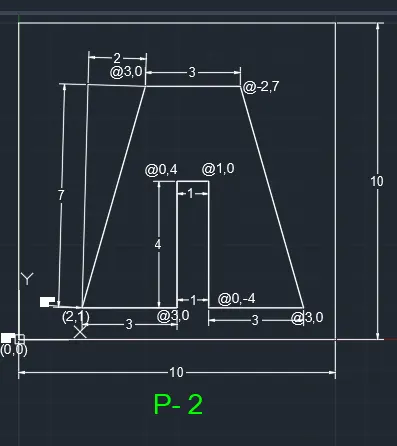
Direct distance entry :-
1. choose the line tool : Start point (2,1)
3.Start next point or [undo] Position the cursor and than enter distance 3
4.Start next point or [undo] Position the cursor and than enter distance 4
5.Start next point or [undo] Position the cursor and than enter distance 1
6.Start next point or [undo] Position the cursor and than enter distance 4
7.Start next point or [undo] Position the cursor and than enter distance 3
8.Start next point or [undo] Position the cursor and than enter distance 7,8
9.Start next point or [undo] Position the cursor and than enter distance 3
10.specify next point or [Close/undo]
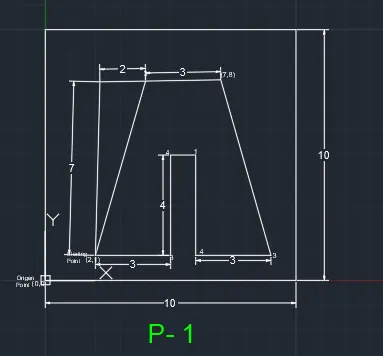
Procedur in Details:-
1. Grid spacing X- direction 1and Y-dirrection 1 And than Grid specing 10
2.take the linne command L -enter And take starting poin (2,1)
3. then second point X-direction 3 and y-direction is 1 then (3,1)
4.third point x-direction is 7 and y-direction is 8 than (3,3)
5.Fourth point x-direction is 6 and y-direction is 3 than (6,3)
6.Than next point x-direction is 6 and y-direction is 4 than (6,4)
7.than next point x-direction is 3 and y-direction is 4 than (3,4)
8.than next point x-direction is 3 and y-direction is 7 than (3,7)
9.than next point x-direction is 8 and y-direction is 7 than (8,7)
10.than next point x-direction is 8 and y-direction is 8 than (8,8)
11.than next point x-direction is 8 and y-direction is than (2,8)
12.than the first starting point (2,1) in the close this is the complete
Result -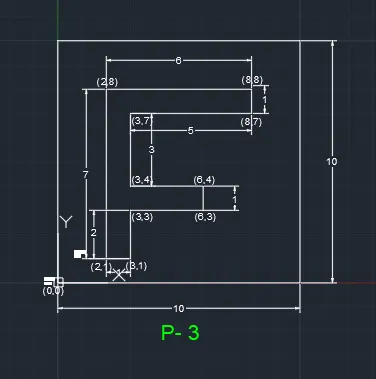
1.Absolute coordinates system:-
Procedur in Details:-
1. Grid spacing X- direction 1and Y-dirrection 1 And than Grid specing 10
2.take the linne command L -enter And take starting poin (2,1)
3. then second point X-direction 2 and y-direction is 8 then (2,8)
4.third point x-direction is 3 and y-direction is 8 than (3,8)
5.Fourth point x-direction is 5 and y-direction is 5 than (5,5)
6.Than next point x-direction is 7 and y-direction is 8 than (7,8)
7.than next point x-direction is 8 and y-direction is 8 than (8,8)
8.than next point x-direction is 8 and y-direction is 1 than (8,1)
9.than next point x-direction is 7 and y-direction is 1 than (7,1)
10.than next point x-direction is 7 and y-direction is 5 than (7,5)
11.than next point x-direction is 5 and y-direction is 3 than (5,3)
12.than next point x-direction is 3 and y-direction is 5 than (3,5)
13.than next point x-direction is 3 and y-direction is 1 than (3,1)
14.than the first starting point (2,1) in the close this is the complete
Result -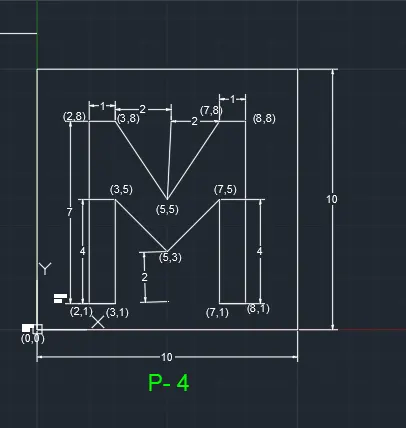
1.Absolute coordinates system:-
Procedur in Details:-
1. Grid spacing X- direction 1and Y-dirrection 1 And than Grid specing 10
2.take the linne command L -enter And take starting poin (2,1)
3. then second point X-direction 2 and y-direction is 9 then (2,9)
4.third point x-direction is 9 and y-direction is 9 than (9,9)
5.Fourth point x-direction is 9 and y-direction is 1 than (9,1)
6.Than next point x-direction is 5 and y-direction is 1 than (5,1)
7.than next point x-direction is 5 and y-direction is 2 than (5,2)
8.than next point x-direction is 8 and y-direction is 2 than (8,2)
9.than next point x-direction is 8 and y-direction is 8 than (8,8)
10.than next point x-direction is 3 and y-direction is 8 than (3,8)
11.than next point x-direction is 3 and y-direction is 1 than (3,1)
12.than the first starting point (2,1) in the close this is the complete
Result -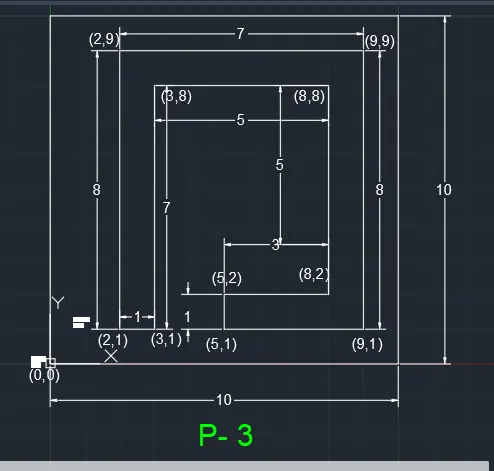
1.Absolute coordinates system:-
Procedur in Details:-
1. Grid spacing X- direction 1and Y-dirrection 1 And than Grid specing 10
2.take the linne command L -enter And take starting poin (2,1)
3. then second point X-direction 2 and y-direction is 10 then (2,10)
4.third point x-direction is 6 and y-direction is 10 than (6,10)
5.Fourth point x-direction is 6 and y-direction is 6 than (6,6)
6.Than next point x-direction is 10 and y-direction is 6 than (10,6)
7.than next point x-direction is 10 and y-direction is 4 than (10,4)
8.than next point x-direction is 6 and y-direction is 1 than (6,1)
9.than the first starting point (2,1) in the close this is the complete
10.than next point x-direction is 3 and y-direction is 3 than (3,3)
11.than next point x-direction is 3 and y-direction is 6 than (3,6)
12.than next point x-direction is 5 and y-direction is 6 than (5,6)
13.than next point x-direction is 5 and y-direction is 3 than (5,3)
9.than the first starting point (3,3) in the close this is the complete in second rectangle
Result -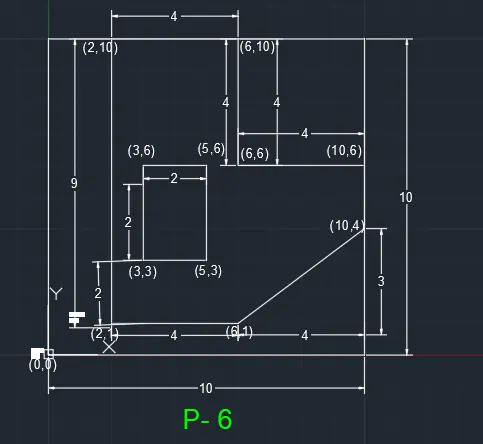
1.Absolute coordinates system:-
Procedur in Details:-
1. Grid spacing X- direction 1and Y-dirrection 1 And than Grid specing 10
2.take the linne command L -enter And take starting poin (0,0)
3. then second point X-direction 0 and y-direction is 2 then (0,2)
4.third point x-direction is 4 and y-direction is 2 than (4,2)
5.Fourth point x-direction is 4 and y-direction is 6 than (4,6)
6.Than next point x-direction is 1 and y-direction is 6 than (1,6)
7.than next point x-direction is 1 and y-direction is 8 than (1,8)
8.than next point x-direction is 9 and y-direction is 8 than (9,8)
9.than next point x-direction is 9 and y-direction is 6 than (9,6)
10.than next point x-direction is 6 and y-direction is 6 than (6,6)
11.than next point x-direction is 6 and y-direction is 2 than (6,2)
12.than next point x-direction is 10 and y-direction is 2 than (10,2)
13.than next point x-direction is 10 and y-direction is 0 than (10,0)
14.than the first starting point (0,0) in the close this is the complete
Result - 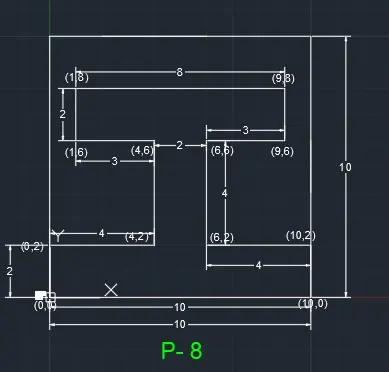
1.Absolute coordinates system:-
Procedur in Details:-
1. Grid spacing X- direction 1and Y-dirrection 1 And than Grid specing 10
2.take the linne command L -enter And take starting poin (1,1)
3. then second point X-direction 1 and y-direction is 8 then (1,8)
4.third point x-direction is 5 and y-direction is 6 than (5,6)
5.Fourth point x-direction is 5 and y-direction is 4 than (5,4)
6.Than next point x-direction is 2 and y-direction is 4 than (2,4)
7.than next point x-direction is 2 and y-direction is 2 than (2,2)
8.than next point x-direction is 3 and y-direction is 2 than (3,2)
9.than next point x-direction is 3 and y-direction is 3 than (3,3)
10.than next point x-direction is 6 and y-direction is 3 than (6,3)
11.than next point x-direction is 6 and y-direction is 1 than (6,1)
112.than the first starting point (1,1) in the close this is the complete
Result -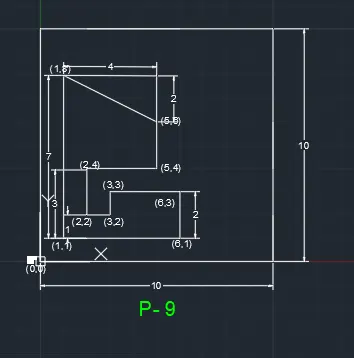
2.Relative Rectangular coordinate system:-
Procedur in Details:-
1.Choose the line tool
2.line specify first point : (1,1) Start point
3.specify next point or [ undo]: @ 0,7
.Second point Dx =0, Dy =7
4.specify next point or [ undo]: @ 5,0
Third point Dx =5, Dy = 0
5.specify next point or [ undo]: @ 0,-4
Fourth point Dx =0, Dy =-4,
6.specify next point or [ undo]: @ -3,0
Fifth point Dx =-3, Dy =0,
7.specify next point or [ undo]: @ 0,-3
sixth point Dx =0, Dy = -3,
8.specify next point or [ undo]: @ 1,1
seventh point Dx =-1, Dy = 1,
9.specify next point or [ undo]: @ 1,4
Eieghth point Dx =1, Dy = 4,
10.specify next point or [ undo]: @ 0,2
Eieghth point Dx =0, Dy = 2,
11.specify next point or [ undo]: @ 3,0
Eieghth point Dx =3, Dy = 0,
11.specify next point or [ undo]: @ 0,-2
Eieghth point Dx =0, Dy = -2,
10.specify next point or [Close/undo] @1,4
Result :-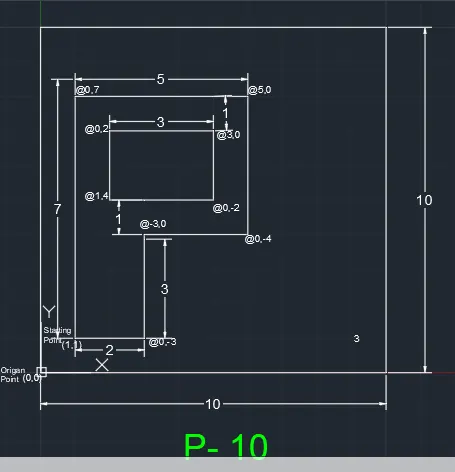
Direct distance entry :-
Procedur in Details:-
1. choose the line tool : Start point (1,1)
3.Start next point or [undo] Position the cursor and than enter distance 2
4.Start next point or [undo] Position the cursor and than enter distance 2
5.Start next point or [undo] Position the cursor and than enter distance 2
6.Start next point or [undo] Position the cursor and than enter distance 2
7.specify next point or [Close/undo] (1,1)
8.Start next point or [undo] Position the cursor and than enter distance 0.66
9.specify next point or [Close/undo]
10.Start next point or [undo] Position the cursor and than enter distance 1.33
11.specify next point or [Close/undo]
Result :-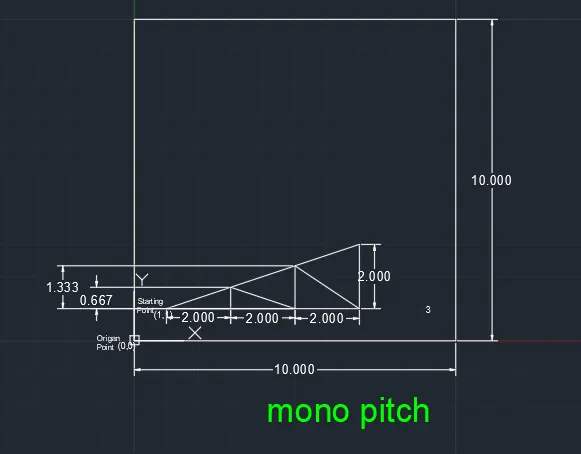
2.Relative polar coordinate system:-
Procedur in Details:-
1. choose the line tool : Start point (0,0)
2.specify next point or [ undo]: @ 1<90
3.specify next point or [ undo]: @ 2<0
4.specify next point or [ undo]: @ 5<90
5.specify next point or [ undo]: @ 2<180
6.specify next point or [ undo]: @ 5.831<30.964
7. choose the line tool : Start point (0,0)
8.specify next point or [ undo]: @ 10<0
9.specify next point or [ undo]: @ 1<90
10.specify next point or [ undo]: @ 2<180
11.specify next point or [ undo]: @ 4<90
12.specify next point or [ undo]: @ 2<0
12.specify next point or [ undo]: @ 1<90
9.specify next point or [Close/undo]
Result :-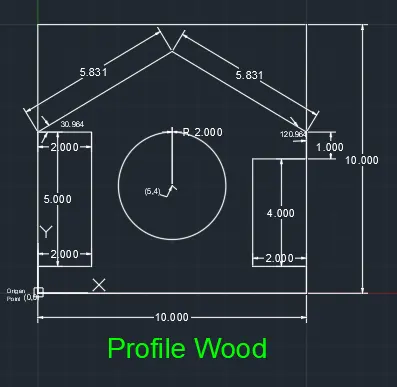
2.Relative polar coordinate system:-
Procedur in Details:-
1. choose the line tool : Start point (1,1)
2.specify next point or [ undo]: @ 4<90
3.specify next point or [ undo]: @ 5<45
4.specify next point or [ undo]: @ 5<315
5.specify next point or [ undo]: @ 1<180
6.specify next point or [ undo]: @ 2.536<180
7.specify next point or [ undo]: @ 3.536<180
8.specify next point or [Close/undo]
10.specify next point or [ undo]: @ 1<90
10.specify next point or [ undo]: @ 1<90
11.specify next point or [ undo]: @ 4<270
12.specify next point or [ undo]: @ 3.536<90
12.specify next point or [ undo]: @ 0.967<90
9.specify next point or [Close/undo]
Result :-