Creation of geometries by Coordinate system methods using AutoCad
Aim:
To create the geometries from p1 to p2 using all cordinate system. to use line tool to create geometries.
Procedure:
To Draw Line simple lines or series of lines segments by one way of the following:
- Command Line: Line or L
- Menu Bar: Draw- Line
- Draw Bar
- Tool palettes: Draw- Line
- Ribbon: Home- Draw panel -Line
question 1
RESULT;
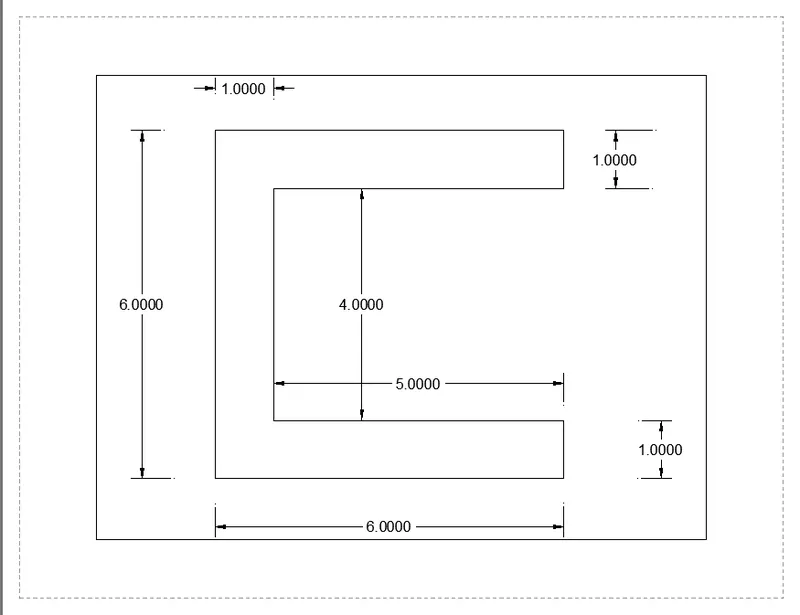
COMMAND Absolute Coordinates Relative rectangular coordinates
COMMAND Line Line
Specify first point: 2,1 2,1
Specify next point: 8,1 @0,6
Specify next point: 8,2 @6,0
Specify next point: 3,2 @0,-1
Specify next point: 3,6 @-5,0
Specify next point: 8,6 @0,-4
Specify next point: 8,7 @5,0
Specify next point: 2,7 @0,-1
Specify next point: 2, 1 or C @-6,0 / C.
2
RESULT
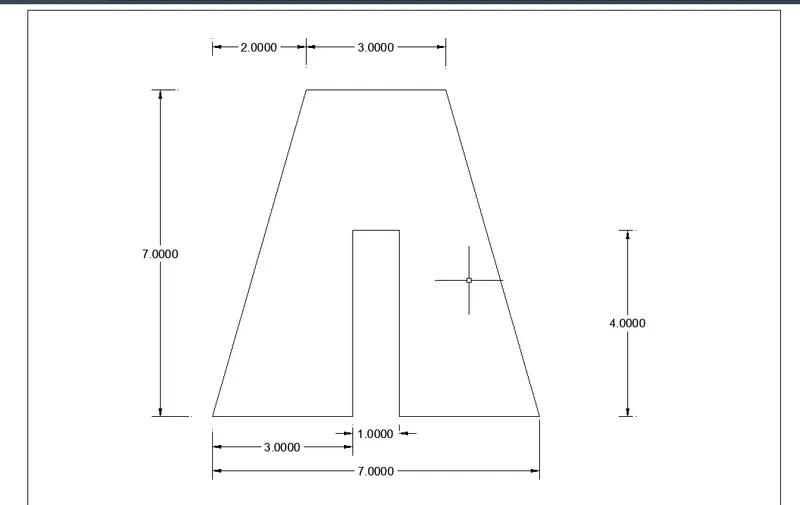
COMMAND Absolute Coordinates Relative rectangular coordinates
COMMAND Line Line
Specify first point: 2,1 2,1
Specify next point: 7,8 @-2,7
Specify next point: 5,1 @3,0
Specify next point: 5,5 @0,4
Specify next point: 6,5 @1,0
Specify next point: 6,1 @0,-4
Specify next point: 9,1 @3,0
Specify next point: 4,8 @-3,0
Specify next point: 2, 1 or C @-2,-7.
3.
RESULT
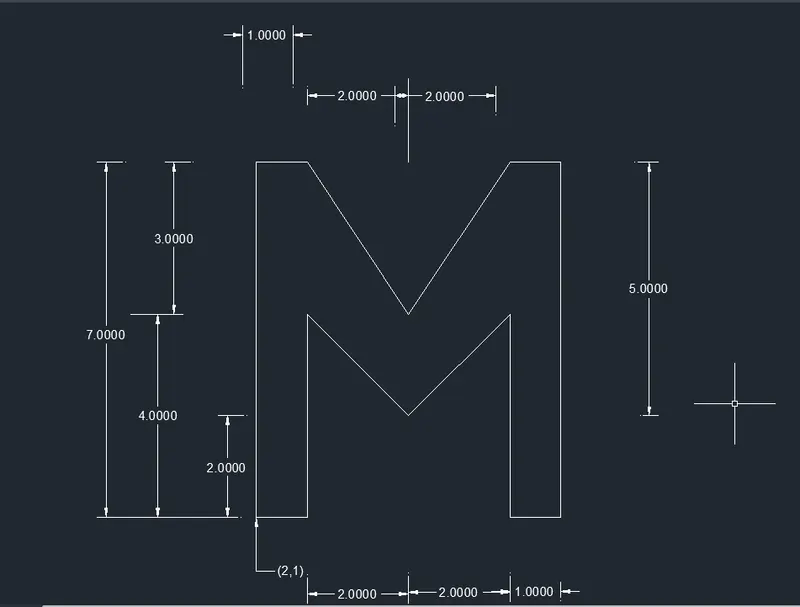
COMMAND Absolute Coordinates Relative rectangular coordinates
COMMAND Line Line
Specify first point: 2,1 2,1
Specify next point: 2,8 @0,7
Specify next point: 3,8 @1,0
Specify next point: 5,5 @2,-3
Specify next point: 7,8 @2,3
Specify next point: 8,8 @1,0
Specify next point: 8,1 @0,-7
Specify next point: 7,1 @-1,0
Specify next point: 7,5 @ 0,4
Specify next point: 5,3 @-2,-2
Specify next point: 3,5 @-2,2
Specify next point: 3,1 @0,4
Specify next point: 2,1 / C @2,1 / C.
4
RESULT
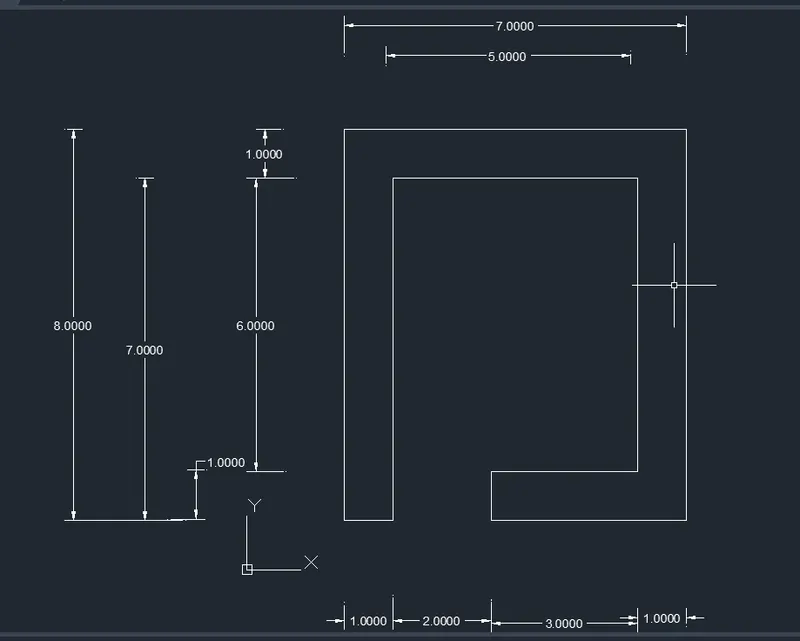
COMMAND Absolute Coordinates Relative rectangular coordinates
COMMAND Line Line
Specify first point: 2,1 @2,1
Specify next point: 2,9 @0,8
Specify next point: 9,9 @7,0
Specify next point: 9,1 @0,-8
Specify next point: 5,1 @-4,0
Specify next point: 5,2 @0,1
Specify next point: 8,2 @4,0
Specify next point: 8,8 @0,6
Specify next point: 3,8 @-5,0
Specify next point: 3,1 @0,-7
Specify next point: 2,1 / C @-1,0 / C.
5
RESULT
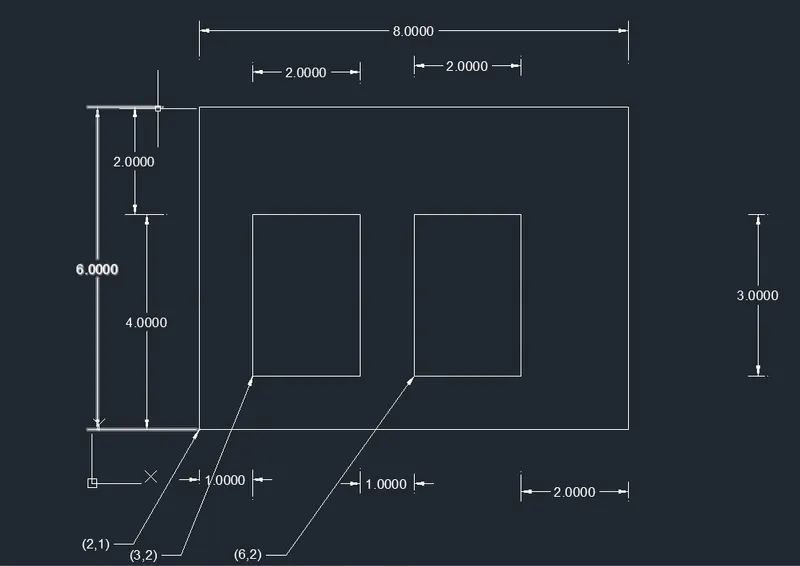
COMMAND Absolute Coordinates Relative rectangular coordinates
COMMAND Line Line
Specify first point: 2,1 2,1
Specify next point: 2,7 @0,6
Specify next point: 10,7 @8,0
Specify next point: 10,1 @0,-6
Specify next point: 2,1 / C @-8,0
Specify next point: 3,2 @3,2
Specify next point: 3,5 @0,3
Specify next point: 5,5 @2,0
Specify next point: 5,2 @0,-3
Specify next point: 3,2 /C @-2,0
Specify next point: 6,2 @6/2
Specify next point: 6,5 @0,3
Specify next point: 8,5 @2,0
Specify next point: 8,2 @0,-3
Specify next point: -6,2 / C @-2,0 /C
6
RESULT
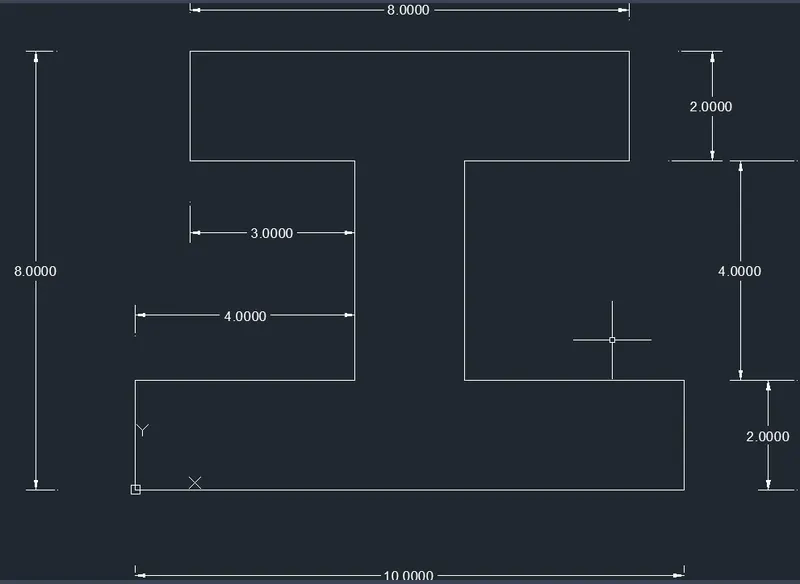
COMMAND Absolute Coordinates Relative rectangular coordinates
COMMAND Line Line
Specify first point: 0,0 0,0
Specify next point: 9,8 @0,2
Specify next point: 6,6 @4,0
Specify next point: 4,6 @-3,0
Specify next point: 9,8 @0,2
Specify next point: 1,8 @ 8,0
Specify next point: 1,6 @0,-2
Specify next point: 4,6 @-3,0
Specify next point: 4,2 @0,-4
Specify next point: 0,2 @ 4,0
Specify next point: 10,2 @-2,0
Specify next point: 0,0 / C @0,-2
7
RESULT
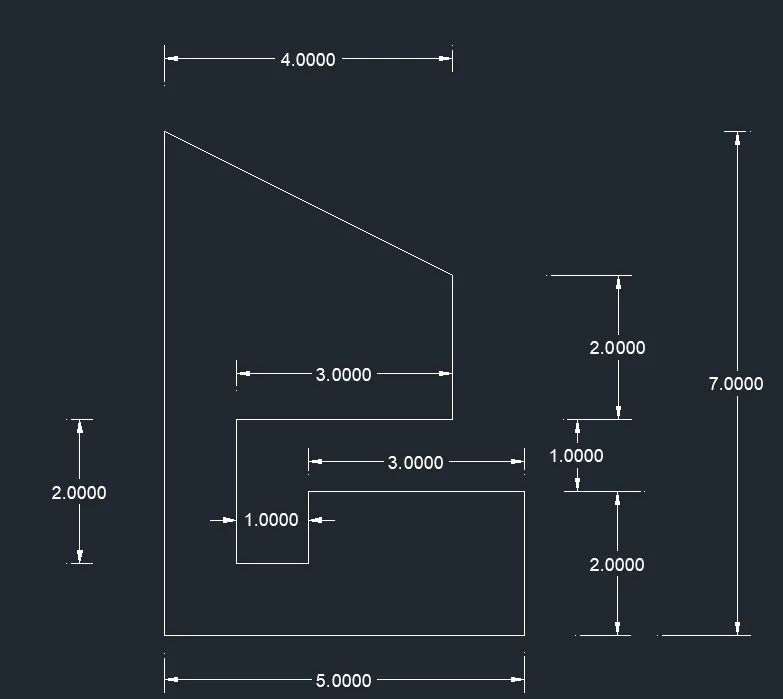
COMMAND Absolute Coordinates Relative rectangular coordinates
COMMAND Line Line
Specify first point: 1,1 1,1
Specify next point: 1,8 @ 0,7
Specify next point: 6,1 @4,-2
Specify next point: 6,3 @0,-2
Specify next point: 3,3 @-3,0
Specify next point: 3,2 @0,-2
Specify next point: 2,2 @1,0
Specify next point: 2,4 @0,1
Specify next point: 5,4 @3,0
Specify next point: 5,6 @0,-2
Specify next point: 1,1/C @CLOSE
8
RESULT
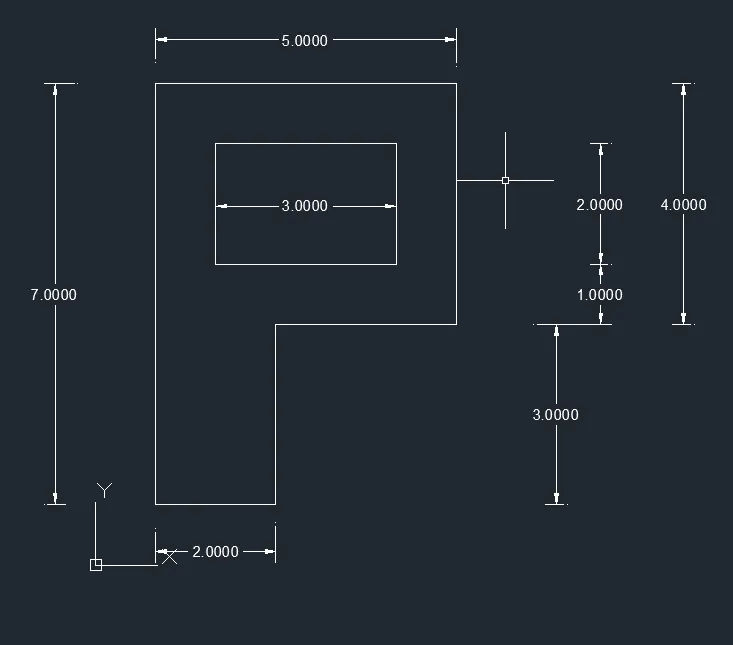
COMMAND Absolute Coordinates Relative rectangular coordinates
COMMAND Line Line
Specify first point: 1,1 1,1
Specify next point: 1,1 @ 0,7
Specify next point: 1,8 @5,0
Specify next point: 6,8 @0,-4
Specify next point: 6,4 @-3,0
Specify next point: 3,4 @0,-3
Specify next point: 3,1/C @-2,0/C
Specify next point: 2,5 @2,5
Specify next point: 5,7 @0,2
Specify next point: 5,5 @3,0
Specify next point: 2,5 @0,-2
Specify next point: 2,7/C @3,0/C
9
RESULT
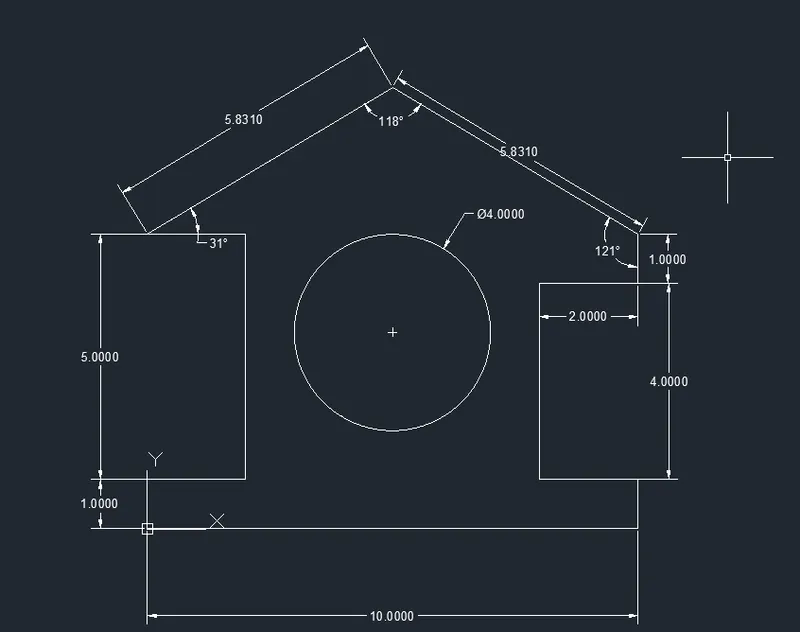
| COMMAND | Absolute Coordinates | Relative rectangular |
| COMMAND | LINE |
LINE |
| Specify first point | 0, 0 | 0,0 |
| Specify next point | 10, 0 | @0,1 |
| Specify next point | 10, 1 | @2,0 |
| Specify next point | 8, 1 | @0,5 |
| Specify first point | 8, 5 | @-2,0 |
| Specify next point | 10, 5 | @5,3 |
| Specify first point | 10, 6 | @5,-3 |
| Specify next point | 5, 9 | @0,-1 |
| Specify next point | 0, 6 | @-2,0 |
| Specify next point | 2, 6 | @0,-4 |
| Specify first point | 2, 1 | @2,0 |
| Specify next point | 0, 1 | @0,-1 |
| Specify next point | 0, 0 / c | @-10,0 / C |
| Command | circle | Circle |
| Specify centre point for circle | 5, 4 | @5,4 |
| Specify radius of circle | 2 | 2 |
10
RESULT
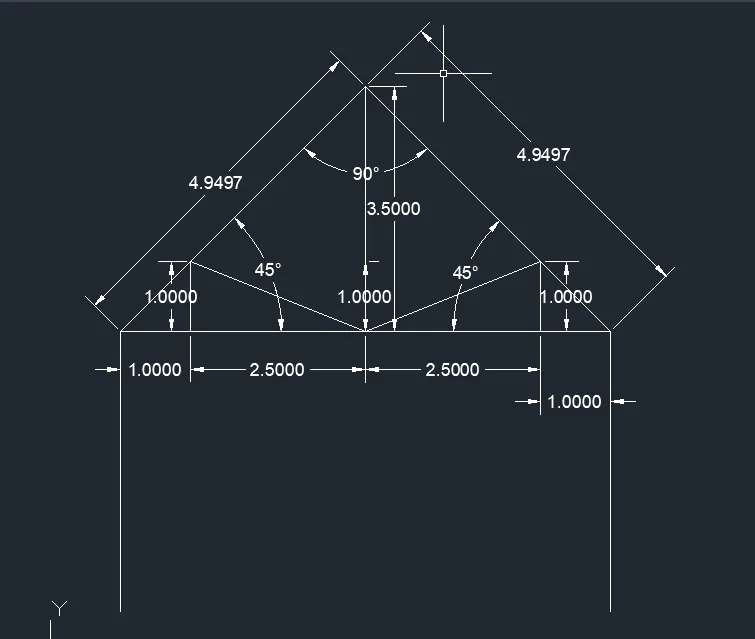
COMMAND Line
Specify first point: @1,1
Specify next point: @0,4
Specify next point: @3.5,3.5
Specify next point: @0,-4
Specify next point: @0,7
Specify next point: @1,0
Specify next point: @0,1
Specify next point: @2.5,-1
Specify next point: @0,3.5
Specify next point: @-1,0
Specify next point: @0,1
Specify next point: @-2.5,2
Specify next point: @-2.5,0
Specify next point: @2.5,0 /C
11
RESULT
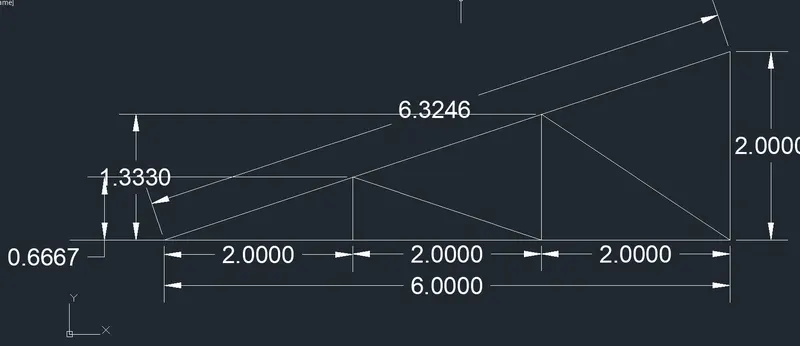
COMMAND Line
Specify first point: @1,1
Specify next point: @-1,0
Specify next point: @-6,-2/C
Specify next point: @ 2,0
Specify next point: @0,0.667
Specify next point: @2,-0.667
Specify next point: @0,1.333
Specify next point: @2,-1.333/C
RESULTS:
Created the geometries from P1 to P2 using all the coordinates system methods and used Line tool and circle tool to create the geometries.