Creation of geometries by Coordinate system methods using AutoCad
AIM:
(A) To Create the geometries from P1 to P2 using all the coordinates system methods
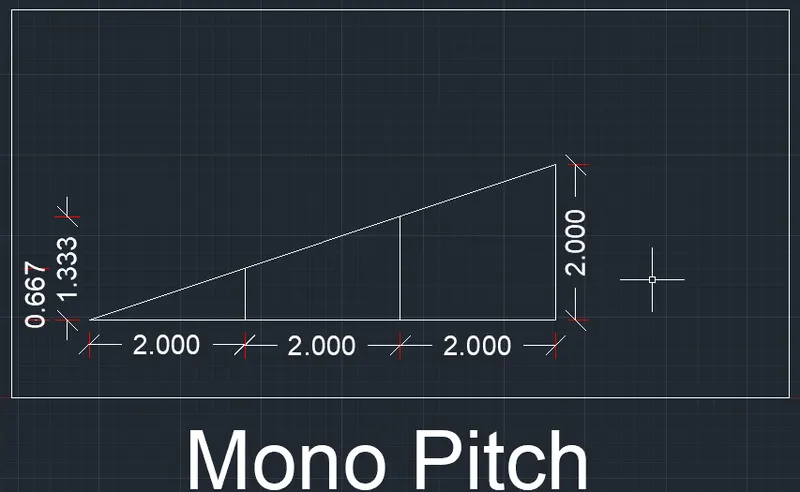
(B) To Draw the profile and the trusses using any coordinate system methods. The dimensions are there for reference.
INTRODUCTION:
Before going to the drawing, we should know about the coordinates systems :
In Autocad, there are two coordinate systems, i.e., Cartesian and polar. To these coordinate systems, the absolute and relative coordinates of Autocad are applicable.
Coordinate Systems: Coordinate system is a system where numbers are used to determine the unique position of points and/or other geometric elements. Also coordinates in AutoCAD can be set by mouse, input (setting) the values of coordinates in the command line and enter coordinates using dynamic input.
There are three types of coordinate systems. They are :
1. Absolute coordinate systems
2. Relative coordinate systems
- a) Relative rectangular coordinates
- b) Relative polar coordinates
3. Direct distance entry
1. Absolute Coordinate System: In this system, all points are established at some distance in the x&yaxis (sometimes z-axis) from a common origin (usually 0,0).
2. Relative Coordinate System: The location of a Relative coordinate is defined by its distance from a reference point. In AutoCAD, when using this system the first point of the drawing/geometry is always absolute, i.e. it is established with respect to origin (0.0), and then all the successive positions are established with respect to their preceding point. This system is further classified as
a) Relative rectangular coordinates: It is a coordinate system that specifies each point by a pair of numerical coordinates in the x-axis and y-axis. In this system, the points succeeding the first point are typed in as '@x,y' in the command line.
b) Relative polar coordinates: This system specifies the distance (length) and angle of a particular point with respect to its previous point. In the Relative polar coordinate system, points are established by typing @distance
3. Direct distance entry method: It is another popular method used for drawing different shapes/geometries in AutoCAD. The direct distance entry method enables the user to draw an object by simply pointing the cursor in the desired direction and entering the required distance in the command line.
Commands used:
1. Line command
2. Dimlinear command
3. Text command
4. Circle command
PROCEDURE:
Starting AutoCAD software:
- Go to START MENU, select AutoCAD 2022
- Click on START DRAWING
- In the Command line type in: STARTUP [ENTER]
- Enter new value of startup: 1
- Go to Application Menu and select New
- In the 'Create New Drawing' dialog box, select the 'Imperial system in the 'Start from Scratch' option.
- Next select the 'Decimal unit system from the 'Advanced Setup' option.
- Set the limits by entering LIMITS in the Command tab. The lower-left corner is specified as 0,0, and the upper-right corner is specified as 100,100.
[Note: The above procedure is followed each time a new drawing is to be created.]
(A) To Create the geometries from P1 to P2 using all the coordinates system methods:
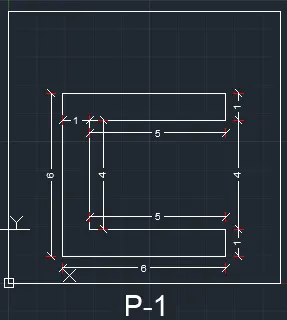
I. Drafting the geometry for P1 by using all Coordinates System methods:
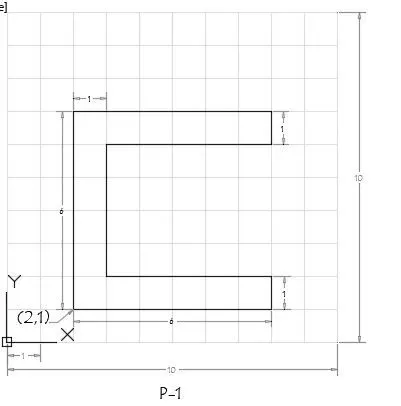
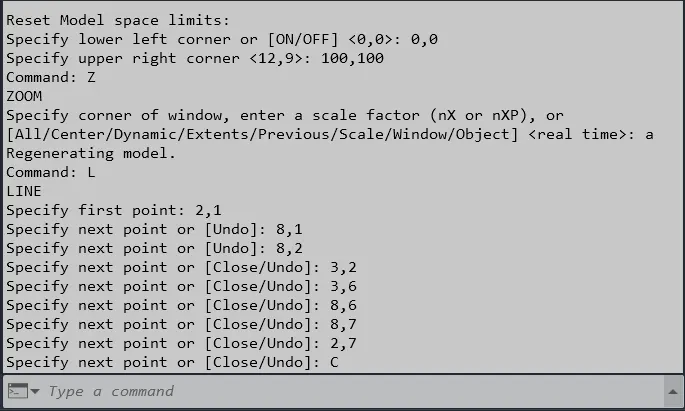
a) Absolute Coordinate System:
1. Select the line tool from the ribbon tab or by entering the 'Line' command in the command tab.
2. Specify the starting coordinate of point 1 as 2,1
3. Specify the next coordinate of point 2 as 8,1
4. Specify the next coordinate of point 3 as 8,2
5. Specify the next coordinate of point 4 as 3,2
6. Specify the next coordinate of point 5 as 3,6
7. Specify the next coordinate of point 6 as 8,6
8. Specify the next coordinate of point 7 as 8,7
9. Specify the next coordinate of point 8 as 2,7
10. Then for the last point, Click 'Close' on the Command Line
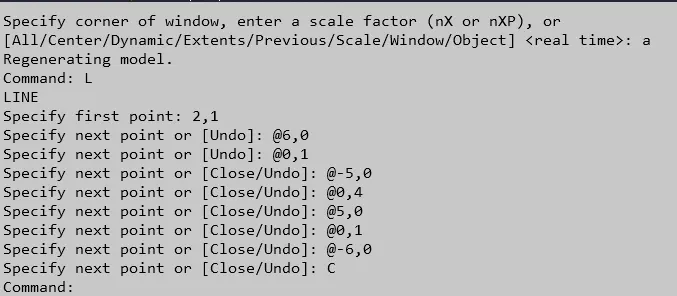
b) Relative Rectangular Coordinate System:
1. Select the line tool from the ribbon tab or by entering the 'Line' command in the command tab.
2. Specify the starting coordinate of point 1 as 2,1
3. Specify the next coordinate of point 2 as @6,0
4. Specify the next coordinate of point 3 as @0,1
5. Specify the next coordinate of point 4 as @-5,0
6. Specify the next coordinate of point 5 as @0,4
7. Specify the next coordinate of point 6 as @5,0
8. Specify the next coordinate of point 7 as @0,1
9. Specify the next coordinate of point 8 as @-6,0
10. Then for the last point, Click 'Close' on the Command Line
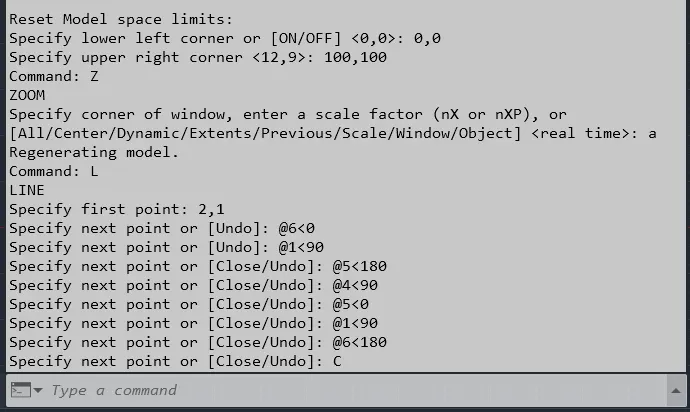
c) Relative Polar Coordinate System:
1. Select the line tool from the ribbon tab or by entering the 'Line' command in the command tab.
2. Specify the starting coordinate of point 1 as 2,1
3. Specify the next coordinate of point 2 as @6<0
4. Specify the next coordinate of point 3 as @1<90
5. Specify the next coordinate of point 3 as @5<180
6. Specify the next coordinate of point 5 as @4<90
7. Specify the next coordinate of point 6 as @5<0
8. Specify the next coordinate of point 7 as @1<90
9. Specify the next coordinate of point 8 as @6<180
10. Then for the last point, Click 'Close' on the Command Line
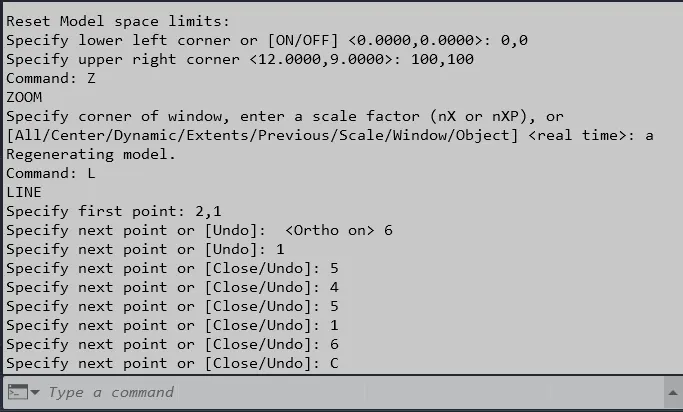
d) Direct Distance Entry method:
1. Select the Line tool from the ribbon tab or by entering the 'LINE' command in the command tab
2. Specify the starting coordinate of point 1 as 2,1 in the command line
3. Enter the length of point 2 as 6 in the command line towards the +ve x-axis
4. Enter the length of point 3 as 1 in the command line towards the +ve y-axis
5. Enter the length of point 4 as 5 in the command line towards the -ve x-axis
6. Enter the length of point 5 as 4 in the command line towards the +ve y-axis
7. Enter the length of point 6 as 5 in the command line towards the +ve x-axis
8. Enter the length of point 7 as 1 in the command line towards the +ve y-axis
9. Enter the length of point 8 as 6 in the command line towards the -ve x-axis
10. Then for the last point, Click "Close' on the command line.
Result:
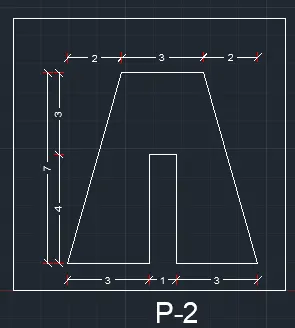
II. Drafting the geometry for P2 by using all Coordinates System methods :
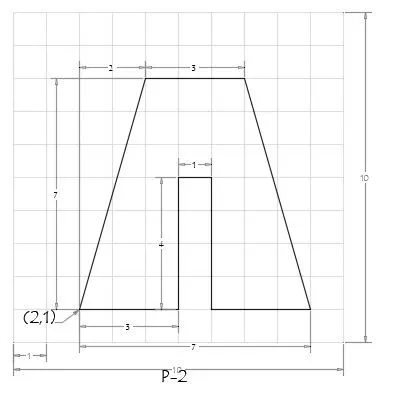
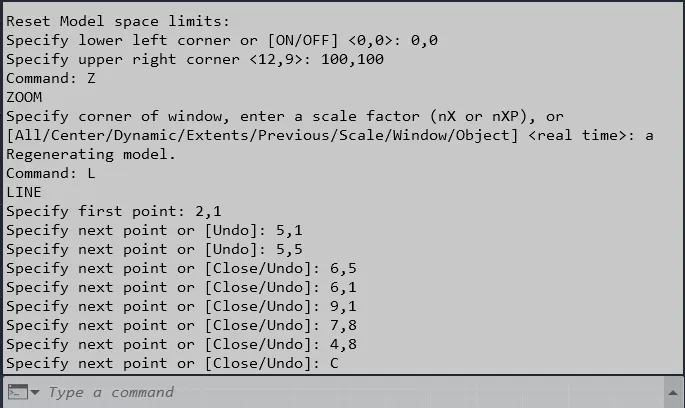
a) Absolute Coordinate System:
1. Select the line tool from the ribbon tab or by entering the 'Line' command in the command tab.
2. Specify the starting coordinate of point 1 as 2,1
3. Specify the next coordinate of point 2 as 5,1
4. Specify the next coordinate of point 3 as 5,5
5. Specify the next coordinate of point 4 as 6,5
6. Specify the next coordinate of point 5 as 6,1
7. Specify the next coordinate of point 6 as 9,1
8. Specify the next coordinate of point 7 as 7,8
9. Specify the next coordinate of point 8 as 4,8
10. Then for the last point, Click 'Close' on the Command Line
b) Relative Rectangular Coordinate System:
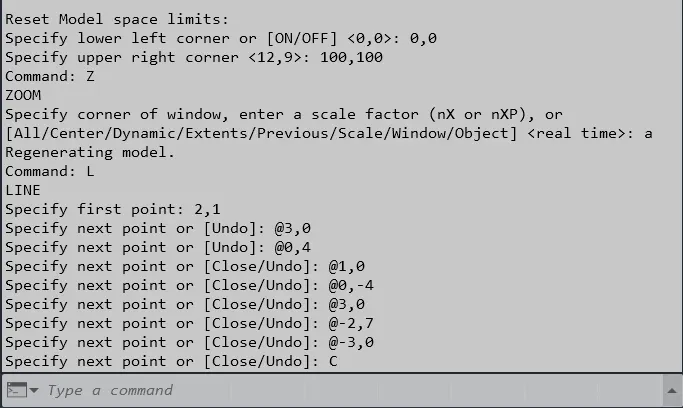
1. Select the line tool from the ribbon tab or by entering the 'Line' command in the command tab.
2. Specify the starting coordinate of point 1 as 2,1
3. Specify the next coordinate of point 2 as @3,0
4. Specify the next coordinate of point 3 as @0,4
5. Specify the next coordinate of point 4 as @1,0
6. Specify the next coordinate of point 5 as @0,-4
7. Specify the next coordinate of point 6 as @3,0
8. Specify the next coordinate of point 7 as @-2,7
9. Specify the next coordinate of point 8 as @-3,0
10. Then for the last point, Click 'Close' on the Command Line
c) Relative Polar Coordinate System:
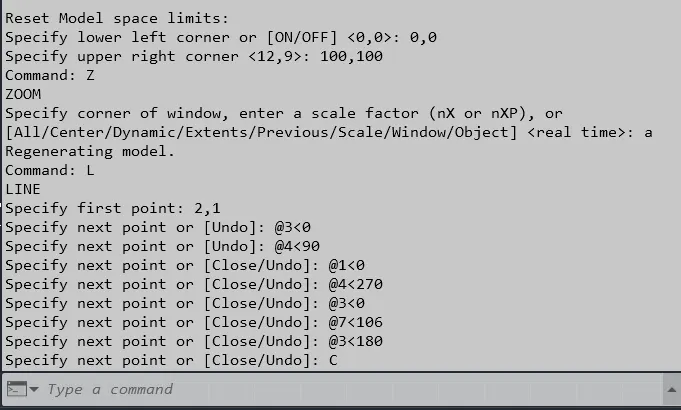
1. Select the line tool from the ribbon tab or by entering the 'Line' command in the command tab.
2. Specify the starting coordinate of point 1 as 2,1
3. Specify the next coordinate of point 2 as @3<0
4. Specify the next coordinate of point 3 as @4<90
5. Specify the next coordinate of point 4 as @1<90
6. Specify the next coordinate of point 5 as @4<270
7. Specify the next coordinate of point 6 as @3<0
8. Specify the next coordinate of point 7 as @7<106
9. Specify the next coordinate of point 8 as @3<180
10. Then for the last point, Click 'Close' on the Command Line
d) Direct Distance Entry method:
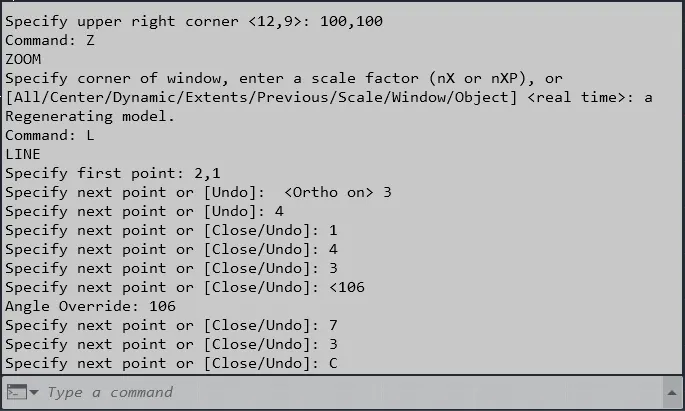
1. Select the Line tool from the ribbon tab or by entering the 'LINE' command in the command tab
2. Specify the starting coordinate of point 1 as 2,1 in the command line
3. Enter the length of point 2 as 3 in the command line towards the +ve x-axis
4. Enter the length of point 3 as 4 in the command line towards the +ve y-axis
5. Enter the length of point 4 as 1 in the command line towards the -ve x-axis
6. Enter the length of point 5 as 4 in the command line towards the +ve y-axis
7. Enter the length of point 6 as 3 in the command line towards the +ve x-axis
8. Enter the length of point 7 as 7 in the command line at an angle of <106 from the +ve x-axis while keeping polar tracking on.
9. Enter the length of point 8 as 3 in the command line towards the -ve x-axis
10. Then for the last point, Click "Close' on the command line.
Result:
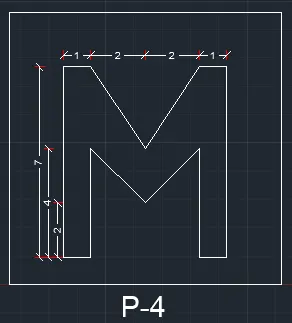
III. Drafting the geometry for P4 by using Absolute Coordinate System :
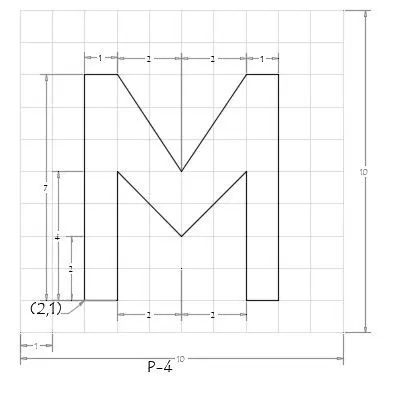
Steps :
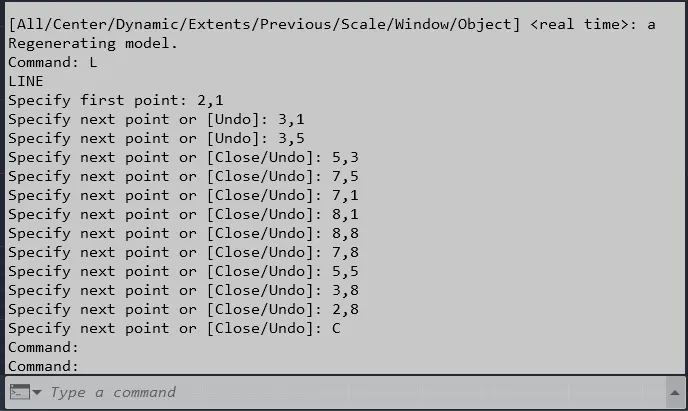
1. Select the line tool from the ribbon tab or by entering the 'Line' command in the command tab.
2. Specify the starting coordinate of point 1 as 2,1
3. Specify the next coordinate of point 2 as 3,1
4. Specify the next coordinate of point 3 as 3,5
5. Specify the next coordinate of point 4 as 5,3
6. Specify the next coordinate of point 5 as 7,5
7. Specify the next coordinate of point 6 as 7,1
8. Specify the next coordinate of point 7 as 8,1
9. Specify the next coordinate of point 8 as 8,8
10. Specify the next coordinate of point 9 as 7,8
11. Specify the next coordinate of point 10 as 5,5
12. Specify the next coordinate of point 11 as 3,8
13. Specify the next coordinate of point 12 as 2,8
14. Then for the last point, Click 'Close' on the Command Line
Result:
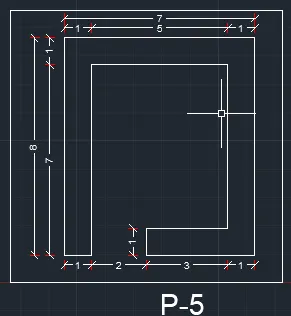
IV. Drafting the geometry for P5 by using Relative Rectangular Coordinate System :
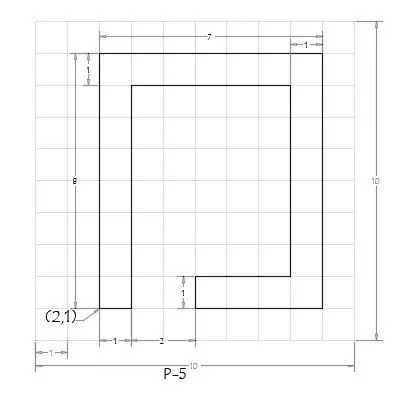
Steps :
1. Select the line tool from the ribbon tab or by entering the 'Line' command in the command tab.
2. Specify the starting coordinate of point 1 as 2,1
3. Specify the next coordinate of point 2 as @1,0
4. Specify the next coordinate of point 3 as @0,7
5. Specify the next coordinate of point 4 as @5,0
6. Specify the next coordinate of point 5 as @0,-6
7. Specify the next coordinate of point 6 as @-3,0
8. Specify the next coordinate of point 7 as @0,-1
9. Specify the next coordinate of point 8 as @4,0
10. Specify the next coordinate of point 9 as @0,8
11. Specify the next coordinate of point 10 as @-7,0
12. Then for the last point, Click 'Close' on the Command Line
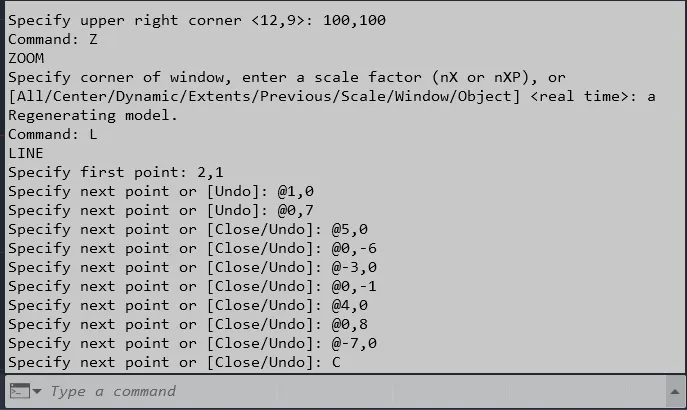
Result:
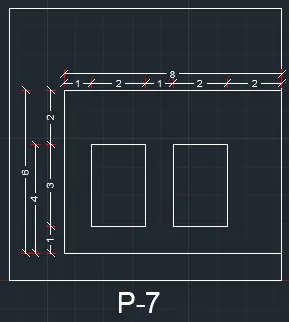
V. Drafting the geometry for P7 by using Absolute Coordinate System:
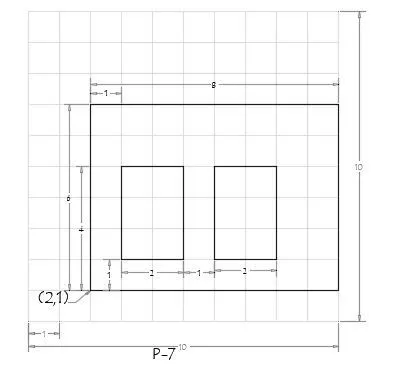
Steps :
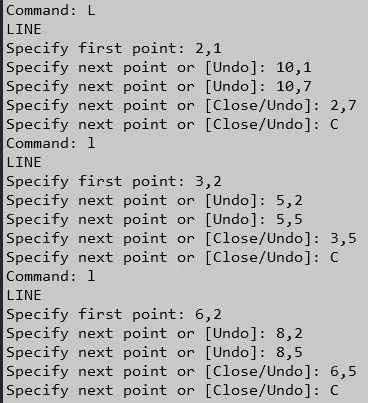
1. Select the line tool from the ribbon tab or by entering the 'Line' command in the command tab.
2. Specify the starting coordinate of point 1 as 2,1
3. Specify the next coordinate of point 2 as 10,1
4. Specify the next coordinate of point 3 as 10,7
5. Specify the next coordinate of point 4 as 2,7
6. Click 'Close' on the command line
7. Select the Line tool from the ribbon tab or by entering the 'Line' command in the command tab
8. Specify the next coordinate of point 5 as 3,2
9. Specify the next coordinate of point 6 as 5,2
10. Specify the next coordinate of point 7 as 5,5
11. Specify the next coordinate of point 8 as 3,5
12. Click 'Close' on the command line
13. Select the Line tool from the ribbon tab or by entering the 'Line' command in the command tab
14. Specify the next coordinate of point 9 as 6,2
15. Specify the next coordinate of point 10 as 8,2
16. Specify the next coordinate of point 11 as 8,5
17. Specify the next coordinate of point 12 as 6,5
18. Then for the last point, Click 'Close' on the Command Line
Result:
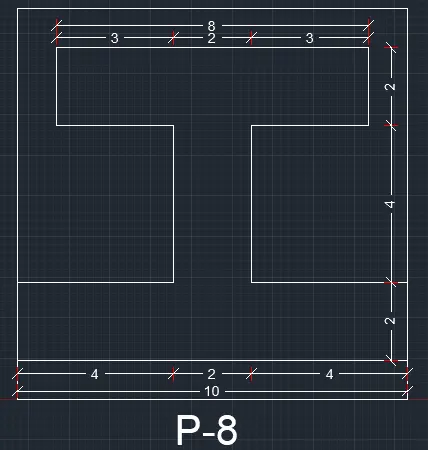
VI. Drafting the geometry for P8 by using Relative Rectangular Coordinate System:
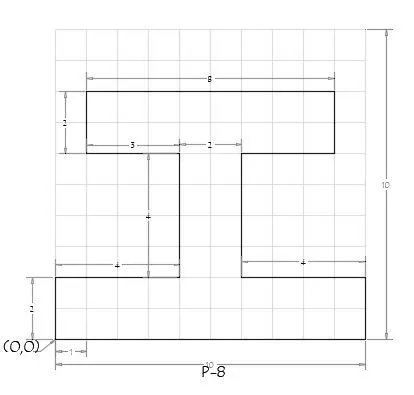
Steps :
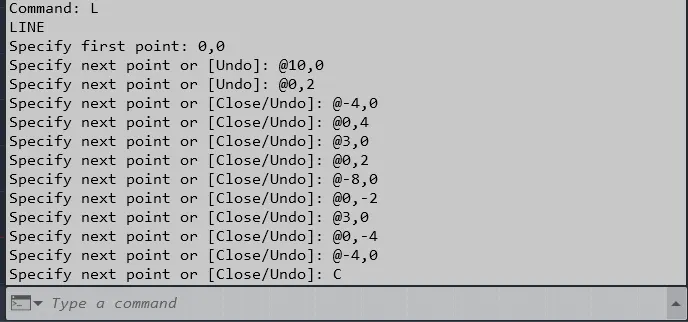
1. Select the line tool from the ribbon tab or by entering the 'Line' command in the command tab.
2. Specify the starting coordinate of point 1 as 0,0
3. Specify the next coordinate of point 2 as @10,0
4. Specify the next coordinate of point 3 as @0,2
5. Specify the next coordinate of point 4 as @-4,0
6. Specify the next coordinate of point 5 as @0,4
7. Specify the next coordinate of point 6 as @3,0
8. Specify the next coordinate of point 7 as @0,2
9. Specify the next coordinate of point 8 as @-8,0
10. Specify the next coordinate of point 9 as @0,-2
11. Specify the next coordinate of point 10 as @3,0
12. Specify the next coordinate of point 11 as @0,-4
13. Specify the next coordinate of point 12 as @-4,0
14. Then for the last point, Click 'Close' on the Command Line
Result:
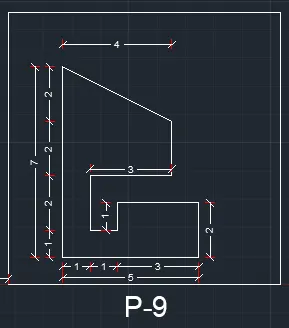
VII. Drafting the geometry for P9 by using Absolute Coordinate System:
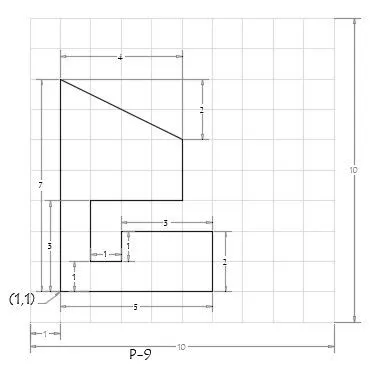
Steps :
1. Select the line tool from the ribbon tab or by entering the 'Line' command in the command tab.
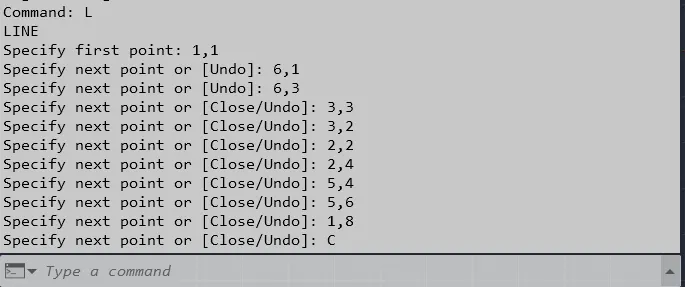
2. Specify the starting coordinate of point 1 as 1,1
3. Specify the next coordinate of point 2 as 6,1
4. Specify the next coordinate of point 3 as 6,3
5. Specify the next coordinate of point 4 as 3,3
6. Specify the next coordinate of point 5 as 3,2
7. Specify the next coordinate of point 6 as 2,2
8. Specify the next coordinate of point 7 as 2,4
9. Specify the next coordinate of point 8 as 5,4
10. Specify the next coordinate of point 9 as 5,6
11. Specify the next coordinate of point 10 as 1,8
12. Then for the last point, Click 'Close' on the Command Line
Result:
VIII. Drafting the geometry for P10 by using Relative Polar Coordinate System:
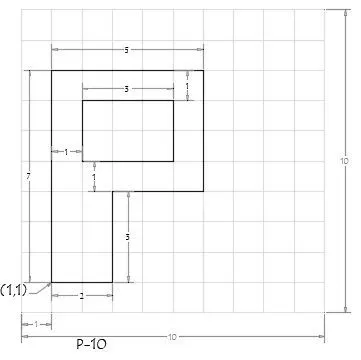
Steps :
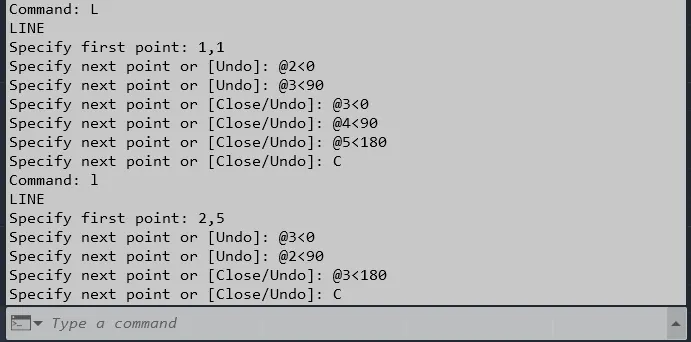
1. Select the line tool from the ribbon tab or by entering the 'Line' command in the command tab.
2. Specify the starting coordinate of point 1 as 1,1
3. Specify the next coordinate of point 2 as @2<0
4. Specify the next coordinate of point 3 as @3<90
5. Specify the next coordinate of point 4 as @3<0
6. Specify the next coordinate of point 5 as @4<90
7. Specify the next coordinate of point 6 as @5<180
8. Click 'Close' on the command line
9. Specify the next coordinate of point 7 as 2,5
10. Specify the next coordinate of point 8 as @3<0
11. Specify the next coordinate of point 9 as @2<90
12. Specify the next coordinate of point 10 as @3<180
13. Then for the last point, Click 'Close' on the Command Line
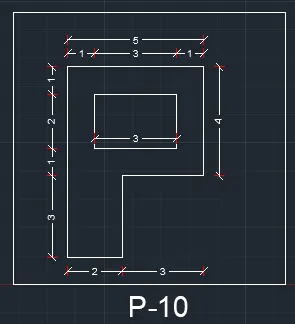
Result:
(B) To Draw the profile and the trusses using any coordinate system methods. The dimensions are there for reference:
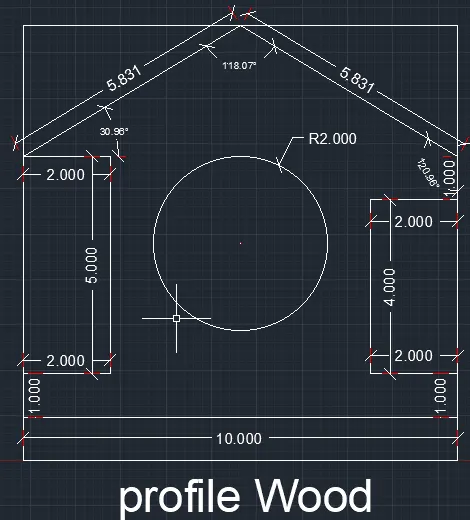
I. Drafting the Wood Profile as shown in the given picture:
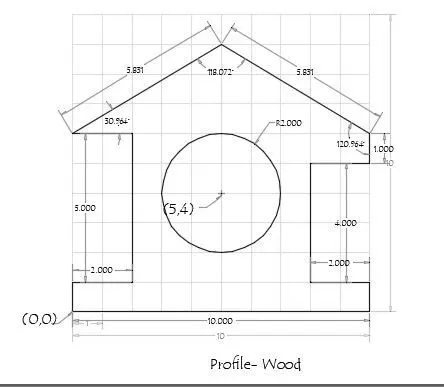
Steps For Creating The Wood Profile Using Direct Distance Entry method:
1. Select the Line tool from the ribbon tab or by entering the 'LINE' command in the command tab
2. Specify the starting coordinate of point 1 as 0,0 in the command line
3. Enter the length of point 2 as 10 in the command line towards the +ve x-axis
4. Enter the length of point 3 as 1 in the command line towards the +ve y-axis
5. Enter the length of point 4 as 2 in the command line towards the -ve x-axis
6. Enter the length of point 5 as 4 in the command line towards the +ve y-axis
7. Enter the length of point 6 as 2 in the command line towards the +ve x-axis
8. Enter the length of point 7 as 1 in the command line towards the +ve y-axis
9. Enter the length of point 7 as 5.831 in the command line at an angle of <149.036 from +ve x-direction while keeping polar tracking on
10. Enter the length of point 8 as 5.831 in the command line at the angle of <210.964 from +ve x-direction while keeping polar tracking on
11. Enter the length of point 9 as 2 in the command line towards the +ve x-axis
12. Enter the length of point 10 as 5 in the command line towards the -ve y-axis
13. Enter the length of point 11 as 2 in the command line towards the +ve x-axis
14. Click 'Close' on the command line
15. Select the Circle tool by entering the 'Circle' command in the command tab
16. Specify center point of the circle as 5,4
17. Specify radius of the circle as 2
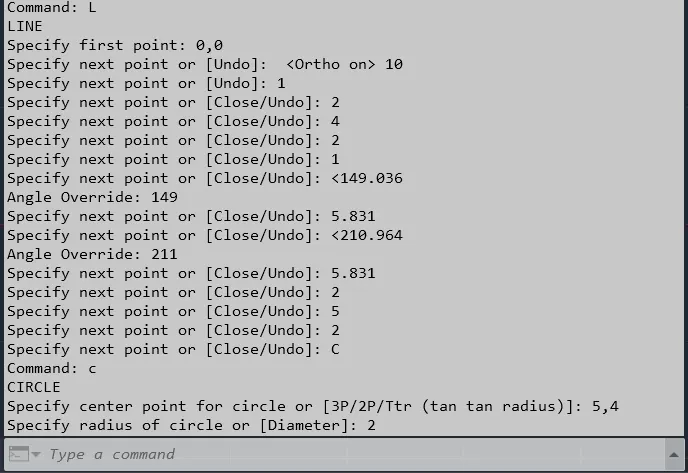
Result:
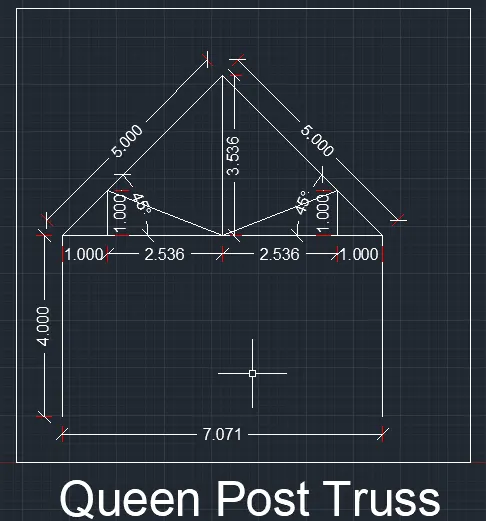
II. Drafting the Queen Post Truss as shown in the given image:
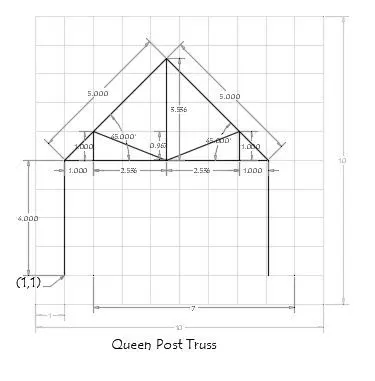
Steps For Creating The Queen Post Truss Using Realtive Polar Coordinate System:
1. Select the line tool from the ribbon tab or by entering the 'Line' command in the command tab.
2. Specify the starting coordinate of point 1 as 1,1
3. Specify the next coordinate of point 2 as @4<90
4. Specify the next coordinate of point 3 as @5<45
5. Specify the next coordinate of point 4 as @5<315
6. Specify the next coordinate of point 5 as @4<270
7. Press 'Esc' to cancel the Line Command
8. Select the line tool again from the ribbon tab or by entering the 'Line' command in the command tab.
9. Specify the starting coordinate of point 1 as 1,5
10. Specify the next coordinate of point 2 as @1<0
11. Specify the next coordinate of point 3 as @2.5355<0
12. Specify the next coordinate of point 4 as @2.5355<0
13. Specify the next coordinate of point 5 as @1<0
14. Press 'Esc' to cancel the Line Command
15. Select the line tool again from the ribbon tab or by entering the 'Line' command in the command tab.
16. Specify the starting coordinate of point 1 as 2,5
17. Specify the next coordinate of point 2 as @1<90
18. Specify the next coordinate of point 3 as @2.7256<338
19. Specify the next coordinate of point 4 as @2.7256<22
20. Specify the next coordinate of point 5 as @1<270
21. Press 'Esc' to cancel the Line Command
22. Select the line tool again from the ribbon tab or by entering the 'Line' command in the command tab.
23. Specify the starting coordinate of point 1 as 4.5,5
24. Specify the next coordinate of point 2 as @3.53571<90
25. Press 'Esc' to cancel the Line Command
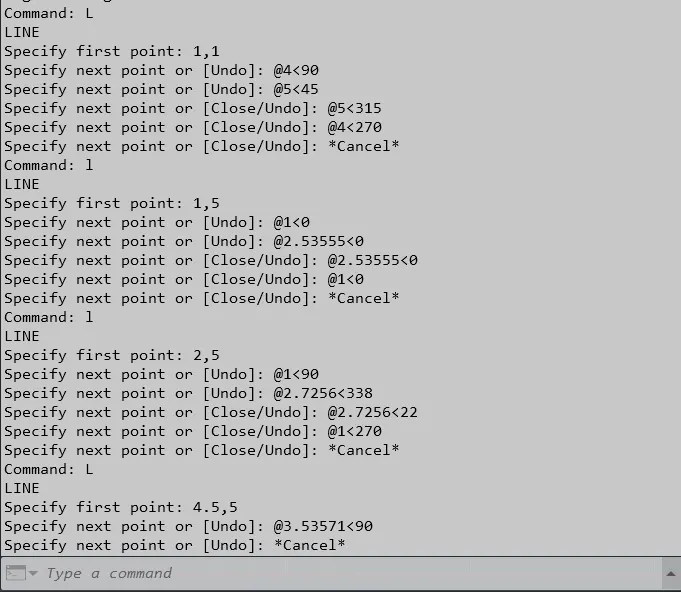
Result:
III. Drafting the Mono Pitch as shown in the given image:
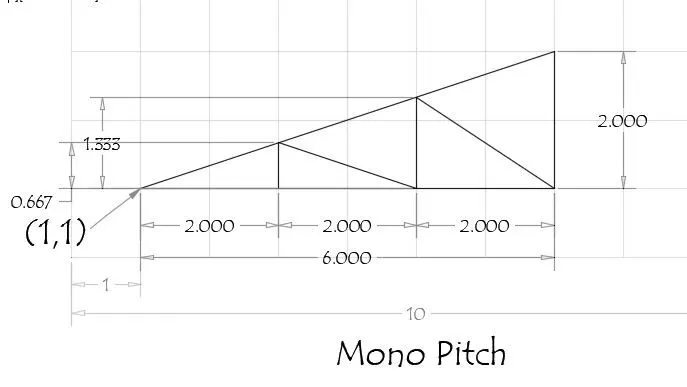
Steps For Creating The Mono Pitch Using Absolute Coordinate System:
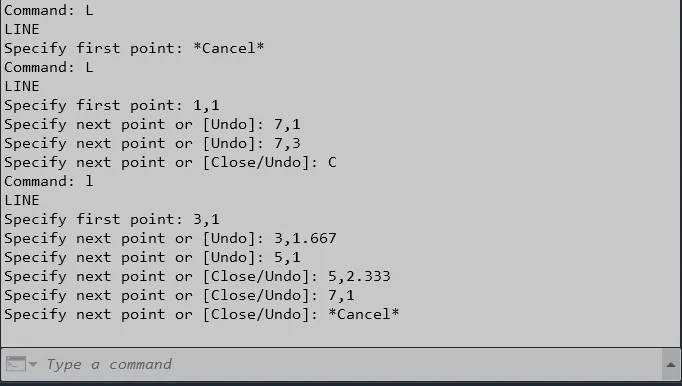
1. Select the line tool from the ribbon tab or by entering the 'Line' command in the command tab.
2. Specify the starting coordinate of point 1 as 1,1
3. Specify the next coordinate of point 2 as 7,1
4. Specify the next coordinate of point 3 as 7,3
5. Click 'Close' on the command line
6. Select the line tool again from the ribbon tab or by entering the 'Line' command in the command tab.
7. Specify the next coordinate of point 4 as 3,1
8. Specify the next coordinate of point 5 as 3,1.667
9. Specify the next coordinate of point 6 as 5,1
10. Specify the next coordinate of point 7 as 5,2.333
11. Specify the next coordinate of point 8 as 7,1
12. Press 'Esc' to cancel the Line command.
Result: