Creation of geometries by Coordinate system methods using AutoCad
AIM:
To create the geometries from using all the coordinates system methods by using the Line tool and circle tool to create the geometries.
PROCEDURE:
In the command line type 'L' select line and enter.Enter the co-ordinates as (2,1).
By using relative co-ordinate system,In the command line enter @0,6. Aline is formed from the first point to the another point at a diatance of 6m from the frist point.
In the command line enter @6,6 and then click on enter.
In the command line enter @6,-1 and then click on enter.
In the command line enter @-5,0 and then click on enter.
In the command line enter @0,-4 and then click on enter.
In the command line enter @5,0 and then click on enter.
In the command line enter @0,-1 and then click on enter.
In the command line click on close.
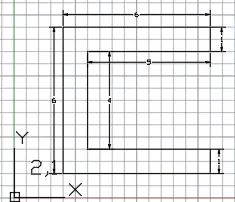
RESULT:Required digram is created by using relative co-ordinate system.
AIM:
To create the geometries from using all the coordinates system methods by using the Line tool and circle tool to create the geometries.
PROCEDURE:
In the command line type 'L' select line and enter.Enter the co-ordinates as (2,1).
By using relative co-ordinate system,In the command line enter @3,0. Aline is formed from the first point to the another point at a diatance of 3m from the frist point.
In the command line enter @6,6 and then click on enter.
In the command line enter @0,4 and then click on enter.
In the command line enter @1,0 and then click on enter.
In the command line enter @3,0 and then click on enter.
In the command line enter @-2,7 and then click on enter.
In the command line enter @-3,0 and then click on enter.
In the command line click on close.
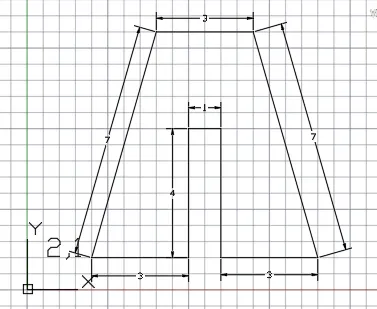
RESULT:Required digram is created by using relative co-ordinate system.
AIM:
To create the geometries from using all the coordinates system methods by using the Line tool and circle tool to create the geometries.
PROCEDURE:
In the command line type 'L' select line and enter.Enter the co-ordinates as (2,1).
By using relative co-ordinate system,In the command line enter @0,7. Aline is formed from the first point to the another point at a diatance of 7m from the frist point.
In the command line enter @1,0 and then click on enter.
In the command line enter @2,-3 and then click on enter.
In the command line enter @2,3 and then click on enter.
In the command line enter @1,0 and then click on enter.
In the command line enter @0,-7 and then click on enter.
In the command line enter @-1,0 and then click on enter.
In the command line enter @0,4 and then click on enter.
In the command line enter @-2,-2 and then click on enter.
In the command line enter @-2,2 and then click on enter.
In the command line enter @0,-4 and then click on enter.
In the command line click on close.
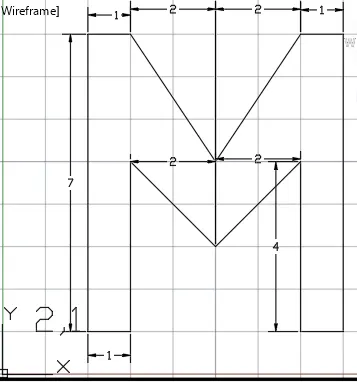
RESULT:Required digram is created by using relative co-ordinate system.
AIM:To create the geometries from using all the coordinates system methods by using the Line tool and circle tool to create the geometries.
PROCEDURE:
In the command line type 'L' select line and enter.Enter the co-ordinates as (2,1).
By using relative co-ordinate system,In the command line enter @0,8. Aline is formed from the first point to the another point at a diatance of 8m from the frist point.
In the command line enter @7,0 and then click on enter.
In the command line enter @0,-8 and then click on enter.
In the command line enter @-4,0 and then click on enter.
In the command line enter @0,1 and then click on enter.
In the command line enter @3,0 and then click on enter.
In the command line enter @0,6 and then click on enter.
In the command line enter @-5,0 and then click on enter.
In the command line enter @0,-7 and then click on enter.
In the command line click on close.
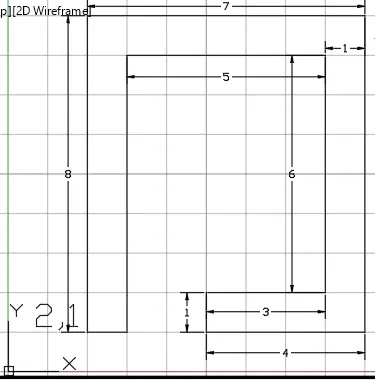
RESULT:Required digram is created by using relative co-ordinate system.
AIM:To create the geometries from using all the coordinates system methods by using the Line tool and circle tool to create the geometries.
PROCEDURE:
In the command line type 'L' select line and enter.Enter the co-ordinates as (2,1).
By using relative co-ordinate system,In the command line enter @0,6. Aline is formed from the first point to the another point at a diatance of 6m in Y-axis from the frist point.
In the command line enter @8,0 and then click on enter.
In the command line click on close.
In the command line enter command 'L' and select line enter the co-ordinates 3,2 and then click on enter.
In the command line enter @0,3 and then click on enter.
In the command line enter @2,0 and then click on enter.
In the command line enter @0,-3 and then click on enter.
In the command line click on close.
In the command line enter command 'L' and select line enter the co-ordinates 6,2 and then click on enter.
In the command line enter @0,3 and then click on enter.
In the command line enter @2,0 and then click on enter.
In the command line enter @0,-3 and then click on enter.
In the command line click on close.
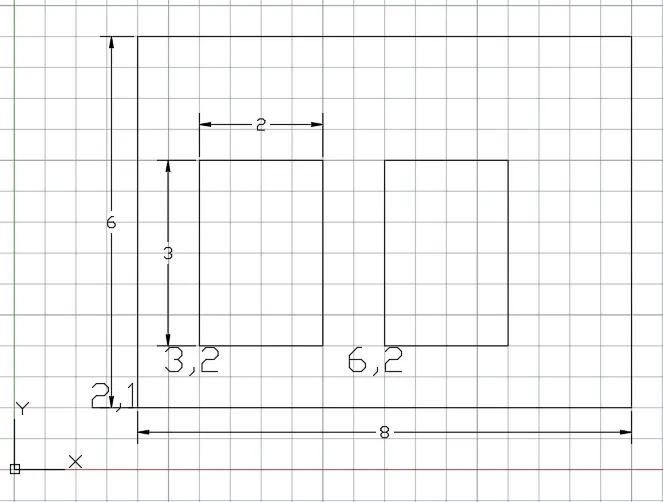
RESULT:Required digram is created by using relative co-ordinate system.
AIM:To create the geometries from using all the coordinates system methods by using the Line tool and circle tool to create the geometries.
PROCEDURE:
In the command line type 'L' select line and enter.Enter the co-ordinates as (0,0).
By using relative co-ordinate system,In the command line enter @10,0. Aline is formed from the first point to the another point at a diatance of 10m from the frist point in X-axis.
In the command line enter @0,2 and then click on enter.
In the command line enter @-4,0 and then click on enter.
In the command line enter @0,-4 and then click on enter.
In the command line enter @3,0 and then click on enter.
In the command line enter @0,2 and then click on enter.
In the command line enter @-8,0 and then click on enter.
In the command line enter @0,-2 and then click on enter.
In the command line enter @3,0 and then click on enter.
In the command line enter @0,-4 and then click on enter.
In the command line enter @-4,0 and then click on enter.
In the command line click on close.
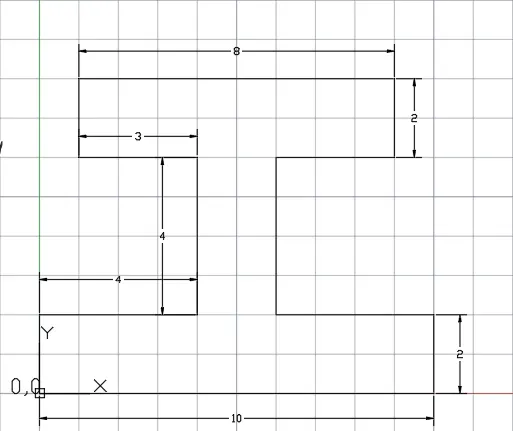
RESULT:Required digram is created by using relative co-ordinate system.
AIM:To create the geometries from using all the coordinates system methods by using the Line tool and circle tool to create the geometries.
PROCEDURE:
In the command line type 'L' select line and enter.Enter the co-ordinates as (1,1).
By using relative co-ordinate system,In the command line enter @5,0. Aline is formed from the first point to the another point at a diatance of 5m from the frist point in X-axis.
In the command line enter @0,2 and then click on enter.
In the command line enter @-3,0 and then click on enter.
In the command line enter @0,-1 and then click on enter.
In the command line enter @-1,0 and then click on enter.
In the command line enter @0,2 and then click on enter.
In the command line enter @3,0 and then click on enter.
In the command line enter @0,2 and then click on enter.
In the command line enter @-4,2 and then click on enter.
In the command line click on close.
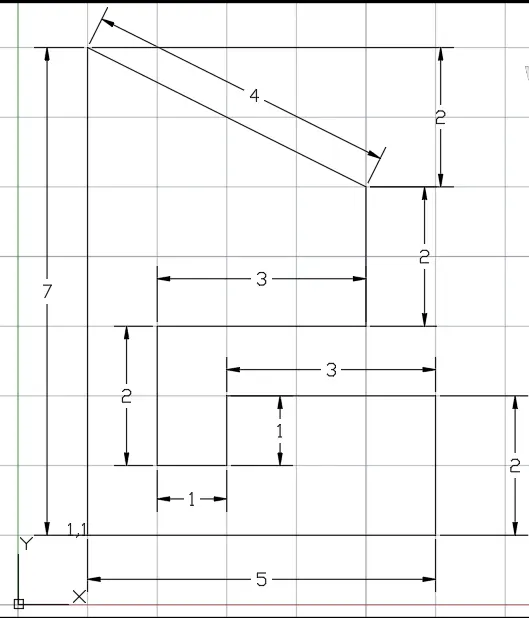
RESULT:Required digram is created by using relative co-ordinate system.
AIM:To create the geometries from using all the coordinates system methods by using the Line tool and circle tool to create the geometries.
PROCEDURE:
In the command line type 'L' select line and enter.Enter the co-ordinates as (1,1).
By using relative co-ordinate system,In the command line enter @0,7. Aline is formed from the first point to the another point at a diatance of 7m from the frist point in Y-axis.
In the command line enter @5,0 and then click on enter.
In the command line enter @0,-4 and then click on enter.
In the command line enter @-3,0 and then click on enter.
In the command line enter @0,-3 and then click on enter.
In the command line click on close.
In the command line enter command 'L' and enter the co-ordinates 2,5 and then click on enter.
In the command line enter @0,2 and then click on enter.
In the command line enter @3,0 and then click on enter.
In the command line enter @0,-2 and then click on enter.
In the command line click on close.
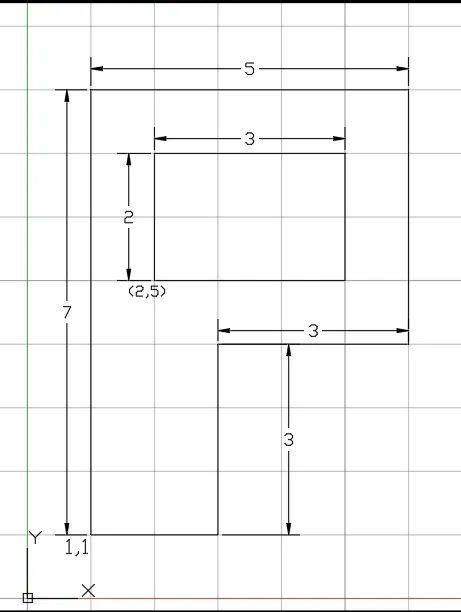
RESULT:Required digram is created by using relative co-ordinate system.
AIM:To draw the profile and the trusses using any coordinate system methods.
PROCEDURE:
In the command line type 'L' select line and enter.Enter the co-ordinates as (0,0).
By using relative co-ordinate system,In the command line enter @10,0. Aline is formed from the first point to the another point at a diatance of 10 m from the frist point in X-axis.
In the command line enter @0,1 and then click on enter.
In the command line enter @-2,0 and then click on enter.
In the command line enter @0,4 and then click on enter.
In the command line enter @2,0 and then click on enter.
In the command line enter @0,1 and then click on enter.
In the command line enter @5.585<150 and then click on enter and enter escape.
In the command line type 'L' select line and enter and click on point(0,0).
In the command line enter @0,1 and then click on enter.
In the command line enter @2,0 and then click on enter.
In the command line enter @0,5 and then click on enter.
In the command line enter @-2,0 and then click on enter.
In the command line click on close.
In the command line enter command 'c' and select circle enter the co-ordinates 2,5 and then click on enter and enter the radius as 1m.
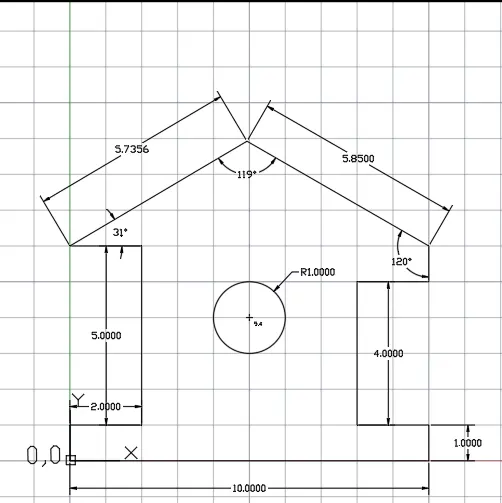
RESULT:The profile and the trusses are drawn by using coordinate system methods.
AIM:To draw the profile and the trusses using any coordinate system methods.
PROCEDURE:
In the command line type 'L' select line and enter.Enter the co-ordinates as (1,1).
By using relative co-ordinate system,In the command line enter @0,4. Aline is formed from the first point to the another point at a diatance of 4 m from the frist point in Y-axis.
In the command line enter @5<45 and then click on enter.
In the command line enter @5<315 and then click on enter.
In the command line enter @0,-4 and then click on enter and then enter escape.
In the command line type 'L' select line and enter.Enter the co-ordinates as (1,5).
In the command line enter @1,0 and then click on enter.
In the command line enter @2.536,0 and then click on enter.
In the command line enter @2.536,0 and then click on enter.
In the command line enter @1,0 and then click on enter and then enter escape.
In the command line type 'L' select line and enter. Enter the co-ordinates as (2,5).
In the command line enter @0,1 and then click on enter and then escape.
In the command line type 'L' select line and enter. Enter the co-ordinates as (7,5).
In the command line enter @0,1 and then click on enter and then escape.
In the command line type 'L' select line and enter. Enter the co-ordinates as (2,6).
In the command line enter @2.536,-1 and then click on enter and then escape.
In the command line type 'L' select line and enter. Enter the co-ordinates as (7,6).
In the command line enter @-2.536,-1 and then click on enter and then escape.
In the command line type 'L' select line and enter. Enter the co-ordinates as (4.536,5).
In the command line enter @0,3.535 and then click on enter and then escape.
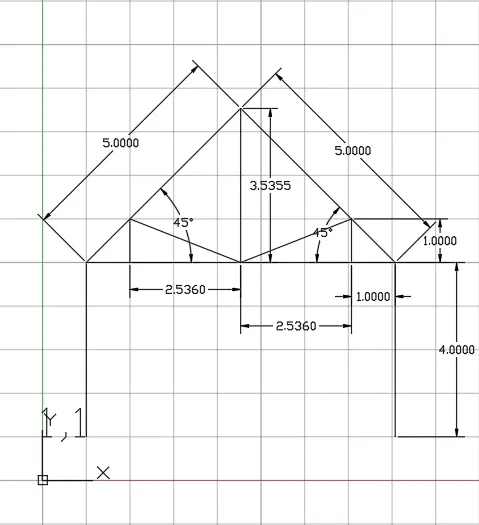
RESULT:The profile and the trusses are drawn by using coordinate system methods.
AIM:To draw the profile and the trusses using any coordinate system methods.
PROCEDURE:
In the command line type 'L' select line and enter.Enter the co-ordinates as (1,1).
By using relative co-ordinate system,In the command line enter @6,0. Aline is formed from the first point to the another point at a diatance of 6 m from the frist point in X-axis.
In the command line enter @0,2 and then click on enter.
In the command line click on close.
In the command line type 'L' select line and enter. Enter the co-ordinates as (3,1).
In the command line enter @0,0.667 and then click on enter and then escape.
In the command line type 'L' select line and enter. Enter the co-ordinates as (5,1).
In the command line enter @0,1.333 and then click on enter and then escape.
In the command line type 'L' select line and enter. Enter the co-ordinates as (3,1.667).
In the command line enter @2,-0.667 and then click on enter and then escape.
In the command line type 'L' select line and enter. Enter the co-ordinates as (5,2.333).
In the command line enter @2,-1.333 and then click on enter and then escape.
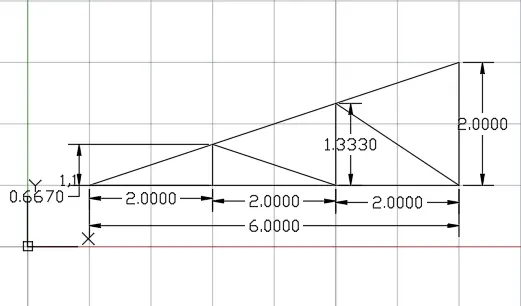
RESULT:The profile and the trusses are drawn by using coordinate system methods.