Creating Kitchen layout, Hatching of Architectural elements and sectional view of an Industrial Building in AutoCad
1]
Aim: To draw the given diagram by the drafting tools.
Procedure :
- By using the drafting tools we will draw the above diagram
- Before the draw the diagram we will setup the units and limits.
- first we start with X-line i.e horizontal and vertical lines.
- after that using the drafting tools i.e offset,fillet,trim,extend ....etc. we will draw the required diagram.
- i.e walls,doors,windows,text,dimension,.....etc.
- we will use Text command for showing the object names.
- and also we will use the Annotation for clear visible of object names
- also we use the block command for objects.
- also we will use attributes wherever required.
- also we will provide the hatch for different objects.
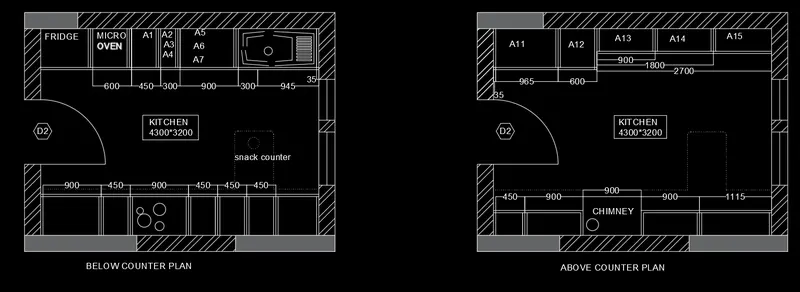
Result: I understand the how to draw the given diagram.
2]
Aim: To draw the given diagram by the drafting tools.
Procedure :
- By using the drafting tools we will draw the above diagram
- Before the draw the diagram we will setup the units and limits.
- first we start with X-line i.e horizontal and vertical lines.
- after that using the drafting tools i.e offset,fillet,trim,extend ....etc. we will draw the required diagram.
- i.e walls,doors,windows,text,dimension,.....etc.
- we will use Text command for showing the object names.
- and also we will use the Annotation for clear visible of object names
- also we use the block command for objects.
- also we will use attributes wherever required.
- also we will provide the hatch for different objects.
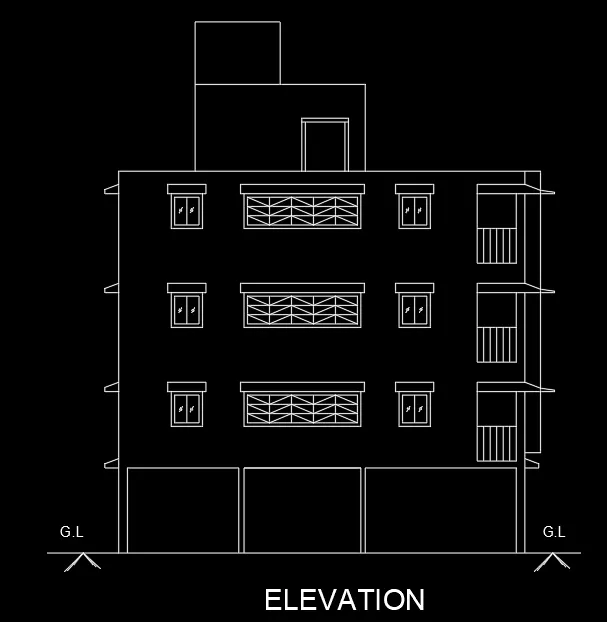
Result: I understand the how to draw the given diagram.
3]
Aim: To draw the given diagram by the drafting tools.
Procedure :
- By using the drafting tools we will draw the above diagram
- Before the draw the diagram we will setup the units and limits.
- first we start with X-line i.e horizontal and vertical lines.
- after that using the drafting tools i.e offset,fillet,trim,extend ....etc. we will draw the required diagram.
- i.e walls,doors,windows,text,dimension,.....etc.
- we will use Text command for showing the object names.
- and also we will use the Annotation for clear visible of object names
- also we use the block command for objects.
- also we will use attributes wherever required.
- also we will provide the hatch for different objects.
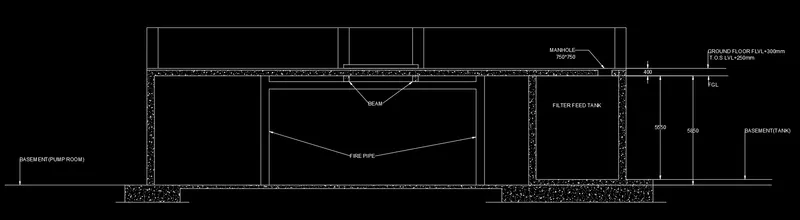
Result: I understand the how to draw the given diagram.