Creating Bar Bending schedule, Different Door types, and Creation of standard drawing templates using AutoCad
1.
Aim:
To create the templates using autocad command and tools as per drawing required.
Introduction:
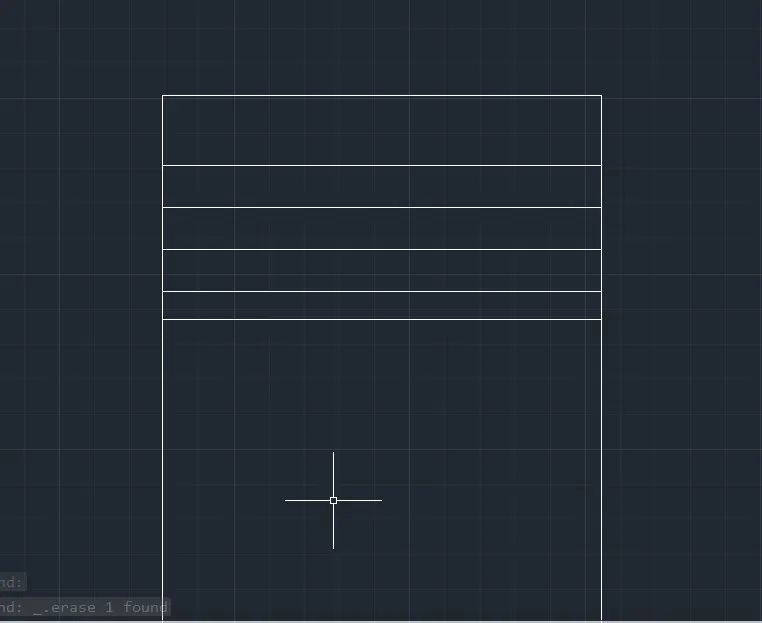
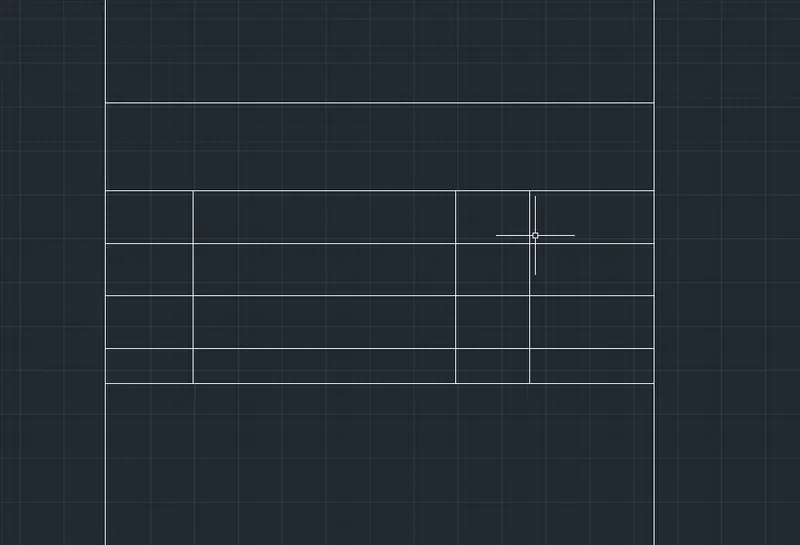
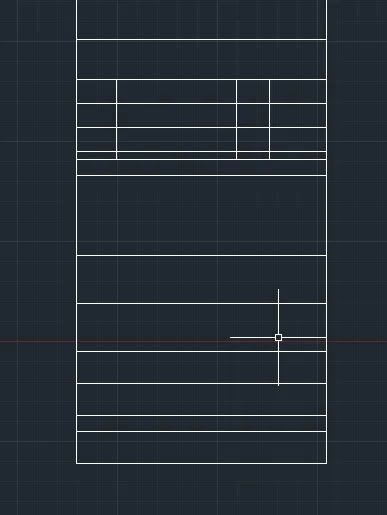
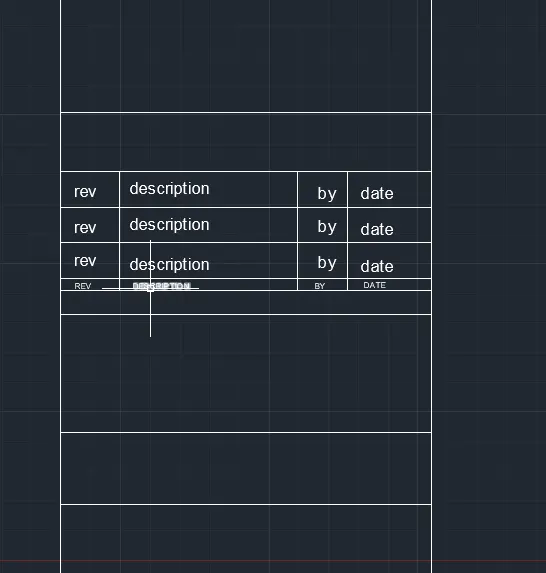
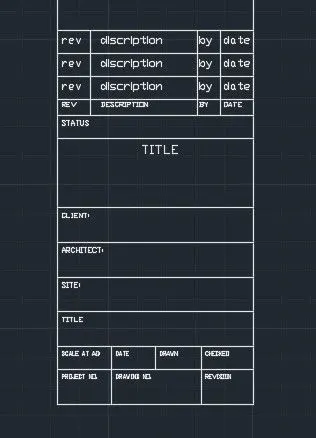
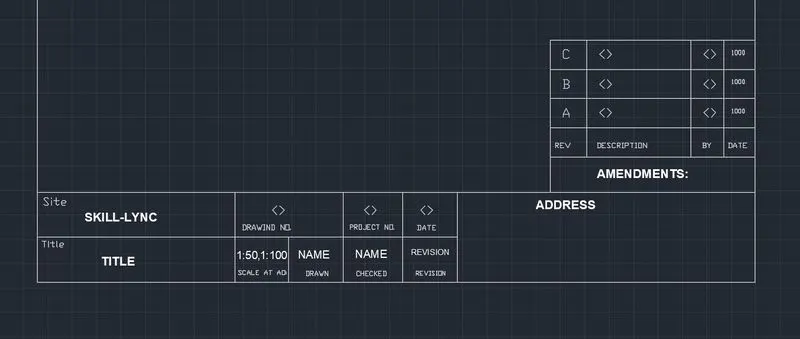
Create the templates as shown in Figures. Take the size of the title block as per industry standards or you can assume it as per the size of the paper. Use text and attributes wherever required. After creating the title block you need to save it as a block with names: Custom1_titleblock and Custom2_titleblock, respectively.
Procedure :-
Custom1_title block :-
- Create the rectangle of size 70 mm and 158mm.
- Draw the block as per given in the drawing by line and offset command.
- Add text as per given in the drawing.
- For making block, Type B in coomand line and select BLOCK command.
- Then select Pick Point the select the object and name the block.
- So the block is created.
- Name the block as Custom1-title block.
Custom2_title block :-
- Create the rectangle of size 250 mm and 60mm.
- Then create the drawing as per the drawing using line and offset coomand.
- Use MTEXT command to insert the text in the drawing.
- Use diffrent text size for different texts.
- Then create the block named custom2_title block.
Result:
as per the requirement of drawing using autocad command and tools for the given data is obtained.
2.
Aim:
To Create the doors type for warehouse using autocad command as per drawing requirment.
Introduction:
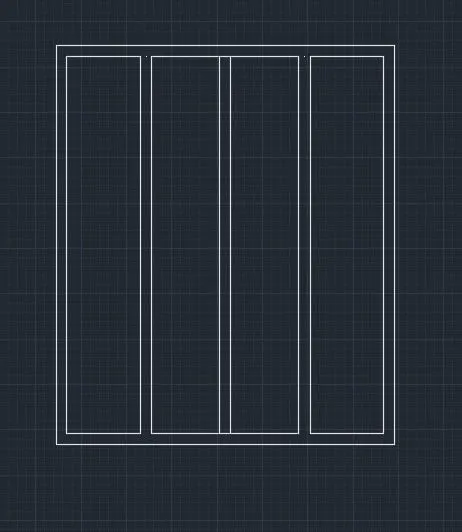
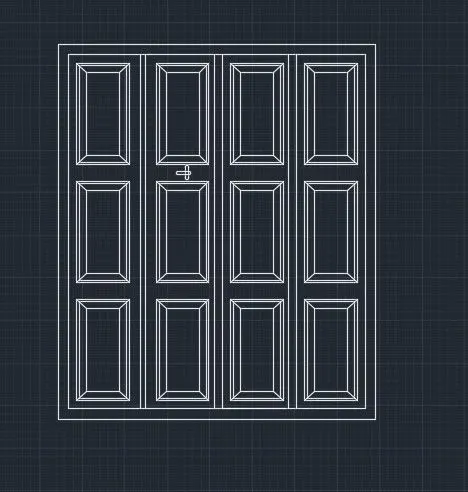
Create the doors type for warehouse as shown in the Figure. You need to create each door type as per standard size or given dimensions. Create the blocks of this door type after creating them.
Procedure :-
Door-1 :-
- Draw the rectangle of size 2330 X 2750 mm.
- Then offset the lines with 50 mm.
- After dividing the line in 4 parts, create the frames of the drawings.
- Then create the panels in between the panels.
- Then copy the panels in different frames.
- For making block, Type B in command line and select BLOCK command.
- Then select Pick Point the select the object and name the block.
- So the block is created.
- Name the block as D1.
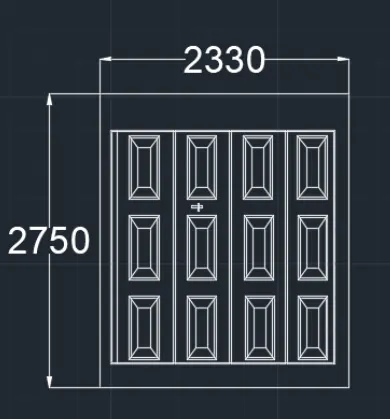
Door-2 :-
- Draw the rectangle of size 2330 X 2750 mm.
- Then offset the lines with 50 mm.
- After dividing the line in 4 parts.
- For making block, Type B in command line and select BLOCK command.
- Then select Pick Point the select the object and name the block.
- So the block is created.
- Name the block as Door 2.
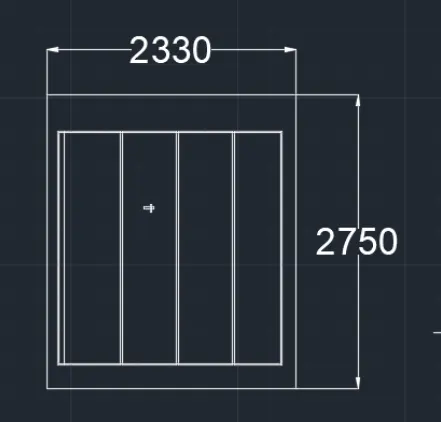
Result:
as per the requirement of drawing using autocad command and tools for the given data is obtained.
3.
Aim:
To Create each symbol as a block with the name using autocad command and tools as per drawing requires.
Introduction:
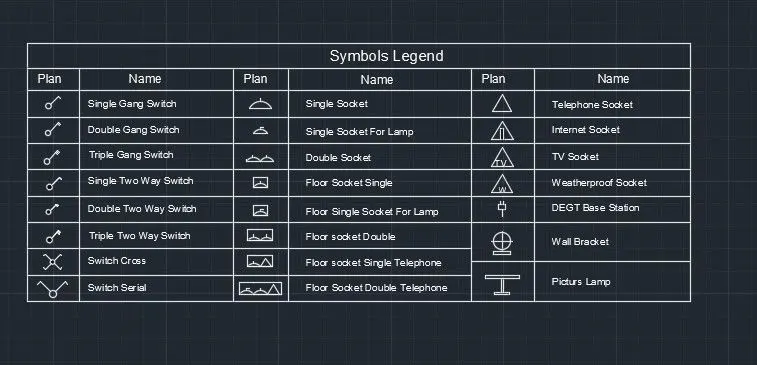
Create each symbol as a block with the name given in the legend. After creating the blocks arrange them in the legend as shown in the Figure.
Procedure :-
- To create electrical legend, firsty we have to make different blocks of every electrical signs.
- Now create the rectangle of 10 rows and 6 columns.
- Place each blocks in respective rows and columns.
- To place the name, Select Fields the select object and choose name option and then OK.
- Place the TExt in respective Rows
Result:
as per the requirement of drawing using autocad command and tools for the given data is obtained.
4.
Aim:
To create the door type for residential building as a block with the name using autocad command and tools as per drawing requires.
Introduction:
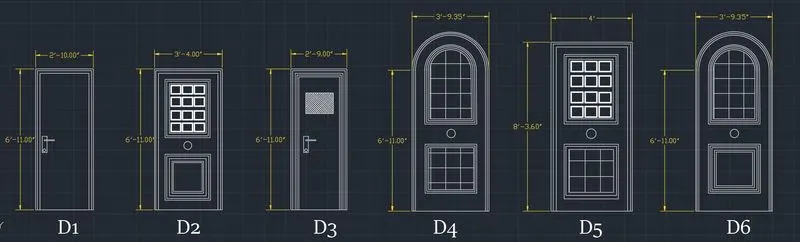
Create the door type for residential building as a block. Save the name of the blocks as type. Use given dimensions or assume dimensions as per industry standards.
Procedure :-
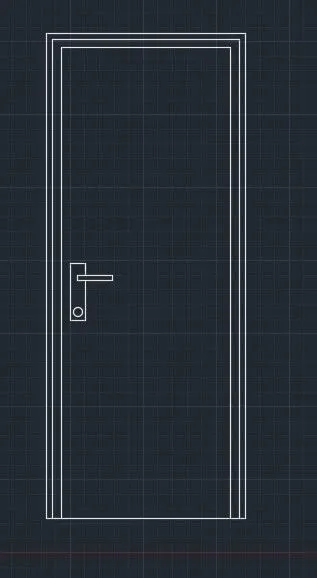
D1 :-
- Draw the Rectangle of size 2'10" X 6'11".
- offset the lines with 1.5" and 1" to make the Frame.
- Draw the lock by Rectancles and Circle.
- Annotate it with dimensions.
- Create the Block of the door.
- Name- D1, Select the Object, Pick Point, OK
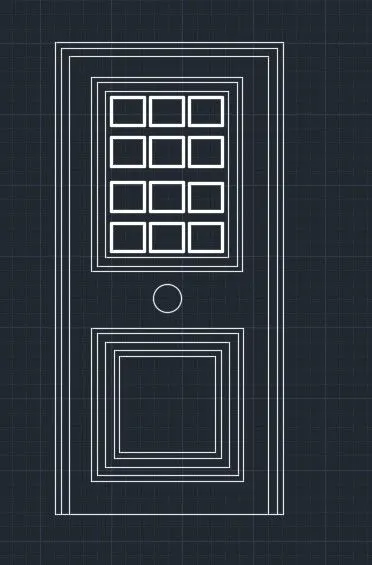
D2 :-
- Draw the Rectangle of size 3'4" X 6'11".
- Then draw the rectangle panel and offset it with 1" and 1.5".
- Draw the squares in the panel and increase the lineweight of squares.
- Draw the Rectangle below the rectanular panels.
- and offset the rectangles.
- Place the circle of 3" in between both the panels.
- Annotate it with dimensions.
- Create the Block of the door.
- Name- D2, Select the Object, Pick Point, OK.
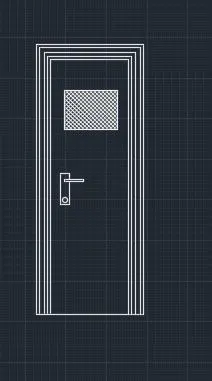
D3 :-
- Draw the Rectangle of size 2'9" X 6'11".
- Offset the lines with 1" and 1.5" and make Panels.
- Draw the rectangle of 1.5" and 9".
- Hatch the rectangle by relative scale.
- Draw the lock by Rectancles and Circle.
- Annotate it with dimensions.
- Create the Block of the door.
- Name- D3, Select the Object, Pick Point, OK.
D4 :-
- Draw the line of size 3'9.5" X 8'3.6".
- Draw the Arc of length 3'9.5".
- Offset the arc by 1" and 1.5" for panels.
- Draw the Rectangle below the rectanular panels.
- Place the rectangles in the rectangle.
- And offset the rectangles.
- Place the circle of 3" in between both the panels.
- Annotate it with dimensions.
- Create the Block of the door.
- Name- D4, Select the Object, Pick Point, OK.
D5 :-
- Draw the Rectangle of size 4' X 8'3.6".
- Offset the lines with 1.5" and 1" to make the Frame.
- Draw the squares in the panel and increase the lineweight of squares.
- Draw the Rectangle below the rectanular panels.
- and offset the rectangles.
- Place the circle of 3" in between both the panels.
- Annotate it with dimensions.
- Create the Block of the door.
- Name- D5, Select the Object, Pick Point, OK.
D6 :-
- Draw the line of size 3'9.5" X 8'3.6".
- Draw the Arc of length 3'9.5".
- Offset the arc by 1" and 1.5" for panels.
- Draw the Rectangle below the rectanular panels.
- And offset the rectangles.
- Place the circle of 3" in between both the panels.
- Annotate it with dimensions.
- Create the Block of the door.
- Name- D4, Select the Object, Pick Point, OK.
Result:
as per the requirement of drawing using autocad command and tools for the given data is obtained.
5.
Aim:
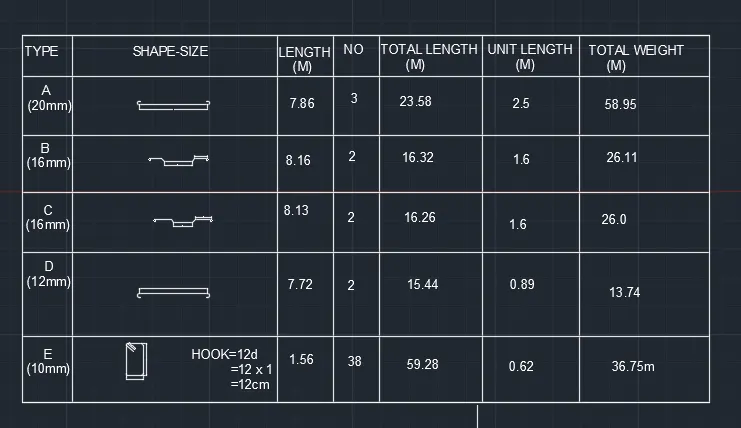
To Create each shape as a block with the name using autocad command and tools as per drawing requires.
Introduction:
Create each shape as a block as shown in the Figure. Save the block and insert them on the table as shown in the Figure.
Procedure :-
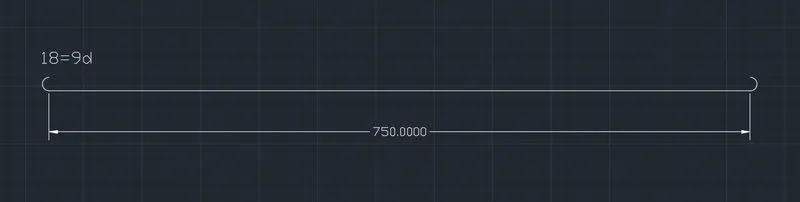
1. A(20 mm)
- Draw the line of 750 mm in length.
- Create the arc bend at 1 side and mirror it at another side.
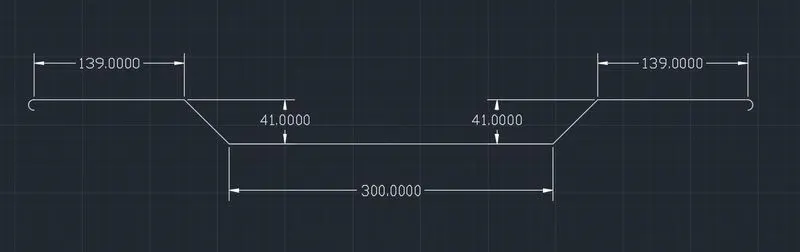
2. B(16 mm)
- Draw the straight line of 150 mm.
- Then draw the line at 45 degree and 41 mm in size.
- Then draw the line of 139 mm from 41mm line.
- Create the arc bend at 1 side.
- Mirror whole drawing at another side at 180 degree.
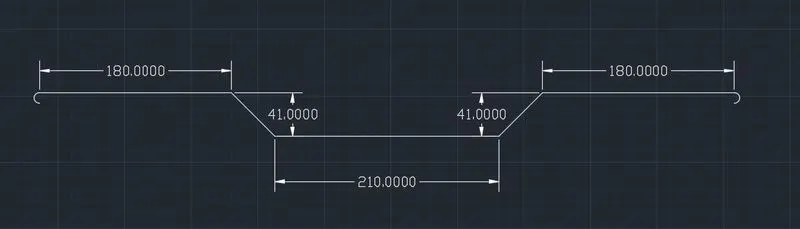
3. C(16 mm)
- Draw the straight line of 105 mm.
- Then draw the line at 45 degree and 41 mm in size.
- Then draw the line of 180 mm from 41mm line.
- Create the arc bend at 1 side.
- Mirror whole drawing at another side at 180 degree.
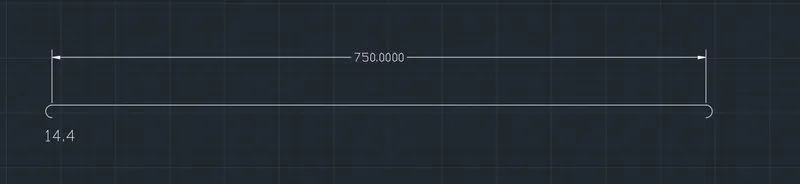
4. D(12 mm)
- Draw the line of 750 mm in length.
- Create the arc bend downward side at 1 side and mirror it at another side.
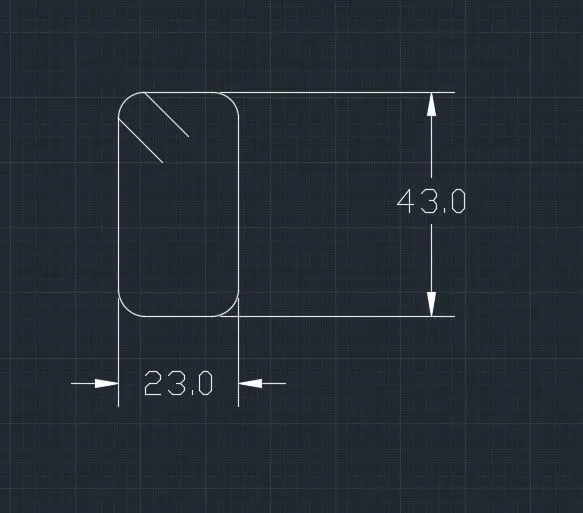
5. E(10 mm)
- Draw the rectangle of 23 mm X 43 mm.
- Fill the fillet of radius 5 mm.
- Draw 2 lines of 12 cm.
Result:
as per the requirement of drawing using autocad command and tools for the given data is obtained.