Creating a Residence Layout, Seating plan, Toilet and Utility room plan using AutoCad
aim- Residence Plan:
Sketch the layout of a residence as shown in the Figure 1. Consider all dimensions as reference to sketch the unit plan. Also the text in the layout are only for reference. Assume the missing dimensions. Also, refer the schedule for size of the doors.
Procedure -
command -Line draw the the according to given dim.
command - offset select the offset according to the the given dim. select the wall as per drawing .
commmand - hatch the given area as per shown in the fig
command open block editor and place the door and window .
command- select the mtext command and place the text accordingly .
command - place the dimension as per drawing in the demarked area.
AUTOCAD COMMAND ALL USED COMMAND BOX-
Select object to offset or [Exit/Undo] <Exit>:
Specify point on side to offset or [Exit/Multiple/Undo] <Exit>:
Select object to offset or [Exit/Undo] <Exit>:
Specify point on side to offset or [Exit/Multiple/Undo] <Exit>:
Select object to offset or [Exit/Undo] <Exit>:
Specify point on side to offset or [Exit/Multiple/Undo] <Exit>:
Select object to offset or [Exit/Undo] <Exit>:
Specify point on side to offset or [Exit/Multiple/Undo] <Exit>:
Select object to offset or [Exit/Undo] <Exit>:
Specify point on side to offset or [Exit/Multiple/Undo] <Exit>:
Select object to offset or [Exit/Undo] <Exit>:
Specify point on side to offset or [Exit/Multiple/Undo] <Exit>:
Select object to offset or [Exit/Undo] <Exit>:
Specify point on side to offset or [Exit/Multiple/Undo] <Exit>:
Select object to offset or [Exit/Undo] <Exit>:
Specify point on side to offset or [Exit/Multiple/Undo] <Exit>:
Select object to offset or [Exit/Undo] <Exit>:
Specify point on side to offset or [Exit/Multiple/Undo] <Exit>:
Select object to offset or [Exit/Undo] <Exit>:
Specify point on side to offset or [Exit/Multiple/Undo] <Exit>:
Select object to offset or [Exit/Undo] <Exit>:
Specify point on side to offset or [Exit/Multiple/Undo] <Exit>:
Select object to offset or [Exit/Undo] <Exit>:
Specify point on side to offset or [Exit/Multiple/Undo] <Exit>:
Select object to offset or [Exit/Undo] <Exit>:
Specify point on side to offset or [Exit/Multiple/Undo] <Exit>:
Select object to offset or [Exit/Undo] <Exit>: _u
Select object to offset or [Exit/Undo] <Exit>: _u
Select object to offset or [Exit/Undo] <Exit>: _u
Select object to offset or [Exit/Undo] <Exit>: _u
Select object to offset or [Exit/Undo] <Exit>: _u
Select object to offset or [Exit/Undo] <Exit>: _u
Select object to offset or [Exit/Undo] <Exit>: _u
Select object to offset or [Exit/Undo] <Exit>: _u
Select object to offset or [Exit/Undo] <Exit>: _u
Select object to offset or [Exit/Undo] <Exit>: _u
Select object to offset or [Exit/Undo] <Exit>: _u
Select object to offset or [Exit/Undo] <Exit>: _u
Select object to offset or [Exit/Undo] <Exit>: _u
Select object to offset or [Exit/Undo] <Exit>: _u
Select object to offset or [Exit/Undo] <Exit>: _u
Select object to offset or [Exit/Undo] <Exit>: _u
Select object to offset or [Exit/Undo] <Exit>: *Cancel*
Command:
Command:
Command:
Command: _offset
Current settings: Erase source=No Layer=Source OFFSETGAPTYPE=0
Specify offset distance or [Through/Erase/Layer] <0'-6">: Specify second point: 9"
Specify point on side to offset or [Exit/Multiple/Undo] <Exit>:
Select object to offset or [Exit/Undo] <Exit>:
Specify point on side to offset or [Exit/Multiple/Undo] <Exit>:
Select object to offset or [Exit/Undo] <Exit>:
Specify point on side to offset or [Exit/Multiple/Undo] <Exit>:
Select object to offset or [Exit/Undo] <Exit>:
Specify point on side to offset or [Exit/Multiple/Undo] <Exit>:
Select object to offset or [Exit/Undo] <Exit>:
Specify point on side to offset or [Exit/Multiple/Undo] <Exit>:
Select object to offset or [Exit/Undo] <Exit>:
Specify point on side to offset or [Exit/Multiple/Undo] <Exit>:
Select object to offset or [Exit/Undo] <Exit>:
Specify point on side to offset or [Exit/Multiple/Undo] <Exit>:
Select object to offset or [Exit/Undo] <Exit>:
Specify point on side to offset or [Exit/Multiple/Undo] <Exit>:
Select object to offset or [Exit/Undo] <Exit>:
Specify point on side to offset or [Exit/Multiple/Undo] <Exit>:
Select object to offset or [Exit/Undo] <Exit>:
Specify point on side to offset or [Exit/Multiple/Undo] <Exit>:
Select object to offset or [Exit/Undo] <Exit>:
Specify point on side to offset or [Exit/Multiple/Undo] <Exit>:
Select object to offset or [Exit/Undo] <Exit>: *Cancel*
Command: TR
TRIM
Current settings: Projection=UCS, Edge=None, Mode=Quick
Select object to trim or shift-select to extend or
[cuTting edges/Crossing/mOde/Project/eRase]:
Select object to trim or shift-select to extend or
[cuTting edges/Crossing/mOde/Project/eRase/Undo]:
Specify next fence point or [Undo]:
Specify next fence point or [Undo]:
Select object to trim or shift-select to extend or
[cuTting edges/Crossing/mOde/Project/eRase/Undo]: *Cancel*
Command:
Command:
Command: _line
Specify first point: *Cancel*
Command:
Command: _pline
Specify start point:
Current line-width is 0'-0"
Specify next point or [Arc/Halfwidth/Length/Undo/Width]:
Specify next point or [Arc/Close/Halfwidth/Length/Undo/Width]:
Specify next point or [Arc/Close/Halfwidth/Length/Undo/Width]:
Specify next point or [Arc/Close/Halfwidth/Length/Undo/Width]: <Ortho off>
Specify next point or [Arc/Close/Halfwidth/Length/Undo/Width]:
Specify next point or [Arc/Close/Halfwidth/Length/Undo/Width]:
Specify next point or [Arc/Close/Halfwidth/Length/Undo/Width]: *Cancel*
Command:
Command:
Command: _dim
Select objects or specify first extension line origin or [Angular/Baseline/Continue/Ordinate/aliGn/Distribute/Layer/Undo]:
Specify first extension line origin or [Angular/Baseline/Continue/Ordinate/aliGn/Distribute/Layer/Undo]:
Specify second extension line origin or [Undo]:
Specify dimension line location or second line for angle [Mtext/Text/text aNgle/Undo]:
Select objects or specify first extension line origin or [Angular/Baseline/Continue/Ordinate/aliGn/Distribute/Layer/Undo]:
Specify first extension line origin or [Angular/Baseline/Continue/Ordinate/aliGn/Distribute/Layer/Undo]:
Specify second extension line origin or [Undo]:
Specify dimension line location or second line for angle [Mtext/Text/text aNgle/Undo]:
Select objects or specify first extension line origin or [Angular/Baseline/Continue/Ordinate/aliGn/Distribute/Layer/Undo]:
Specify first extension line origin or [Angular/Baseline/Continue/Ordinate/aliGn/Distribute/Layer/Undo]:
Specify second extension line origin or [Undo]:
Specify dimension line location or second line for angle [Mtext/Text/text aNgle/Undo]:
Select objects or specify first extension line origin or [Angular/Baseline/Continue/Ordinate/aliGn/Distribute/Layer/Undo]:
Specify first extension line origin or [Angular/Baseline/Continue/Ordinate/aliGn/Distribute/Layer/Undo]:
Specify second extension line origin or [Undo]:
Specify dimension line location or second line for angle [Mtext/Text/text aNgle/Undo]:
Select objects or specify first extension line origin or [Angular/Baseline/Continue/Ordinate/aliGn/Distribute/Layer/Undo]:
Specify first extension line origin or [Angular/Baseline/Continue/Ordinate/aliGn/Distribute/Layer/Undo]:
Specify second extension line origin or [Undo]:
Specify dimension line location or second line for angle [Mtext/Text/text aNgle/Undo]:
Select objects or specify first extension line origin or [Angular/Baseline/Continue/Ordinate/aliGn/Distribute/Layer/Undo]:
Select objects or specify first extension line origin or [Angular/Baseline/Continue/Ordinate/aliGn/Distribute/Layer/Undo]:_u
Select objects or specify first extension line origin or [Angular/Baseline/Continue/Ordinate/aliGn/Distribute/Layer/Undo]:
Select line to specify extension lines origin:
Specify dimension line location or second line for angle [Mtext/Text/text aNgle/Undo]:
Select objects or specify first extension line origin or [Angular/Baseline/Continue/Ordinate/aliGn/Distribute/Layer/Undo]:
Specify first extension line origin or [Angular/Baseline/Continue/Ordinate/aliGn/Distribute/Layer/Undo]:
Specify second extension line origin or [Undo]:
Specify dimension line location or second line for angle [Mtext/Text/text aNgle/Undo]:
Select objects or specify first extension line origin or [Angular/Baseline/Continue/Ordinate/aliGn/Distribute/Layer/Undo]:
Specify first extension line origin or [Angular/Baseline/Continue/Ordinate/aliGn/Distribute/Layer/Undo]:
Specify second extension line origin or [Undo]:
Specify dimension line location or second line for angle [Mtext/Text/text aNgle/Undo]:
Select objects or specify first extension line origin or [Angular/Baseline/Continue/Ordinate/aliGn/Distribute/Layer/Undo]:
Specify first extension line origin or [Angular/Baseline/Continue/Ordinate/aliGn/Distribute/Layer/Undo]:
Specify second extension line origin or [Undo]:
Specify dimension line location or second line for angle [Mtext/Text/text aNgle/Undo]:
Select objects or specify first extension line origin or [Angular/Baseline/Continue/Ordinate/aliGn/Distribute/Layer/Undo]:
Specify first extension line origin or [Angular/Baseline/Continue/Ordinate/aliGn/Distribute/Layer/Undo]:
Specify second extension line origin or [Undo]:
Specify dimension line location or second line for angle [Mtext/Text/text aNgle/Undo]:
Select objects or specify first extension line origin or [Angular/Baseline/Continue/Ordinate/aliGn/Distribute/Layer/Undo]:
Specify first extension line origin or [Angular/Baseline/Continue/Ordinate/aliGn/Distribute/Layer/Undo]:
Specify second extension line origin or [Undo]:
Specify dimension line location or second line for angle [Mtext/Text/text aNgle/Undo]:
Select objects or specify first extension line origin or [Angular/Baseline/Continue/Ordinate/aliGn/Distribute/Layer/Undo]:
Specify first extension line origin or [Angular/Baseline/Continue/Ordinate/aliGn/Distribute/Layer/Undo]:
Specify second extension line origin or [Undo]:
Specify dimension line location or second line for angle [Mtext/Text/text aNgle/Undo]:
Command:
Command:
Command: _dim
Select objects or specify first extension line origin or [Angular/Baseline/Continue/Ordinate/aliGn/Distribute/Layer/Undo]:
Specify first extension line origin or [Angular/Baseline/Continue/Ordinate/aliGn/Distribute/Layer/Undo]:
Specify second extension line origin or [Undo]:
Specify dimension line location or second line for angle [Mtext/Text/text aNgle/Undo]:
Select objects or specify first extension line origin or [Angular/Baseline/Continue/Ordinate/aliGn/Distribute/Layer/Undo]:
Specify first extension line origin or [Angular/Baseline/Continue/Ordinate/aliGn/Distribute/Layer/Undo]:
Specify second extension line origin or [Undo]:
Specify dimension line location or second line for angle [Mtext/Text/text aNgle/Undo]:
Select objects or specify first extension line origin or [Angular/Baseline/Continue/Ordinate/aliGn/Distribute/Layer/Undo]:
Specify first extension line origin or [Angular/Baseline/Continue/Ordinate/aliGn/Distribute/Layer/Undo]:
Specify second extension line origin or [Undo]:
Specify dimension line location or second line for angle [Mtext/Text/text aNgle/Undo]:
Select objects or specify first extension line origin or [Angular/Baseline/Continue/Ordinate/aliGn/Distribute/Layer/Undo]:
Specify first extension line origin or [Angular/Baseline/Continue/Ordinate/aliGn/Distribute/Layer/Undo]:
Specify second extension line origin or [Undo]:
Command:
Command:
Command: _dim
Select objects or specify first extension line origin or [Angular/Baseline/Continue/Ordinate/aliGn/Distribute/Layer/Undo]:
Specify first extension line origin or [Angular/Baseline/Continue/Ordinate/aliGn/Distribute/Layer/Undo]:
Specify second extension line origin or [Undo]:
Specify dimension line location or second line for angle [Mtext/Text/text aNgle/Undo]:
Select objects or specify first extension line origin or [Angular/Baseline/Continue/Ordinate/aliGn/Distribute/Layer/Undo]:
Specify first extension line origin or [Angular/Baseline/Continue/Ordinate/aliGn/Distribute/Layer/Undo]:
Specify second extension line origin or [Undo]:
Specify dimension line location or second line for angle [Mtext/Text/text aNgle/Undo]:
Select objects or specify first extension line origin or [Angular/Baseline/Continue/Ordinate/aliGn/Distribute/Layer/Undo]:
Specify first extension line origin or [Angular/Baseline/Continue/Ordinate/aliGn/Distribute/Layer/Undo]:
Specify second extension line origin or [Undo]:
Specify dimension line location or second line for angle [Mtext/Text/text aNgle/Undo]:
Select objects or specify first extension line origin or [Angular/Baseline/Continue/Ordinate/aliGn/Distribute/Layer/Undo]:
Specify first extension line origin or [Angular/Baseline/Continue/Ordinate/aliGn/Distribute/Layer/Undo]:
Specify second extension line origin or [Undo]:
Specify dimension line location or second line for angle [Mtext/Text/text aNgle/Undo]:
Select objects or specify first extension line origin or [Angular/Baseline/Continue/Ordinate/aliGn/Distribute/Layer/Undo]:
Select objects or specify first extension line origin or [Angular/Baseline/Continue/Ordinate/aliGn/Distribute/Layer/Undo]:
Command:
Command:
Command:
Command: _copyclip 1 found
Command:
Command:
Command: _pasteclip Specify insertion point:
Command:
Command:
Command:
Command: _textedit
Current settings: Edit mode = Multiple
Select an annotation object or [Undo/Mode]: *Cancel*
Command:
Command:
Command:
Command: _copyclip 1 found
Command:
Command:
Command: _pasteclip Specify insertion point:
Command:
Command:
Command:
Command:
Command: _TEXTEDIT
Current settings: Edit mode = Multiple
Select an annotation object or [Undo/Mode]:
Select an annotation object or [Undo/Mode]: *Cancel*
Command:
Command:
Command:
Command: _TEXTEDIT
Current settings: Edit mode = Multiple
Select an annotation object or [Undo/Mode]: *Cancel*
Command:
Command:
Command: _table
Specify insertion point:
Command:
Command: Regenerating model.
Specify opposite corner:
Command:
Command:
Command: _scale 1 found
Specify base point:
Specify scale factor or [Copy/Reference]:
Window Lasso Press Spacebar to cycle options
Command:
Command:
Command: _copyclip 1 found
Command:
Command:
Command: _pasteclip Specify insertion point:
Command: Specify opposite corner:
Command:
Command:
Command: _scale 1 found
Specify base point:
Specify scale factor or [Copy/Reference]:
Extremely small scale factor ignored.
Extremely small scale factor ignored.
Extremely small scale factor ignored.
Command: Specify opposite corner:
Command: Specify opposite corner:
Command: *Cancel*
Window Lasso Press Spacebar to cycle options
Command:
Command:
Command: _move 1 found
Specify base point or [Displacement] <Displacement>:
Specify second point or <use first point as displacement>:
Command: *Cancel*
Command: Specify opposite corner:
Command: *Cancel*
Command: Specify opposite corner:
Command: *Cancel*
Command: Specify opposite corner:
Command:
Command:
Command: _table
Specify insertion point:
Automatic save to C:\Users\HP\AppData\Local\Temp\Drawing1_1_2923_bd6448c4.sv$ ...
Command:
Command:
Command: Specify opposite corner:
Command:
Specify point location or [Base point/Undo/eXit]:
Command: Specify opposite corner or [Fence/WPolygon/CPolygon]:
Command: *Cancel*
Command: Specify opposite corner:
Command: _.erase 1 found
Window Lasso Press Spacebar to cycle options
Command:
** STRETCH **
Specify stretch point or [Base point/Copy/Undo/eXit]: *Cancel*
Command:
Command:
Command: _move 1 found
Specify base point or [Displacement] <Displacement>:
Specify second point or <use first point as displacement>:
Command: *Cancel*
Command: *Cancel*
Command: Specify opposite corner:
Command:
Command: Specify opposite corner:
Command:
Command: Specify opposite corner:
Command:
Command: Specify opposite corner:
Command:
Command: Specify opposite corner:
Command:
Command: Specify opposite corner:
Command:
Command: Specify opposite corner:
Command:
Command: Specify opposite corner:
Command:
Command: Specify opposite corner:
Command:
Command:
Command: Specify opposite corner:
Command:
Specify point location or [Base point/Undo/eXit]:
Command: Specify opposite corner:
Command:
Command: Specify opposite corner:
Command:
Command: Specify opposite corner:
Command:
Specify point location or [Base point/Undo/eXit]:
Command: Specify opposite corner:
Command:
Command:
Command: Specify opposite corner:
Command:
Command:
Command: Specify opposite corner:
Command:
Command: Specify opposite corner:
Command:
Command: Specify opposite corner or [Fence/WPolygon/CPolygon]:
Command: *Cancel*
Command: Specify opposite corner:
Command: Specify opposite corner or [Fence/WPolygon/CPolygon]: *Cancel*
Command: *Cancel*
Command: Specify opposite corner:
Command: *Cancel*
Command:
Press ESC or ENTER to exit, or right-click to display shortcut menu.
result -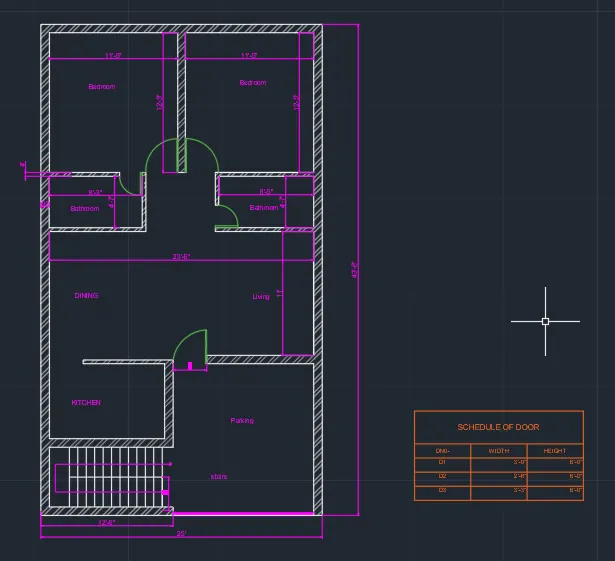
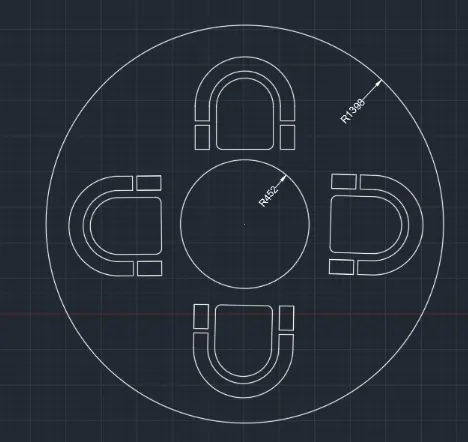
AIM-Sketch the seating plan for an outdoor canopy. Assume the dimensions for the seating. Also, consider the dimensions in mm.
PROCEDURE-
command -Line draw the the according to given dim.
command - offset select the offset according to the the given dim. select the wall as per drawing .
commmand - hatch the given area as per shown in the fig
command open block editor and place the door and window .
command- select the mtext command and place the text accordingly .
command - place the dimension as per drawing in the demarked area.
COMMAND - FILLET ROUND FILLET
RESULT-
AIM-
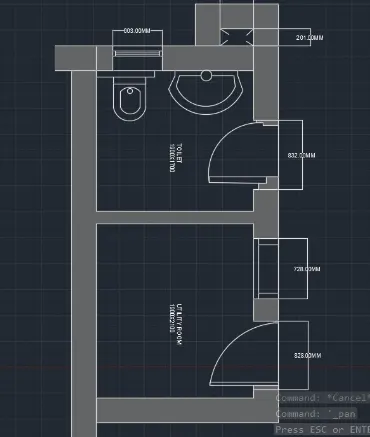
Sketch the part plan for the toilers and utilities room. Consider the outer wall thickness as 300mm and inner wall thickness as 150mm. Also, assume the missing dimension, Texts, dimensions, and hatches are only for references. Also, symbols for toilets and w/c are also for references.
PROCEDURE-
command -Line draw the the according to given dim.
command - offset select the offset according to the the given dim. select the wall as per drawing .
commmand - hatch the given area as per shown in the fig
command open block editor and place the door and window .
command- select the mtext command and place the text accordingly .
command - place the dimension as per drawing in the demarked area.
COMMAND USED IN COMMAND BOX-
Specify start point of arc or [Center]:
Specify second point of arc or [Center/End]:
Specify end point of arc: Cancel
Command:
Command:
* STRETCH *
Specify stretch point or [Base point/Copy/Undo/eXit]:
Command: Cancel
Command:
Command:
Command: _offset
Current settings: Erase source=No Layer=Source OFFSETGAPTYPE=0
Specify offset distance or [Through/Erase/Layer] <200.00>: Specify second point:
Select object to offset or [Exit/Undo] <Exit>:
Specify point on side to offset or [Exit/Multiple/Undo] <Exit>:
Select object to offset or [Exit/Undo] <Exit>: Cancel
Command:
Command: _line
Specify first point:
Specify next point or [Undo]:
Specify next point or [Undo]: Cancel
Automatic save to
RESULT-