Assignment 3
Objective:
1.To run the rail simulation for 55ms and set the animation steps to get 25-60 animation stpes.
2.To check if the results are acceptable or unacceptable ,carry out energy error and mass error of the simulation.
3.Plot the various energy and rigid wall forces in hypergraph 2d.
4. Alter the property cards of the to recommended properties, run the simulation and compare the reults and plots with the base simulation results.
5. Discussion about the results and reason behind the result changes.
steps:
Import the .rad file into hypermesh and change the run time to 55 and animation frequency time to 0.92 in ENG_RUN card and ANIM_DT in model browser.
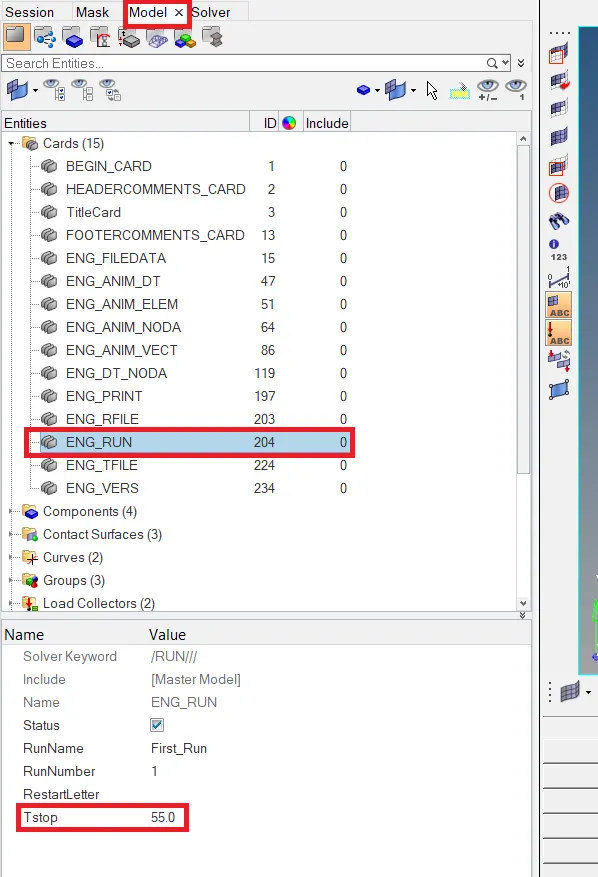
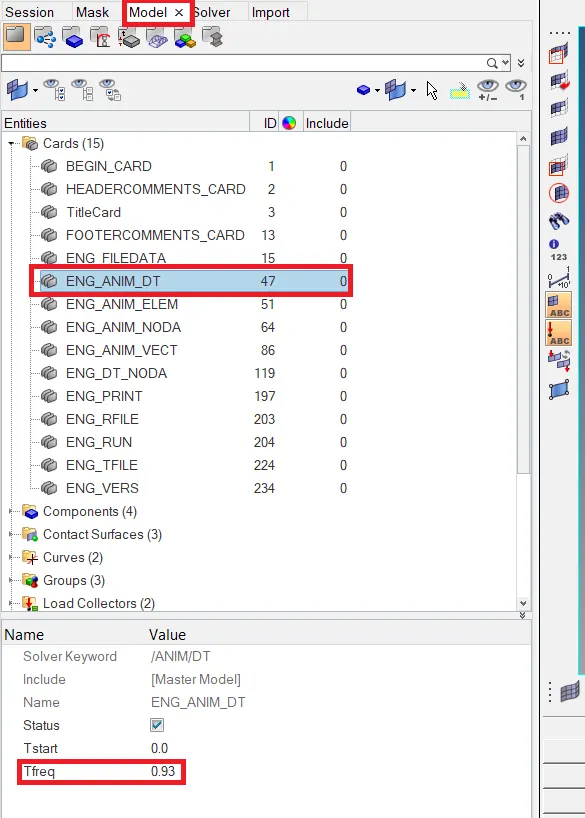
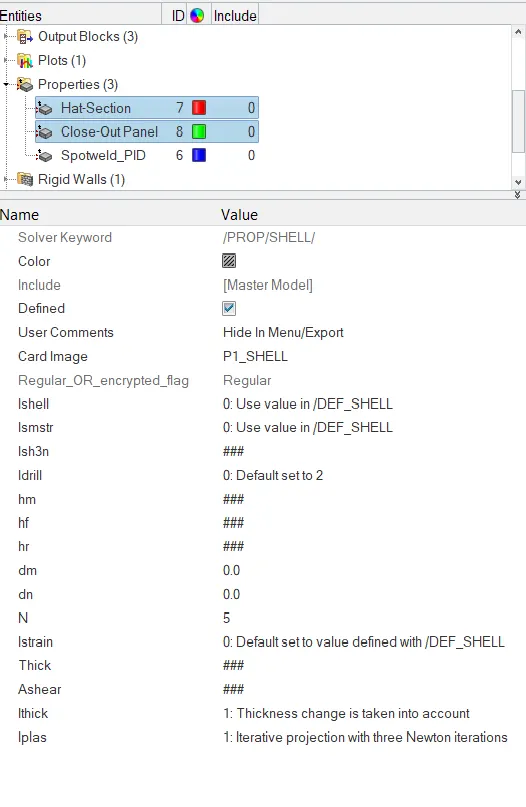
Engine card and property cards for the simulation.
Ishell:
type of element formulation, it has to be choosen considering the time and cost of the simulation. In crah analysis the underintegrated elements are widely used due to their low cost and better accuracy.
In crash models, 90% of the elements are modelled using shell elements, and in Radioss, Standard shell elements are Mindlin plate elements with transverse shear deformation. which are more accurate than the Kirchhoff element (Altairhelp, Finite elements, Shell Elements).
Ismstr:
Small strain formulation flag, default is used, this means the, full geometric nonlinearities with possible small strain formulation activation. this option switches to small strain t=o when the deformation is too large and times step decreases below minimum timestep.
Ish3n:
3 node shell element formulation. default is set to standard triangle (C0) with modification for large rotation.
N:
for simulation invloving plasticity, the stress distribution through the thickness is non-linear unlike in elastic type where it is linear. Hence it is recommende to use minimum of 3 integraton points to account for nonlinearity case, Number of integration points through the thickness also effects the quality of internal energy value. for this simulation it is recommended to use value of 5
Ithick:
Resultant stress calculation flag, it is set to 1, which consideres the thickness change in th emodel.
Iplas:
set to 1,for Law36 and global integration. it is set to Iterative projection with three Newton iterations
when the enigin card are set to the desired values the model is reday for simulation, go to Analysis page radioss panel set the options as shown in the below figure and click on radioss.

for improved simulation time set the options to -nt 4 (-nt space 4).
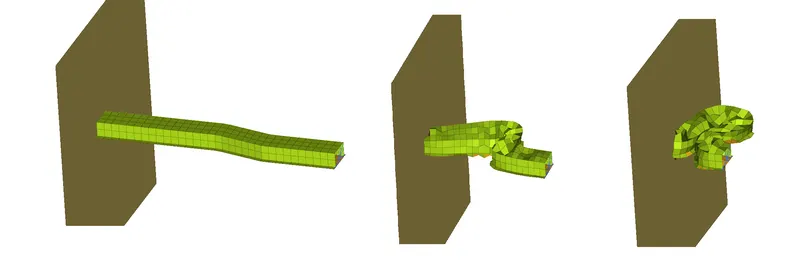
Simulation result.
once the simulation is complete switch to hyperview to check the simulation animation, meanwhile check the 0001.out file for energy erroe and mass error of the simulation.
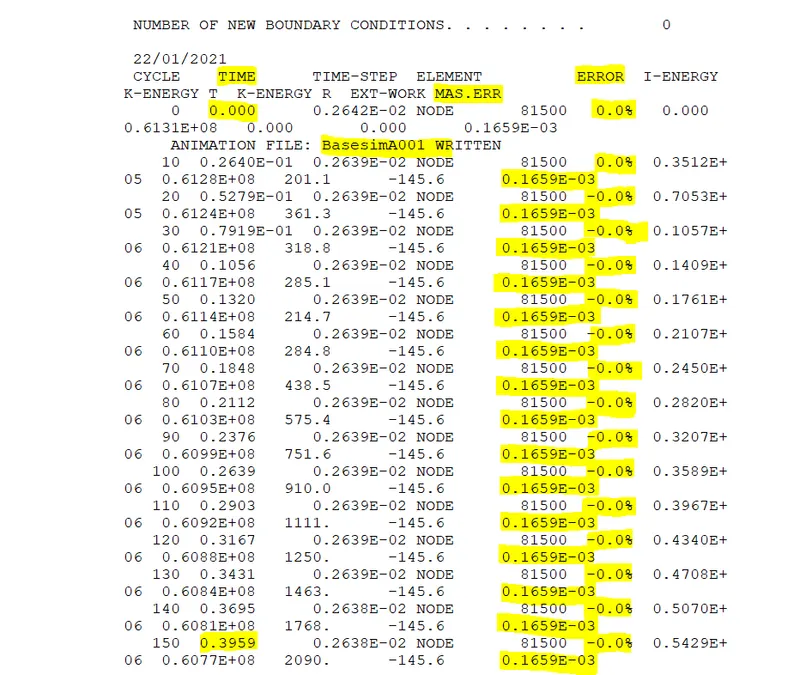
from the above 0001.out file the energy error at the start of the simulation is 0% and mass error is -0.165e-3. which is written in animation A001.
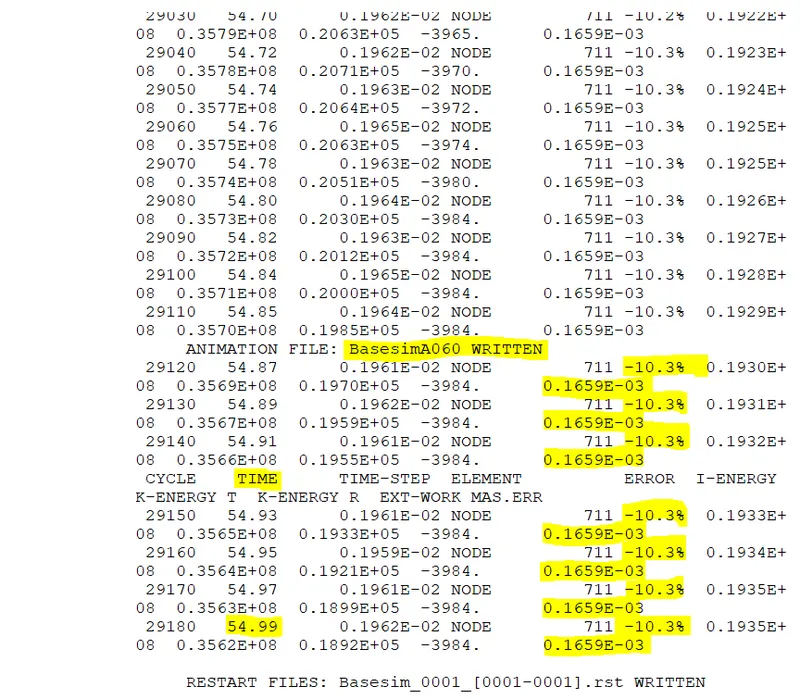
the end of simulation, energy error is -10.3%, which has increaded from the start of simulation. this energy error shows that their is energy imbalance in the model mainly due to hourglass energy, since underintegrated element formulation is used for base simulation.
The result is still acceptable because the error is less than 15% (Altairhelp, Computation Checks)
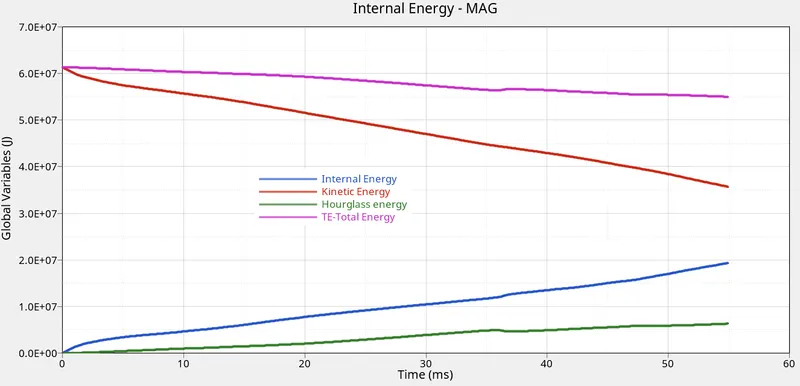
graph showing internal energy, kinetic energy,hourglass energy and total energy.
at the begning of the simulation, at time zero, the structure is not under any strai, hence, area under stress strain curve will be zero, the internal energy will be zero. which can be seen in the graph.
As time increases the structure is under loading consition, which causes strain, the kinetic energy of the applied force is transfered to the structure, hence the internal energy increases and kinetic energy decreases.
The total energy (TE) decreases slightly due to hourglass energy generation in the model due to underintegrated elements.
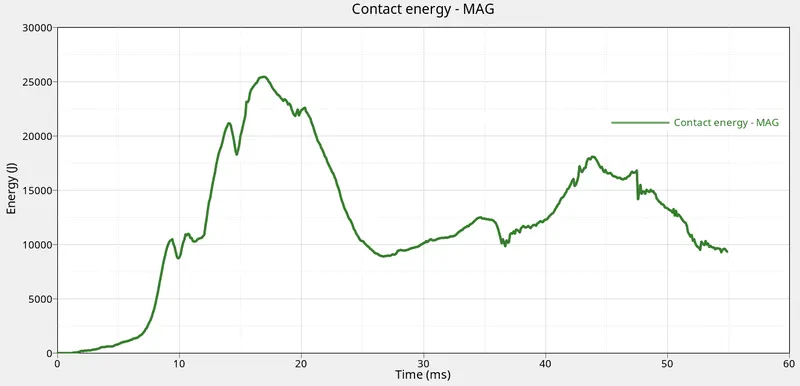
Contact energy graph.
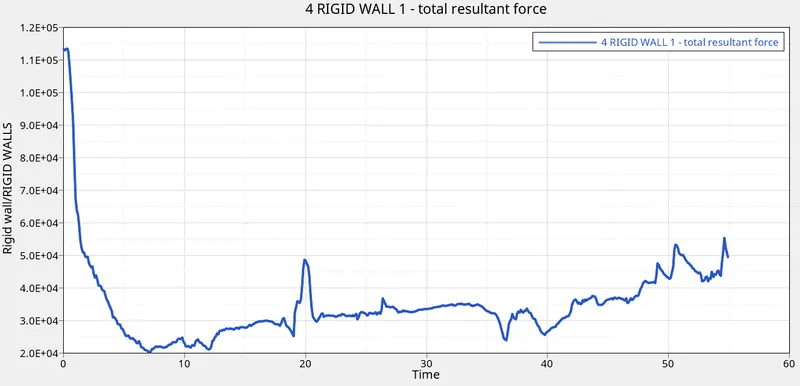
Rigid wall total resultant forces forces graph.
At time t=0, the wall experiences high forces, as time increases the rail structure starts to deform which reduces fores acting on the wall, which is seen in the graph above.
Simulation of rail structure with improved element formulation.
Import the the .rad file and change the run time and animation frequency to 55ms and 0.93 as shown previously.
Chnange the material properties of Hat section and close-out panel as to recommended values.
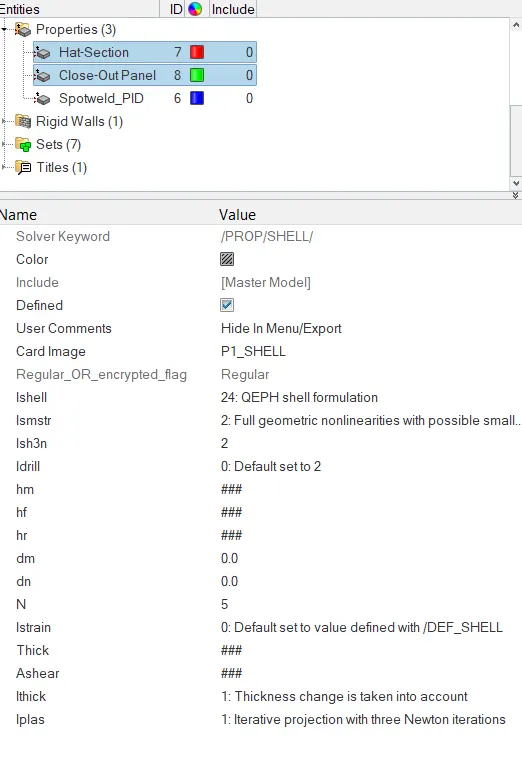
material properties.
Ishell: QEPH 24 is improved underintegrated element type which uses physical stabilization method to control the hourglass. this element type has the best tradeoff between quality and cost.
Run the simulation similarly to the previous run.
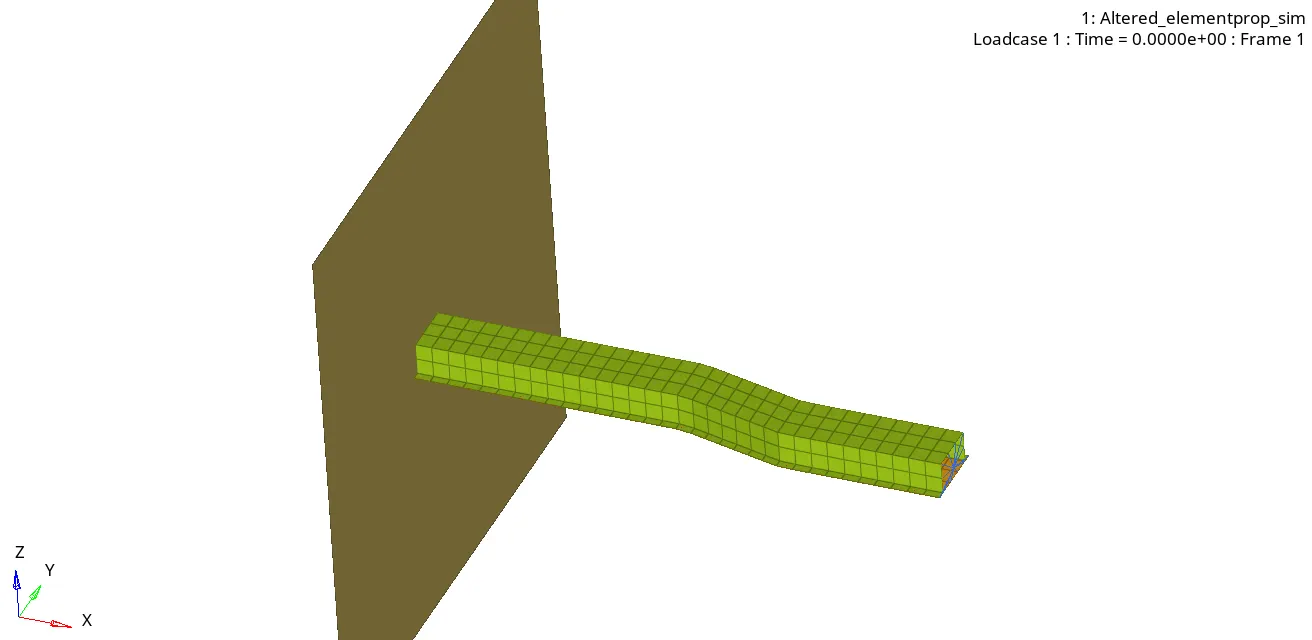
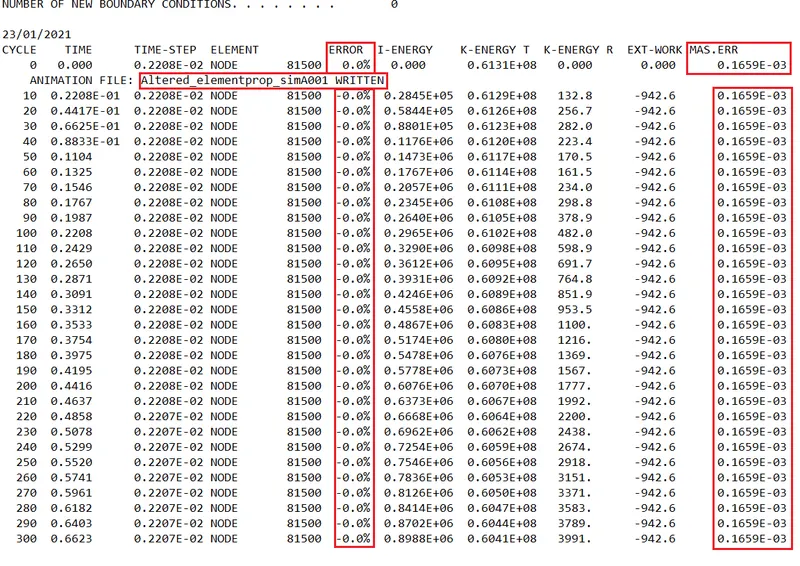
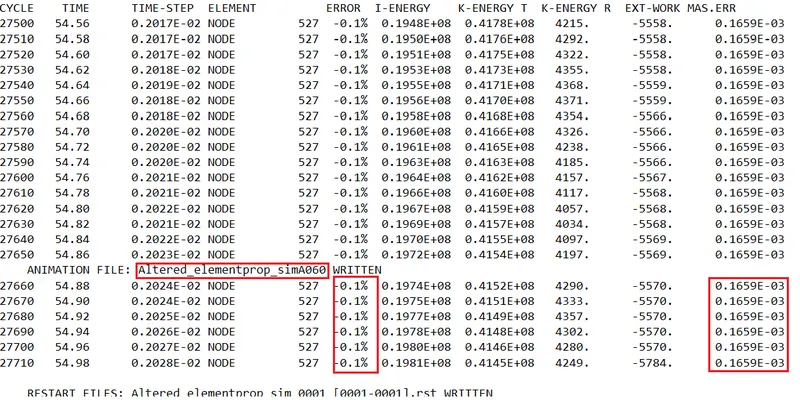
Enery error and mass error at the start and end of the simulation.
from the the above 0001.out file the energy error at the start of the simulation is 0% and at the end of the simulation it is -0.1% which is close to zero, which indicates that all the energy in the simulation is well balanced.
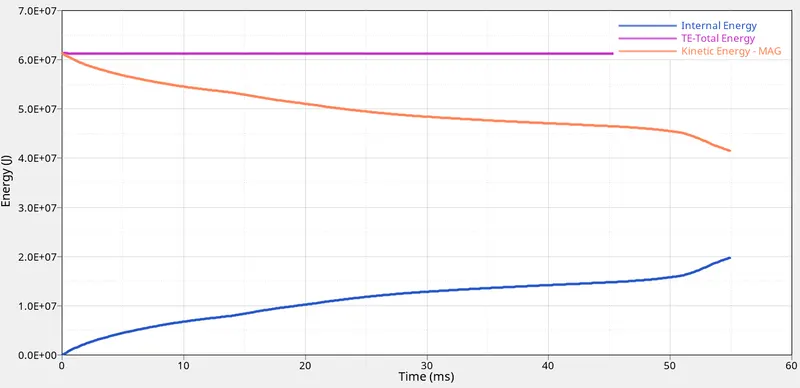
Energy graphs.
The same trend is observed in kinetic energy and internal energy of the system as observed in the base simulation model, the kinetic energy decreases as time increases this is because the the applied force causes the structure to deform transfering the kinetic energy into the system, which, in turn increases the internal energy of the simulation.
The total energy in this case dose not decrease it stays almost constant which is in contrast to the base simulation.
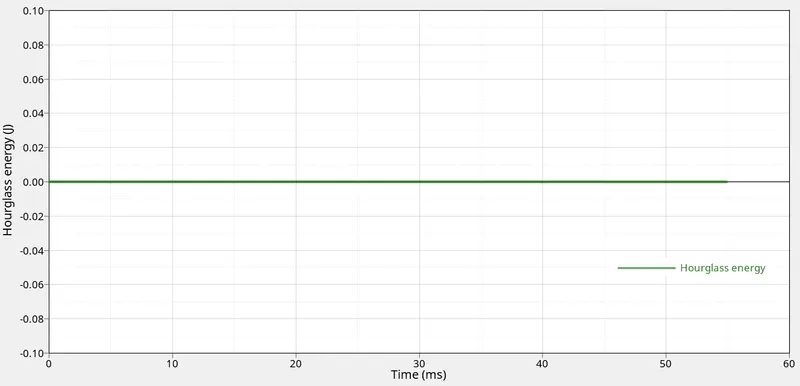
Hourglass energy in the system.
The graphs above shows that the hourglass energy of the simulation, which is at zero from the start to the finish of the simulation, this explaines the reason behinde total energy of the simulation being constant and not decreasing as seen in the base simulation.
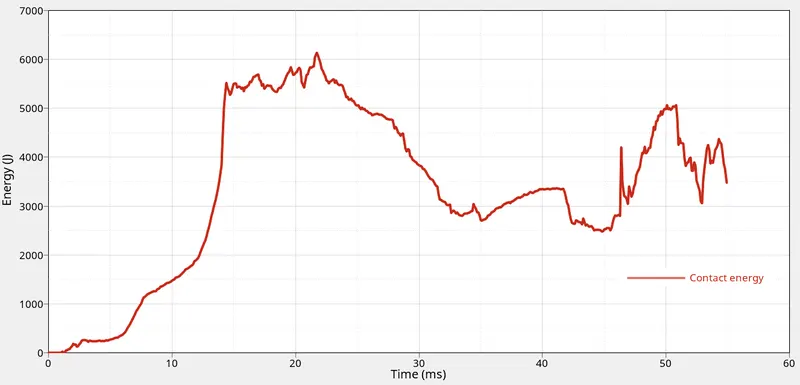
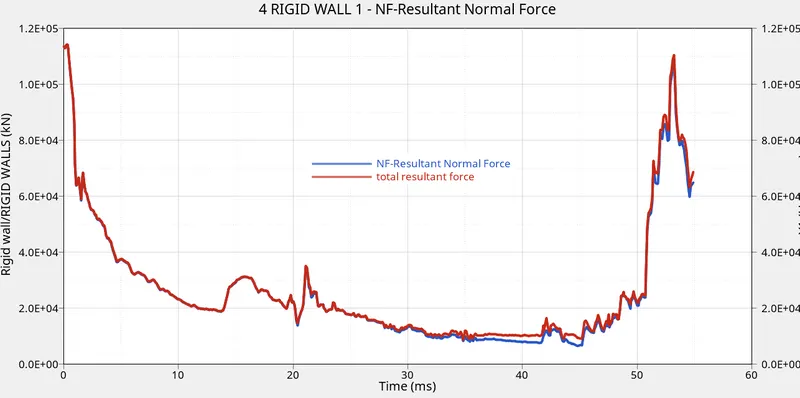
contact energy and rigid wall fores graph.
Rigid wall shows the similar trend at the start of the simulation as that of base simulation, as the rail structure absorbs the energy of the applied force the forces acting on the wall reduces as time increases but at the end of simulation the wall forces increase due to rail structure being crushed against the wall, which increases the forces on the wall.
Discussion.
Base simulation
- Ishell= 0, Elements type used is default i.e. Belytshko and Tsay. Q4, visco-elastic hourglass modes orthogonal to deformation, which is underintegrated element type which uses penalty method to control the hourglass energy formation.
- shell strain formulation (Ismstr) used is default, which is large starin with full geometry nonlinearities.
- N value i.e. number of integration points used is 5.
- Is3n: set to default, which considers modification for large rotation.
- Ithick: thickness change is taken into account.
- Iplas: iterative plastisity method is applied.
improved element formulation.
- Ishell= 24 QEPH shell formulation with hourglass physical stabilization.
- Ismstr= 2 Full geometric nonlinearities with possible small strain formulation activation, which is also a default setting similar to the base simulation setting.
- N=5, same as base simulation setting.
- Ish3n=2, Standard 3 noded shell (C0)with modification for large rotation, which is also a default setting similar to the base simulation.
- Ithick=1, similar to the base simulation setting
- Iplas =1, similar to the base simulation setting.
Based on bothe property setting observation, the only noticable change is the element type used which also dictates method to stabilise the hourglass.
in the first simulation perturbation stabilization method is used,in the second simulation physical stabilization is used.
due to physical stabilization method the hourglass energy in the second simulation is 0, and the energy error is to -0.1%.
Conclusion.
The presented report discusses and compares the various property settings used for the rail simulation and the importance of the element type in the simulation, and the different hourglass correcting methods incorporated by different element type is explained.
Reference:
Altair (2019) Altair HypwerWorks Help. Available at: https://2019.help.altair.com/2019/altair_help/index.htm (Accessed: 22 January 2021).