Crash Simulation of a Steel Rail using Radioss
AIM : To compare the results of the base simulation and that of the simulation with improved shell element properties.
OBJECTIVES :
-
To change the run time to 55 ms, the number of animation steps during simulation to a minimum of 25 and maximum of 60. Run the base simulation without any modification to element properties.
At the end of the simulation, do the energy error and mass error checks and determine whether results would be acceptable or not.
If acceptable, Plot rigid wall forces, internal energy, hourglass energy, contact energy, total energy of the simulations. -
To change all the shell elements properties to recommended properties, save this as separate, rad files and run the simulation.
Repeat the steps from the first simulation.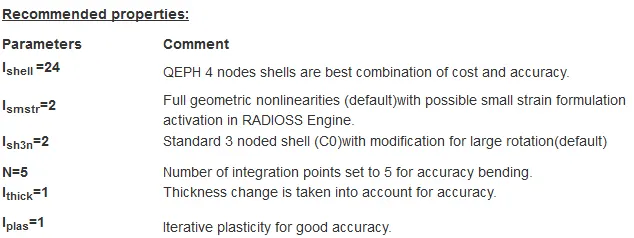
-
To create a brief report comparing all the results for both simulations.
Now, comment whether there is any change in the results and why there is any change in the result.
SETUP & PROCEDURE :
(1) RUNNING THE BASE SIMULATION :
- The Starter file and Engine file (.rad files) are available with us.
- The started file is imported in Hypermesh. The user profile chosen is RADIOSS.
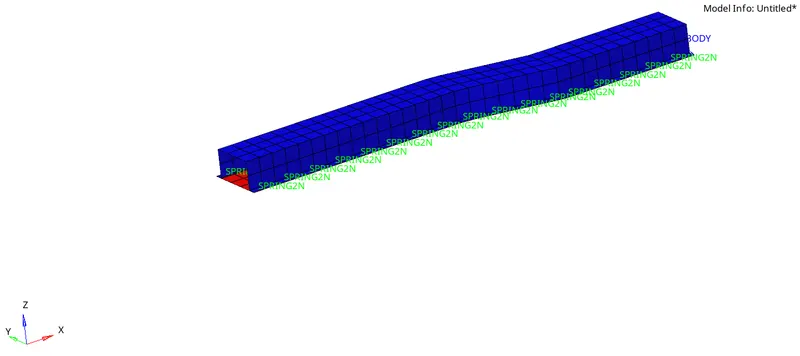
- Here, the property card is left with its default values.
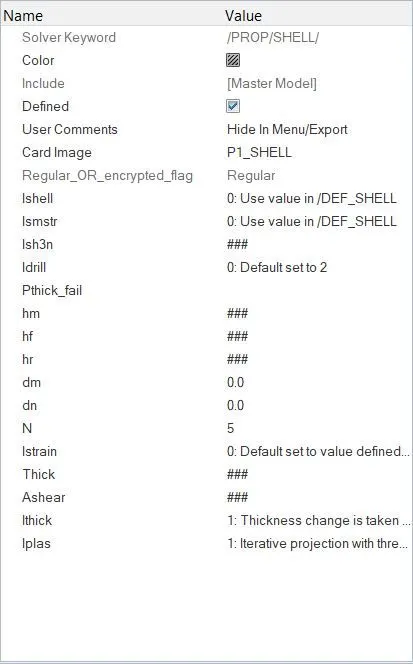
Since, the mesh involved in this case is a 2D quad mesh, P1_SHELL card is selected.
Element formulation :
The Ishell flag corresponds to the type of integration method used in the simulation in case of quad elements. Here, the card value is kept at 0 so that the value from the DEF_SHELL card is used by default which is Ishell = 24.
Better integration method results in no hourglass energy.
Since, there are no tria elements involved, the Ish3n flag is of no use here.
Ismstr corresponds to whether we need small or large strain formulation. By default, the large strain formulation value is selected wherein, the strain formulation is done on instantaneous values and not on inital values.
Ithick corresponds to whether or not the thickness of the elements is varying. Here, Ithick = 1 wherein, the thickness change is taken into account.
Iplas is the 'shell plain stress plasticity flag.' Iplas = 1 corresponds to the iterative process wherein RADIOSS computes the new thickness by frequently updating the strain along the thickness of the element. Iplas = 2 corresponds to the radial resturn method, which is comparatively faster, although less accurate.
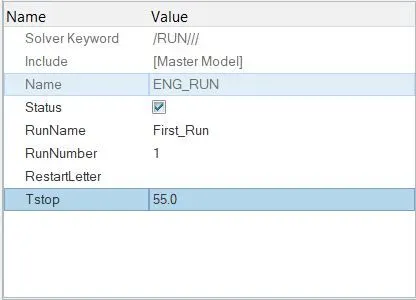
Number of integration points N is kept as 5. - Now, as required, the run time is changed to 55 ms. This is done by accesing the ENG_RUN card.
- Since, the number of animation steps are to be kept between 25 and 60, the Tfreq is kept as 1 ms which will result into 55 animation steps (Since Tstart = 0 and Tstop = 55 ms). This is done inside the ENGINE_ANIM_DT card.
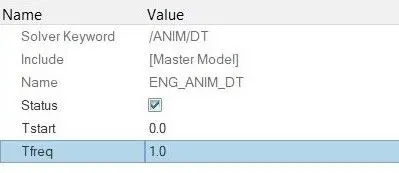
- Also, the material properties are left with their default values.
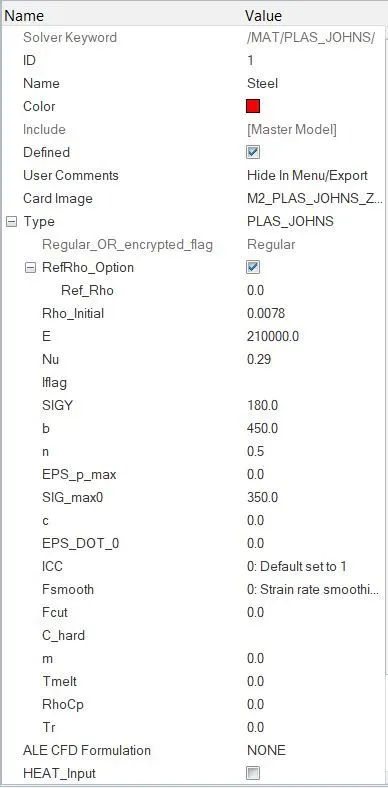
The unit system followed here is g-mm-ms. This is avaialble inside the BEGIN_CARD. - Now, the simulation is ran over this model using the Analysis - Radioss option in Hypermesh.
Here, all the available components are selected to export, the run options is chosen as analysis with run number = 1.
-nt 4 option is specified which corresponds to 'number of threads = 4' for faster simulation.
By specifying, a dedicated local directory, the simulation is ran succesfully.
- Radioss stores all the output files inside the specified directory.
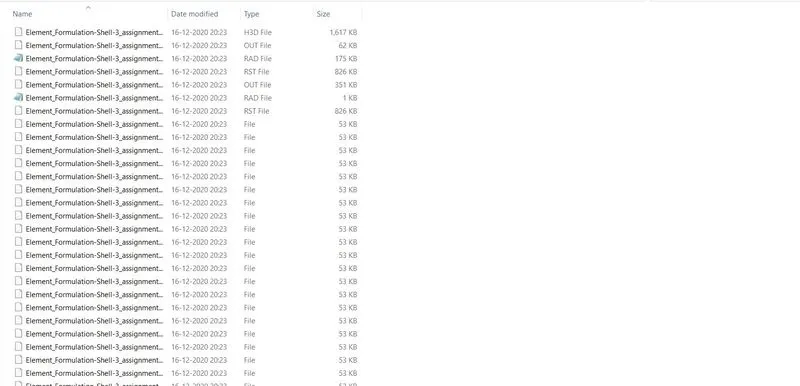
- The H3D file is the animation file which combines all the animation step files.
Corresponding to the Started and Engine files we had earlier, Radioss gives out two OUT files (one is the starter output and the other is the engine output file).
The T01 file consists of all the output data necessary to plot graphical results.
RESULTS :
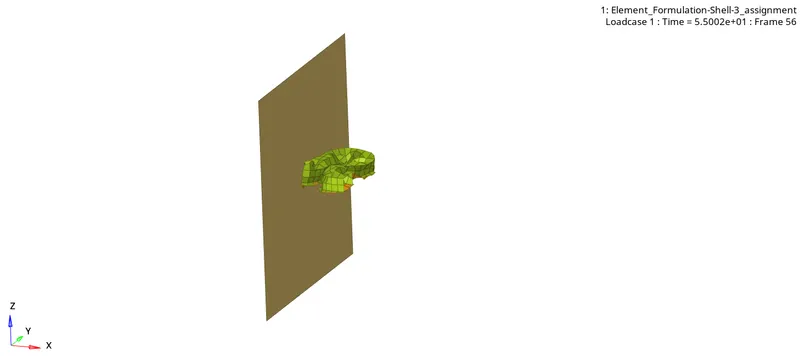
The H3D file is imported in Hyperview window to visualize the animation.
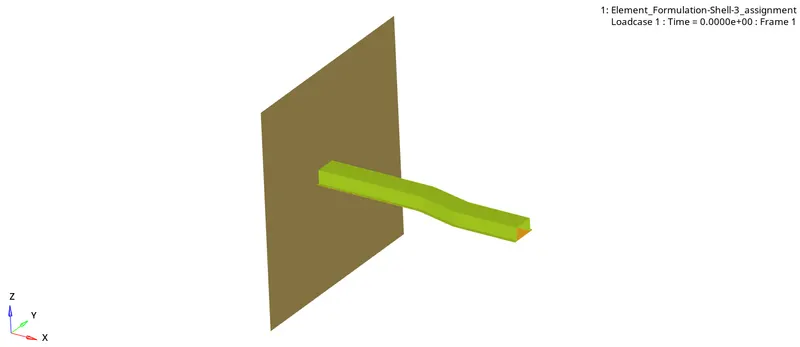
Energy error - Mass error check :
- This can be done using the Engine output file.
- During crash, the kinetic energy of the body gets coverted into potential energy due to deformation. However, total energy conversion is not possible due to other factors such as frictional energy loss, noise energy loss, etc.
- Ideally speaking, the energy error should be as close to 0 as possible. However, for practical purposes, error ranging between 5% tolerance value is appreciated.
- The error must be negative and decreasing. The error value should be less than 15% at the end of computation. If this value goes beyond 15%, then appropriate measures are to be taken as this might lead to divergence of the simulation.
- In case of QEPH or fully integrated elements, the energy error can be slightly positive, since there is no hourglass energy and the computation is more accurate. In this case, an error of +1% or +2% is acceptable.
- To conclude, the error value should be at most -15% and better to below -5%.
- Here, the energy error goes upto -10.3% in the final step, which is kind of OK. However, if this value can be reduced further, it should be done.
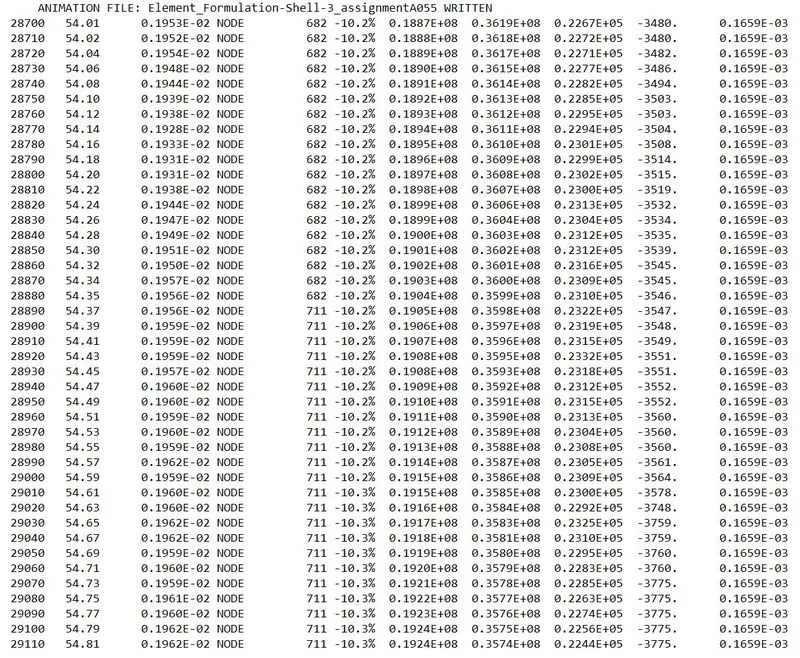
- The added mass value throughout the computation is found to be 0.1659e-03.
- The added mass can be due to Interface TYPE2, Spotflag =1. In this case, the added mass is totally made at time t=0. It can also be due to options for constant time step (/DT/NODA/CST or /DT/INTER/CST).
- In case of added mass in the model, it is necessary to check if it is not too important with respect to the total mass of the model.
- Added mass due to /DT/NODA/CST is often the cause of the divergence of computation.
Plots :
Now, to plot all the required graphs, the HyperGraph 2D window is opened and the T01 file is imported in it. By selecting different options in the Y-request option, all the graphs are plotted.
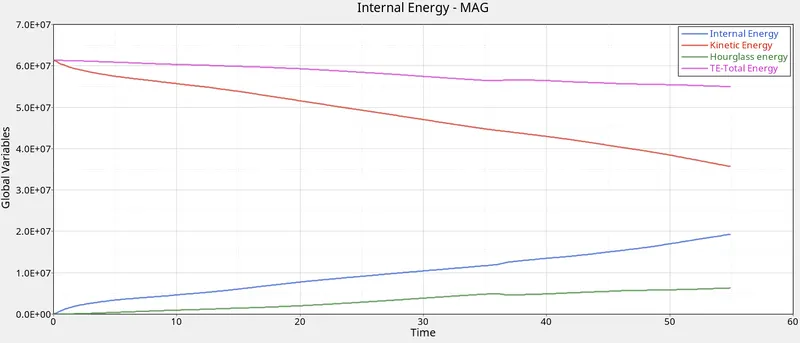
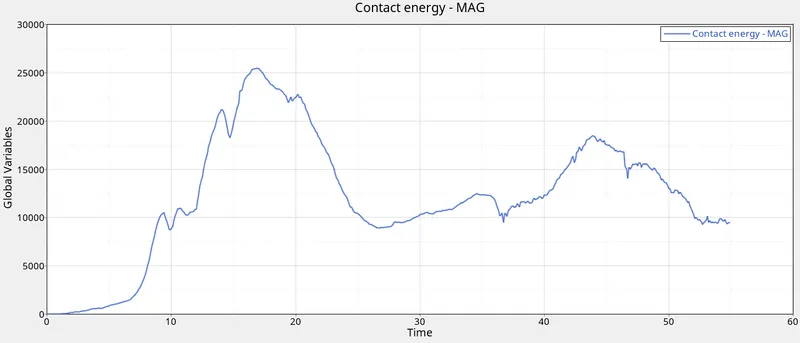
- As expected, the Internal energy starts from 0 and goes on increasing due to increasing deformation of the component. On the other hand, the Kinetic energy of the model goes on decreasing from an initial maximum value.
- The hourglass energy value goes on increasing over the course of computation.
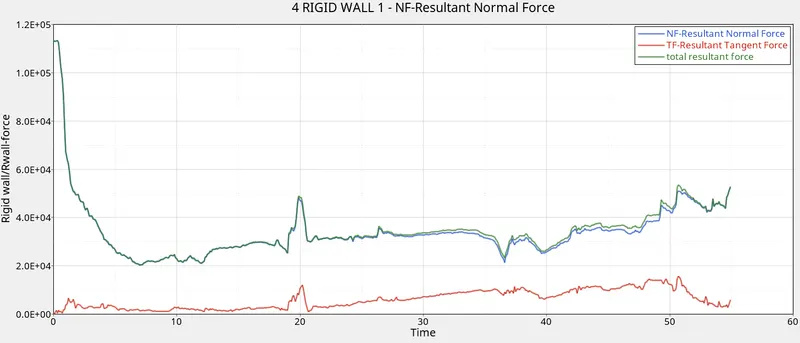
- The magnitude of the normal force shows a drastic decrease once the component hits and applies an impact load over the rigid wall.
- On the other hand, the tangential i.e. the frictional force increases slowly as more and more component surface comes in contact with the wall.
(2) RUNNING THE SIMULATION WITH IMPROVED SHELL ELEMENT PROPERTIES :
- The property card is now changed with flag values equal to the recommended properties.
Rest all the properties are kep unchanged.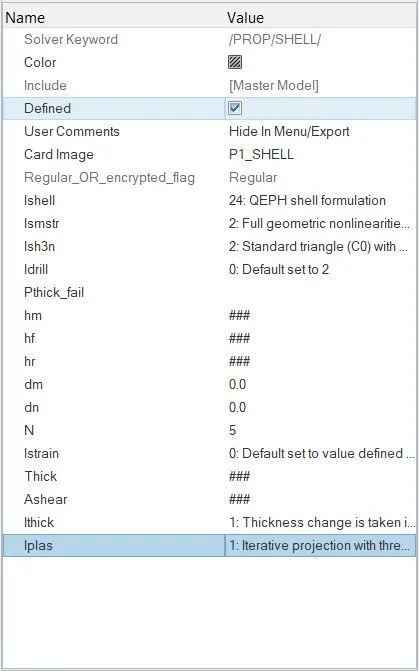
- Also, the material properties are kept unchanged.
- The simulation is now ran in the similar way as done in the first case by creating another local directory.
RESULTS :
- The deformation was found to be different in this case.
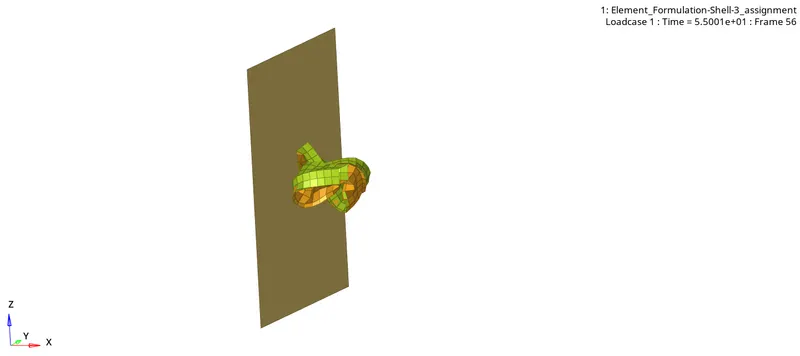
- In this case, the energy error in the final step is found to be much less than that in the first case : -0.1%.
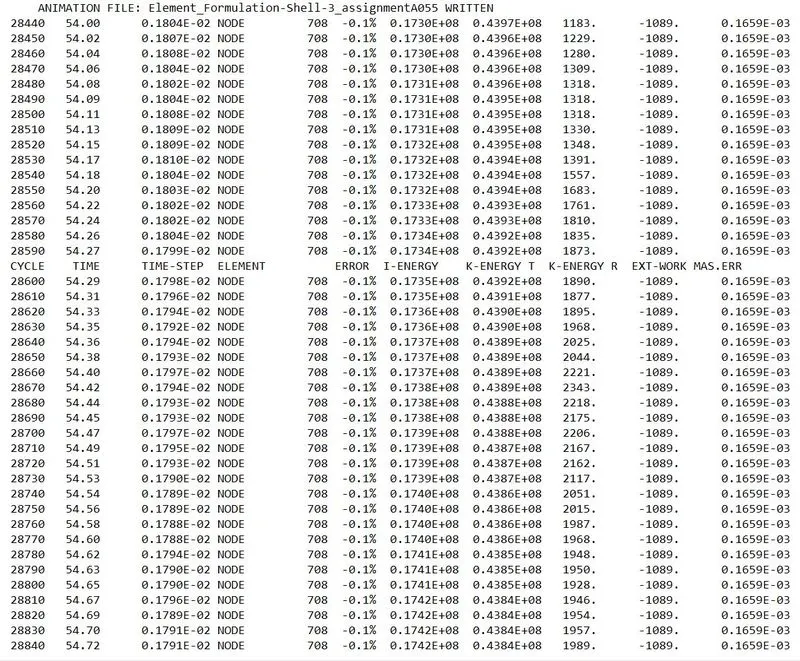
The primary reason for this being the better shell formulation method used - QEPH (Ishell=24). Due to this, there is not hourglass energy created. - The mass error is the same in this case, too i.e. 0.1659e-03.
Plots :
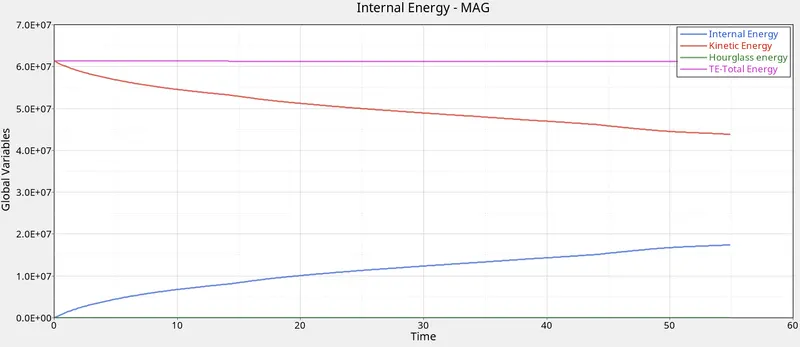
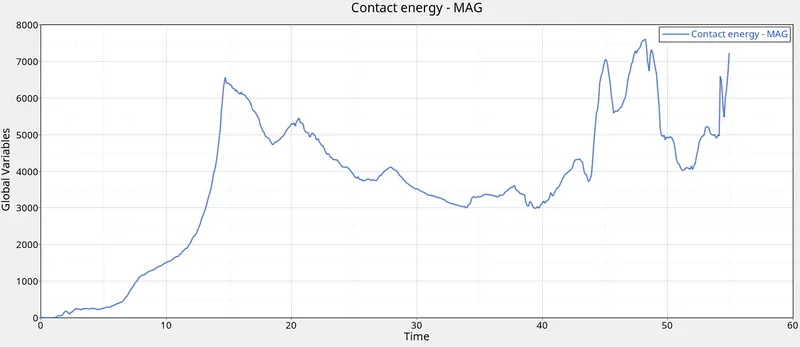
- As can be seen in the above plot, there is no hourglass energy in the above plot.
- This is why, QEPH is preffered over other integration methods as it is highly accurate and also reasonable in terms of cost involved.
- Also, the magnitude of contact energy (about 7000) is much lesser than that in the earlier case (about 25000).
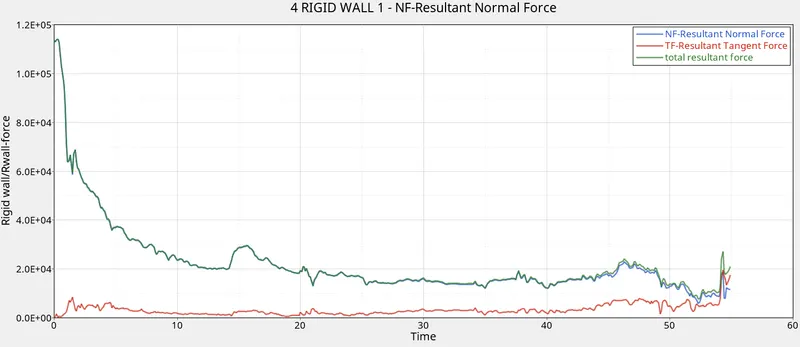
- The rigid wall forces, too, showed lesser magnitudes than that in the base simulation, symbolising that most of the impact loads/energy have been absorbed during the deformation.
HOUR GLASS DEFORMATION :
It is essentially a spurious deformation mode of a Finite Element Mesh, resulting from the excitation of zero-energy degrees of freedom.
It typically manifests as a patchwork of zig-zag or hourglass like element shapes, where individual elements are severely deformed, while the overall mesh section is undeformed.
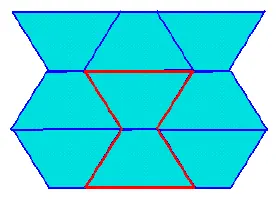
Consider a 4 noded Rectangular shell element. They may have any number of Integration points (depending upon full or reduced integration). Stresses and strains at this element are captured by integrating the values got at these integration points.
It is to be remembered that values are more accurate at the exact location of the Integration point and not so accurate as we move away from it.
For sake of lesser computational time, we can use Q4 elements which means Reduced Integration where only one integration point is used and it is ideally at the centre of the element.
In the case of these Reduced Integration elements, while post processing results, we can see a false or fake deformation mode (zig zag lines). Such a thing is the Hour Glass phenomenon.
This is because elements with lesser integration points are less stiffer and as there is no stiffness in this mode, these elements show this kind of change in configuration.
Steps to avoid :
- Mesh Refining is a solution. Hourglassing is more prone in coarse mesh.
- Fully Integrated elements are better though computational time increases vastly and fully integrated elements are prone to shear locking.
- Providing a small arbitrary stiffness in the mode in which hourglass deforms. This is only a FEA point of view and in actual physical system, there is no such stiffness. This is what is called as Built in hourglass controls.
- Viscous damping.
CONCLUSION :
Successfully ran the simulations, first with default property card and then by assigning the recomended properties.
Learnt quite a lot of interesting things such as -
- What is Element formulation and what role does it play in running the simulation.
- What is Hour Glass effect and what are it's consequences. How can we avoid this phenomenon.
- What are the different types of output files generated by Radioss after the simulation run.
- How to plot the results and analyze them effectively.