Advanced Sheet Metal Design Using NX Cad Challenge_2_Box Assembly
Objective: To create a box assembly with flanges, beads, hinges, loops, dimples.
Introduction: This box assembly makes use of many basic features including hinges. The box is closed with a lid. This lid can be opened using the hinges.
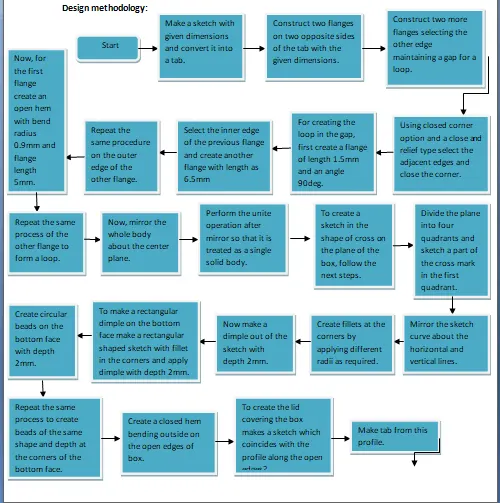
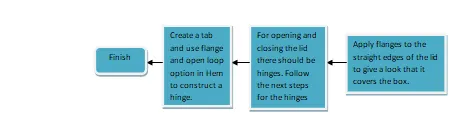
Description: In this section we will see the features used in design of the box assembly.
- Tab: This feature is used to create a sheet metal of given thickness from a sketch.
- Normal cut-out: Using normal cut-out we can make a cut-out in the sheet metal in the shape of any sketch.
- Bend: This feature is available under more button of the bend group. It is used to bend the sheet metal along the chosen curve.
- Flange: This feature is available in the bend group. It helps in creating flanges of a given dimension and also a given angle along the selected edge of the sheet metal.
- Break corner: This feature is used to make the sharp edges of sheet metal blunt. It is available in the corner group.
- Unbend: Click on unbend button from the form group.
- Dimple: Dimple is a feature available in the punch group. To make a dimple one has to select the sketch and also give depth as input.
- Bead: This feature is also available in the punch group. To make a bead one has to select the sketch as the bead shape and also give depth as input.
- Mirror Feature: This feature is available under the more button in the feature group. One as to give the plane about which the mirror should happen and also the feature to be mirrored.
- Re bend: While re bending the sheet metal one should make sure that it is done in the reverse order of unbending process.
- Hem: Hemming is the process in which the edge is rolled flush to itself, while a seam joins the edges of two materials.[1]
- Open loop: To create a hinge we have to use this command and give input details such as bend radius and sweep angle.
Conclusion: A box assembly with hinges to open its lid is created by using the above features and the procedure in the flow chart.