RELATED RECENT PLACEMENTS
Anupama Yeragudipati
Kabira Mobility
Gurunanak Khalsa College


Arun Kumar
Riverstone
Anna University

Paul Willington
DGS Technical Services Pvt. Ltd.
SAVEETHA SCHOOL OF ENGINEERING ,CHENNAI

IVIN TROY
Kabira Mobility
College of Engineering and Management,Punnapra

Karuthapandi K
DGS Technical Services Pvt. Ltd.
S. Veerasamy Chettiar college of engineering and technology

Gowsikraj M
Hyundai Motor India Ltd
Sri krishna college of technology


Mujahidoddin Saudagar
Hyundai Motor India Ltd
G.H Raisoni college of engineering and management Amravati


Krutika Ravikumar
Genpact
R.V.College of Engineering
This course is full of best-in-class content by leading faculty and industry experts in the form of videos and projects
On a daily basis we talk to companies in the likes of Tata Elxsi and Mahindra to fine tune our curriculum.
Module 1 - Course Introduction and Fundamentals
Module 2 - Basic Excel Functions and Modification of Worksheets
Module 3 - Data Formatting, Working with Shapes & Images, Creating your First Chart
Module 4 - Excel Templates, Excel Options and Printing your Excel Worksheets, Introduction to Tables
Module 5 - Conditional Functions and Other Functions
Module 6 - Pivot Tables and Lookup Functions
Module 7 - New Functions, Data Tab, and Introduction to Power Query
Module 8 - Advanced Pivot Table Functions and PowerPivot Tools
Module 9 - Large Data Sets, File Protection, Named Ranges, and More in Data Tab
Module 10 - List Functions and Excel Automation using Macros
Module 11 - VBA Basics
Module 12 - Email Automation and Industry Application
Module 13 - Introduction to Tableau
Module 14 - Shelves, Cards, and Analytics Pane
Module 15 - Data Types, Sorting, Grouping
Module 16 - Filtering & Table Calculations
Module 17 - Complete Dashboard Building and Best Practices
Module 18 - Distribution and Publishing
Module 19 - Joins and Blending
Module 20 - Relationships (2020.2 and Later Versions)
Module 21 - Data Preparations, Parameter & Set Actions
Module 22 - Advanced Calculations and Analytics
Module 23 - Nested LODs and Mapping Functions
Module 24 - Dynamic Designs, Extensions, and Tooltip Visualizations
Module 25 - Introduction to Power BI
Module 26 - Transform Data (Query Editor) - Part 1
Module 27 - Transform Data (Query Editor) - Part 2
Module 28 - Relational Data Model - Part 1
Module 29 - Relational Data Model - Part 2
Module 30 - Basics of DAX - Part 1
Module 31 - Basics of DAX - Part 2
Module 32 - Advanced DAX Functions
Module 33 - Creating Interactive Reports - Part 1
Module 34 - Creating Interactive Reports - Part 2
Module 35 - Creating Interactive Reports - Part 3
Our courses have been designed by industry experts to help students achieve their dream careers
Our projects are designed by experts in the industry to reflect industry standards. By working through our projects, Learners will gain a practical understanding of what they will take on at a larger-scale in the industry. In total, there are 3 Projects that are available in this program.
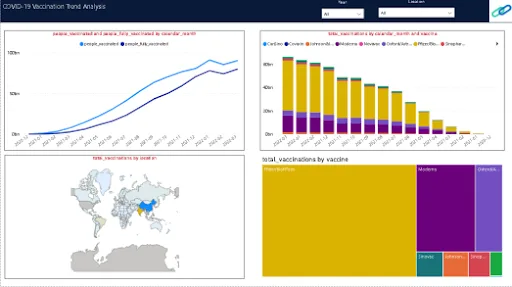
COVID-19 Vaccinations Trend Analysis
In this project, learners have to track and analyze COVID-19 vaccination trends to see doses administered by manufacturer, country, region, age, and gender.

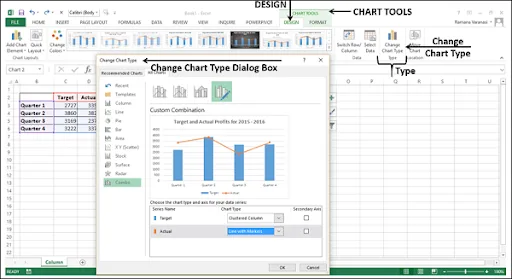
Data Cleaning and Transformation using Pivot Table and Charts
In this project, you will be given a large set of data from ABC Private Limited that is manufacturing and selling various types of automobiles. With this information, you will have to format the data and summarize product sales (in terms of the total sum of sales, average sales, the standard deviation of sales, the variance of sales, maximum sales, and minimum sales). In addition to this, you will also have to create a spreadsheet with information on fields status, product line, and sales using Pivot Table. From the concepts learned in the course, you will have to make customized ribbons, analyze the ordered quantities, present the data appropriately, clean the data, and highlight the top 10% of values using conditional formatting.
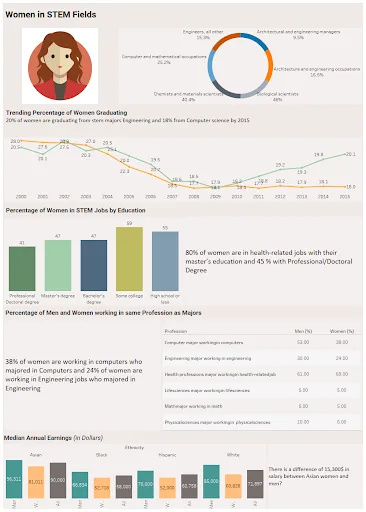
Developing a Dashboard on Tableau - Women in STEM Fields
Learners are required to develop a dashboard on Tableau with a given data set. The data set will have data about the women who graduated (year of graduation, number of employed women, those in STEM jobs, educational level, and salary comparisons). At the end of this project, learners are to deliver a dashboard that resembles an article predicting basic issues. It should be titled “Women in STEM Fields” and have pie graphs as well as comparisons regarding the statistics. Learners are also to write insights regarding the gender game in the STEM industry.
Our courses have been designed by industry experts to help students achieve their dream careers
Skill-Lync has received honest feedback from our learners around the globe.

Talk to our career counsellors to get flexible payment options.
INR 40,000
Inclusive of all charges
Become job ready with our comprehensive industry focused curriculum for freshers & early career professionals
1 Year Accessto Skill-Lync’s Learning Management System (LMS)
Personalized Pageto showcase Projects & Certifications
Live Individual & Group Sessionsto resolve queries, Discuss Progress and Study Plans.
Personalized & Hands-OnSupport over Mail, Telephone for Query Resolution & Overall Learner Progress.
Job-Oriented Industry Relevant Curriculumavailable at your fingertips curated by Global Industry Experts along with Live Sessions.
Our courses are designed by leading academicians and experienced industry professionals.
3 industry experts
Our instructors are industry experts along with a passion to teach.
8 - 12 years in the experience range
Instructors with 8 - 12 years extensive industry experience.
Areas of expertise
Please fill in your number & an expert from our team will call you shortly.