Civil · Course

Construction Planning using Primavera P6

Execute your construction plans efficiently with Primavera P6 by mastering the techniques from industry experts. Our beginner-friendly Primavera P6 certification course will impart key technical skills to enable you to develop a project schedule.

Duration
12 weeks
Content
22 hours
Projects
2
Mode
Online
Overview

What you'll
be able to do.

  • The objective of this course is to discuss the fundamental concepts of
    • Project planning
    • Management
    • Project structuring
    • Configuration Activities & Duration
    • Schedule Implementation Grouping
    • Filtering & Formatting
    • Baselines & Budgets
    • Resource & Costs
    • Updating & Tracking
    • Risks
    • Issues & Threshold
    • P6 Visualizations
    • Generating Outputs & Reports
Tools you'll use
Primavera P6
Curriculum

12 modules,
built with industry.

  1. 01Construction Planning using Primavera P612 modules
    1. Fundamentals of Project Planning & ManagementW01
      • In this session, you will learn
        • About project management
        • Career Perspectives
        • What is Planning?
        • Planning Parameters
        • Iron Triangle
        • Project Lifecycle
        • Terminologies
        • Basic of Primavera P6
        • The outputs of Primavera P6
    2. Project StructuringW02
      • In this session, you will learn
        • About projects, programs and portfolio
        • In detail about Contracts
        • Project Case Study : Introduction
        • In detail about Portfolio and Organisational Structure
    3. Project ConfigurationW03
      • In this session, you will learn
        • Projects in P6
        • Calendars in P6
        • Calendar - Types and uses
        • Calendar - Project study
        • Work Breakdown Structure
        • WBS - Representation
        • Layout and Views
    4. Activities and RelationshipsW04
      • In this session, you will learn
        • In detail about activities
        • Sequencing in construction
        • Sequencing in demolition
        • How to Add activities
        • Activity steps and codes
        • User defined fields
        • User preferences
    5. Schedule ImplementationW05
    6. Grouping, Filtering and FormattingW06
      • In this session, you will learn
        • Group and sort
        • Filters
        • How to Customize activity IDs
        • About global change
        • Tracing logic
        • Tables and fonts
    7. BaselinesW07
      • In this session, you will learn
        • In detail about baselines
        • Types of Baselines
          • Creating Baselines
          • Assigning Baselines
          • Restoring Baselines
        • In deatil about budgeting
    8. Resource and CostsW08
      • In this session, you will learn
        • About Resource Management Process
        • The Responsibility of Project Managers
        • Resource Types
        • Resource Assignments
        • How to Create Resource
        • Levelling Resource
        • Resource Profiles and Spreadsheets
    9. Updating and TrackingW09
      • In this session, you will learn
        • How to Update Progress
        • Mode of Updating
        • Automatic and Manual Updating
        • In detail about graphical progress indicators
        • The basic of tracking
    10. Risks, Issues and ThresholdW10
      • In this session, you will learn
        • Risk Definition
        • How to Add Risk and Types
        • P6 Risk Categories
        • P6 Risk Analysis
        • P6 Risk score calculations
        • Threshold
        • Issues
    11. Oracle P6 VisualizerW11
      • In this session, you will learn
        • Visualizer and its types
        • Visualizer Layouts
        • Customizing and Formatting
        • Reflections
    12. Generating Outputs and ReportsW12
      • In this session, you will learn
        • Report and its types
        • How to Batch Reports
        • How to Customize Reports
        • Level of Effort
        • Import and Export
        • How to Use Curtains in P6
        • Check In / Check Out
Industry projects

2 projects
you'll ship.

Our projects are designed by experts in the industry to reflect industry standards. By working through our projects, Learners will gain a practical understanding of what they will take on at a larger-scale in the industry. In total, there are 2 Projects that are available in this program.

Developing a realistic schedule to construct a main school building (G+2)

Developing a realistic schedule to construct a main school building (G+2)

In this project, Students need to develop a realistic schedule to construct a main school building (G+2). It will have a parking facility with internal roads and main building comp…
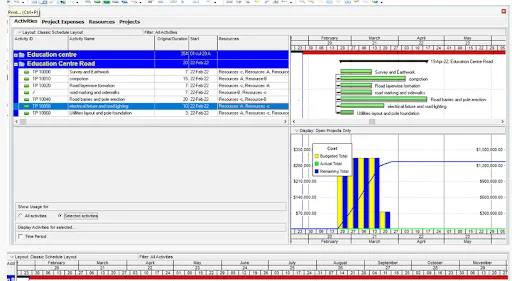
Developing the project schedule of the 100m WBM road construction project

Developing the project schedule of the 100m WBM road construction project

In this project, students need to plan and develop a resource loaded schedule of a 100 m WBM road constructed inside the Skill Lync Education center premises to allow access to the…

Fee

One fee.
Everything included.

Become job ready with our comprehensive industry focused curriculum for freshers & early career professionals

Premium
₹40,000
Inclusive of all charges
  • 1 Year Access
  • Personalized Page
  • Live Individual & Group Sessions
  • Personalized & Hands-On
  • Job-Oriented Industry Relevant Curriculum
Check eligibility →
FAQ

Questions,
answered.

What type of certificate will students get after completing the course?

An online certificate will be provided to students based on their achievements in the Primavera course.
What is the mode of delivery for the course?

The course will be delivered online through video tutorials and textual content.
Is there any provision to clear questions and doubts?

The course offered by Skill-Lync gives the student access to various support options through phone, email and chat with a skilled engineer who can resolve all student queries.
Will Skill-Lync participate in finding a career opportunity for me after completing the course?

Skill-Lync will offer an internship opportunity to students interested, but the institute shall not find a job for the candidate.
Will I work on any projects during the interim of the course?

Yes, you will be working on two projects during the course, where you will develop a realistic schedule for constructing the main building and a WBM road.
Is there any pre-requisite to start this course?

Skill-Lync offers this Primavera P6 software course for civil engineers who want to become project management professionals. Thus, a background in this field is recommended.
Will I get an e-verification after completion of the course?

Yes, you will get a shareable e-verified profile which you can upload on social media platforms.
Does Skill-Lync offer any community forums where I can get support?

Yes, you can join community forums to communicate with experts and batchmates from Skill-Lync.
Next step

Not sure it's
the right fit?

A counsellor will walk you through the syllabus, projects and fee options — and tell you honestly if another course suits you better.

Get the syllabus + a call back

We'll email the full syllabus and call within one working day.

By submitting you agree to our Terms and Privacy Policy.

Call usEnquire

Talk to a career counsellor

Free 20-minute call. We'll map the right course to where you want to work.

By submitting you agree to our Terms and Privacy Policy.