What is CAD Communication?
In complex embedded systems, multiple electronic systems are used for establishing the application. In this case, there is need for exchange of information between these electronics systems.
 Skill-Lync·13 Jun 2023·2 min read
What Is CAD Communication?
Need For Communication:
In complex embedded systems, multiple electronic systems are used for establishing the application. In this case, there is a need for the exchange of information between these electronic systems.
Types of communication:
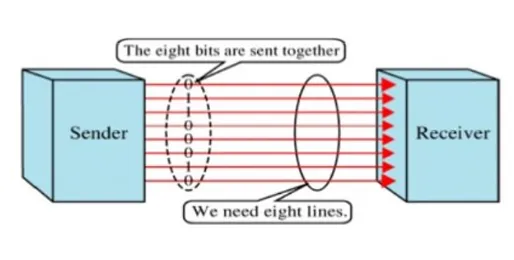
1) Parallel Communication:
- Data is transmitted simultaneously on a separate wire.
- The space needed is higher, So the cost of implementation is high.
- Faster speed of communication.
- Requires complex wiring circuitry.
- Does not require synchronization between Sender and Receiver.
Example: PCI, ATA, Etc
2) Serial Communication - Information is transmitted as a series of bit streams one at a time.
1) Based on the number of paths/Wire, serial communication is classified as
- Half Duplex
- A single wire is used for transmission and reception of messages.
- Communication direction will be one at a time.
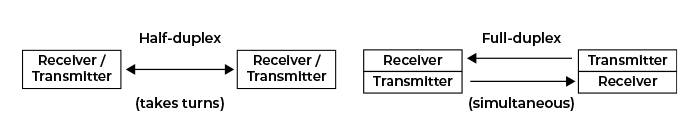
Full Duplex
- Dedicated wire/path for transmission and reception of data.
- Simultaneous data transfer for Transmission and Reception of data
Based on the type of synchronization
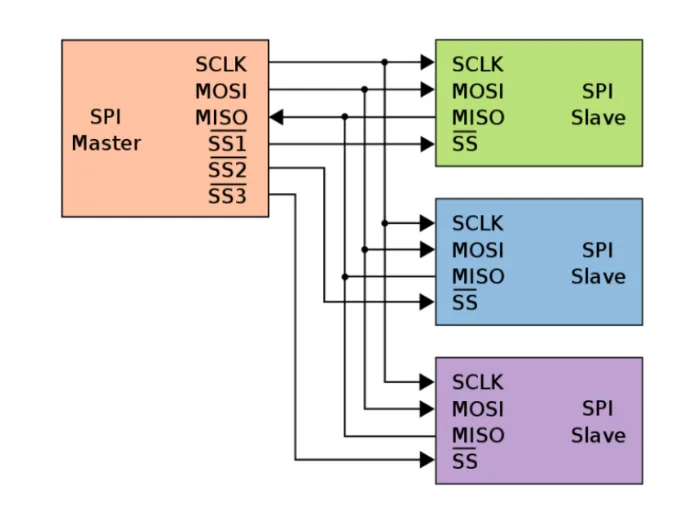
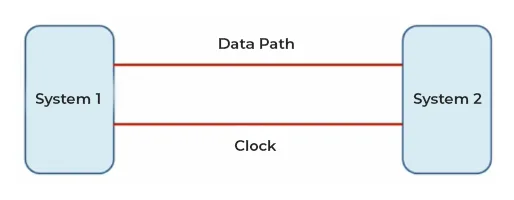
- Synchronous serial Communication:
- Dedicated wire for Data transmission and Clock Signal
- Follows master and slave-based communication
- Master – Generates clock irrespective of the direction of communication
- Slave – Follows the master clock to perform read/write operations on a data bus
- Examples of Synchronous Communication: SPI, I2C, USART, RS232, Etc
Disadvantages of Synchronous serial communication:
- Clock from Master – High-frequency signal which might cause data interference and corruption.
- External noise due to EMC of the board might affect the clock characteristics, which could result in the wrong decoding of data.
- The transmitter and receiver should operate in same clock frequency.
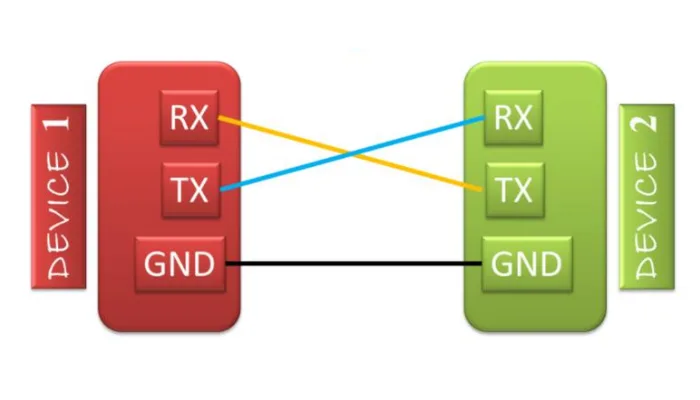
Asynchronous Serial Communication:
- Sender and receiver have their own internal clocks thus do not need an external common clock pulse.
- Slower data transfer rate compared to synchronous communication
- Example : UART, CAN, LIN , Etc.
- Parameters of Asynchronous Communication:
- Baud rate – Number of data bits transmitted to receiver in 1 second, unit: Bits per Second(BPS)
- (Rule of Thumb: Transmitter and Receiver should have same Baud rate for proper communication
- Bit Duration: The time for which transmitter precisely maintains for every bit on a data bus or the time for the receiver to decode each bit on the data bus
- Bit Duration = 1/ Baud rate
- Idle State – Default state in absence of communication
- Number of Start and Stop bits: (Self Synchronization of TX and RX)
- For a proper communication synchronization is required, as sender and receiver run at different clock rate.
- So Start Bit and Stop bits are used for exact synchronization.
- This makes it slower as compared to that in synchronous transmission, but it is cheaper.
Example:
Simple Asynchronous communication :
- The baud rate for communication: is 9600bps
- Data to transmit: “1011 0111”
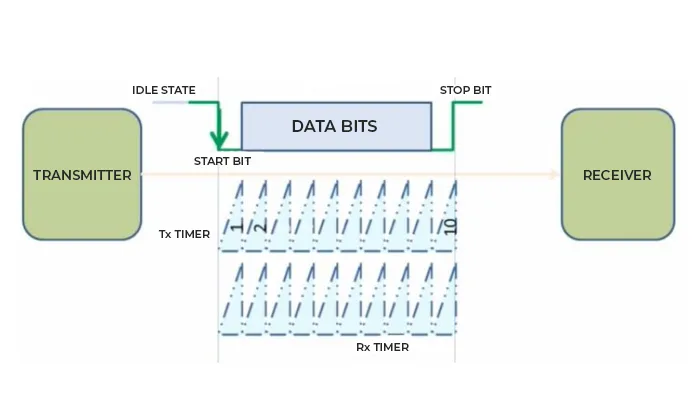
Working:
- When the Data in the BUS changes from continuous logic to Low(Start Bit), The internal timer of the sender and receiver starts and gets ready for communication.
- After data bits, when the bus level changes from logic low to high (Stop bits) to indicate the end of the communication.
The disadvantage of Asynchronous Serial Communication
- Start and Stop Bit Over heading.
- Noise in the signal may lead to False recognition of Start and Stop bits.
- Response time cannot be predicted.
- The handling of errors is more intricate.
- Applications are comparatively hard to design for such transmissions.