Siemens Simatic AX: What Software-Defined Automation Means for PLCs
On 17 November 2026 Siemens launched Simatic AX Motion Control Engineering and made Logic Control Engineering available worldwide. Here is what was confirmed, how text-first PLC engineering with Git, packages, unit tests and CI differs from TIA Portal, a motor start/stop latch in Structured Text with AxUnit-style tests, and what Indian automation engineers should learn next.


On 17 November 2026, Siemens launched Simatic AX Motion Control Engineering and made Simatic AX Logic Control Engineering generally available worldwide. Logic Control Engineering had first been released in the US. Siemens calls this a major milestone for what it terms software-defined automation. In practice that means PLC programs are written as plain text in IEC 61131-3 Structured Text. They are edited in a VS Code-based IDE, versioned in Git, shared as packages, unit-tested on a PC with no PLC attached, and built by a CI pipeline.
Below we cover what Siemens confirmed and what it left unsaid, how this differs from classic TIA Portal engineering, and a motor start/stop example with an interlock, written in Structured Text with unit tests in the AxUnit style. We end with what Indian PLC and automation engineers should learn next.
Key facts at a glance
- 17 November 2026: Siemens (Erlangen) launched Simatic AX Motion Control Engineering (MCE) and made Simatic AX Logic Control Engineering (LCE) generally available worldwide. Source: Siemens press release HQDIPR202611177500EN.
- 24-26 November 2026: MCE is shown in public for the first time at the SPS trade fair in Nuremberg (Siemens is in Hall 11). The fair dates come from Mesago, the organiser.
- June 2026: LCE added XLad, a text-based ladder language, and support for the S7-1200 G2 controller. Before that, Simatic AX focused on S7-1500 controllers (Siemens, 18 June 2026).
- No PLC needed for unit tests: Siemens' Simatic AX learning path says AxUnit tests run through Apax (locally or in a pipeline) or the IDE without PLCSIM Advanced or a real PLC.
- Context: TIA Portal V16 (November 2019) added a Version Control Interface to Git, SVN and TFS. TIA Portal V21 (November 2025) added an export format that Siemens says enables "seamless integration" with Git for the first time.
Courses: the software skills behind this shift are covered in Skill-Lync's DevOps Fundamentals course (Git, branching, merges) and Software Verification and Validation for Hand Code (unit, integration and system testing).
What did Siemens announce on 17 November 2026?
Siemens made two announcements. Simatic AX Motion Control Engineering, which is new, configures motion "technology objects" (the software objects that represent a servo axis) as text documents, with PLCopen support and direct Git integration. And Simatic AX Logic Control Engineering, the PLC programming product, is now generally available worldwide after its earlier US release. Both are sold through Siemens Digital Exchange.
The release, dated Erlangen, 17 November 2026, makes these specific points:
- One text-based environment. Engineers can manage projects that include motion control in the same text-based environment they use for logic control, "without switching to a separate engineering tool".
- Built for software methods. Siemens says Simatic AX, unlike traditional automation engineering tools, "is built from the ground up on modern software development methods".
- What LCE does. LCE offers "IT-like hardware configuration" for PLCs and I/O devices. It programs Simatic S7 PLCs with text-based code, command-line interfaces (CLI) and scripting.
- The audience. Annemarie Große Frie, Head of Automation Systems at Siemens, said: "More and more engineers with IT skills are entering the world of automation." She called MCE "an important next step" for Siemens' software-defined automation offering.
- A customer view. Paul Slaats, Manager Engineering at Contiweb, is quoted as saying his team already works "with Git, automated builds and text-based code" and can now handle motion in the same workflow.
Confirmed vs reported. Every claim in this section comes from Siemens' own release. News aggregators listed the item on 18 November, but the release itself is dated 17 November. The release gives no prices, no licence terms, no country-by-country launch dates beyond "worldwide", and no change to TIA Portal. We have not assumed any of these.
What is Simatic AX, and how did it get here?
Simatic AX is Siemens' family of IT-style engineering tools for its PLCs. On its product page Siemens describes it as "the IT-like way of engineering PLCs, technology objects, SCADA and HMIs", with VS Code-based tools, native Git integration, unit testing and CI pipelines. It first appeared in 2022 as an add-on to TIA Portal and has since grown into its own product line.
| Date | Milestone | Source |
|---|---|---|
| 9 Nov 2022 | TIA Portal V18 release introduces Simatic Automation Xpansion (Simatic AX): a VS Code-based environment, version control via GitLab, object-oriented Structured Text libraries that integrate into TIA Portal | Siemens press |
| 18 Jun 2026 | XLad ladder language, the first graphical language in LCE, plus S7-1200 G2 support; shown at Automate, Chicago, 22-25 June | Siemens press |
| 28 Jul 2026 | WinCC Unified Elements extends Simatic AX from PLC programming into HMI and SCADA visualisation | Siemens press |
| 17 Nov 2026 | Motion Control Engineering launched; Logic Control Engineering generally available worldwide | Siemens press |
| 24-26 Nov 2026 | First public showing of MCE at SPS, Nuremberg | Siemens; Mesago |
What does "software-defined automation" mean for PLC code?
Software-defined automation means the whole PLC application, including logic, hardware configuration and dependencies, lives in plain-text files. Those files can then go through the same machinery software teams use: Git history and code review, versioned packages, automated unit tests and CI pipelines that build and test every change. The control logic is still IEC 61131-3. What changes is the workflow around it.
1. Text you can read, diff and generate
IEC 61131-3, whose current edition (4.0) was published in May 2025, defines one textual PLC language, Structured Text (ST), and two graphical ones, Ladder Diagram (LD) and Function Block Diagram (FBD), plus sequential function chart elements. Until June 2026, Simatic AX LCE was ST only. XLad then added ladder logic stored as text, and Siemens says you can switch between a graphical view and a text editor. Because everything is text, a change shows up as a line-by-line diff. Siemens also calls the XLad text "AI-ready", groundwork for AI-assisted engineering of control logic.
2. Git version control
AX Code, the Simatic AX IDE, is built on Visual Studio Code and ships with Git source control built in (Siemens learning path). Branches, pull requests and line-by-line review now work on PLC code just as they do on any software repository.
3. Package management with Apax
Apax is Simatic AX's package manager, similar to npm for JavaScript. A project's apax.yml lists its dependencies using semantic version ranges, and apax install writes an apax-lock.json lock file so that every machine gets the same versions. Siemens' Apax cheat sheet gives a worked case. If versions 2.0.15, 2.5.26 and 4.0.0 are available, then ^2.0.1 installs 2.5.26 (newest within major version 2), ~2.0.1 installs 2.0.15 (newest within 2.0) and 2.0.1 installs exactly 2.0.1. apax install --immutable fails if the manifest and lock file disagree, which is what you want on a build server.
4. Unit tests with AxUnit
AxUnit is the unit-testing framework. You mark a function or method with the {Test} pragma, or a class with {TestFixture}, and check results with assertions such as AxUnit.Assert.Equal(expected := ..., actual := ...). The framework re-initialises a test fixture before each test, so tests do not leak state into each other. It also supports parameterised tests and mocking. Tests run on the llvm target on the PC, so no simulator or hardware is needed.
5. CI/CD and the command line
Everything in the IDE can also be done from the command line: apax build compiles the ST, apax test runs the AxUnit tests (--coverage adds coverage), and a postbuild: apax test script runs the tests after every successful build. Siemens' own open-source Simatic AX libraries on GitHub use this route. Their GitHub pipelines run install, build and test steps in a container image on every pull request and every push to main, and a separate release pipeline packs and publishes the library.
How is Simatic AX different from TIA Portal engineering?
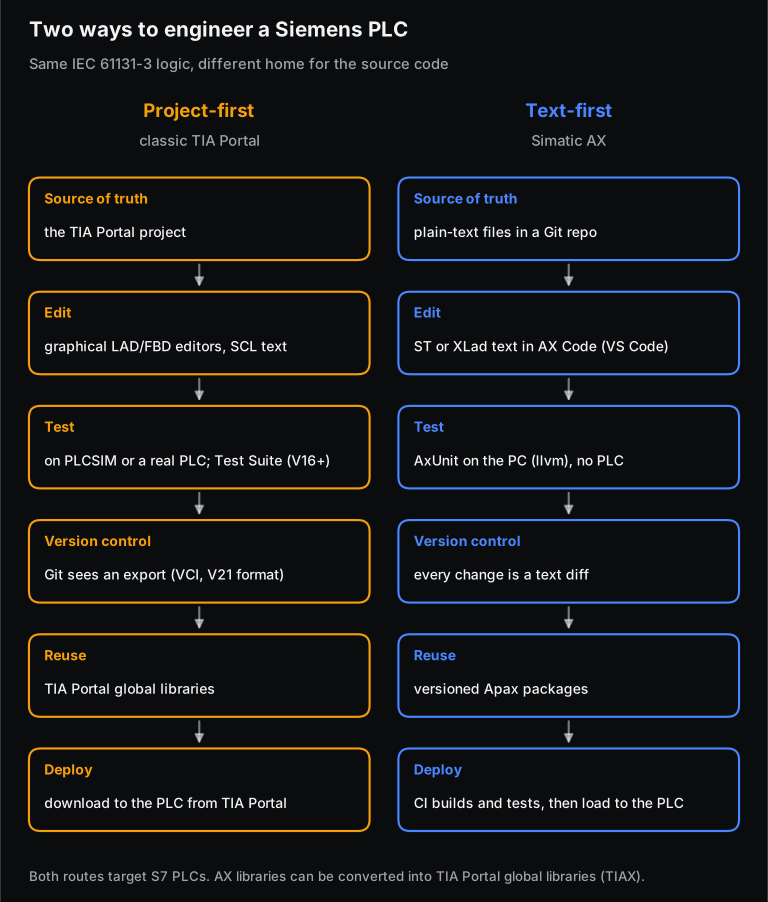
The main difference is where the source of truth lives. In TIA Portal you engineer inside the TIA Portal project, mostly in graphical editors, and Git works on an exported copy. In Simatic AX the text files in the repository are the project, and the IDE, compiler, tests and CI all work on those files directly. Both target Siemens S7 PLCs and both use IEC 61131-3 languages.
| Aspect | Classic TIA Portal (STEP 7) | Simatic AX (LCE/MCE) |
|---|---|---|
| Languages | SCL (Siemens' Structured Text), LAD, FBD, GRAPH (sequential function chart), plus CFC and CEM | ST; ladder through XLad since June 2026 |
| Editor | TIA Portal, with graphical LAD and FBD editors | AX Code (VS Code-based), or any text editor plus the CLI |
| Version control | Version Control Interface to Git, SVN and TFS since V16; new Git-friendly export format in V21 | Git on the source files themselves |
| Testing | TIA Portal Test Suite (V16 onward); simulation or hardware | AxUnit on the PC (llvm target); no PLC needed |
| Reuse | Global libraries; multiuser engineering | Versioned Apax packages from registries |
| Motion | Technology objects configured in the TIA Portal project | Technology objects as text documents with PLCopen support (MCE, new) |
Siemens' own style guide for S7-1200/S7-1500 already recommends SCL, its Structured Text, as "the preferred programming language for standard blocks", so text-based PLC code is not new at Siemens. What AX changes is that text sits at the centre of the workflow. The two tools also connect. Siemens' TIAX workflow compiles an AX library with apax build, exports it with the ax2tia tool and imports it into a TIA Portal global library (V18 or later). So a team can write tested ST libraries in AX and still deliver a machine engineered in TIA Portal.
What does a motor start/stop with interlock look like in Simatic AX?
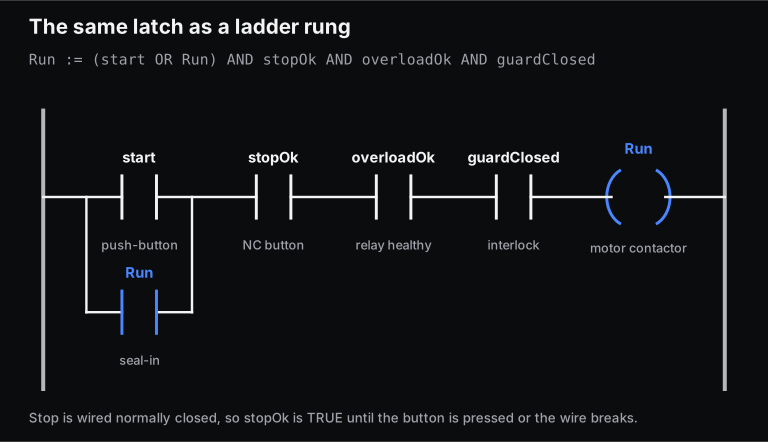
It looks like a seal-in latch, the oldest circuit in industrial control, written as one line of Structured Text inside a class. The motor runs once start is pressed and keeps itself on through its own contact. It drops out if stop is pressed, the overload relay trips or the guard opens, and after that it needs a fresh start press.
NAMESPACE Plant.Motors
    CLASS MotorStartStop
        VAR
            _running : BOOL;
        END_VAR

        METHOD PUBLIC Execute : BOOL
            VAR_INPUT
                start : BOOL;        // momentary start push-button
                stopOk : BOOL;       // stop push-button wired NC: TRUE = not pressed
                overloadOk : BOOL;   // thermal overload relay: TRUE = healthy
                guardClosed : BOOL;  // guard interlock: TRUE = closed
            END_VAR
            _running := (start OR _running) AND stopOk AND overloadOk AND guardClosed;
            Execute := _running;
        END_METHOD
    END_CLASS
END_NAMESPACE
Three details matter:
- Stop is wired normally closed. The input is TRUE when nothing is wrong, so a broken wire looks like a stop press and the motor stops. This is a common fail-safe wiring practice.
- The class keeps state.
_runningkeeps its value between PLC scans, which is what makes the latch work. In digital-logic terms it is an SR latch with reset taking priority; Skill-Lync's Digital Electronics book covers latches if you want the gate-level view. - It is the same logic as a ladder rung. Start in parallel with a seal-in contact, in series with the three permissives, driving the coil. The PLC and ladder logic chapter of the Mechatronics book explains how a rung is evaluated each scan.
How do you unit test it with AxUnit?
You put the tests in a test class marked {TestFixture} and create the motor object inside it. Each {Test} method then drives the inputs for a few scans and asserts the output. AxUnit re-creates the fixture before every test, so each test starts with the motor stopped.
USING AxUnit.Assert;
USING Plant.Motors;

NAMESPACE Plant.Motors.Test
    {TestFixture}
    CLASS MotorStartStopTest
        VAR
            m : MotorStartStop;
        END_VAR

        {Test}
        METHOD PUBLIC Start_pulse_latches_motor_on
            VAR
                q : BOOL;
            END_VAR
            q := m.Execute(start := TRUE, stopOk := TRUE, overloadOk := TRUE, guardClosed := TRUE);
            q := m.Execute(start := FALSE, stopOk := TRUE, overloadOk := TRUE, guardClosed := TRUE);
            Equal(expected := TRUE, actual := q);
        END_METHOD

        {Test}
        METHOD PUBLIC Guard_open_drops_motor_and_needs_new_start
            VAR
                q : BOOL;
            END_VAR
            q := m.Execute(start := TRUE, stopOk := TRUE, overloadOk := TRUE, guardClosed := TRUE);
            q := m.Execute(start := FALSE, stopOk := TRUE, overloadOk := TRUE, guardClosed := FALSE);
            q := m.Execute(start := FALSE, stopOk := TRUE, overloadOk := TRUE, guardClosed := TRUE);
            Equal(expected := FALSE, actual := q);
        END_METHOD

        // One scan from rest: the motor may start only if every permissive is healthy
        {Test(s := TRUE,  so := TRUE,  ol := TRUE,  g := TRUE,  x := TRUE)}
        {Test(s := TRUE,  so := FALSE, ol := TRUE,  g := TRUE,  x := FALSE)}
        {Test(s := TRUE,  so := TRUE,  ol := FALSE, g := TRUE,  x := FALSE)}
        {Test(s := TRUE,  so := TRUE,  ol := TRUE,  g := FALSE, x := FALSE)}
        {Test(s := FALSE, so := TRUE,  ol := TRUE,  g := TRUE,  x := FALSE)}
        METHOD PUBLIC Single_scan_from_rest
            VAR_INPUT
                s : BOOL;
                so : BOOL;
                ol : BOOL;
                g : BOOL;
                x : BOOL;
            END_VAR
            Equal(expected := x, actual := m.Execute(start := s, stopOk := so, overloadOk := ol, guardClosed := g));
        END_METHOD
    END_CLASS
END_NAMESPACE
To run the tests without hardware, the project's apax.yml needs the llvm target, and a post-build script runs them after every build:
# fragment of apax.yml
targets:
  - "1500"
  - "llvm"
scripts:
  postbuild: apax test
Then apax build compiles the ST and runs the tests, on your laptop or on a CI server, before anything goes near a PLC.
How we checked this. The syntax (namespaces, CLASS with METHOD PUBLIC, {TestFixture}, {Test}, parameterised {Test(...)} with VAR_INPUT, USING AxUnit.Assert and Equal(expected := ..., actual := ...)) follows the examples in Siemens' public Simatic AX learning path and Siemens' own AxUnit test files on GitHub. We do not have a licensed Simatic AX install, so we have not compiled this code. Treat it as AX-style IEC 61131-3 code and expect small changes when you build it. We did re-run the logic in a Python script that applies the same equation scan by scan. All seven test cases above (and an extra stop-button case in the script) give the expected results, and across all 32 combinations of the four inputs and the previous state, the motor runs in only 3, each with stop, overload and guard all healthy.
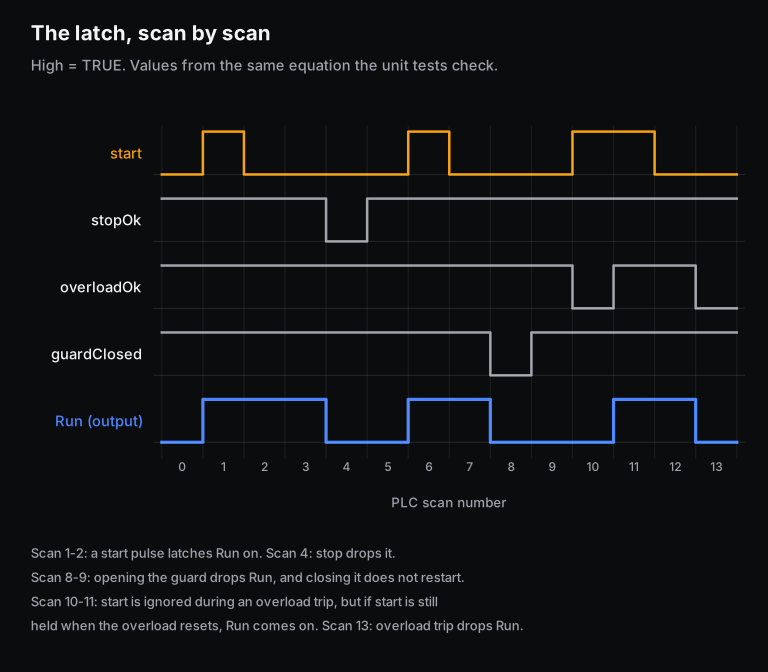
Scan 11 is the kind of thing unit tests are good at catching. Whether a motor should restart when start is held through an overload reset is a design decision. Once you make it, a test locks it in, and anyone who later changes the latch finds out from a failing CI run rather than on the shop floor.
A safety note. The guard input here is a standard PLC interlock, not a safety function. Real machine guards that protect people go through safety-rated circuits or a fail-safe controller, designed to machinery safety standards. Siemens publishes separate safety programming guidelines for S7-1200 and S7-1500 for that purpose.
What does Motion Control Engineering add?
MCE brings motion axes into the same text-and-Git workflow. On Siemens controllers, a servo axis is represented by a technology object, the software object the PLC program commands. MCE lets you configure those objects as text documents, with PLCopen support and direct Git integration, next to the ST logic that commands them. PLCopen is a vendor-neutral set of motion function blocks such as MC_Power and MC_MoveAbsolute, so motion code follows the same pattern across vendors that support it. Siemens' open-source AX motion library LAxisCtrl, for example, provides a PLCopen-compliant axis control block for the S7-1500. Its synchronous functions such as gearing and camming need a T-CPU (S7-1500T).
What should Indian PLC and automation engineers learn next?
Learn the IEC 61131-3 basics in both ladder and Structured Text, then add the software habits Simatic AX is built around: Git, unit testing, package versions and CI. Keep your TIA Portal skills too. Siemens positions AX alongside TIA Portal, and its TIAX workflow feeds AX libraries into TIA Portal projects.
A practical order:
- PLC fundamentals first. Scan cycle, ladder logic, timers, counters and state machines. Start with the PLC chapter of the Mechatronics book, then the state machines chapter of the Digital Electronics book. Machine sequences are usually written as state machines, and Siemens publishes an open-source AX state-machine library.
- Structured Text properly. Functions vs function blocks, namespaces, then the object-oriented parts (classes, methods, interfaces) that AX uses heavily. If you have written C, this will feel familiar. Our post on how automation and embedded systems relate covers the overlap.
- Git, for real. Branches, merges, pull requests and resolving conflicts. The DevOps Fundamentals course covers Git and CI tooling.
- Testing as a habit. Write the test before you change the latch. The verification and validation course teaches unit, integration and system testing. It uses hand-written embedded code, but the ideas carry straight over to PLC code.
- CLI, YAML and pipelines. Be comfortable running builds from a terminal and reading a pipeline file. That is all an
apax.ymland a CI workflow are. - Control and motion. PID loops and PLCopen motion blocks. The PID chapter of the Control Systems book has the theory. Students preparing for GATE can map this to the GATE Robotics and Automation paper.
On access: Siemens' learning path says Simatic AX needs a SiemensID account and a Simatic AX licence. The learning material itself (slides, exercises and libraries) is public on Siemens' Simatic AX GitHub organisation, so you can read real AX code and tests before you have a licence.
The same move from hardware-first to software-first is happening in cars. Our explainer on the software-defined vehicle shows the parallel. Siemens says it built AX for "the growing number of automation engineers with an IT background". That is Siemens' description of its customers, not hiring data, and we make no claim about jobs or pay here.
Frequently asked questions
Is Simatic AX free to use?
No free licence is announced. Siemens' Simatic AX learning path says you need a SiemensID account and a Simatic AX licence, and the 17 November 2026 release says LCE and MCE are available through Siemens Digital Exchange. Siemens has not published prices in the release. The training material on Siemens' Simatic AX GitHub organisation is free to read.
Does Simatic AX replace TIA Portal?
Siemens has not said so. The 17 November 2026 release says nothing about TIA Portal. Siemens still develops TIA Portal (V21 came out in November 2025), and its TIAX workflow converts AX libraries into TIA Portal global libraries. For now the two tools work side by side.
Can I write ladder logic in Simatic AX?
Yes, since June 2026. XLad is a ladder language for Simatic AX Logic Control Engineering. It is stored as text so it can be versioned in Git, and you can switch between a graphical and a text view. Siemens says XLad can reuse libraries written in Structured Text.
Which PLCs does Simatic AX support?
Simatic AX began with Simatic S7-1500 controllers, and since June 2026 Logic Control Engineering also supports the S7-1200 G2. Some motion functions, such as gearing and camming in Siemens' LAxisCtrl library, need an S7-1500T technology CPU.
Is SCL the same as Structured Text?
SCL is Siemens' name for its implementation of IEC 61131-3 Structured Text in TIA Portal, and Siemens' own style guide lists it as "Structured Text (SCL/ST)". The core syntax (assignments with :=, IF, CASE, FOR) is the same idea. Simatic AX's ST makes heavy use of namespaces and classes, so code may need changes when it moves between the two.
Do I need a PLC to run AxUnit tests?
No. Siemens' learning path says AxUnit tests run through Apax or the IDE without PLCSIM Advanced or a real PLC, as long as the llvm target is enabled in apax.yml. You still need hardware or a simulator for commissioning and I/O checks.
Sources and further reading
- Siemens AG, Software-Defined Automation: Siemens announces major milestone for Simatic AX engineering, press release HQDIPR202611177500EN, Erlangen, 17 Nov 2026.
- Siemens AG, Siemens expands accessibility to Software-Defined Automation with Simatic AX, press release HQDIPR202606177407EN, 18 Jun 2026.
- Siemens, Siemens launches SIMATIC AX WinCC Unified Elements, 28 Jul 2026.
- Siemens AG, TIA Portal V18 enables more efficient and flexible automation engineering, HQDIPR202211096596EN, 9 Nov 2022.
- Siemens AG, Engineering framework ready for continuous software development (TIA Portal V16), 26 Nov 2019.
- Siemens AG, TIA Portal V21 combines engineering efficiency with higher plant availability, 11 Nov 2025.
- Siemens, SIMATIC AX product page, accessed 19 Nov 2026.
- Siemens AG, Simatic AX learning path (AX Code, unit testing, package management chapters) and Apax cheat sheet (Apax 4.2.x), GitHub, accessed 19 Nov 2026.
- Siemens AG, ae-tiax: application examples for the TIAX workflow and LAxisCtrl axis control library, GitHub, accessed 19 Nov 2026.
- Siemens AG, Programming style guide for SIMATIC S7-1200/S7-1500, Entry ID 81318674, V2.1.0, April 2025.
- Siemens AG, Programming Guidelines Safety S7-1200/S7-1500, Industry Support entry 109750255.
- IEC, IEC 61131-3:2025 Programmable controllers, Part 3: Programming languages, edition 4.0, 22 May 2025.
- PLCopen, Function blocks for motion control (MC_Power, MC_MoveAbsolute and related blocks).
- Mesago Messe Frankfurt, SPS 2026 update (24-26 Nov 2026, Nuremberg).