Is MATLAB Free for Students? India Price, Free Routes and Their Limits
MATLAB is free if your college has a Campus-Wide licence; otherwise MATLAB Online (basic) gives 20 free hours a month and the trial 30 days, and the Student Suite costs USD 49 a year in India. Every limit and price checked on MathWorks' India pages, plus GNU Octave, Python and Scilab compared on a tested RLC example.

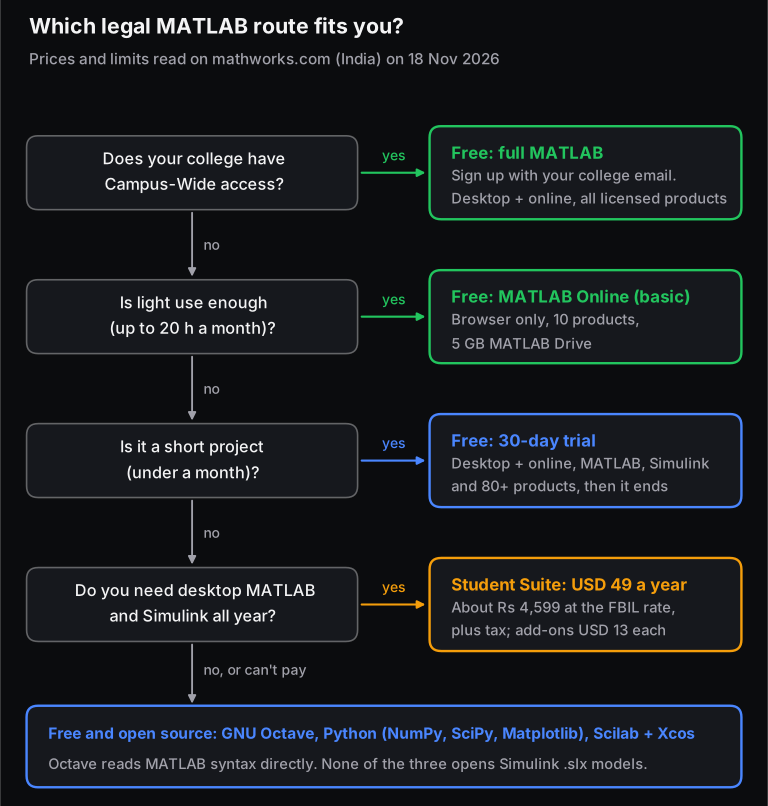
Is MATLAB free for students? Only if your college pays for it. If your college has a MathWorks Campus-Wide licence, you get full MATLAB and Simulink free: sign up with your college email address. If it doesn't, anyone with a free MathWorks account gets MATLAB Online (basic) for 20 hours a month, plus a 30-day free trial. After that, the MATLAB and Simulink Student Suite costs USD 49 a year in India, before tax.
We checked every price and limit below on MathWorks' India pages (in.mathworks.com) on 18 November 2026. The current release is R2026b. We also tried the three main free alternatives on a small engineering problem, with real output. There is no piracy advice here, and we explain why near the end.
In short (checked 18 Nov 2026)
- Campus-Wide licence: free, with unlimited desktop and online use, on and off campus, for every student at a college that has one. MathWorks' India credentialing list names 82 such institutions, but it isn't complete: IIT Kanpur, for example, has the licence and isn't on the list.
- MATLAB Online (basic): free for anyone, with 20 hours per calendar month, 10 common products, 5 GB of MATLAB Drive storage, and a 15-minute idle timeout. It runs in the browser only.
- Free trial: 30 days of unlimited use on desktop and online, covering MATLAB, Simulink and 80+ products.
- Student Suite: USD 49 a year in India (about ₹4,599 at the FBIL reference rate of 9 Nov 2026), plus tax. Add-ons cost USD 13 each (about ₹1,220). One computer only, and for coursework only.
- Free alternatives: GNU Octave 11.3 (June 2026), Python with NumPy/SciPy/Matplotlib, and Scilab 2027.0 with Xcos (October 2026). None of them opens Simulink models.
How do I check if my college has a MATLAB Campus-Wide licence?
Create a MathWorks account (or sign in) using your college email address, then click "Get MATLAB" on mathworks.com. If your college has Campus-Wide access, MathWorks links you to the licence automatically and you can download MATLAB straight away. A personal Gmail address won't work, because the email domain is how MathWorks recognises your college.
Step by step:
- Use your official college email, the one ending in your institute's domain (for example,
[email protected]). If you already have a MathWorks account on a personal address, add or switch to the college address in your account settings. - Go to "Get MATLAB" on in.mathworks.com and sign in. MathWorks' student page says it plainly: if your university has Campus-Wide access and you create a MathWorks account with your student email address, "you will be able to use MATLAB immediately".
- Look for your college's portal page. Colleges with a licence often have a MathWorks portal page. For example, IIT Kanpur's page reads "MATLAB and Simulink Access for Indian Institute of Technology Kanpur. Both are available through your school's license." Search "MATLAB portal" plus your college name, or ask your computer centre.
- Check MathWorks India's credentialing list. On 18 Nov 2026 it named 82 colleges and universities, including VNIT Nagpur, VJTI Mumbai, NIT Delhi, NIT Hamirpur, Thiagarajar College of Engineering and BMS College of Engineering. Being missing from this list doesn't prove your college has no licence (IIT Kanpur isn't on it). Credentialing is a separate MathWorks India programme that colleges sign up for and renew every year.
A Campus-Wide licence covers students, faculty, staff and researchers, on and off campus, on any device. That means your own laptop is covered too. It is still your college's licence, so access depends on your college email and affiliation. Expect it to end when you leave. IIT Kanpur's computer centre, for example, describes its licence as covering "faculty, researchers, staff, and students" on work and personal computers.
What do you get free with MATLAB Online (basic)?
MATLAB Online (basic) is free for anyone with a MathWorks account, student or not. It gives you 20 hours per calendar month in the browser, with MATLAB, Simulink and nine toolboxes and 5 GB of MATLAB Drive storage. Sessions end after 15 minutes idle. It's enough for practice and small assignments, but not for a semester-long project.
| Limit | MATLAB Online (basic), free | MATLAB Online with a licence |
|---|---|---|
| Hours | 20 per calendar month | Unlimited |
| Products | "10 commonly used products" (see list below) | Everything on your licence that runs online |
| MATLAB Drive storage | 5 GB | 20 GB |
| Continuous compute time | 15 minutes | 90 minutes |
| Idle timeout | 15 minutes | 60 minutes |
| Desktop version | No | Yes |
| Support | Help Center and MATLAB Central community | Depends on licence type |
MathWorks' FAQ lists the basic tier's products as MATLAB, Simulink, and these toolboxes:
- Control System
- Curve Fitting
- Deep Learning
- Image Processing
- Optimization
- Signal Processing
- Statistics and Machine Learning
- Symbolic Math
- Text Analytics
Simscape and Stateflow are not on the list, so most physical-modelling and state-machine coursework needs more than the free tier.
Four details from the FAQ are worth knowing:
- The hours reset at midnight UTC at the start of each calendar month. That is 5:30 am IST on the 1st.
- If you cross 20 hours mid-session, you can finish that session. It ends when you sign out or after 15 minutes idle, and the meter may then show "21 of 20 hours".
- Your files stay accessible in MATLAB Drive after you hit the limit, so you can still download them.
- Some things don't count towards the 20 hours: MathWorks' free self-paced courses (such as MATLAB Onramp) and the MATLAB Mobile app.
Twenty hours a month adds up to 240 hours a year. That is plenty for learning syntax and finishing lab sheets. A Simulink-heavy final-year project will outgrow it quickly, mostly because of the 15-minute continuous compute cap.
How long is the MATLAB free trial?
The MATLAB trial is free for 30 days. It gives unlimited use on desktop and online, with MATLAB, Simulink and "80+ products", according to MathWorks' trial page. (The MATLAB Online FAQ says "over 70 products", so the exact count varies by page.) It suits a short, intensive piece of work. Start it when you are ready to work every day, not a fortnight before you need it.
When the trial ends, you can link a college licence, buy a licence, or drop back to MATLAB Online (basic). Files you saved in MATLAB Drive stay available.
How much does MATLAB Student cost in India?
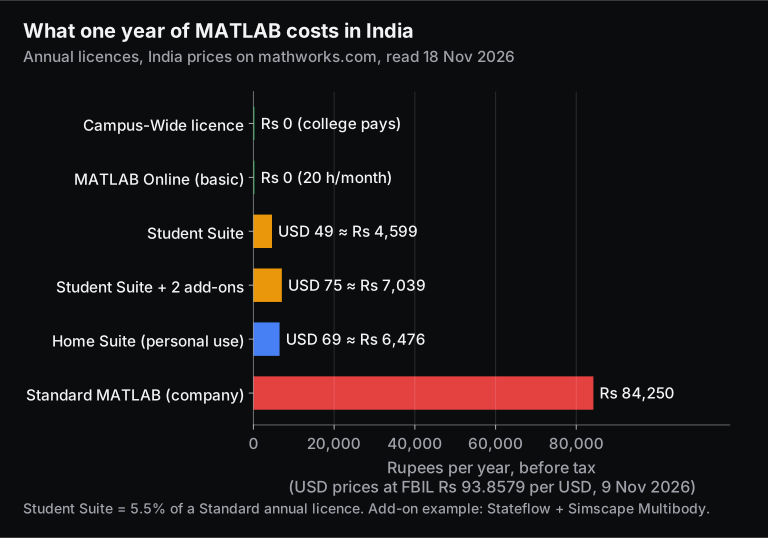
The MATLAB and Simulink Student Suite costs USD 49 a year for purchase and use in India, excluding tax. That is MathWorks' India price on 18 Nov 2026. MathWorks lists the student price in US dollars even on its India site. At the FBIL reference rate of ₹93.8579 per dollar (9 Nov 2026), that is about ₹4,599 a year, or roughly ₹383 a month, before tax.
| Licence (India price, read 18 Nov 2026) | Price, excl. tax | About, in ₹ | Who it's for |
|---|---|---|---|
| Campus-Wide (through your college) | Free to you | ₹0 | Students, faculty, staff, researchers at that college |
| MATLAB Online (basic) | Free | ₹0 | Anyone with a MathWorks account |
| MATLAB and Simulink Student Suite, annual | USD 49 | ₹4,599 | Students, for coursework at a degree-granting institution |
| Student add-on product, each | USD 13 | ₹1,220 | Added to a Student Suite |
| MATLAB and Simulink Home Suite, annual | USD 69 | ₹6,476 | Personal, non-academic, non-commercial use |
| MATLAB Standard, individual, annual | ₹84,250 per year | ₹84,250 | Companies and other organisations |
| MATLAB Standard, individual, perpetual | ₹2,11,000 | ₹2,11,000 | Companies and other organisations |
The rupee column is our conversion. Your bank or card will charge its own exchange rate and fees, and tax is added at checkout. Even so, the gap is the point: the Student Suite costs about 5.5% of a Standard annual licence.
What does the MATLAB Student Suite include, and which add-ons cost extra?
The Student Suite includes MATLAB, Simulink, the Online Training Suite and 12 add-on products, such as the Control System, Signal Processing and Optimization toolboxes and Simscape Electrical. It also gives you MATLAB Online, Simulink Online and MATLAB Mobile. Other add-ons cost USD 13 each. Some products used in automotive work are not sold with student licences at all.
The add-on products included, according to the MathWorks Store listing for India:
- Control System Toolbox
- Curve Fitting Toolbox
- Deep Learning Toolbox
- DSP System Toolbox
- Image Processing Toolbox
- Optimization Toolbox
- Parallel Computing Toolbox
- Signal Processing Toolbox
- Simscape
- Simscape Electrical
- Statistics and Machine Learning Toolbox
- Symbolic Math Toolbox
The same store page lists 60 add-ons at USD 13 each. Products that branch-specific courses often need include:
- Stateflow (state machines, used in most model-based design and EV control coursework): extra, USD 13.
- Simscape Multibody, Simscape Driveline and Simscape Fluids (mechanical, vehicle and hydraulic physical models): extra, USD 13 each.
- Simulink Coder and MATLAB Coder (C code generation): extra, USD 13 each.
- Not in the student store list at all on 18 Nov 2026: Embedded Coder, AUTOSAR Blockset, Powertrain Blockset, Vehicle Dynamics Blockset and Simscape Battery. The store notes that "not all products are available for Student licenses". If your project needs one of these, you need a college licence or the trial.
So an EV or controls student who adds Stateflow and Simscape Multibody pays USD 75 (about ₹7,039) for the year. Check your course's software list before you buy, because add-ons are cheap individually but add up.
What are the MATLAB Student licence terms? Does it expire?
Yes, it expires. In India, the Student Suite is sold only as an annual licence. It gives you 12 months of use, with updates (MathWorks Software Maintenance Service) included, and you must renew it to keep using MATLAB. It is meant for coursework at a degree-granting institution and is permitted on one computer. To move it to a new laptop, you deactivate it on the old one first.
- Term: the pricing tool lists only "Annual" for Student and Home licences in India, so the licence is not permanent.
- Use: MathWorks describes the Student licence as "for use in conjunction with courses offered at a degree-granting institution". It is not meant for paid freelance or company work.
- One computer: a MathWorks Support answer (edited 28 May 2026) says: "You are permitted to install MATLAB Student and Home on one computer." To move it, deactivate it from inside MATLAB (Help, then Licensing, then Deactivate software). If the old laptop is dead, deactivate it from the License Center on the website.
- Home licence: USD 69 a year, "for personal use only", and not for academic, government or commercial use. A student should buy the Student Suite, not Home.
Is MATLAB free through the Government's I-STEM portal?
For academic researchers, possibly. On 30 March 2022, the Office of the Principal Scientific Adviser announced, through PIB, that academic users in India could use the MATLAB suite "at no cost" through the I-STEM portal (istem.gov.in), hosted on I-STEM's cloud. It is aimed at research users and needs registration and approval, so it's not an instant download.
I-STEM's own progress page (last updated 17 Feb 2025) lists 500 approved MATLAB users out of 3,463 approved software users. We could not confirm from public pages on 18 Nov 2026 whether new MATLAB applications are open. If you are an MTech or PhD student at an institute without a Campus-Wide licence, register on I-STEM and check the "Software Through I-STEM" section.
Which route should you take?
Try the free routes in order: first your college licence, then MATLAB Online (basic), then the 30-day trial. Pay for the Student Suite only when you need desktop MATLAB or Simulink for a whole year. If none of these work, or you would rather learn open tools, the free alternatives below cover most numerical coursework.
What are the best free alternatives to MATLAB?
There are three legitimate free alternatives:
- GNU Octave is the closest. It runs MATLAB-style
.mcode with few changes. - Python with NumPy, SciPy and Matplotlib is the most general-purpose. The same skills carry over to data analysis, machine learning and automation.
- Scilab has its own language, but comes with Xcos, a free block-diagram simulator that does a similar job to Simulink.
All three are free and open source, so you can install them on any computer you own.
| Tool | Latest release (checked 18 Nov 2026) | Licence | Best for |
|---|---|---|---|
| GNU Octave | 11.3.0, 1 Jun 2026 (Windows installer; macOS via the wiki's instructions) | GNU GPL | Running MATLAB lab code and textbook examples with few changes |
| Python + NumPy, SciPy, Matplotlib | We tested with Python 3.12.8, NumPy 2.5.4, SciPy 1.18.1, Matplotlib 3.11.2 | BSD (NumPy, SciPy) | Data analysis, machine learning, automation, anything you want to carry into a job |
| Scilab (with Xcos) | 2027.0.0, 15 Oct 2026 | GNU GPL v2.0 | Block-diagram simulation of control and dynamic systems without Simulink |
If you are weighing MATLAB against Python for your career rather than just for this semester, see our Python vs MATLAB comparison for learners.
The same problem in MATLAB/Octave and Python, side by side
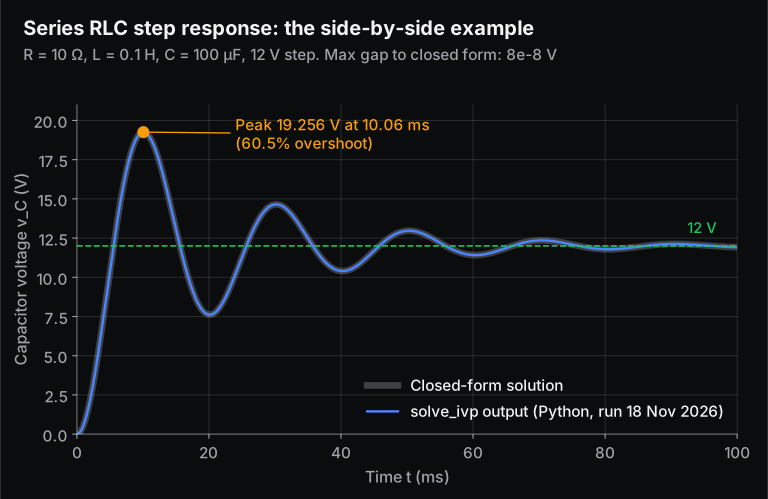
To show how close the languages are, here is one small problem written both ways. A series RLC circuit (R = 10 Ω, L = 0.1 H, C = 100 µF) is switched onto a 12 V supply at t = 0, and we want the capacitor voltage. The circuit obeys:
With these values, the damping ratio is . The circuit is lightly damped, so the voltage overshoots and rings before settling at 12 V. Mechanical students will recognise the same equation as a spring-mass-damper.
MATLAB (this code is also valid in GNU Octave):
R = 10; L = 0.1; C = 100e-6; V = 12;            % ohm, H, F, volt
f = @(t, x) [x(2)/C; (V - R*x(2) - x(1))/L];   % x = [vC; i]
t = linspace(0, 0.1, 10001);                    % 0 to 100 ms, 10 us steps
opts = odeset('RelTol', 1e-8, 'AbsTol', 1e-10);
[t, x] = ode45(f, t, [0; 0], opts);
[vpk, k] = max(x(:, 1));                        % indices start at 1
fprintf('Peak vC = %.3f V at t = %.2f ms\n', vpk, 1e3*t(k));
plot(1e3*t, x(:, 1)); xlabel('t (ms)'); ylabel('v_C (V)'); grid on
Python (NumPy, SciPy, Matplotlib):
import numpy as np
from scipy.integrate import solve_ivp
import matplotlib.pyplot as plt

R, L, C, V = 10, 0.1, 100e-6, 12                 # ohm, H, F, volt
f = lambda t, x: [x[1]/C, (V - R*x[1] - x[0])/L]  # x = [vC, i]
t = np.linspace(0, 0.1, 10001)                   # 0 to 100 ms, 10 us steps
sol = solve_ivp(f, (0, 0.1), [0, 0], t_eval=t, rtol=1e-8, atol=1e-10)
k = np.argmax(sol.y[0])                          # indices start at 0
print(f"Peak vC = {sol.y[0][k]:.3f} V at t = {1e3*sol.t[k]:.2f} ms")
plt.plot(1e3*sol.t, sol.y[0]); plt.xlabel("t (ms)"); plt.ylabel("v_C (V)"); plt.grid(True)
plt.show()
Output of the Python version (run on 18 Nov 2026 with the versions listed in the table above):
Peak vC = 19.256 V at t = 10.06 msPlease read what we did and did not run. GNU Octave was not installed on the machine that built this post, and we have no MATLAB licence there. So only the Python version was executed. We checked its result against the closed-form solution:
- The largest difference over all 10,001 points was 8 × 10⁻⁸ V.
- The theoretical peak is 19.256 V at 10.061 ms, which is a 60.5% overshoot.
The MATLAB/Octave version uses the same method: MathWorks documents ode45 as "based on an explicit Runge-Kutta (4,5) formula, the Dormand-Prince pair", and SciPy's default RK45 cites the same Dormand-Prince paper. It also uses the same tolerances and output grid, so it should print the same line. If you have MATLAB Online (basic), paste it in and check.
The two listings show the differences that catch people out:
- Indexing: MATLAB counts from 1 (
x(:, 1)), while Python counts from 0 (sol.y[0]). - Brackets: MATLAB uses round brackets for indexing; Python uses square brackets.
- The
*operator: in MATLAB,*means matrix multiplication. In NumPy,*multiplies element by element, and@is matrix multiplication.
The NumPy documentation's "NumPy for MATLAB users" page covers all of these differences.
How compatible are Octave, Python and Scilab with MATLAB?
Octave is compatible enough to run most plain MATLAB scripts. Python and Scilab need a rewrite. None of the three opens Simulink .slx models, and none matches MATLAB's specialised toolboxes one for one.
Here is how they compare on the things students actually hit:
| Need | GNU Octave | Python (NumPy/SciPy) | Scilab |
|---|---|---|---|
Run a MATLAB .m script as is | Usually: core syntax and common functions match | No: rewrite (similar logic) | No: convert with the bundled mfile2sci tool, then fix by hand |
Open Simulink .slx models | No (Octave has no Simulink support) | No | No; build an equivalent model in Xcos |
| Block-diagram simulation | No | No built-in tool | Yes: Xcos (mechanical, hydraulic, control models) |
| Toolboxes | Community packages (signal, optim and others) that may not match MATLAB's interface | Separate open-source libraries, with their own APIs | ATOMS toolboxes |
Load .mat files | Yes, but not MATLAB's -v7.3 HDF5 files | scipy.io.loadmat reads v4, v6 and v7 to 7.2; v7.3 needs a separate HDF5 library | loadmatfile reads MATLAB binary files |
| Speed of plain loops | Slower: no fully working JIT compiler, so vectorise | Vectorise with NumPy arrays rather than looping | Not tested here |
Classes (classdef) | Partly supported | Python classes (different syntax) | Different system |
The Octave rows come from the Octave project's own "Differences between Octave and Matlab" page. That page also lists Octave-only syntax that MATLAB will reject: # comments, != and ++. If you share code with MATLAB users, stick to % comments and ~=.
The honest summary: for numerical methods, signals, plotting and most lab sheets, the free tools are enough. For Simulink, Stateflow and automotive model-based design, they are not: no free tool opens or runs those models. That is where a college licence, the trial or the Student Suite earns its cost. Our posts on how MATLAB is used in electrical engineering, whether MATLAB is useful to mechanical engineers and the difference between Simulink and MATLAB show where each fits.
Why not just use a cracked copy of MATLAB?
Because it breaks MathWorks' licence terms, and it isn't worth it when free routes exist. The legal free routes above cover most students. A cracked install also gets no updates or support, and the services tied to a genuine licence, such as full MATLAB Online and the larger MATLAB Drive, need a real licence linked to your account. We don't give or link to any cracking instructions.
How can I learn MATLAB for free?
Start with MathWorks' MATLAB Onramp, a free self-paced course of about 2 hours that runs in the browser and doesn't count towards the 20-hour basic limit. Then practise on MATLAB Online (basic) or Octave, using problems from your own subjects.
Skill-Lync's free lessons are another option. The MATLAB Basics free lessons on Grow are the first 3 of the course's 27 lessons, and you can watch them without paying. If you want a structured course with projects and mentor support, compare Skill-Lync's MATLAB and Simulink courses. They range from MATLAB Basics and MATLAB and Simulink Basics to MATLAB for Mechanical Engineers. For where these skills lead after college, see MATLAB career paths in India. To get help choosing, talk to a Skill-Lync counsellor.
Frequently asked questions
Is MATLAB Online free for students?
Yes, in two ways. MATLAB Online (basic) is free for everyone, with 20 hours a month, 10 products and 5 GB of storage. If your college has a Campus-Wide licence, you get the full MATLAB Online free when you link your college email, with unlimited hours and 20 GB of storage. MathWorks' limits were checked on 18 Nov 2026.
Is the MATLAB student licence permanent?
No. In India, MathWorks sells the MATLAB and Simulink Student Suite only as an annual licence. It costs USD 49 for 12 months of use with updates included. When the year ends, you renew it or stop using it. Your files remain yours, and MATLAB Online (basic) stays free with its 20-hour monthly limit.
Can I install MATLAB Student on two laptops?
No. MathWorks Support says MATLAB Student and Home are permitted on one computer. You can move the licence by deactivating it on the old machine, either from inside MATLAB or from the License Center if the old laptop no longer works, and then activating it on the new one. A Campus-Wide licence is more generous and covers any device.
Does the Student Suite include Simulink and Stateflow?
It includes Simulink, Simscape and Simscape Electrical, but not Stateflow. Stateflow is a USD 13 add-on (about ₹1,220), as are Simscape Multibody, Driveline and Fluids. Embedded Coder, AUTOSAR Blockset, Powertrain Blockset and Simscape Battery were not in the student store list on 18 Nov 2026.
Can I use GNU Octave instead of MATLAB for college lab work?
For most numerical lab sheets, yes. Octave runs MATLAB-style scripts with few changes and is free under the GPL. Check first whether your lab needs Simulink, a specific toolbox or MATLAB's newer -v7.3 data files, because Octave doesn't support those. Avoid Octave-only syntax if your examiner runs MATLAB.
Sources and further reading
- MathWorks, MATLAB for Students (Campus-Wide access with a student email; what the Student Suite includes). Accessed 18 Nov 2026.
- MathWorks, MATLAB Pricing and Licensing, India (Student USD 49 annual, Home USD 69 annual, Standard ₹84,250 a year or ₹2,11,000 perpetual, all excluding tax). Accessed 18 Nov 2026.
- MathWorks Store, New Annual License: MATLAB and Simulink Student Suite (suite contents; 60 add-ons at USD 13). Accessed 18 Nov 2026.
- MathWorks, MATLAB Online Versions (basic tier: 20 hours a month, products, 5 GB, 15-minute limits; FAQ). Accessed 18 Nov 2026.
- MathWorks, MATLAB Online (storage, compute). Accessed 18 Nov 2026.
- MathWorks, Try MATLAB, Simulink, and More for Free (30-day trial). Accessed 18 Nov 2026.
- MathWorks, MATLAB Home (personal use only). Accessed 18 Nov 2026.
- MathWorks Support Team, How do I transfer a Student or Home license to a new computer? (one computer; deactivation), edited 28 May 2026.
- MathWorks India, Campus-Wide Credentialing (82 institutions listed on 18 Nov 2026) and Campus-Wide access eligibility. Accessed 18 Nov 2026.
- MathWorks, MATLAB and Simulink access for IIT Kanpur (example portal page), and IIT Kanpur Computer Centre, MATLAB Campus-Wide License at IIT Kanpur. Accessed 18 Nov 2026.
- MathWorks, R2026b Release Highlights. Accessed 18 Nov 2026.
- MathWorks, MATLAB Onramp (about 2 hours, self-paced). Accessed 18 Nov 2026.
- PIB (Office of the Principal Scientific Adviser), MATLAB on I-STEM National Portal Launched, 30 Mar 2022; I-STEM, Approved users utilising software through I-STEM (last updated 17 Feb 2025).
- FBIL, Reference rates (INR 93.8579 per USD, 9 Nov 2026). Accessed 18 Nov 2026.
- GNU Octave, News (Octave 11.3.0, 1 Jun 2026; GPL) and Octave wiki, Differences between Octave and Matlab. Accessed 18 Nov 2026.
- Scilab, Scilab 2027.0.0 (15 Oct 2026, GPL v2.0), Xcos and mfile2sci. Accessed 18 Nov 2026.
- MathWorks, ode45 documentation (Dormand-Prince pair); SciPy, solve_ivp and loadmat; Scilab, loadmatfile. Accessed 18 Nov 2026.
- NumPy, NumPy for MATLAB users; numpy.org and scipy.org (BSD licences). Accessed 18 Nov 2026.