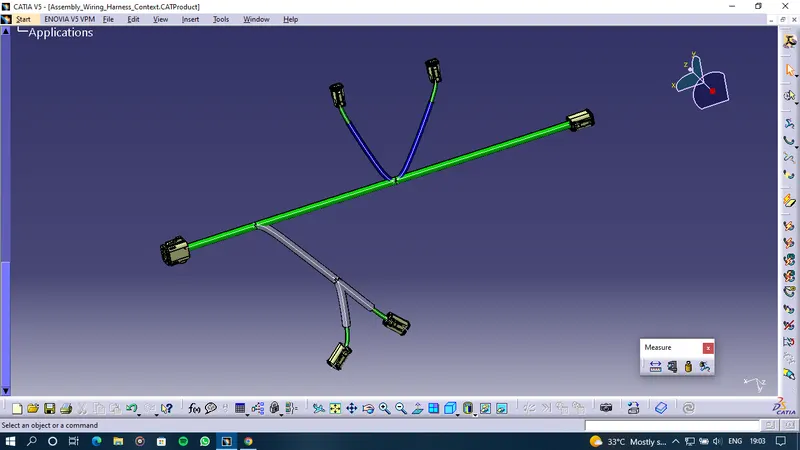
Wiring harness design in CATIA V5 - 3D modeling Week 4 Challenge
The assumption made for harness bundle diameters are:-
Main branch = 10mm diameter
Sub-branches = 05mm diameter
To create the following harness firstly created a product assembly file named" Assembly_Wiring_Harness_Context" and also created sub product file as "Assembly_Geometrical_Bundle" in which the wiring harness routing is done.
- Firstly Imported all required connectors in the harness assembly and made sure that all the components should be electrically defined. Following are the connectors used in this harness assembly:-
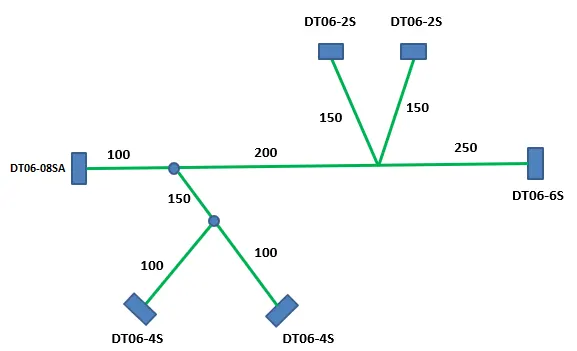
- DT06-4S (2x)
- DT06-6S
- DT06-2S (2x)
- DT06-08SA
- Then Use the Multi Brancheable document to join two connectors.
- Created the Main branch connecting the DT06-6S and DT06-08SA connectors.
- Maintained the distance as mentioned in the figure below. Similarly connected the other connectors as mentioned by the Bundle Segment command and used Add Branch point command to create the bundle segments in the following image.
- Then added the Protective covering on all branches connected to DT06-2S & DT06-4S connectors. Keep end extremity at 30mm (from connectors end) in which DT06-2S has COT_15mm corrugated tube whereas DT06-4S has PVC tape covering
TOP VIEW
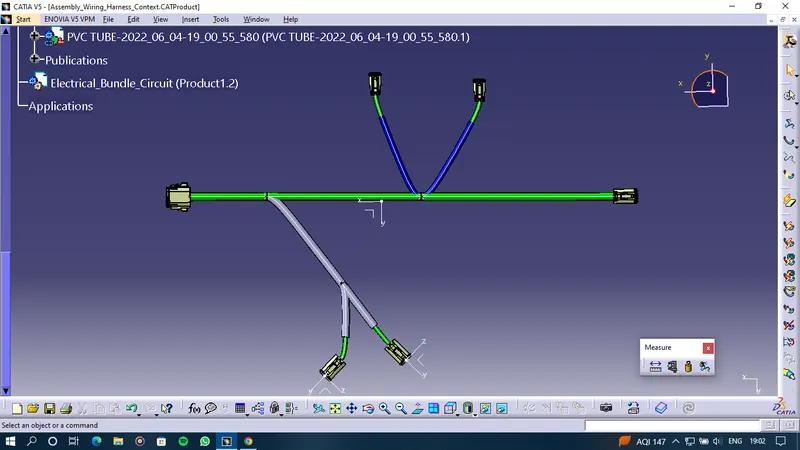
ISO VIEW