Auto Reflect Macro Creation
Aim
Create a macro that will reflect given multicomponent FE part with ease which should be independent of deck and the Only inputs required are, original CAD comp, reflected CAD comp and original FE comps.And also we need name of the reflect component should also be taken as input from the user. Also ask the user to suffix the name with an “_” by displaying a help string.
OBJECTIVE
We know that the reflection in the hypermesh by thamanual process will only refelect the entity and stored in the current collector itself.And we need the reflected entities to be shown in the a newly created collector having the name to identify the orginal coomponenet and the reflected entity.But in industry the components taken for work is quite huge and so it will be having a lot of parts in it.And we need to taken many times the reflection of these entire parts like in the case of the symmetric objects like the automobiles.So everytime reflecting and manually organize it to the newly formed collelctor is very tedious task.Also now the industries prefer the method of creating the reflected side and then delete the other side and then save that reflected side.And again open this file in any Text editior and change the component name to the required name by using the find and replace option.Then again reimport the orginal and the saved file.This will give the refelected mesh with the reflecte entities collector.But this is also make the job tedious and the component number increases this is also very complex.So a robust macro is need to automatically acoomadate the reflected parts with the name and the thickness of the components should be assigned by the code itself and the code must be independant of the deck we are using .
TCL CODE EXPLANATION
proc nastran { name t } {

*createentity comps includeid=0 name=$name
*createmark comps 1 $name
set compid [ hm_getmark comps 1 ]
*createentity props cardimage=PSHELL includeid=0 name=$name
*createmark props 2 $name
set propid [ hm_getmark props 2 ]
*setvalue props id=$propid STATUS=1 95=$t
*setvalue comps id=$compid propertyid={props $propid}
*autocolor comps
}


proc radioss { name t } {

*createentity comps cardimage=Part includeid=0 name= $name
*createmark comps 1 $name
set compid [hm_getmark comps 1 ]
*createentity props cardimage=P1_SHELL includeid=0 name=$name
*createmark props 1 $name
set propid [hm_getmark props 1 ]
*setvalue props id=$propid STATUS=1 431=$t
*setvalue comps id=$compid propertyid={props $propid}
*autocolor props

}


proc Reflect {} {

#inputs
*clearmarkall 1 ; *clearmarkall 2
set name [hm_getstring Component_name "Enter the name of the component followed by _"]
*createmarkpanel comps 1 "select the component containing orginal geometry to be reflected"
set o_gom [hm_getmark comps 1 ]
*createmarkpanel comps 1 " Select the componenet containing the target geometry "
set t_gom [ hm_getmark comps 1]
*createmarkpanel comps 1 " Select the component having the Fe entities that you want to reflect "
set o_fea [ hm_getmark comps 1 ]
set profile [ hm_info templatetype ]

foreach i $o_fea {
set t [hm_getthickness comps $i ]
set old_n [ hm_entityinfo name comps $i ]
set n $name$t
$profile $n $t
*createmark elements 1 $old_n
*copymark elements 1 $n
*displaycollectorwithfilter components "off" "$old_n" 1 0

}

*createmark comps 2 "displayed"
*autocolorwithmark components 2

#creating centroids

*clearmarkall 1 ; *clearmarkall 2
*createmark surfaces 1 "by collector" $o_gom
set o_cog [hm_getcentroid surfaces 1 ]

*createnode [lindex $o_cog 0] [lindex $o_cog 1] [lindex $o_cog 2] 0

*createmark node 2 -1
set o_node [hm_getmark node 2]

*createmark surfaces 1 "by collector" $t_gom
set t_cog [hm_getcentroid surfaces 1]
*createnode [lindex $t_cog 0] [lindex $t_cog 1] [lindex $t_cog 2] 0
*createmark node 2 -1

set t_node [hm_getmark node 2]

#creating intercepts

set intercepts [ hm_getdistance nodes $o_node $t_node 0 ]
*clearmarkall 1 ;

*createnodesbetweennodes $o_node $t_node 1
*createmark node 1 -1
set m_node [hm_getmark node 1]
set m_node_info [ hm_nodevalue $m_node]


#reflecting the entities

*clearmarkall 1 ; *clearmarkall 2
*createmark elements 1 "displayed"
*createplane 1 [lindex $intercepts 1] [lindex $intercepts 2] [lindex $intercepts 3] [lindex $m_node_info 0 0] [lindex $m_node_info 0 1] [lindex $m_node_info 0 2]

*reflectmarkwithoption elements 1 1 0

#equivalence

*clearmarkall 1 ; *clearmarkall 2
*createmark component 1 "displayed"
*equivalence components 1 0.01 1 0 0
}

puts [ Reflect ]
proc optistruct { name t } {
- *createentity comps includeid=0 name=$name$t
*createmark comps 1 $name
set compid [ hm_getmark comps 1 ]
*createentity props cardimage=PSHELL includeid=0 name=$name$t
*createmark props 2 $name
set propid [ hm_getmark props 2 ]
*setvalue props id=$propid STATUS=1 95=$t
*setvalue comps id=$compid propertyid={props $propid} - }
puts [ optistruct $n $t ]
}
assigning of the property to the component.
To get to know about the commands required to done this. We need to do the process we need to do in the hypermesh itself after clearing the command.tcl file.once after doing the process we get the code executed by the hypermesh to do the process.After removing the unnecessary lines in the code , We get the commands to create the procedure.
The procedure requires two inputs like component name and the thickness which will be inputted by the user.
Inside the body
- *createentity comps includeid=0 name=$name
This is the command for creating the new component collector with the includeid as zero.And the name of the newly formed collector as the $name$t which are the inputs by the user.
- *createmark comps 1 $name$t
Then we need to get the component id of the newly formed component. For that first we create mark of that component.And then we use hm_getmark to get the component id and this will be set in the variable compid.
- *createentity props cardimage=PSHELL includeid=0 name=$name$t
similarly using the *createentity command we can create a property with the same name as the component name and with the cardimage as PSHELL ( This is the case of the optistruct solvr )
- *createmark props 2 $name
set propid [ hm_getmark props 2 ]
Like that of component we set the property id in the variabel propid using this commands.
- *setvalue props id=$propid STATUS=1 95=$t
This setvalue command is use to assign thickness to the propedrty id. 95 is the thickness attribute of the optistruct solver property card. this will be set to $t , which is the value entered by the user.
- *setvalue comps id=$compid propertyid={props $propid}
This command will set the component id and property id for the newly created component and property.
Similarly create for the Radioss as well.Then we need to proceed with the reflect procedure creation.We need a maximum of three inputs from the user which will be the source entity, target entity and the entity having the elements to reflect.
This can be ask using the *createmarkpanel command.And the name of the component supplied by the user must be followed by a _ . So this needs to be specified in the message of the Hm_getstring command.
We will be setting the target geomerty as t_gom, source geomerty as o_gom. And the orginal component having the entities to be reflected as o_gom.
set profile [ hm_info templatetype ]
hm_infotemplatetype will output the current template name we are using and we set that name into a variable called profile.
foreach i $o_fea {
set t [hm_getthickness comps $i ]
set old_n [ hm_entityinfo name comps $i ]
set n $name$t
$profile $n $t
*createmark elements 1 $old_n
*copymark elements 1 $n
*displaycollectorwithfilter components "off" "$old_n" 1 0
}
We need to do same kind of opertions on the set of components.So this requires a loop and the entities id or name will be saved in the form of list we will be using the froeach loop. And we assign the countr i value as the value of the o_gom.Then using the hm_getthickness comand we find output the thickness of the components and we save that to the variable called "t".
Using the $profile we call in the function nastran or the optistruct depends upon the solver in which the user is working.
then using the *createmark command we save the elements from the orginal components.and then using the *copymark command we copy that to the $n which we already set with the value of $name which the user will be inputted.
Then we need to switch off the components display and the orgginal elments. This is done using the *displaycollectorwithfilter command.
*createmark comps 2 "displayed"
*autocolorwithmark components 2
This is ued to the autocolouring of the components formed after the foreach loops ends.
*createmark surfaces 1 "by collector" $o_gom
set o_cog [hm_getcentroid surfaces 1 ]
This code is to mark the o_gom component by collector option and the centrod of the surface must be find out.this is reuested through the hm_getcentroid command.
And we need to create a node at the geomertic centre.This can done using the
*createnode [lindex $o_cog 0] [lindex $o_cog 1] [lindex $o_cog 2] 0
Since the o_cog is a list having the cordinates of the node at the centroid.This can be extracted using the lindex command.
*createmark node 2 -1
This negative number is to create the mark of the latest fpormed entities.
set o_node [hm_getmark node 2]
This is for getting the id of the node created at the centroid
*createmark surfaces 1 "by collector" $t_gom
set t_cog [hm_getcentroid surfaces 1]
*createnode [lindex $t_cog 0] [lindex $t_cog 1] [lindex $t_cog 2] 0
*createmark node 2 -1
set t_node [hm_getmark node 2]
Very similar thing is done for the other geometry as well.
Then we need to create the intercepts to create the vector for creating the plane for which the reflection need to be done.
*createmark elements 1 "displayed"
*createplane 1 [lindex $intercepts 1] [lindex $intercepts 2] [lindex $intercepts 3] [lindex $m_node_info 0 0] [lindex $m_node_info 0 1] [lindex $m_node_info 0 2]
*createplane command is need to create the plane with the first three set of inputs are the intrcepts in x,y,and z respectively and the other three set of inputs are the ones indicating the base node x ,y,x coordinates.
*reflectmarkwithoption elements 1 1 0
*reflectmarkwithoption command will reflects the selected entities about a plane. and the inputs in the command are mark id in which the elements are stored and the plan id which is the 1 and 1 respectively in the code.
*clearmarkall 1 ; *clearmarkall 2
*createmark component 1 "displayed"
*equivalence components 1 0.01 1 0 0
}
This is code for equivalencing the nodes as ther will be connectivity issues betwen the reflected set of entities.
Then at the end we need to call the procedure by its name. That is the code
Reflect
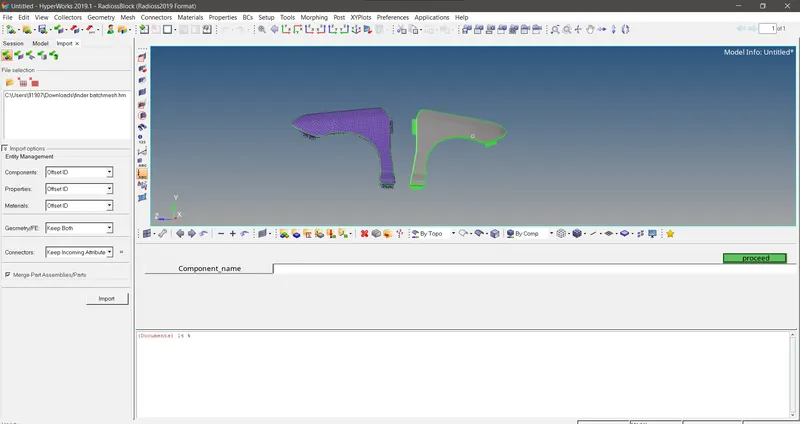
Fig 1 After the running of the script, Hm ask for the created component name
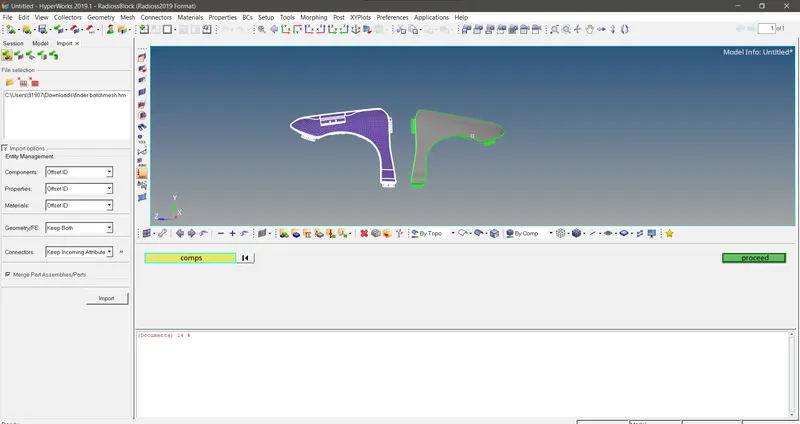
Fig 2 Hm asking for te inputs required for the code , which is the source ,target and the orginal fea component
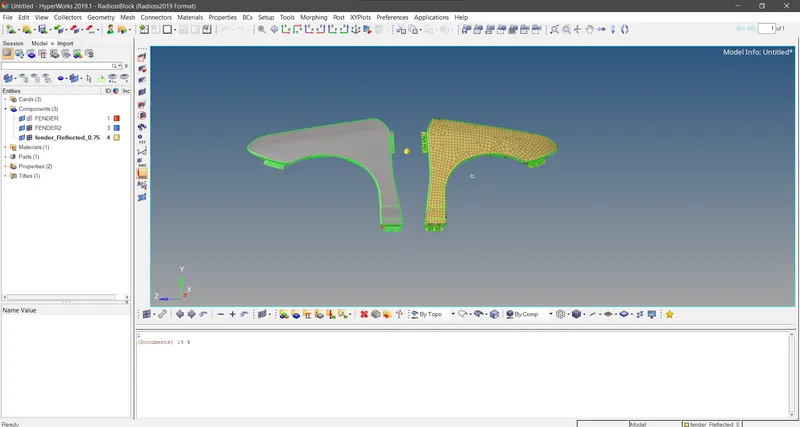
Fig 3 After the reflection happens , the component is created and the other componet display switched off and the base node of the plane is visible at the middle.
CONCLUSION
The tedious job of creating collector and organizing the elements into it is no more required as we have the macro ready to automate this procedure.Every such process which we need to do manually which are of repeated processes can be automated using the macro.That will make our life lot more easier when we do the jobs in FEA domain.Especially when it comes to the meshing the macros we built so far will helps us to do the delivery checks in quick span of time and we can make our model deck beutiful with the intellegent autoreflect macro we built here.