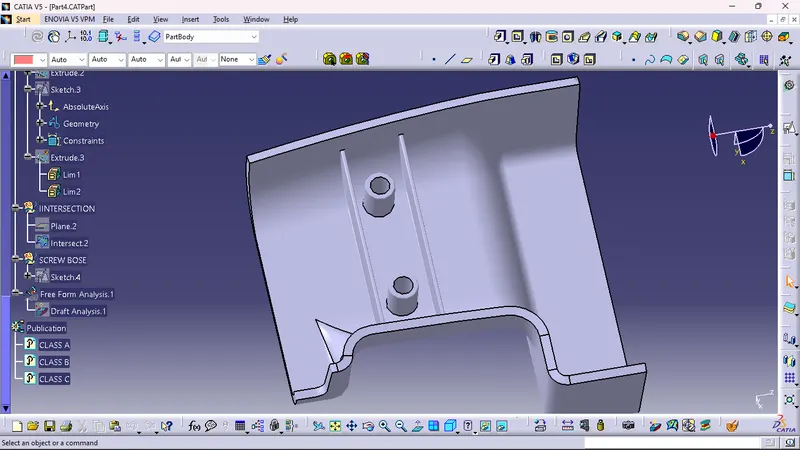
Week 9 - Attachment Feature Creation (Ribs & Screw Boss) - Challenge 1
1. FORMATION OF CLASS B SURFACE
a. first i took a point on CLASS A SURFACE in Y direction.
b. then took a line eith normal the surafce with the point and made a tooing axis.
c.offset the CLASS A SURFACE to mane a CLASS B SURFACE.
d.then extracted the edges of the fillet surface.
e. then with the hepl of multisection surface i made the fillets.
f. formed the CLASS B SURFACE.
2. FORMATION OF CLASS C SURFACE
a. took boundary of CLASS A SURFACE and used smooth curve.
b. in sweep command selected the line profile type and the subtype is with reference surface angle 87deg and the lenght is 4mm.
c. then i joined the CLASS A SURFACE with CLASS C SURFACE.(Join.2)
d. then extended the CLASS B SURFACE to get a desired lenghth so that it can trime Join.2 with CLASS B SURFACE.
e. then i selected the part body and formed the close surface
3. RIB DESIGN
a. i extracted the sutface of close body then i took a zx plane.
b. then positioned sketch , zx plane , poit 1.
c. too ka two different sketch for the different line.
d. the excrude it with the depth of 1mm and the hight of 2.5*2mm.
e. then draft angleof 0.5deg.
f. the fillets of 0.25mm
4. SCREW BOSE
a. took another sketch of zx plane and the same point.
b. made two circle of ( inner dia 5.2mm) an d outer dia (8.2mm).
c. pad the sketch of 12.5mm hight.