Week_8_Plastic Model_1
Aim - Mesh the given plastic component and make sure it passes the quality criteria given below
procedure -
1. first import the model to hypermesh
2.check the model and make sure it is geomatrically proper and has no unwanted
free edges
3.extract the midsureface for the model in geom - midsurface - extraction option - skin offset
4.click on surface - displayed and then click on midsurface
5.the midsurface is later generated later on go for preferences- quality criteria
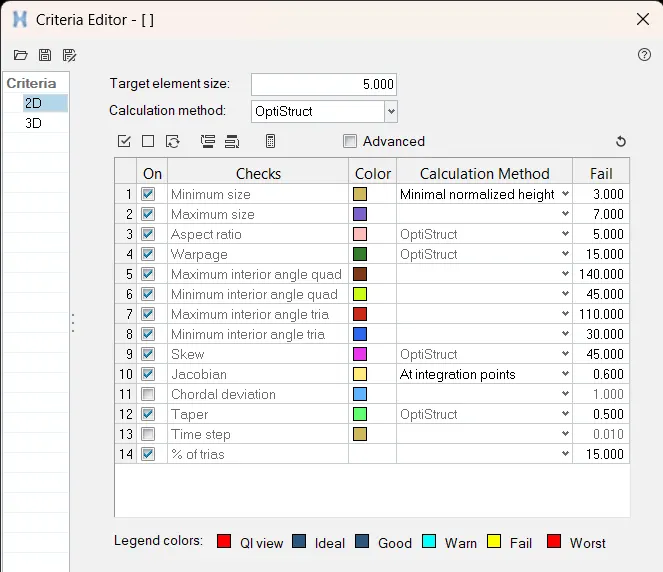
6. enter the quality criteria given in the quetion
7.later on start with the meshing on 2d -auto mesh optins
8. make sure the lines are properly toggled where necessary to extract a good mesh
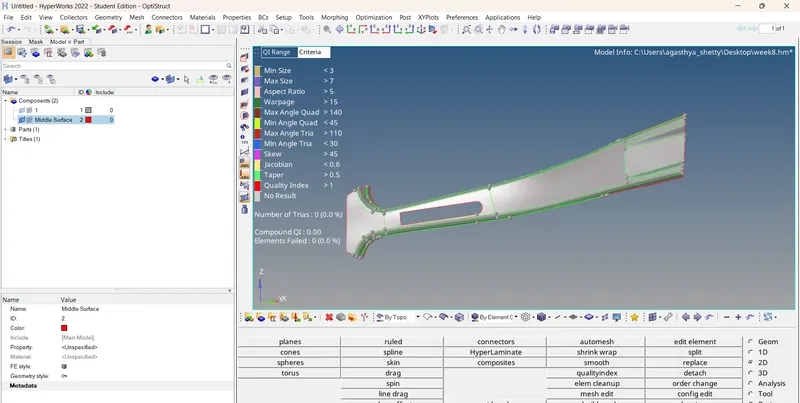
the qulity criteria ---
conclusin - we have studied the midsurafce extraction of a palstic component and on how to mesh it without failing for
the quality