Week - 8 Mass Scaling
#9 // Week - 8 Mass Scaling.
Aim: To use the mass scaling techniques in explicit and implicit to reduce the run time of the simulation and compare the runtime using the trial & error method in LS-Dyna.
Introduction-
Mass scaling- the concept of mass scaling is used to reduce the Computational time for solving a simulation by adding non-physical mass.
we can initiate mass scaling in ls dyna by CONTROL_TIMESTEP card, by means of Dt2ms and Tssfac (time step scaling factor)
Theory-
Time step size for mass-scaled solutions
DT2MS > 0
Every element must have a time step, in case of an element have a high mass it will reduce the stable time step, and those which has a less time step will increase respectively to get a balance mass.
Positive values are for quasi-static analyses or time history analyses where the inertial effects are insignificant.
DT2MS < 0
In this case, whatever element has a higher time step will not get touched, only the element where the stable time step is low, they have to be brought to the level of DT2MS, and mass is added so that the element gets that stable time step
In this case, we will add mass that is less than 8% of the model mass
TSSFAC × |DT2MS| is the minimum time step size
Permitted and mass scaling is done if and only if it is necessary to meet the Courant time step size criterion.
This option can be used in transient analyses if the mass increases remain insignificant. See also the variable MS1ST below and the *CONTROL_TERMINATION variable ENDMAS.
Time Step Scale Factor TSSFAC. During the solution, we loop through the elements and determine a new time step size by taking the minimum value over all elements:
Δtn+1 = TSSFAC × min { Δt1, Δt2,. . . , ΔtN }… where N is the number of elements.
Objective-
The Aim is to solve the given “.k” file which takes large computational time by mass scaling henceforth reducing the computational time by ensuring the stability of mass scaling
TSSFAC- timestep scale factor is the scale factor for the computed time step its default is 0.9. it does not affect mass scaling
DT2MS- it is a timestep for the mass-scaled solution. if DT2MS is negative mass is added only to those elements whose timestep is less than DT2MS, other masses are the same
if DT2MS is positive mass is added only to those elements whose timestep is less than DT2MS, mass is reduced for elements whose mass is more than DT2MS.
if stability is less, then TSSFAC is reduced.
In implicit analysis, mas scaling has no effect.
Procedure:
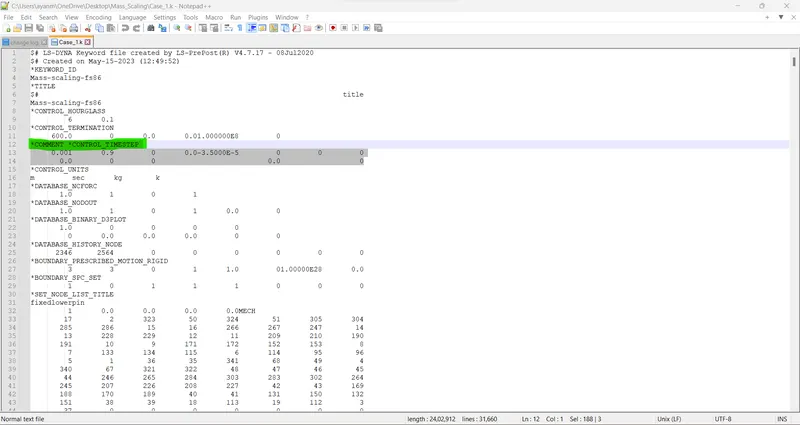
Case 1: Run the “.k” file without mass scaling i.e. without the control_timestep card.
//Note- Go to Model > Keyword > CONTROL > TIMESTEP > Comment(check) and save in '.k' file. Then run it. /
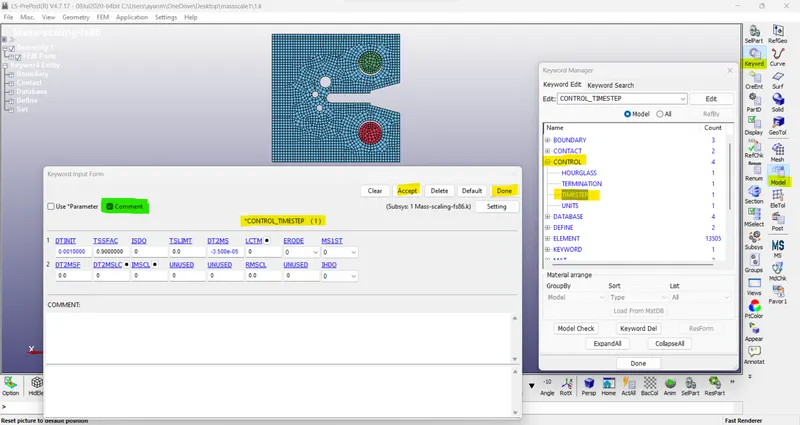
/Or, We can directly Comment on it from Notepad++
// Here we get the total estimated clock time as 34 hrs 24 mins and DT is 0.000044
/ here mass added is 0 and mass scaling= 0%
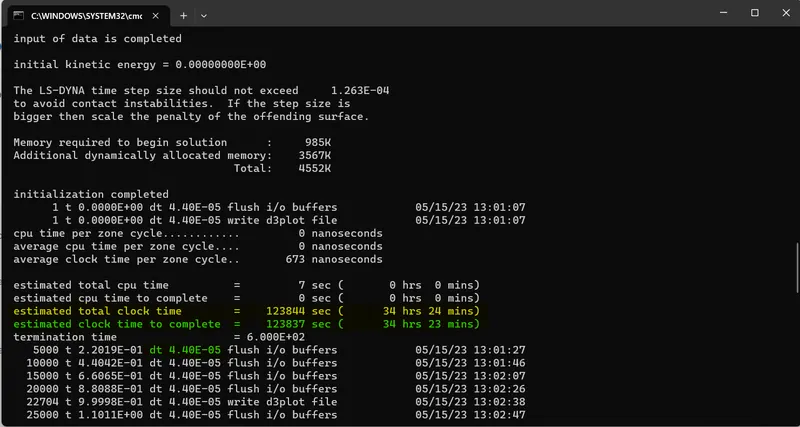
/Note- To kill the run in the command file press- ctrl+c > quit.
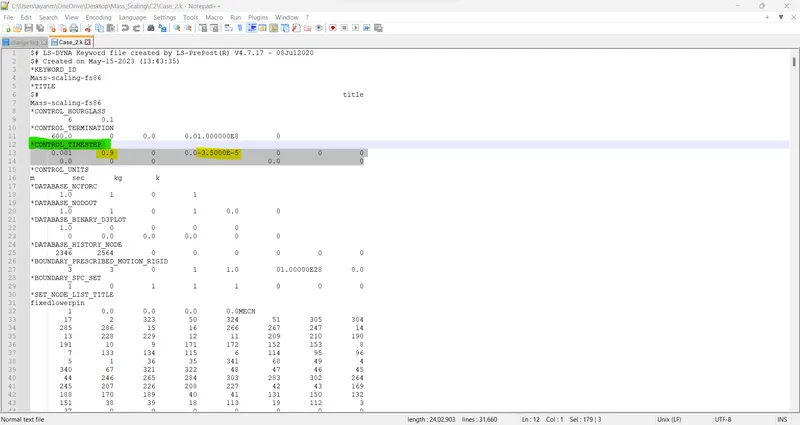
Case 2: run the simulation with mass scaling- TSSFAC= 0.9 and DT2MS= -3.5000E-5
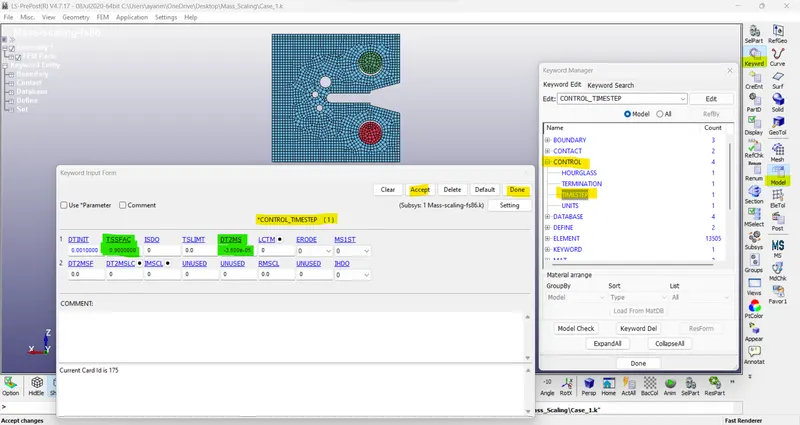
/Or, We can directly Comment on it from Notepad++
>
Total clock time= 32 hrs 40 mins
Added mass= 0
mass scaling= 0%
DT= 0.000044
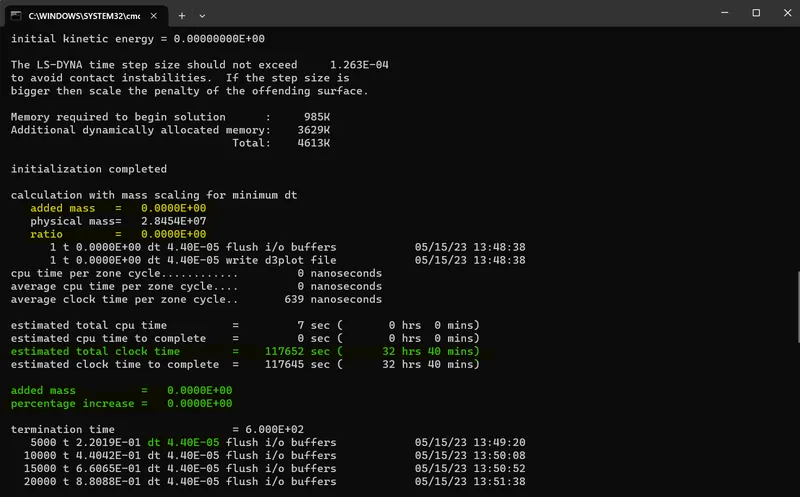
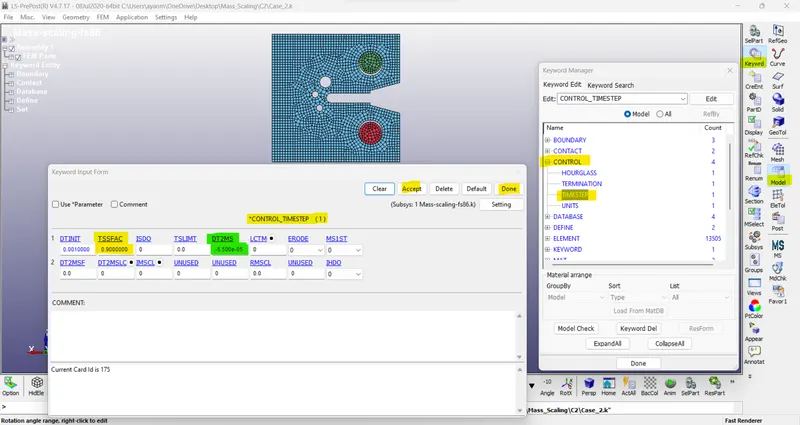
Case 3: like 2nd case, we will run the simulation with an increase in the DT2MS
TSSFAC= 0.9 & DT2MS= -5.500e-05
>
Total clock time= 31 hrs 31 mins
Added mass= 2855.2
mass scaling= 0.010034 %
DT= 0.0000495
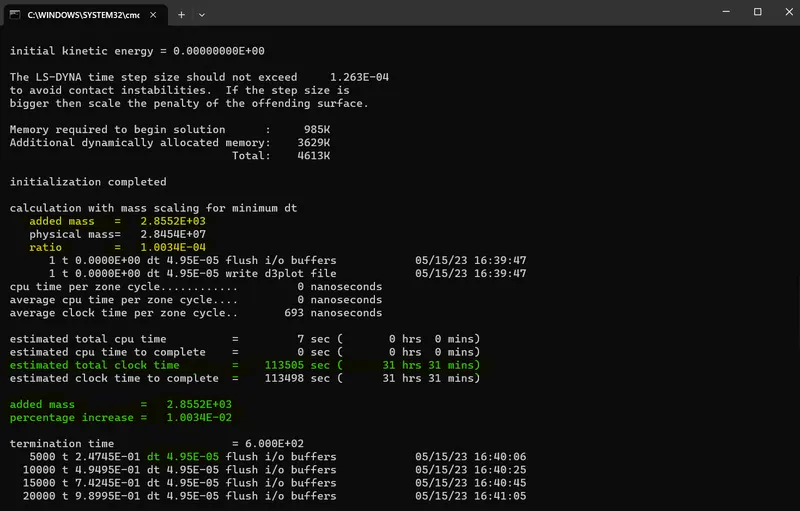
Case 4:
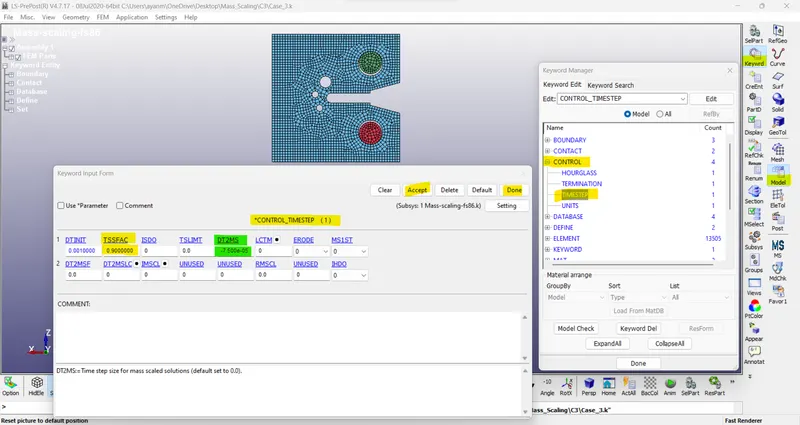
TSSFAC= 0.9 & DT2MS= -7.500e-05
>
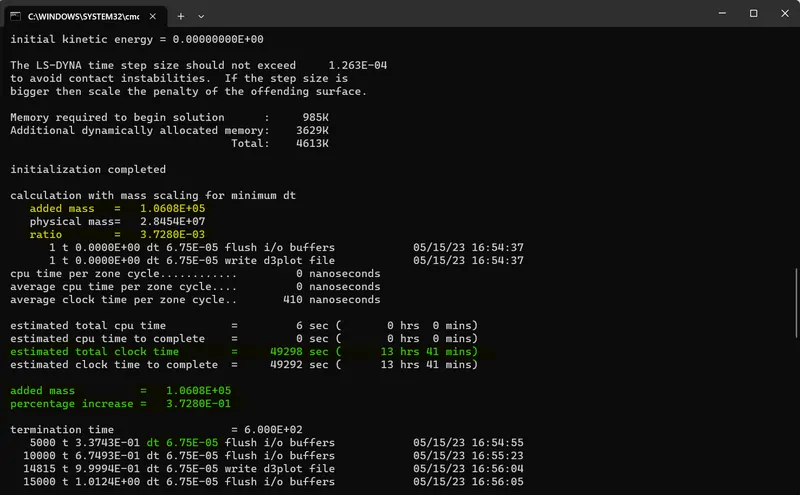
Total clock time= 13 hrs 41 mins
Added mass= 106080
mass scaling= 0.37280 %
DT= 0.0000675
Case 5:
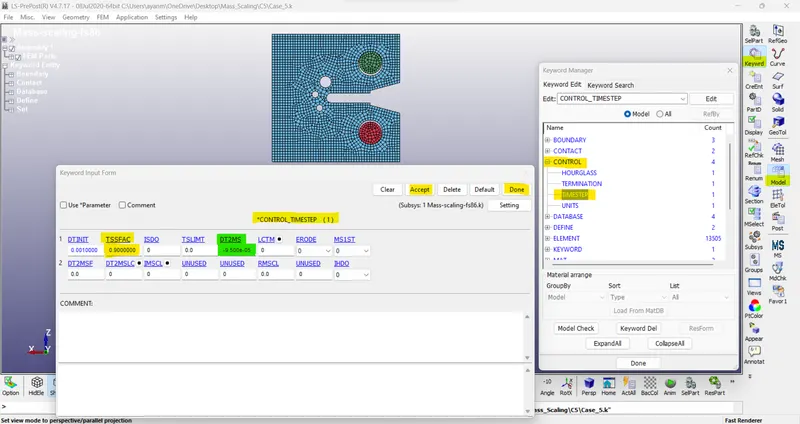
TSSFAC= 0.9 & DT2MS= -9.500e-05
>
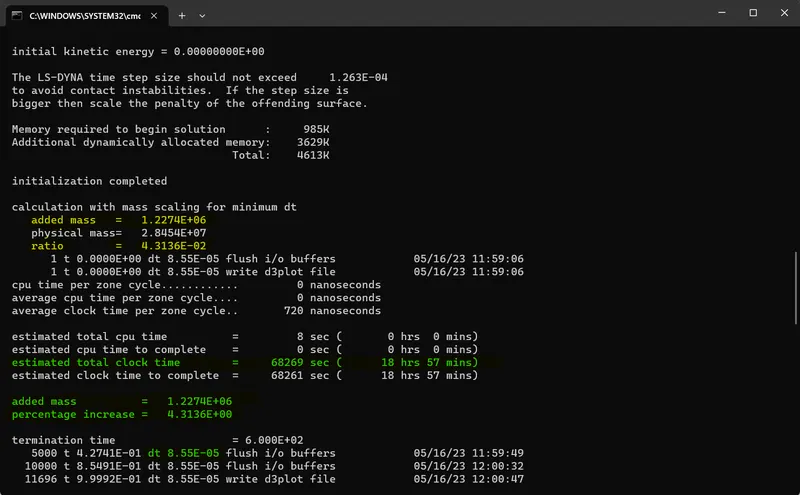
Total clock time= 18 hrs 57 mins
Added mass= 1227400
mass scaling= 4.3136 %
DT= 0.0000855
Case 6:
TSSFAC= 0.9 & DT2MS= -1.000e-04
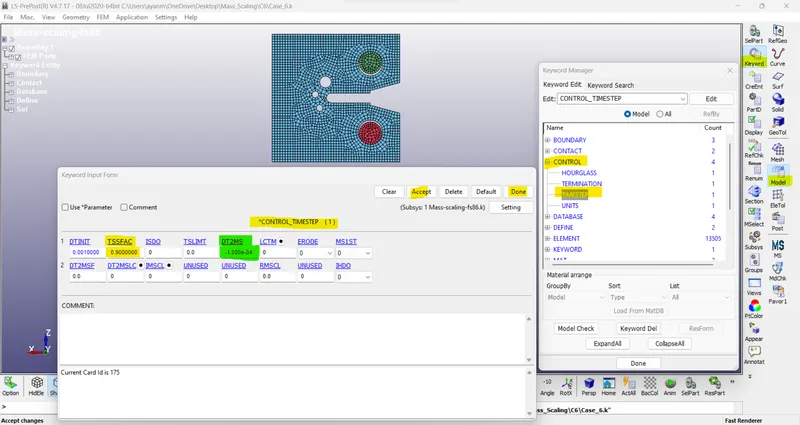
>
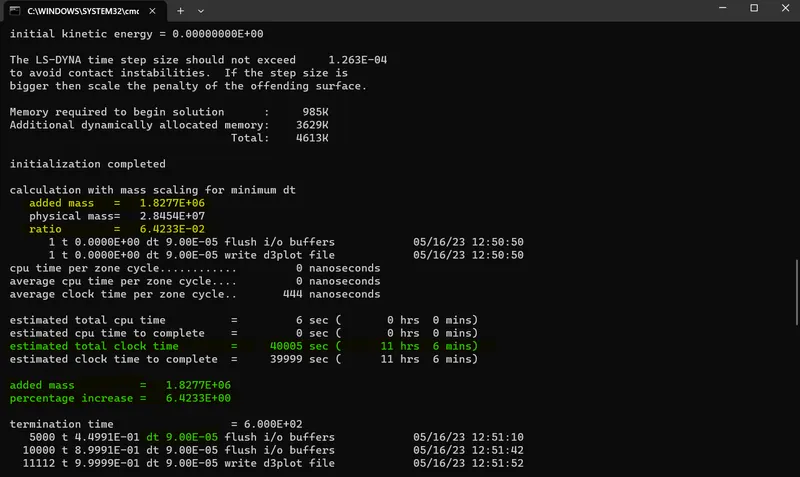
Total clock time= 11 hrs 6 mins
Added mass= 1827700
mass scaling= 6.4233 %
DT= 0.00009
Case 7:
TSSFAC= 0.9 & DT2MS= -1.015e-04
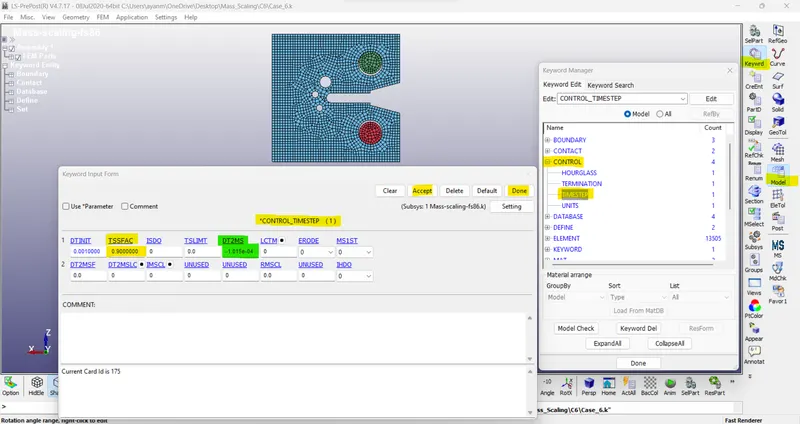
>
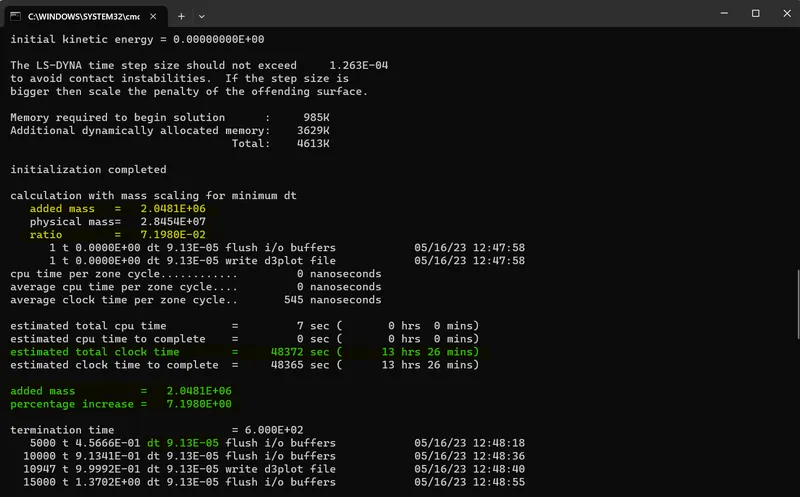
Total clock time= 13 hrs 26 mins
Added mass= 2048100
mass scaling= 7.1980 %
DT= 0.0000913
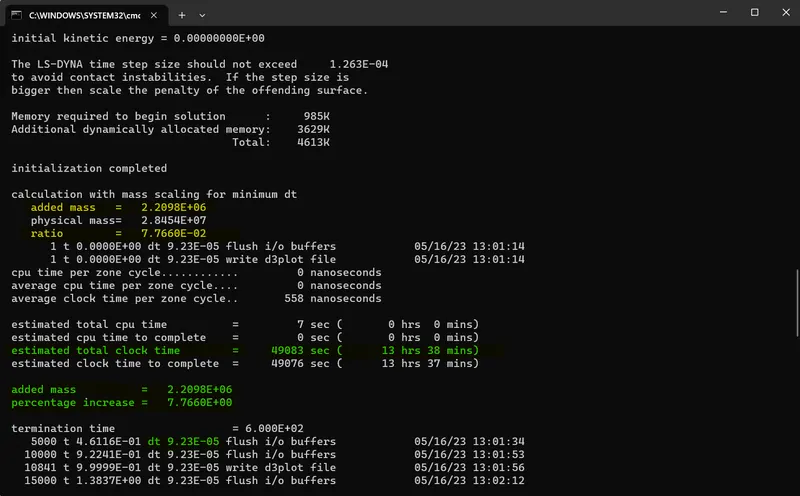
Case 8:
TSSFAC= 0.9 & DT2MS= -1.025e-04
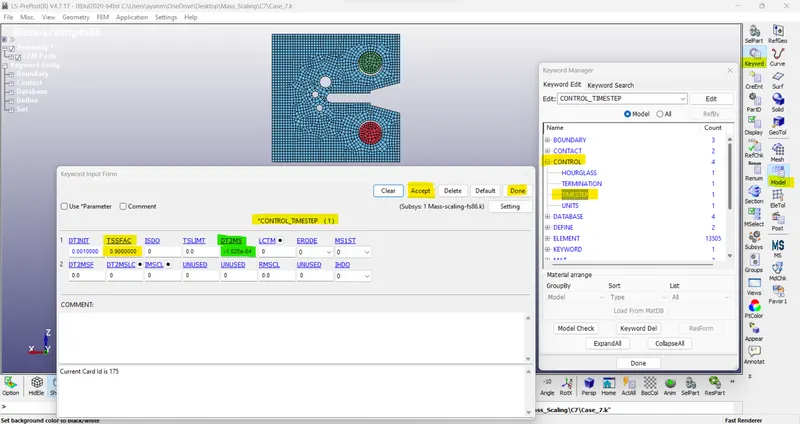
>
Total clock time= 13 hrs 38 mins
Added mass= 2209800
mass scaling= 7.7660 %
DT= 0.0000923
Case 9:
TSSFAC= 0.9 & DT2MS= -1.030e-04
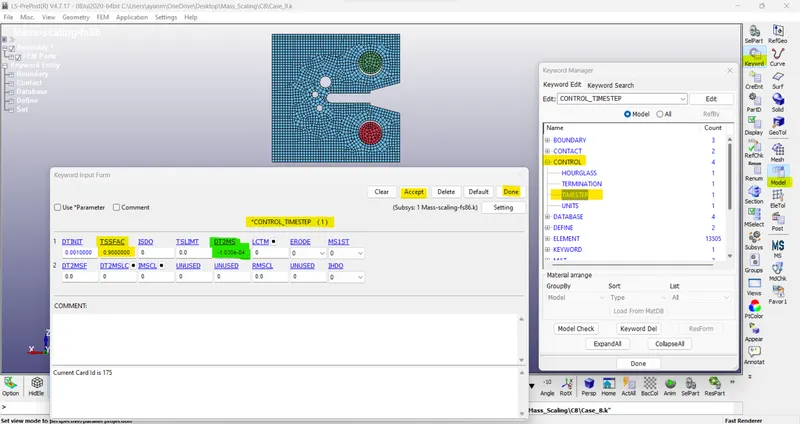
>
Total clock time= 12 hrs 25 mins
Added mass= 2295200
mass scaling= 8.0661 %
DT= 0.0000927
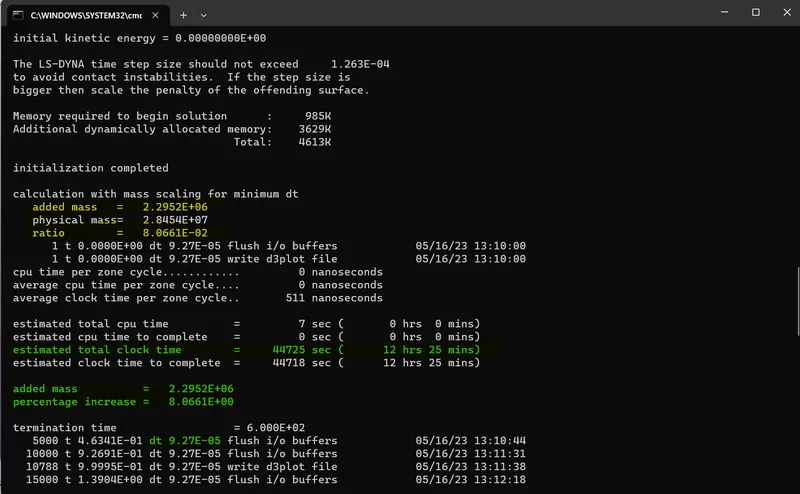
- Simulation is estimated to run for 12hrs 25mins and the percentage add-in mass is around 8%. Percentage add-in mass has reached the max.
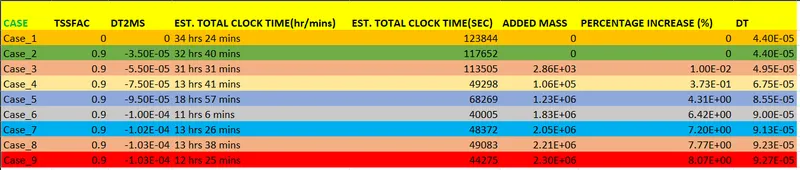
/ Histogram plot to compare the runtime with mass scaling trials. ->
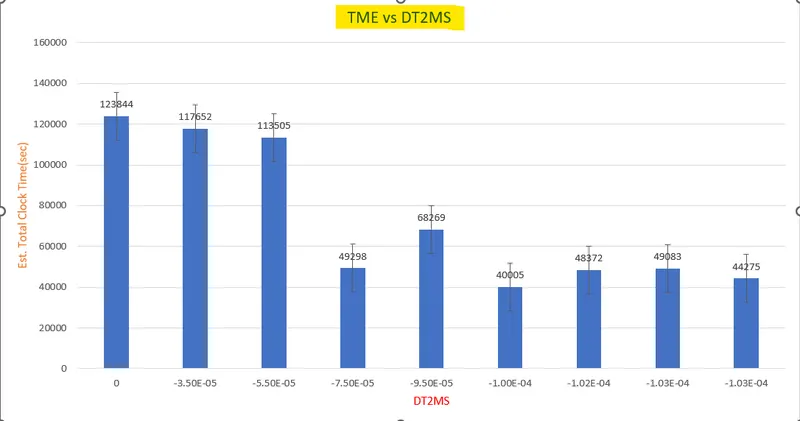 \
\
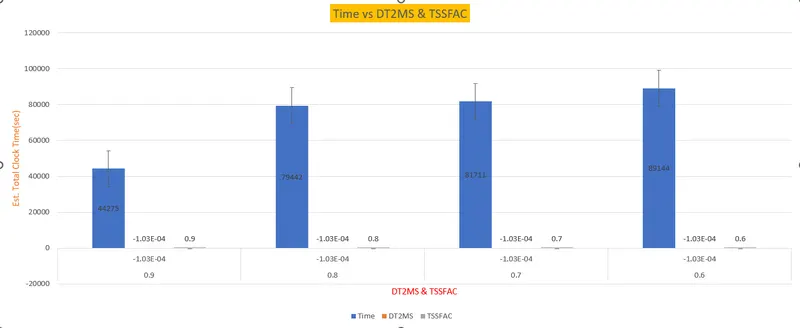
- Now we try to change the scaling factor (TSSFAC) with a DT value of -1.030e-4 to avoid instability.
Case 10:
TSSFAC= 0.8 & DT2MS= -1.030e-04
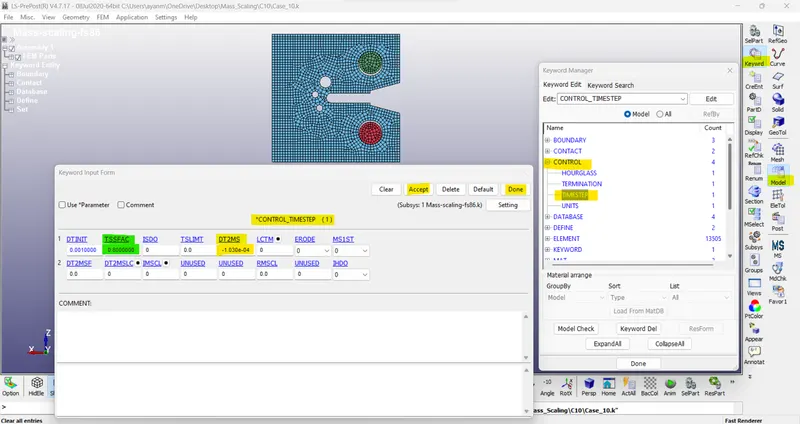
>
Total clock time= 22 hrs 4 mins
Added mass= 2295200
mass scaling= 8.0661 %
DT= 0.0000824
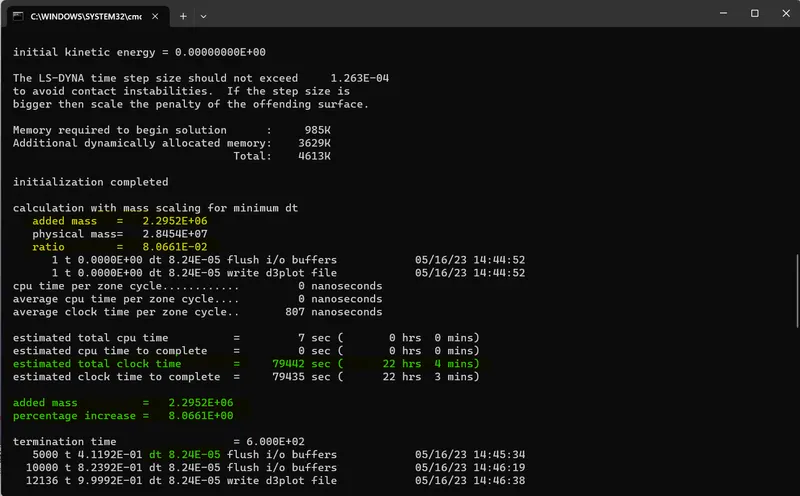
Case 11:
TSSFAC= 0.7 & DT2MS= -1.030e-04
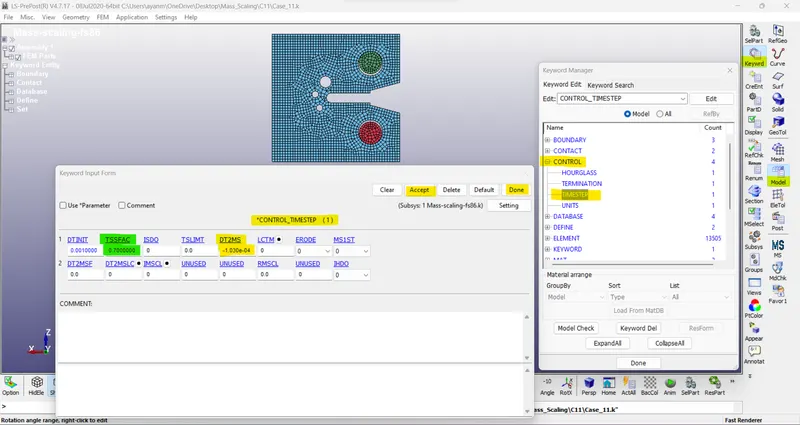
>
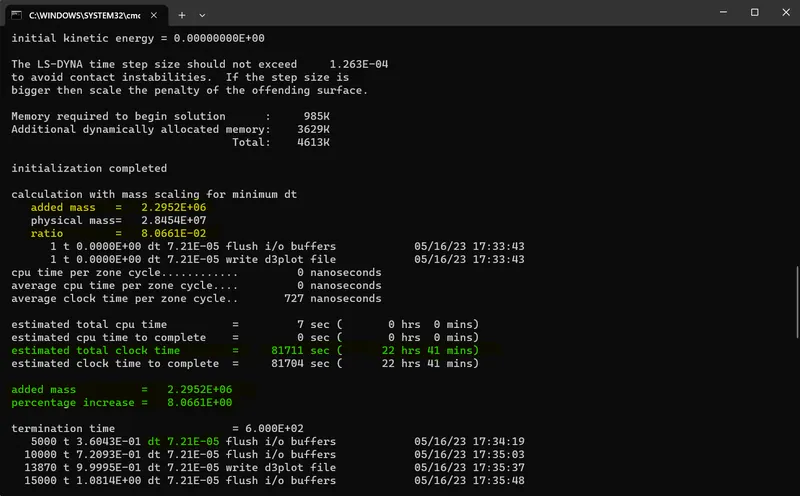
Total clock time= 22 hrs 41 mins
Added mass= 2295200
mass scaling= 8.0661 %
DT= 0.0000721
Case 12:
TSSFAC= 0.6 & DT2MS= -1.030e-04
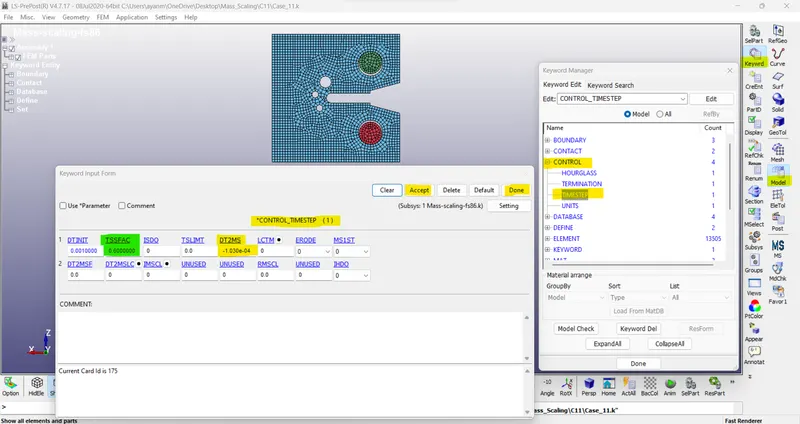
>
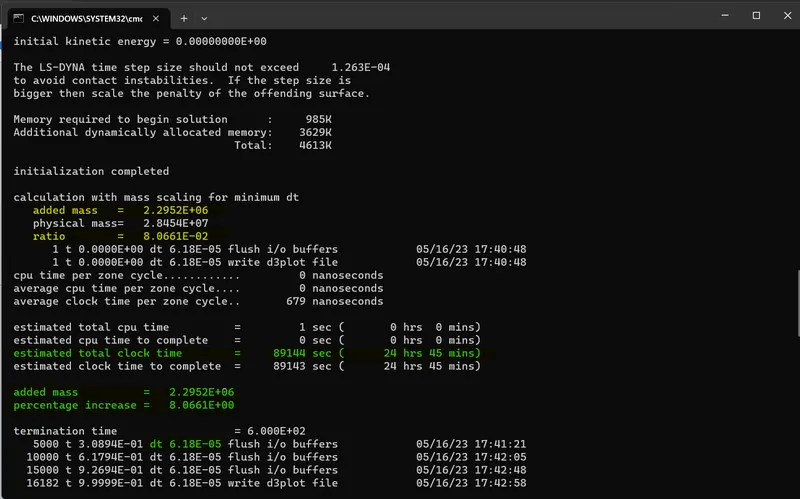
Total clock time= 24 hrs 45 mins
Added mass= 2295200
mass scaling= 8.0661 %
DT= 0.0000618
/ Histogram plot to compare the runtime with mass scaling trials. ->

Implicit simulation ->
Run the same model using an implicit solver with necessary changes and compare implicit and explicit runtime.
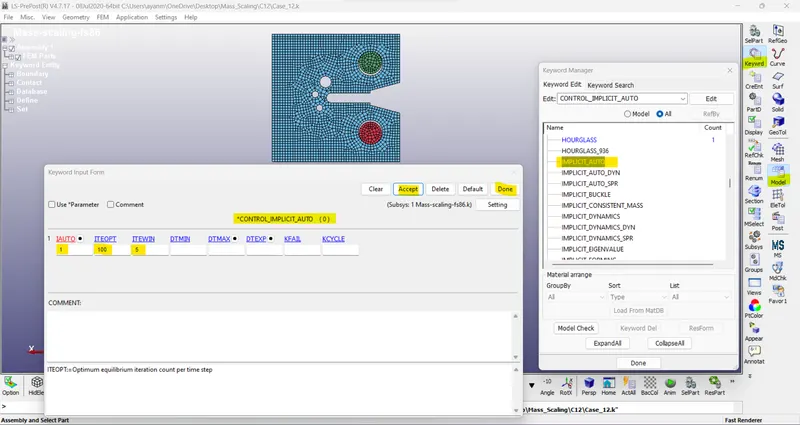
/ Model and part >> keyword manager >> all >> control >> implicit_auto
IAUTO: 1 // ITEOPT: 100 // ITEWIN: 5
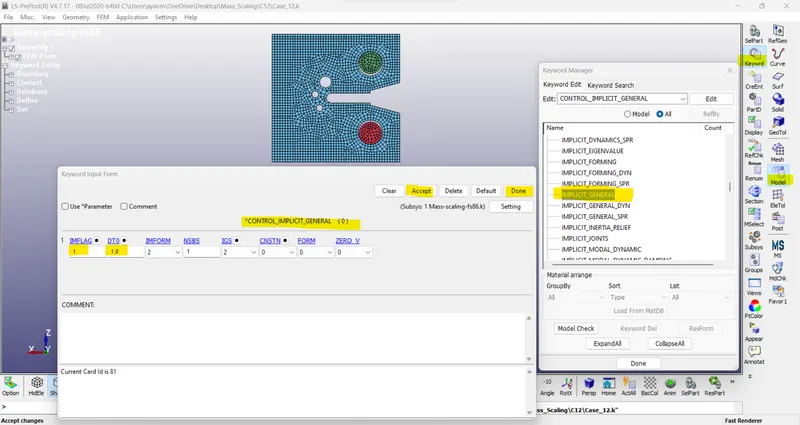
/ Model and part >> keyword manager >> all >> control >> implicit_general
IMFLAG: 1 // DT0 =Initial time step size for implicit analysis:1
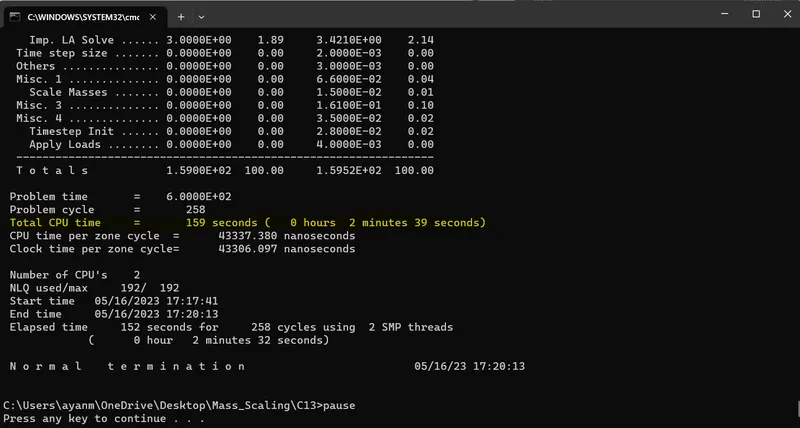
- The same file run in implicit by adding implicit_auto, implicit_general, and implicit solver cards are added.
- The implicit analysis automatically adjusts the DT and the total time taken to complete the simulation is 2 mins 39 secs.
Conclusion: The technique of mass scaling is carried out in the above simulation in explicit and implicit analysis.
The mass scaling is carried out in explicit method and observed that for a simple simulation like this, the total run time can be significantly reduced.
Drive Link - > https://drive.google.com/drive/folders/16JfBL2dESgk5qqU5bg3fC5gIHgjNWGQ1?usp=sharing
https://drive.google.com/file/d/1-rbmQk2at_qkjdb7oF7URJtde3G95T2c/view?usp=sharing, https://drive.google.com/file/d/11Sx6NLcNI3B9cSs1pSZxxKcyCJos1rnl/view?usp=sharing, https://drive.google.com/file/d/19rGltWZneh1OW0eooPOcI4JgmdV6aSVT/view?usp=sharing, https://drive.google.com/file/d/1DHnpTX-9hCooZ-IjQKpnUqPj1UqM1IuZ/view?usp=sharing, https://drive.google.com/file/d/1HBFNLaElLAwIHLX1A5aEigtNiLm3uvV2/view?usp=sharing, https://drive.google.com/file/d/1NHDS5UNI1-pRO_MwC9b7FU2XvSifiozZ/view?usp=sharing, https://drive.google.com/file/d/1Sdt1gVL7jTlR0K1QaAn3B4mw2oQ3PuZL/view?usp=sharing, https://drive.google.com/file/d/1UXJ9Exw3VodvSXLY6pOaWH4vUJJCeTGE/view?usp=sharing, https://drive.google.com/file/d/1W_VlwypNSPGqL3J359vCCM3WvieDkXS3/view?usp=sharing, https://drive.google.com/file/d/1aSDh7XjUbZNqnmsoQ3pTzqCZkHSPkvBh/view?usp=sharing, https://drive.google.com/file/d/1bYsFB-I0XNOW_JCGXphRirjchi-Aee76/view?usp=sharing, https://drive.google.com/drive/folders/1hlqB9Ehd-JL45y1Epo3Ub2Eoa2wC_Zm9?usp=sharing, https://drive.google.com/file/d/1jG1xauFSwFBrsJ2PQVe-ok6BBnRk95Uv/view?usp=sharing