Week 8 - Challenge 1 - Base Bracket Design
MAIN OBJECTIVE :
Create the Base Bracket Plastic component through the given Class-A surface. To begin with, the tooling axis for the given Class-A Surface should be created meeting the requirements of the draft angle and at the end perform the Draft analysis on the model.
CAT PART :
BASE BRACKET
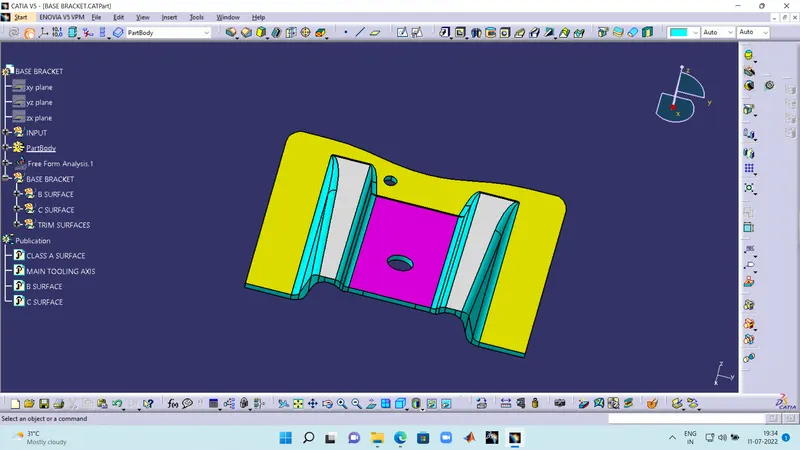
- THE TREE STRUCTURE HAS BEEN GIVEN IN THE ABOVE PICTURE.
EXPLANATION :
The class A of a cat part was given as the input. The following steps i have followed to find the tooling axis.
- I have created point in the center hole using center point in the circle option in the point command.
- After that i have created a dummy tooling axis using Z direction with with point to direction option.
- I took a plane with referance to the center point and used an intersection command to intersect the line of the class A.
- After the intersection line i took the critical faces which may intervene with tooling. And draw 2 lines from vertex at 45 degreee with refernce to the dummy axis.
- I have a created the original axis using the 45 degree lines using line to bisect command.
- After that i did a draft analysis using compass to check the draft was 3 deg or not and not popping up any deflection.
CREATING CLASS B AND CLASS C :
After draft analysis creating a new geometrical set and performing this below operations.
- In surface work bench selecting the faces of the two RIB's and performing (EXTRACT,UN-TRIM,EXTRAPOLATE) operations on the faces and acquire the outputs and offset them to 3.5.
- The same goes with the base and under base after getting a complete faces use TRIM command to get the acquire the surface after performing those give finishing touch with the edge fillet with 3+2.5 mm radius to get the final class B surface.
- Introduce a new geometrical set named CLASS C and select a boundry of CLASS A using boundary command and the 2 holes on the surface.
- After select those boundary and introduce sweep command to extrude the face upto 10 mm. And use join command to join the class A with class c.
- Use final trim to chop off the extruded part of sweep with class B face to get the final CLASS C surface (COMBINING OF CLASS A AND CLASS B).
FINAL CAT PART :
Jump into the part workbench and define in partbody and select closed surface of the class C and make it a complete solid to complete the task.
NOTE : The following catpart was given below.