Week 8 - BlockMesh Drill down challenge
Objective:
The objective of the problem is to produce mesh by using the Open FOAM software, and to show the changes in post-processing of velocity and pressure gradients by using Para View open source software for the given conditions.
Mesh Specification:
- Number of cells along the x-direction (longer dimension) = 200
- Number of cells along the y-direction = 10
- Use a graded mesh. Grading factor near all walls should be 0.2, 0.5, 0.8
Boundary Condition Specification:
Follow the dimensions to create blocks using Open Foam
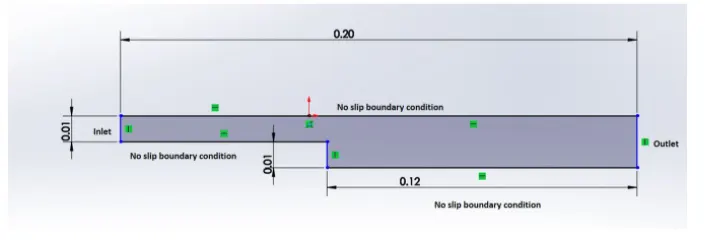
To create the geometry as shown in the figure, we need edit the blockMeshDict file that is available in the system folder of the case setup.
Geometry Creation:
Let us consider creating the geometry using 5 blocks as shown in the figure below,
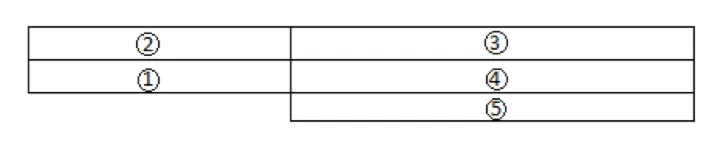
To View the Bigger Picture,
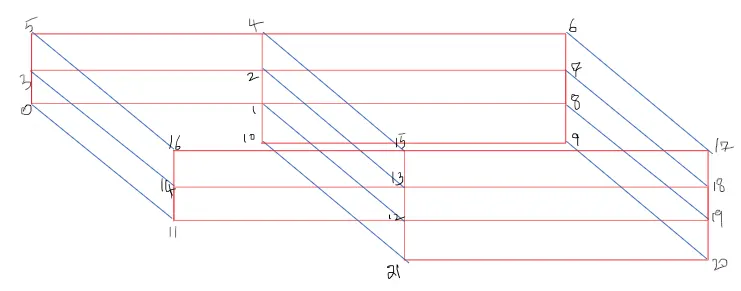
Here in this task cavity case from icoFoam solver which is part of incompressible tutorials is copied to run folder and blockMeshDict le is edited to develop a required shape in Open FOAM. After editing the blockmeshdict file block mesh command is run in case setup to generate shape in Open FOAM. Once after obtaining the required the geometry icoFoam solver is used to run the simulation, once after the running icoFoam solver. Para Foam command ran to open the Para View simulation software where the geometry is viewed with final results. Different mesh grading factor is used during the process.
The below shown code for the simple grading. we are edit this code in the blockMeshdict file located in system folder.
BlockMeshDict File
/*--------------------------------*- C++ -*----------------------------------*\
  =========                 |
  \\      /  F ield         | OpenFOAM: The Open Source CFD Toolbox
   \\    /   O peration     | Website:  https://openfoam.org
    \\  /    A nd           | Version:  7
     \\/     M anipulation  |
\*---------------------------------------------------------------------------*/
FoamFile
{
    version     2.0;
    format      ascii;
    class       dictionary;
    object      blockMeshDict;
}
// * * * * * * * * * * * * * * * * * * * * * * * * * * * * * * * * * * * * * //

convertToMeters 0.01;

vertices
(
    (0 0 0)
    (8 0 0)
    (8 0.5 0)
    (0 0.5 0)
    (8 1 0)
    (0 1 0)
    (20 1 0)
    (20 0.5 0)
    (20 0 0)
    (20 -1 0)
    (8 -1 0)
    (0 0 0.1)
    (8 0 0.1)
    (8 0.5 0.1)
    (0 0.5 0.1)
    (8 1 0.1)
    (0 1 0.1)
    (20 1 0.1)
    (20 0.5 0.1)
    (20 0 0.1)
    (20 -1 0.1)
    (8 -1 0.1)
);

blocks
(
    	hex (0 1 2 3 11 12 13 14) (200 10 1) simpleGrading (1 1 1)
	hex (3 2 4 5 14 13 15 16) (200 10 1) simpleGrading (1 1 1)
	hex (2 7 6 4 13 18 17 15) (200 10 1) simpleGrading (1 1 1)
	hex (1 8 7 2 12 19 18 13) (200 10 1) simpleGrading (1 1 1)
	hex (10 9 8 1 21 20 19 12) (200 20 1) simpleGrading (1 1 1)
);

edges
(
);

boundary
(
    inlet
    {
        type patch;
        faces
        (
            (0 11 14 3)
	    (3 14 16 5)
        );
    }
    outlet
    {
        type patch;
        faces
        (
            (9 8 19 20)
            (8 7 18 19)
	    (7 6 17 18)
        );
    }
    frontAndBack
    {
        type empty;
        faces
        (
            (0 3 2 1)
            (3 5 4 2)
            (10 1 8 9)
            (1 2 7 8)
            (2 4 6 7)
            (11 12 13 14)
            (14 13 15 16)
            (21 20 19 12)
            (12 19 18 13)
            (13 18 17 15)
        );
    }
    fixedWalls
    {
        type wall;
        faces
        (
            (5 16 15 4)
            (4 15 17 6)
	    (0 1 12 11)
	    (10 21 12 1)
	    (10 9 20 21)
        );
    }
);

mergePatchPairs
(
);

// ************************************************************************* //
ControlDict File
/*--------------------------------*- C++ -*----------------------------------*\
  =========                 |
  \\      /  F ield         | OpenFOAM: The Open Source CFD Toolbox
   \\    /   O peration     | Website:  https://openfoam.org
    \\  /    A nd           | Version:  7
     \\/     M anipulation  |
\*---------------------------------------------------------------------------*/
FoamFile
{
    version     2.0;
    format      ascii;
    class       dictionary;
    location    "system";
    object      controlDict;
}
// * * * * * * * * * * * * * * * * * * * * * * * * * * * * * * * * * * * * * //

application     icoFoam;

startFrom       startTime;

startTime       0;

stopAt          endTime;

endTime         0.5;

deltaT          0.00001;

writeControl    timeStep;

writeInterval   40;

purgeWrite      0;

writeFormat     ascii;

writePrecision  6;

writeCompression off;

timeFormat      general;

timePrecision   6;

runTimeModifiable true;


// ************************************************************************* //
Pressure Boundary Conditions
/*--------------------------------*- C++ -*----------------------------------*\
  =========                 |
  \\      /  F ield         | OpenFOAM: The Open Source CFD Toolbox
   \\    /   O peration     | Website:  https://openfoam.org
    \\  /    A nd           | Version:  7
     \\/     M anipulation  |
\*---------------------------------------------------------------------------*/
FoamFile
{
    version     2.0;
    format      ascii;
    class       volScalarField;
    object      p;
}
// * * * * * * * * * * * * * * * * * * * * * * * * * * * * * * * * * * * * * //

dimensions      [0 2 -2 0 0 0 0];

internalField   uniform 0;

boundaryField
{
    inlet
    {
        type            zeroGradient;
    }

    outlet
    {
        type            fixedValue;
	value		uniform 0;
    }

    frontAndBack
    {
        type            empty;
    }

    fixedWalls
    {
	type		zeroGradient;
    }
}

// ************************************************************************* //
Velocity Boundary Conditions
/*--------------------------------*- C++ -*----------------------------------*\
  =========                 |
  \\      /  F ield         | OpenFOAM: The Open Source CFD Toolbox
   \\    /   O peration     | Website:  https://openfoam.org
    \\  /    A nd           | Version:  7
     \\/     M anipulation  |
\*---------------------------------------------------------------------------*/
FoamFile
{
    version     2.0;
    format      ascii;
    class       volVectorField;
    object      U;
}
// * * * * * * * * * * * * * * * * * * * * * * * * * * * * * * * * * * * * * //

dimensions      [0 1 -1 0 0 0 0];

internalField   uniform (0 0 0);

boundaryField
{
    inlet
    {
        type            fixedValue;
	value		uniform (0.1 0 0);
    }

    outlet
    {
        type            zeroGradient;
    }

    frontAndBack
    {
        type            empty;
    }

    fixedWalls
    {
	type            fixedValue;
	value		uniform (0 0 0);
    }
}

// ************************************************************************* //
The pressure, velocity boundary conditions in folder 0 will remain same for all the mesh grading factor we just change the block and controldict le in the system remains also same for every mesh grading factor. If the courant number is exceeding the maximum limit then we have to change the dt value for every mesh grading factor. The starting time is zero and the end time is 0.5
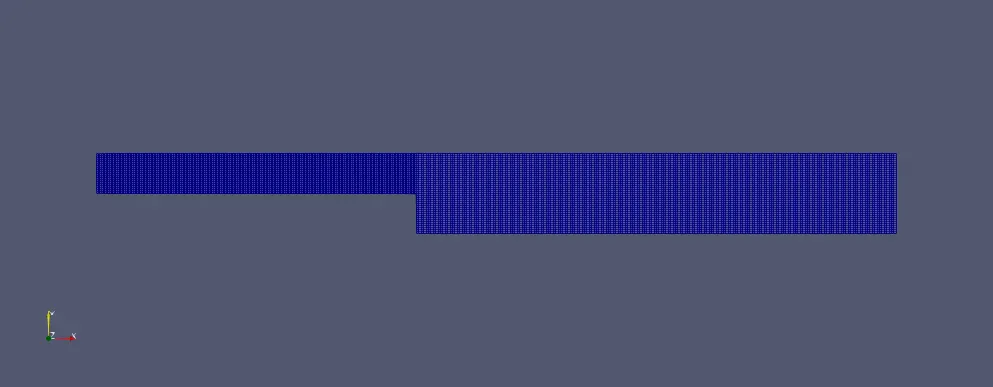
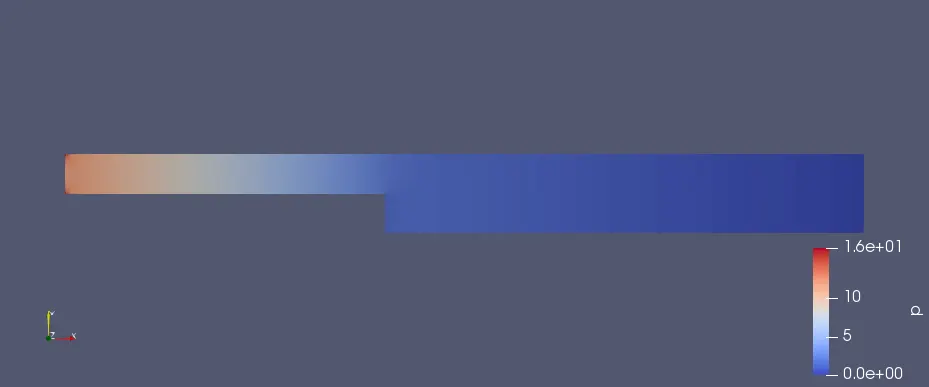
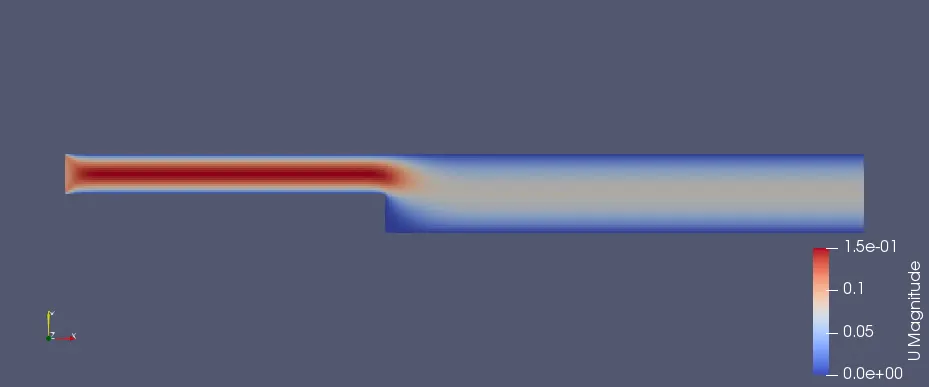
For simple Meshing grade scheme of 1:
The mesh block diagram
The Pressure Variation Diagram
The Velocity Variation Diagram
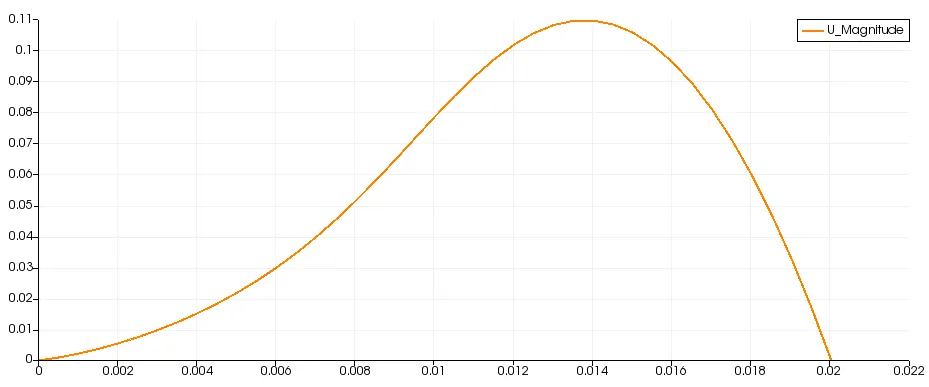
The velocity Profile:
The velocity prole at a distance of 0.085 m near the step from the inlet as shown below,
For simple Meshing grade scheme of 0.2:
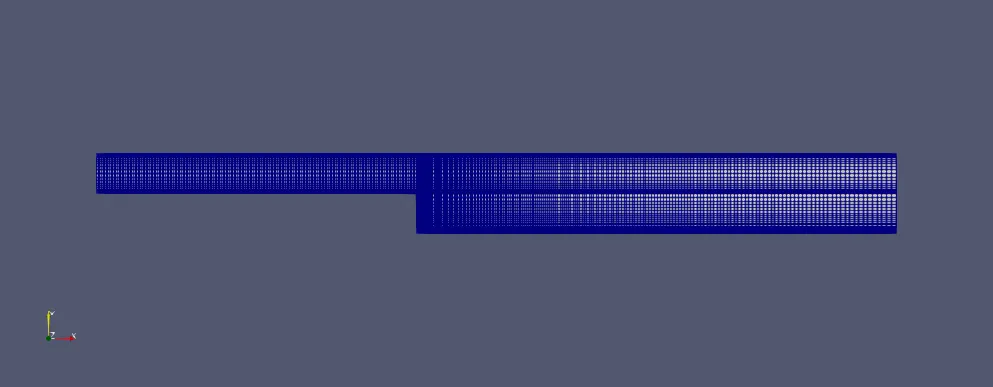
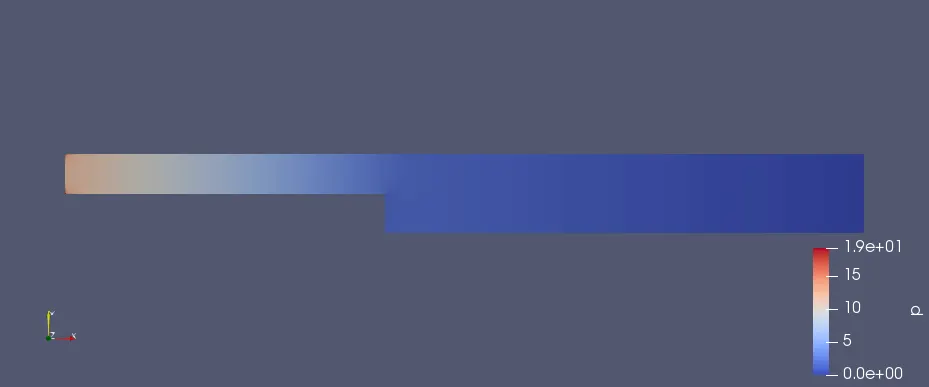
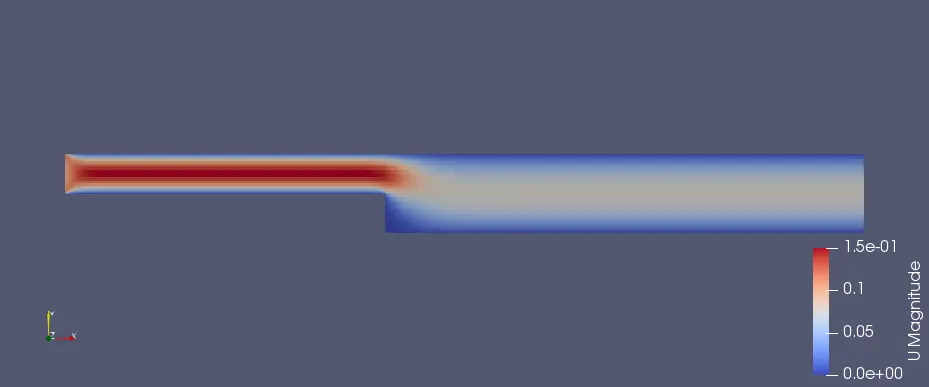
For this we kept the code same and a little bit changes are done i.e. in blocks. what we change is shown below remaining code has no changes.
blocks
(
    	hex (0 1 2 3 11 12 13 14) (200 10 1) simpleGrading (1 5 1)
	hex (3 2 4 5 14 13 15 16) (200 10 1) simpleGrading (1 0.2 1)
	hex (2 7 6 4 13 18 17 15) (200 10 1) simpleGrading (5 0.2 1)
	hex (1 8 7 2 12 19 18 13) (200 10 1) simpleGrading (5 5 1)
	hex (10 9 8 1 21 20 19 12) (200 20 1) simpleGrading (5 5 1)
);
The mesh block diagram
The Pressure Variation Diagram
The Velocity Variation Diagram
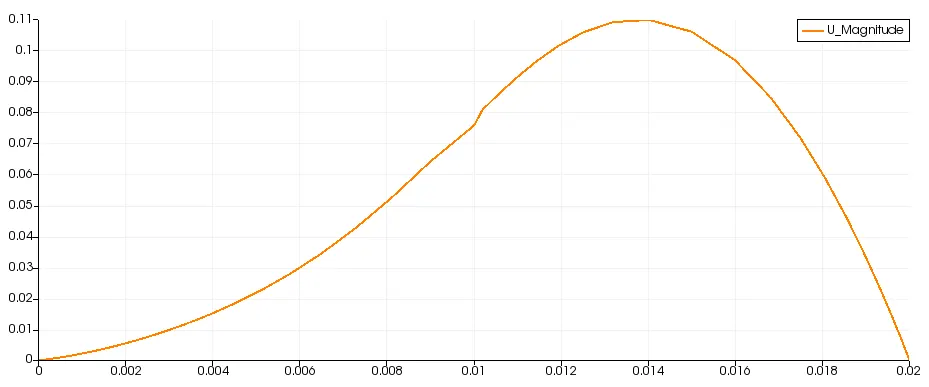
The velocity Profile:
The velocity prole at a distance of 0.085 m near the step from the inlet as shown below,
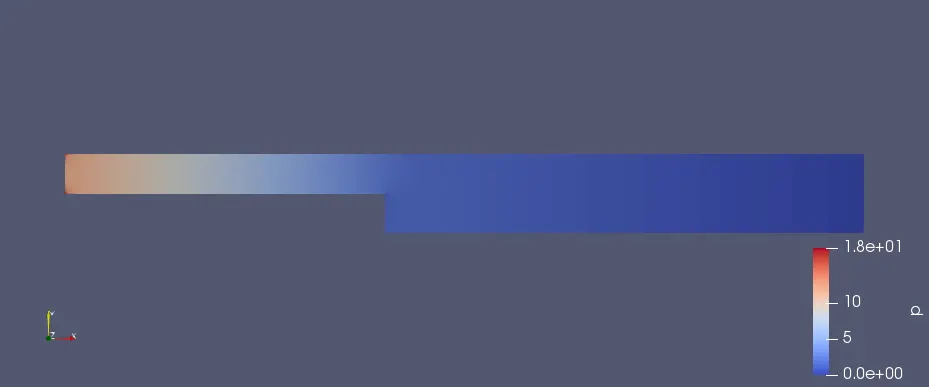
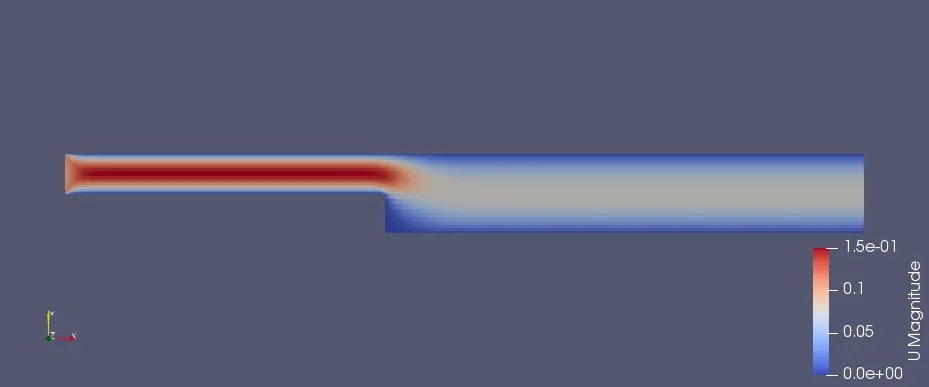
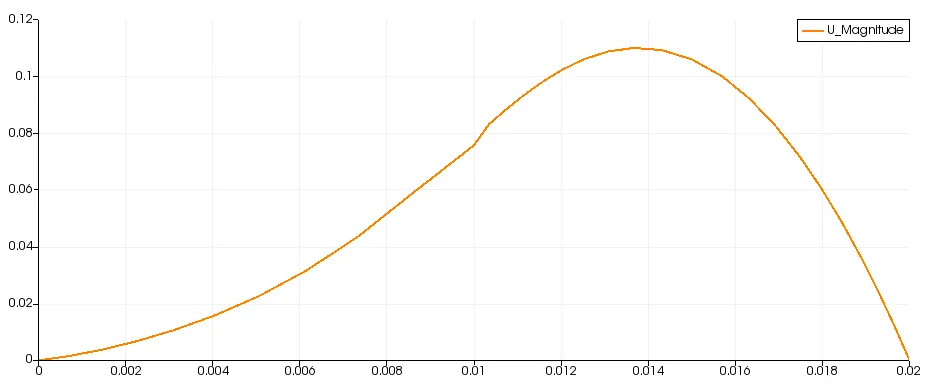
For simple Meshing grade scheme of 0.5:
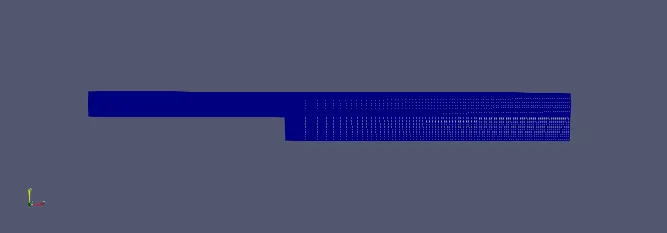
For this we kept the code same and a little bit changes are done i.e. in blocks. what we change is shown below remaining code has no changes.
blocks
(
    	hex (0 1 2 3 11 12 13 14) (200 10 1) simpleGrading (1 2 1)
	hex (3 2 4 5 14 13 15 16) (200 10 1) simpleGrading (1 0.5 1)
	hex (2 7 6 4 13 18 17 15) (200 10 1) simpleGrading (2 0.5 1)
	hex (1 8 7 2 12 19 18 13) (200 10 1) simpleGrading (2 2 1)
	hex (10 9 8 1 21 20 19 12) (200 10 1) simpleGrading (2 2 1)
);
The mesh block diagram
The Pressure Variation Diagram
The Velocity Variation Diagram
The velocity Profile:
The velocity prole at a distance of 0.085 m near the step from the inlet as shown below,
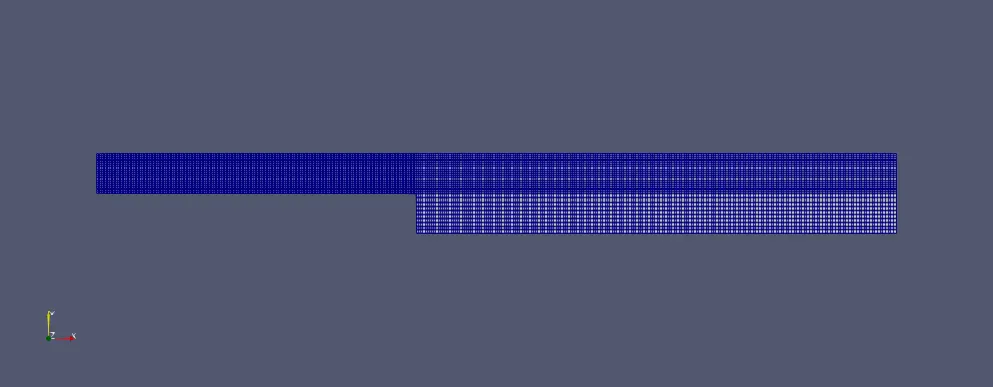
For simple Meshing grade scheme of 0.8:
For this we kept the code same and a little bit changes are done i.e. in blocks. what we change is shown below remaining code has no changes.
blocks
(
    	hex (0 1 2 3 11 12 13 14) (200 10 1) simpleGrading (1 1.25 1)
	hex (3 2 4 5 14 13 15 16) (200 10 1) simpleGrading (1 0.8 1)
	hex (2 7 6 4 13 18 17 15) (200 10 1) simpleGrading (1.25 0.8 1)
	hex (1 8 7 2 12 19 18 13) (200 10 1) simpleGrading (1.25 1.25 1)
	hex (10 9 8 1 21 20 19 12) (200 10 1) simpleGrading (1.25 1.25 1)
);
The mesh block diagram
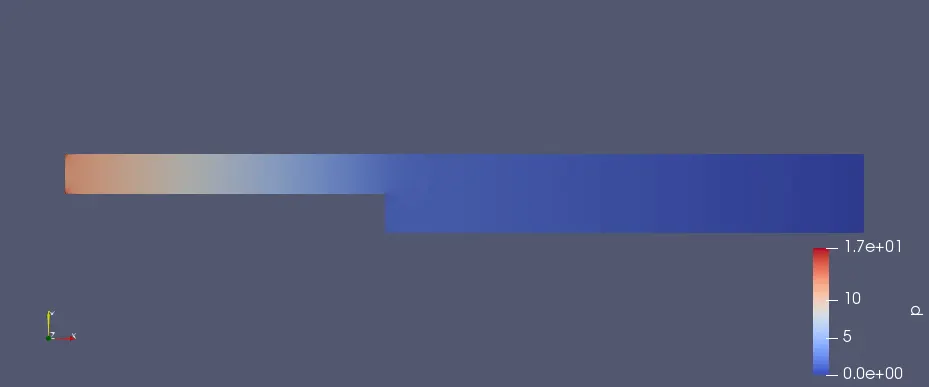
The Pressure Variation Diagram
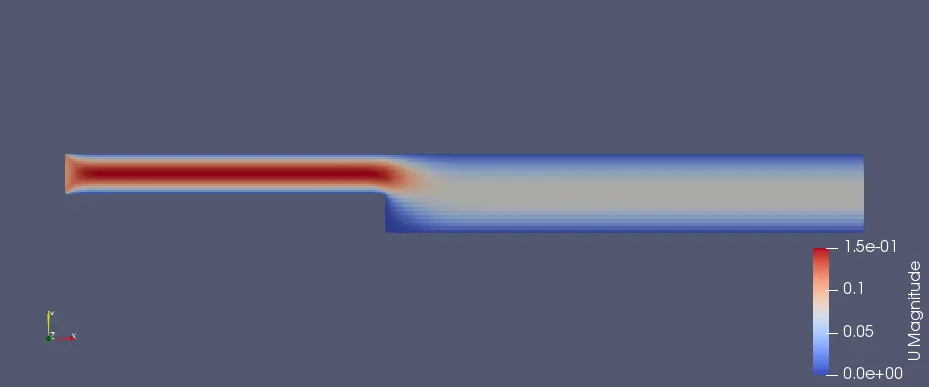
The Velocity Variation Diagram
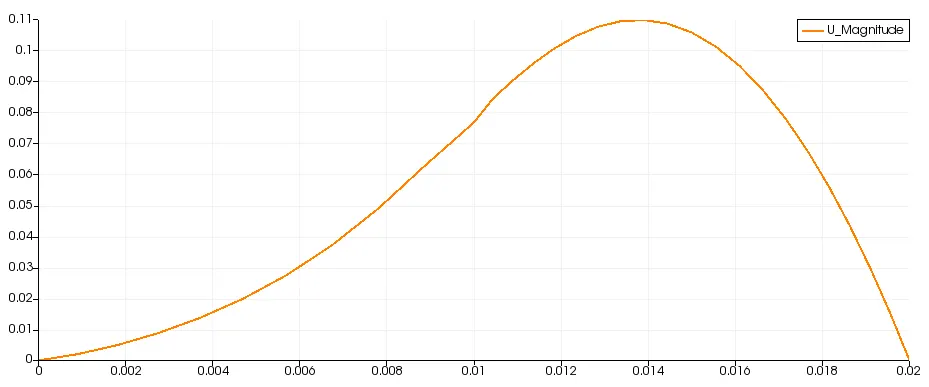
The velocity Profile:
The velocity prole at a distance of 0.085 m near the step from the inlet as shown below,
Conclusion:
All The velocity graphs obtained from the different meshing grading factors are similar with a negligible variation. As the masher size is lower i.e. for finer mesh, we can visualize the accurate output.