Week 8 - BlockMesh Drill down challenge
BlockMesh Drill down challenge
Objective:
- To study icoFoam solver and to simulate the flow through a backward-facing step.
- Also to create different meshes and compare the results obtained from them.
Given:
Mesh specification
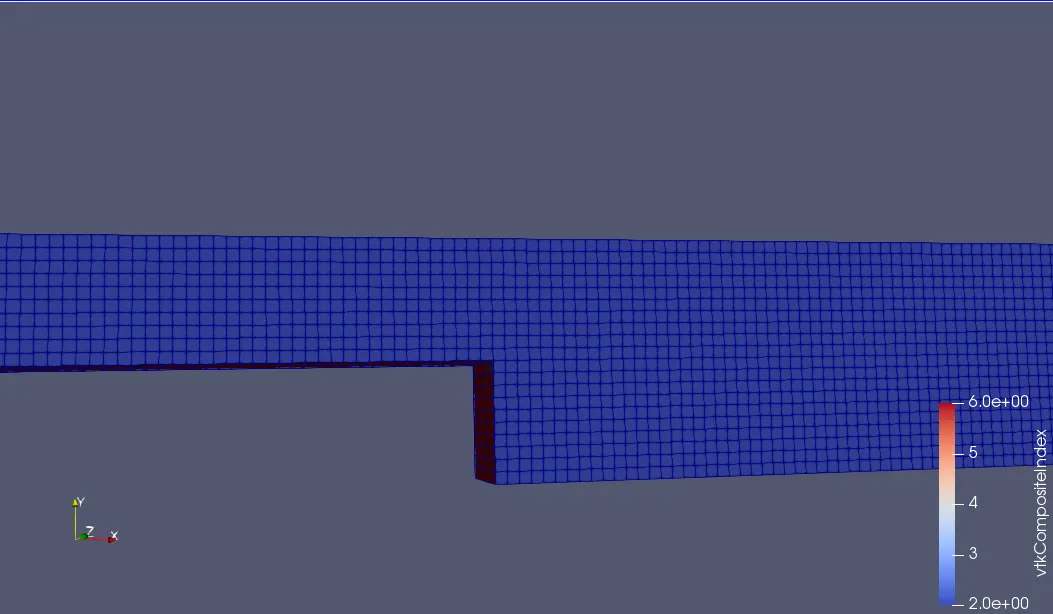
- Number of cells along the x direction (longer dimension) = 200
- Number of cells along the y direction = 10
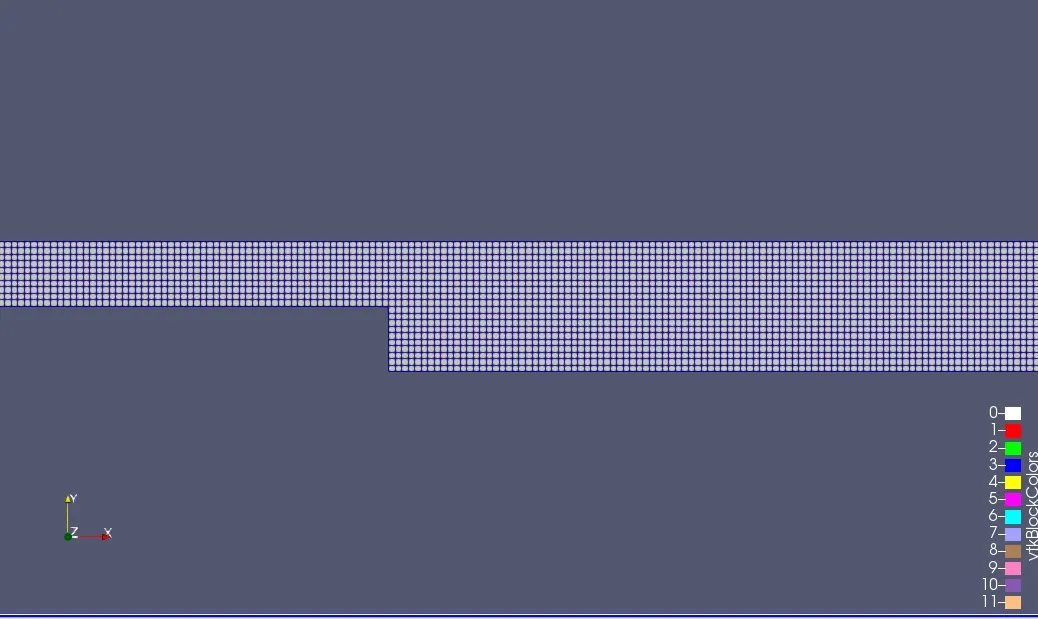
- Use a graded mesh. Grading factor near all walls should be 0.2,0.5 and 0.8.
- Inlet Velocity is 1 m/sec.
Boundary conditions:
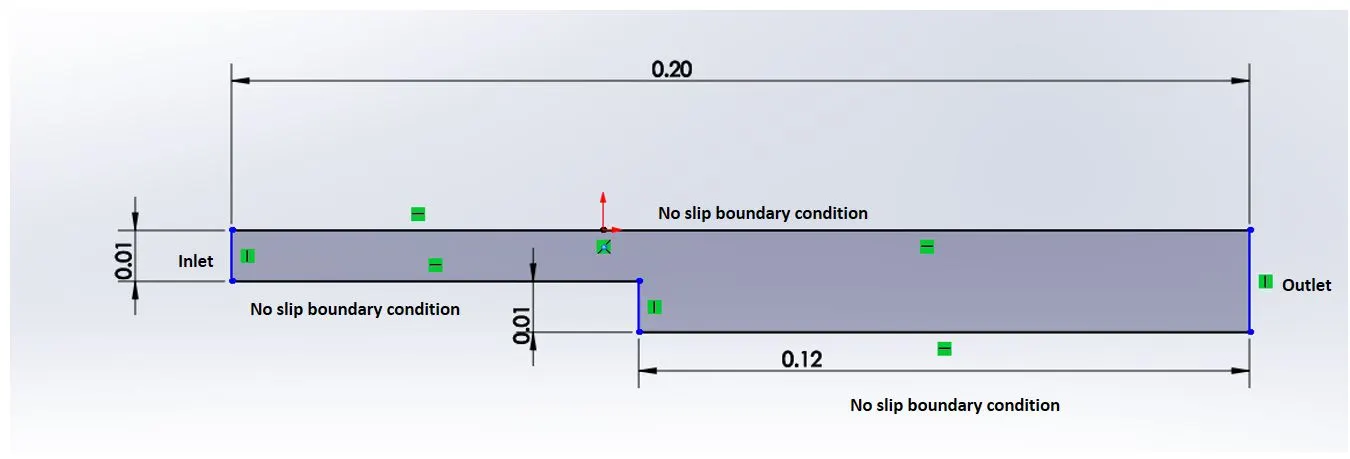
To Show:
- Simulate the first step without Grading factor.
- Run the second simulation with the mesh grading factors of 0.2, 0.5 & 0.8. Compare the effect of grading factor with necessary contours & plots.
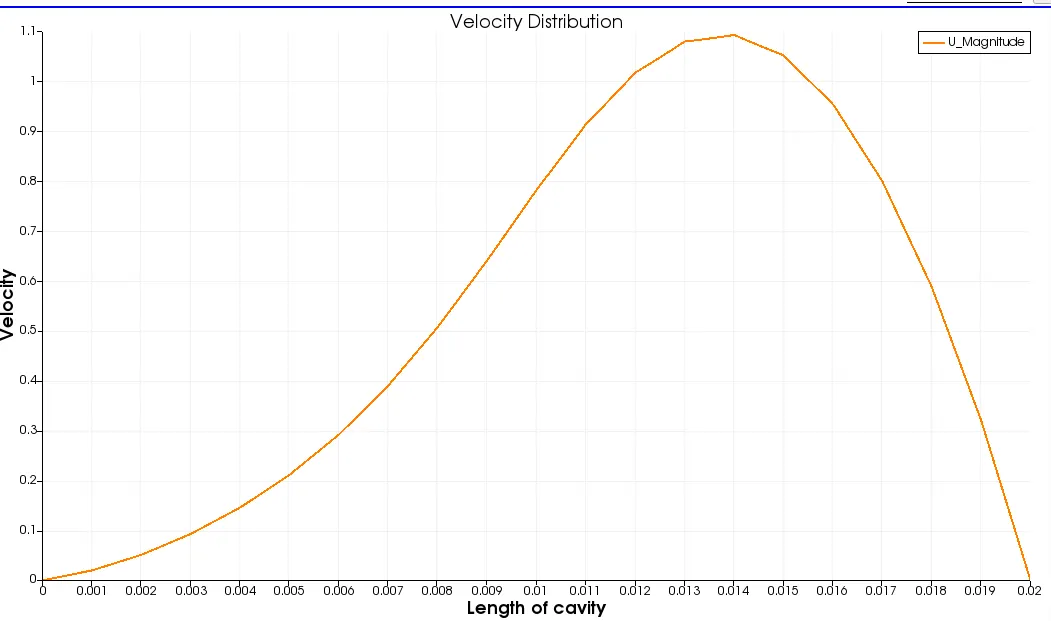
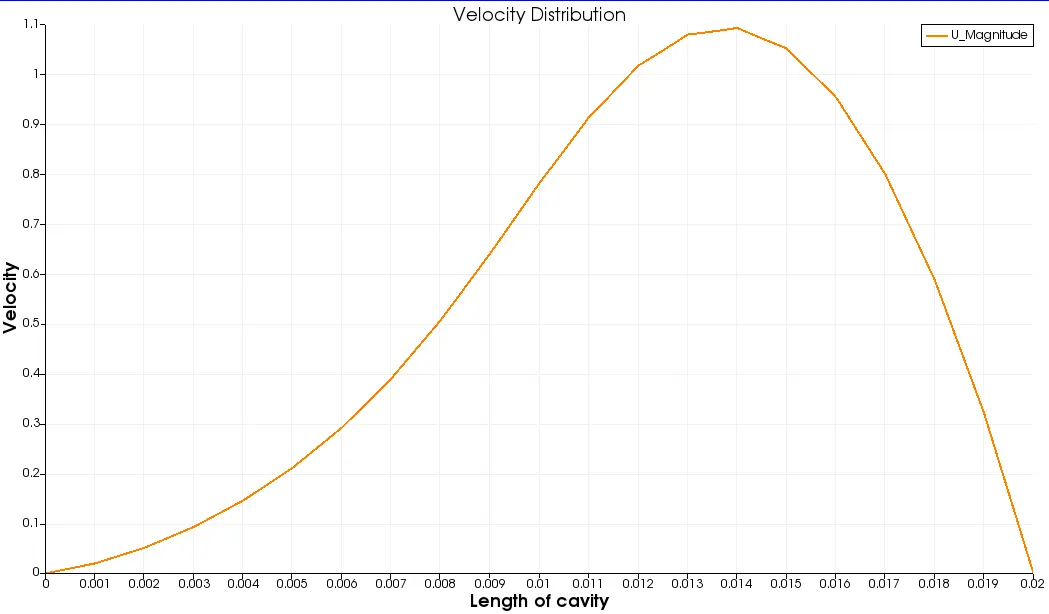
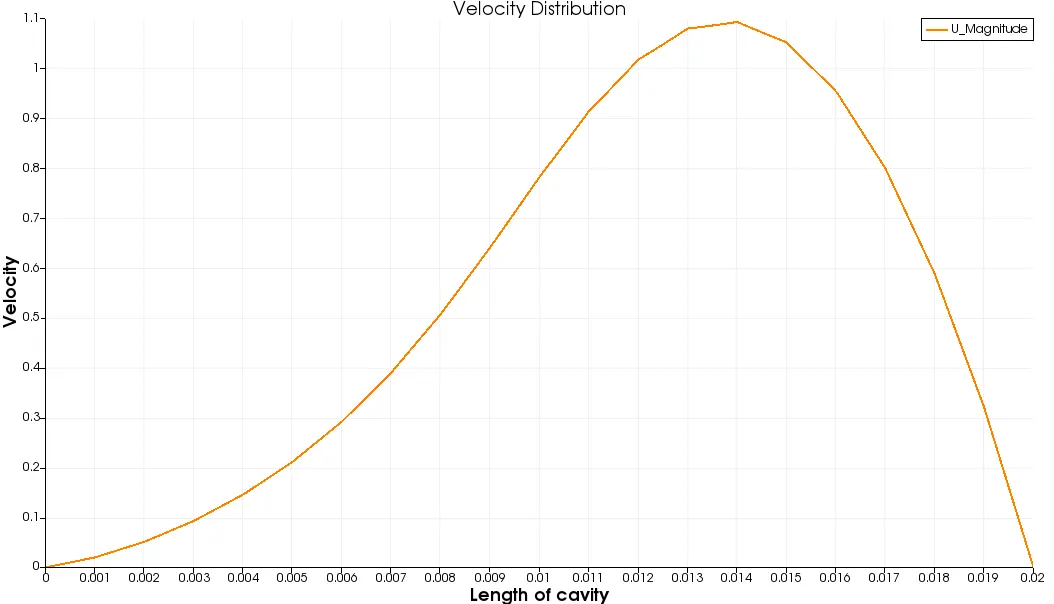
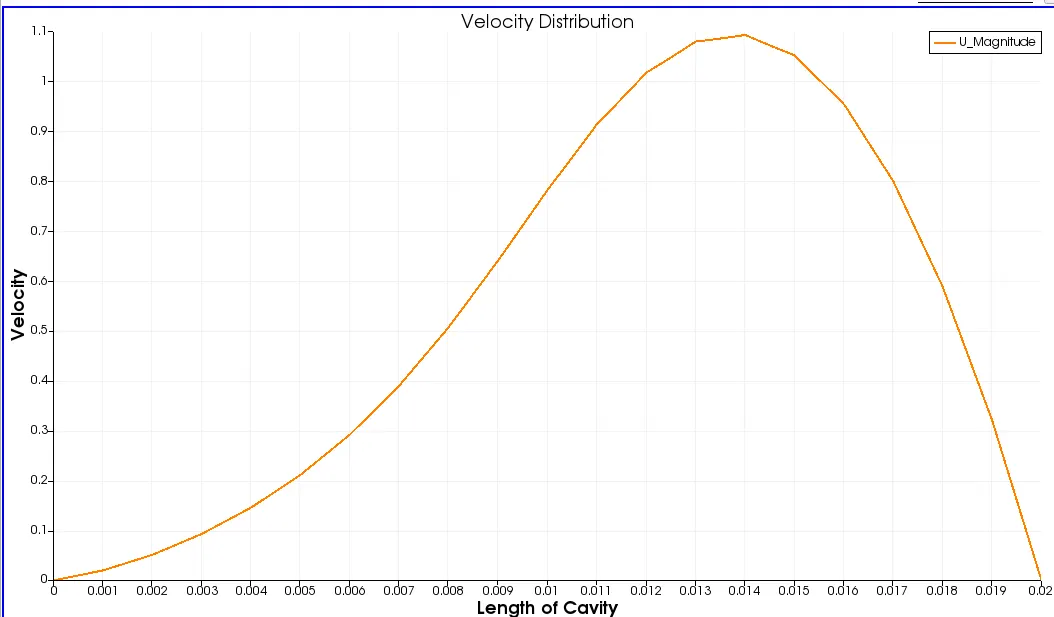
- Measure the velocity profiles at 0.085m from the inlet by plotting a line.
- Compare the plots for all the above grading factors.
Solution:
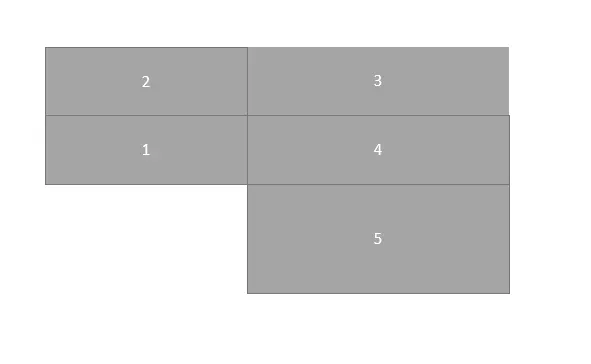
Geometry creation,
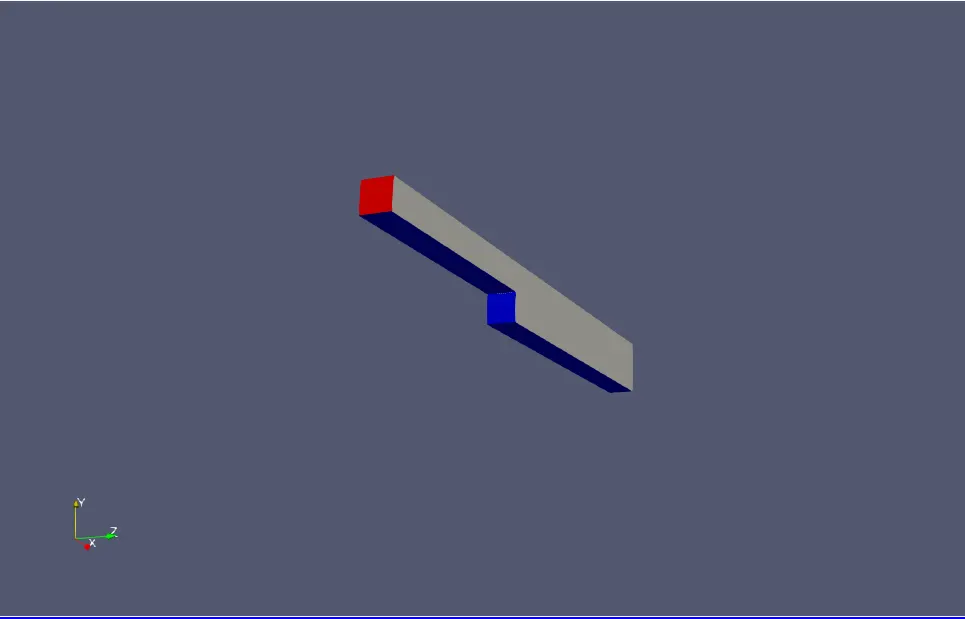
Geometry is created by assuming the five blocks as shown below,
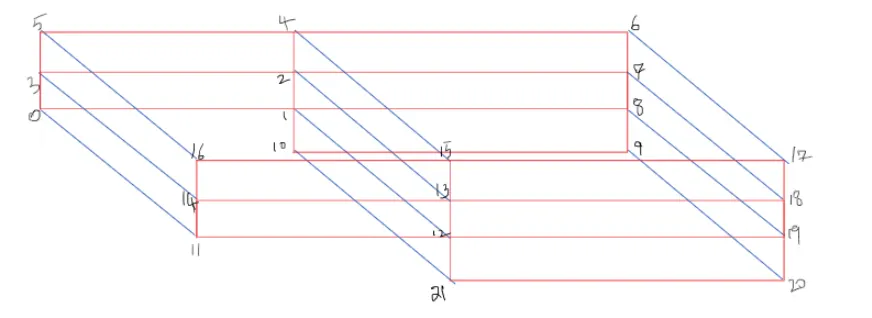
And the numerings for creating the blocks is shown below,
Simulation Steps:
- Firstly in Linux OS open " Terminal ".
- Type ' cd $FOAM_TUTORIALS/ ', on typing this will direct to the inbuilt tutorial files in openFOAM software. Now to view the list of tutorials type ' ls '.
- Once the list opens, we can see multiple directories displayed. To select type ' cd incompressible/ '. As above to go into its list type ' ls '. Then it directs to the particular directory.
- As per the given data wee need to solve the flow using the icoFOAM solver to simulate the flow through a backward-facing step. So type ' cd icoFOAM/ '. Go to the list and select cavity i.e. ' cd cavity/ '.
- Once we direct to the cavity folder it shows multiple files, here there is a file called ' cavity ' , this should be copied and paste the file to the ' run folder ' by using the command ' cp -r cavity $FOAM_RUN /(folder name where u saved the cavity in run folder without'/') '.
- Now go back to the cavity folder that we have saved in run folder, type ' ls ' to see the list in cavity. Go to ' system ', to see the list type ' ls '. It shows multiple files like blockMeshDict, controlDict, fvschemes, fvsolutions.
- As we copied this from the tutorial they contain user defined values. So now, as per our geometry and the given data it chould be modified carefully by typing ' gedit ' before the particular file which we are changing i.e. gedit blockMeshDict.
- Here from the above files blockMeshDict - helps to give a perfect geometry , controlDict - helps to give the limits w.r.to time i.e. start time, endtime and the deltaT. The deltaT value should be less than 1 as we know that the courant number should be less than 1.
- Again come back to the cavity file by using ' cd .. ' command. From the list we need to select ' 0 ', here '0' represents the initial conditions of the problem. Changes should be made as per cour calculations in velocity(U) and pressure(p) files respectively.
- After changing the data in the files it is mandatory to save the file so as to overwrite the previous values.
- Go back to the cavity directory in run, by typing ' blockMesh '. By giving this command it structures the mesh and internal calculations are done for a perfect meshing. After the end of running theblockMesh, now check for the errors in the mesh by using ' checkMesh ' command.
- Hence if there are no errors after checking the mesh we can say that it is stable.
- Now use ' icoFoam ' command to run the simulation completely, this is becaused we used icoFoam as the solver for this problem. Wait untill it reaches the last time step. Check if it has excuited for all the time steps so that simulation goes smoothly.
- After the end of the simulation type ' paraFoam '. The command paraFoam directs to the paraview software directly by displaying the geometry.
- Now find the velocity profile at 0.085 m from the inlet of the geometry with a line plot.
- Now mesh grading factors of 0.2, 0.5, 0.8 are calculated for the geometry by using condition f = size of end cell/size of starting cell. These obtained plots are compared.
CASE (1)
Withuot Grading Factor
"blockMeshDict"
/*--------------------------------*- C++ -*----------------------------------*\
  =========                 |
  \\      /  F ield         | OpenFOAM: The Open Source CFD Toolbox
   \\    /   O peration     | Website:  https://openfoam.org
    \\  /    A nd           | Version:  8
     \\/     M anipulation  |
\*---------------------------------------------------------------------------*/
FoamFile
{
    version     2.0;
    format      ascii;
    class       dictionary;
    object      blockMeshDict;
}
// * * * * * * * * * * * * * * * * * * * * * * * * * * * * * * * * * * * * * //

convertToMeters 1;

vertices
(
    (0 0 0)
    (0.08 0 0)
    (0.08 0.005 0)
    (0 0.005 0)
    (0.08 0.01 0)
    (0 0.01 0)
    (0.20 0.01 0)
    (0.20 0.005 0)
    (0.20 0 0)
    (0.20 -0.01 0)
    (0.08 -0.01 0)
    (0 0 0.01)
    (0.08 0 0.01)
    (0.08 0.005 0.01)
    (0 0.005 0.01)
    (0.08 0.01 0.01)
    (0 0.01 0.01)
    (0.20 0.01 0.01)
    (0.20 0.005 0.01)
    (0.20 0 0.01)
    (0.20 -0.01 0.01)
    (0.08 -0.01 0.01)
);

blocks
(
    hex (0 1 2 3 11 12 13 14) (80 5 1) simpleGrading (1 1 1)
    hex (3 2 4 5 14 13 15 16) (80 5 1) simpleGrading (1 1 1)
    hex (2 7 6 4 13 18 17 15) (120 5 1) simpleGrading (1 1 1)
    hex (1 8 7 2 12 19 18 13) (120 5 1) simpleGrading (1 1 1)
    hex (10 9 8 1 21 20 19 12) (120 10 1) simpleGrading (1 1 1)
);

edges
(
);

boundary
(
    inlet
    {
        type patch;
        faces
        (
            (0 11 14 3)
            (3 14 16 5)
        );
    }
    outlet
    {
        type patch;
        faces
        (
            (9 8 19 20)
            (8 7 18 19)
            (7 6 17 18)
        );
    }
    frontAndBack
    {
        type empty;
        faces
        (
            (11 12 13 14)
            (14 13 15 16)
            (13 18 17 15)
            (12 19 18 13)
            (21 20 19 12)
            (0 3 2 1)
            (3 5 4 2)
            (1 2 7 8)
            (2 4 6 7)
            (10 1 8 9)
        );
    }
    Noslipwalls
    {
    	type wall;
    	faces
    	(
    	    (5 16 15 4)
    	    (4 15 17 6)
    	    (0 1 12 11)
    	    (10 9 20 21)
    	    (10 21 12 1)
    	);
    }
);

mergePatchPairs
(
);

// ************************************************************************* //
"controlDict"
/*--------------------------------*- C++ -*----------------------------------*\
  =========                 |
  \\      /  F ield         | OpenFOAM: The Open Source CFD Toolbox
   \\    /   O peration     | Website:  https://openfoam.org
    \\  /    A nd           | Version:  8
     \\/     M anipulation  |
\*---------------------------------------------------------------------------*/
FoamFile
{
    version     2.0;
    format      ascii;
    class       dictionary;
    location    "system";
    object      controlDict;
}
// * * * * * * * * * * * * * * * * * * * * * * * * * * * * * * * * * * * * * //

application     icoFoam;

startFrom       startTime;

startTime       0;

stopAt          endTime;

endTime         0.5;

deltaT          0.0001;

writeControl    timeStep;

writeInterval   20;

purgeWrite      0;

writeFormat     ascii;

writePrecision  6;

writeCompression off;

timeFormat      general;

timePrecision   6;

runTimeModifiable true;


// ************************************************************************* //
"transportProperties"
/*--------------------------------*- C++ -*----------------------------------*\
  =========                 |
  \\      /  F ield         | OpenFOAM: The Open Source CFD Toolbox
   \\    /   O peration     | Website:  https://openfoam.org
    \\  /    A nd           | Version:  8
     \\/     M anipulation  |
\*---------------------------------------------------------------------------*/
FoamFile
{
    version     2.0;
    format      ascii;
    class       dictionary;
    location    "constant";
    object      transportProperties;
}
// * * * * * * * * * * * * * * * * * * * * * * * * * * * * * * * * * * * * * //

nu              [0 2 -1 0 0 0 0] 0.01;


// ************************************************************************* //
"pressure(p) boundary condition"
/*--------------------------------*- C++ -*----------------------------------*\
  =========                 |
  \\      /  F ield         | OpenFOAM: The Open Source CFD Toolbox
   \\    /   O peration     | Website:  https://openfoam.org
    \\  /    A nd           | Version:  8
     \\/     M anipulation  |
\*---------------------------------------------------------------------------*/
FoamFile
{
    version     2.0;
    format      ascii;
    class       volScalarField;
    object      p;
}
// * * * * * * * * * * * * * * * * * * * * * * * * * * * * * * * * * * * * * //

dimensions      [0 2 -2 0 0 0 0];

internalField   uniform 0;

boundaryField
{
    inlet
    {
        type            zeroGradient;
    }

    outlet
    {
        type            fixedValue;
        value           uniform 0;
    }

    frontAndBack
    {
        type            empty;
    }
    Noslipwalls
    {
        type            zeroGradient;
    }
}

// ************************************************************************* //
"velocity(U) boundary condition"
/*--------------------------------*- C++ -*----------------------------------*\
  =========                 |
  \\      /  F ield         | OpenFOAM: The Open Source CFD Toolbox
   \\    /   O peration     | Website:  https://openfoam.org
    \\  /    A nd           | Version:  8
     \\/     M anipulation  |
\*---------------------------------------------------------------------------*/
FoamFile
{
    version     2.0;
    format      ascii;
    class       volVectorField;
    object      U;
}
// * * * * * * * * * * * * * * * * * * * * * * * * * * * * * * * * * * * * * //

dimensions      [0 1 -1 0 0 0 0];

internalField   uniform (0 0 0);

boundaryField
{
    inlet
    {
        type            fixedValue;
        value           uniform (1 0 0);
    }

    outlet
    {
        type            zeroGradient;
    }

    frontAndBack
    {
        type            empty;
    }
    Noslipwalls
    {
        type            noSlip;
    }
}

// ************************************************************************* //
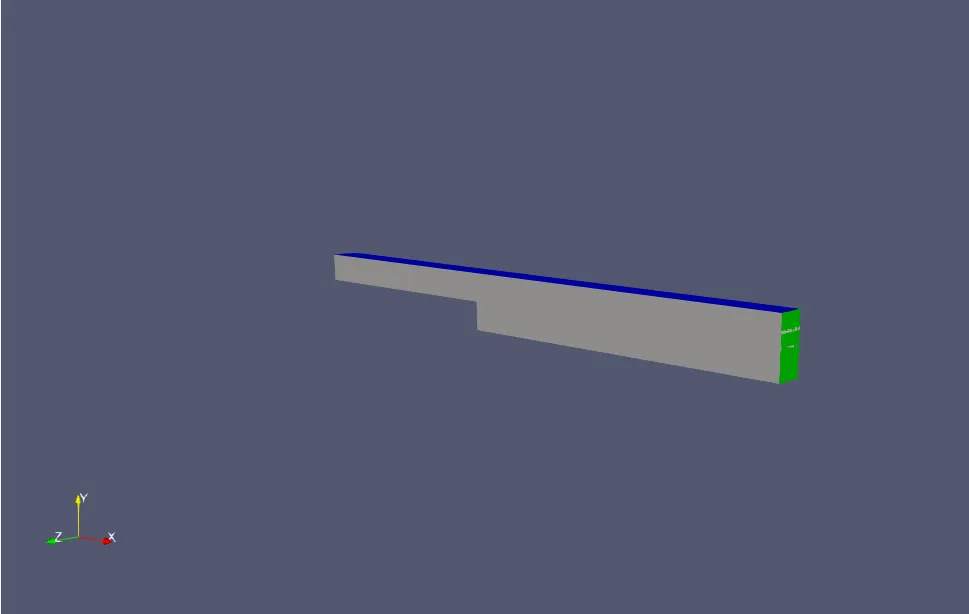
Geometry:
OUTPUT
case (1) : Without Grading Factor
Meshing
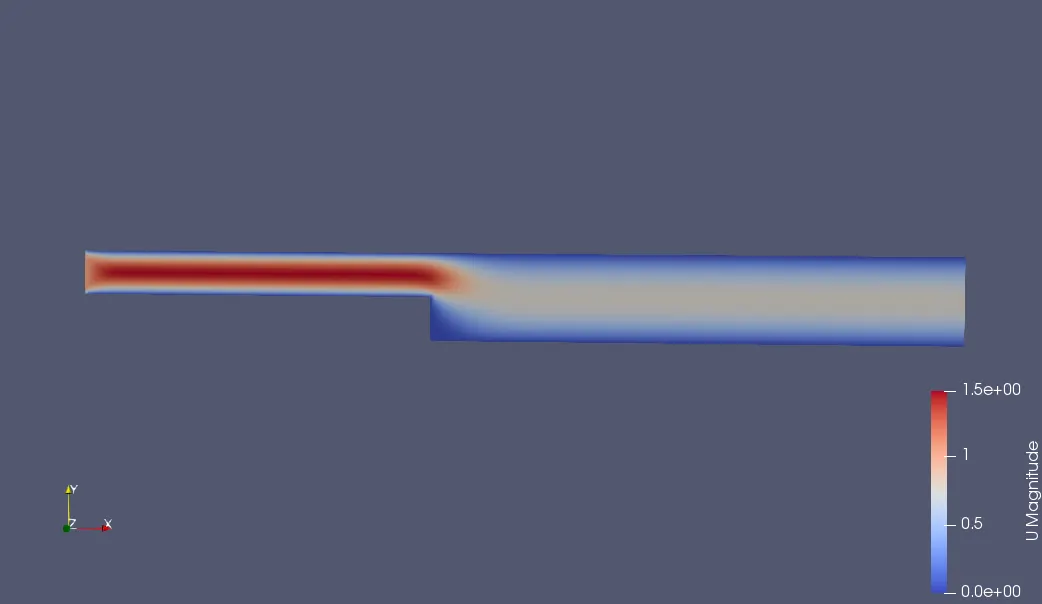
Velocity Contour
Velocity Profile
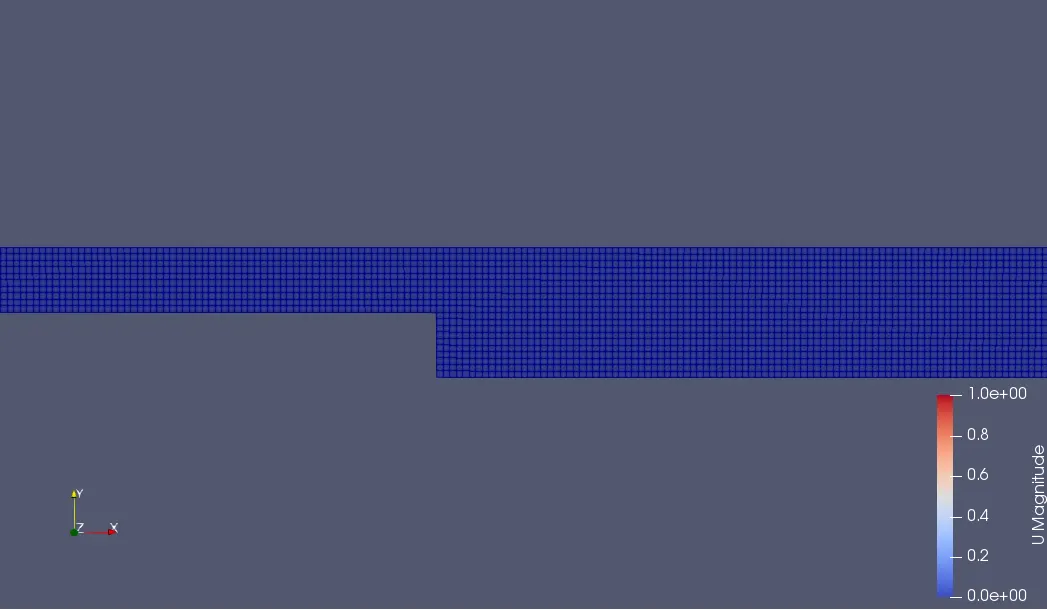
case (2) : Grading Factor=0.2
Meshing
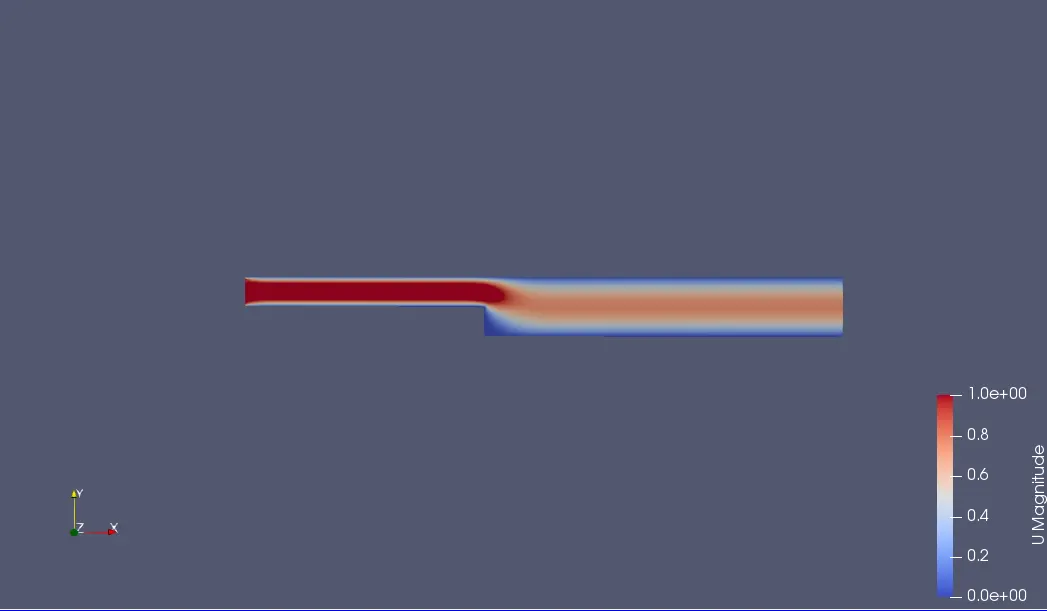
Velocity Contour:
Velocity Profile
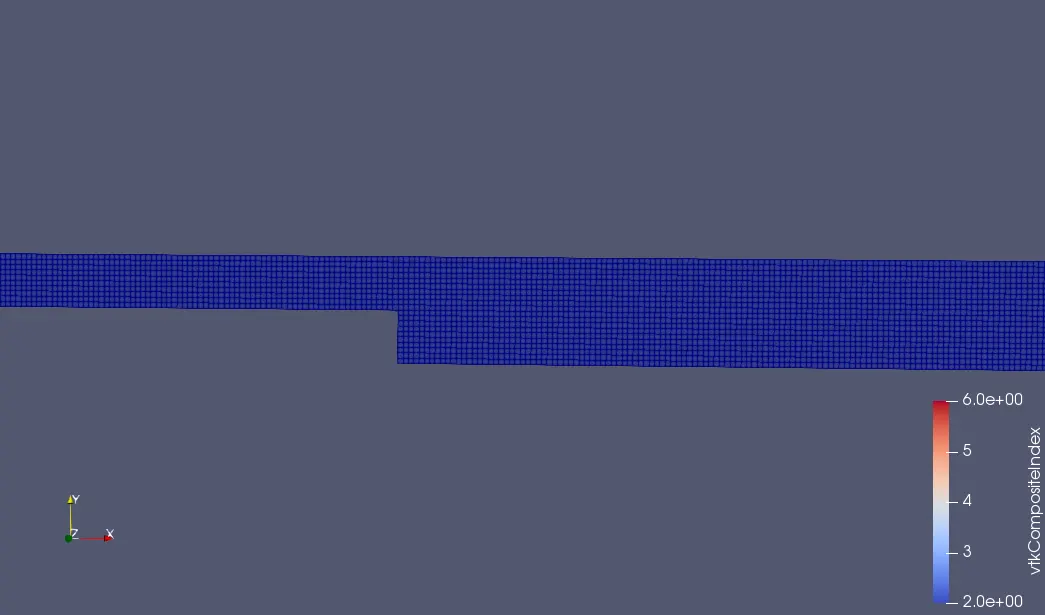
case (3) : Grading Factor=0.5
Meshing
Velocity Contour:
Velocity Profile
case (4) : Grading Factor=0.8
Meshing
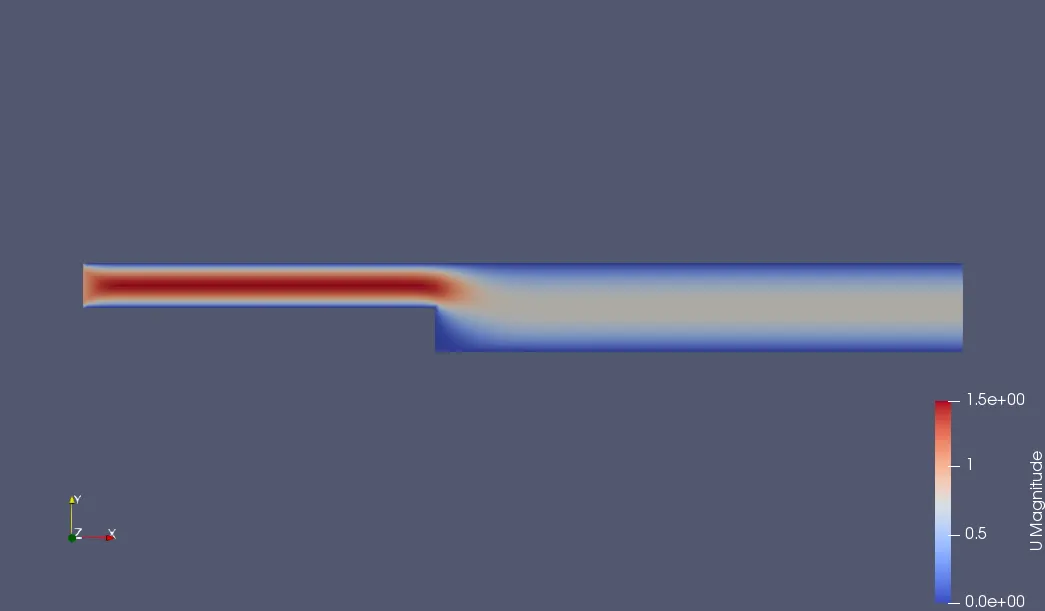
Velocity Contour:
Velocity Profile
OBSERVATION:
- Initially we define the inlet speed was 1m/s.
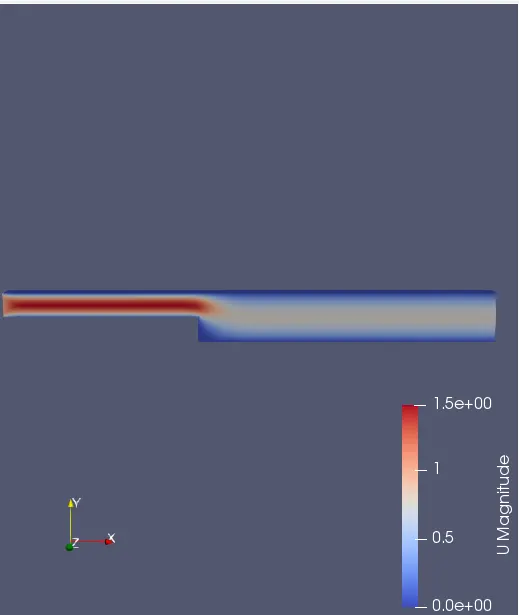
- But when we compare the same at 0.085 m from the inlet of the geometry, it is clearly observed that it is more than 1m/s in all the cases.
- This is because the walls of the cavity gives the resistance to the flow , due to this near walls the velocity decreases. In order to maintain the constant mass flow rate the velocity in the middle increases.
- On comparing all the above cases, we have noticed that there is an effect on the simulation by changing the mesh grading factor.
- For all the three mesh gradiention factors (i.e. 0.2,0.5 &0.8), the plots appear to be almost similar. But for different grading factors, results show some changesin the velocity values.
CONCLUSION:
- Velocity contour obtained from all the mesh grading factors looks similar with a negligible variation.
- For different grading factor , there are slight changes in the velocity values.
- Hence it can be concluded that finer mesh gives the better and accurate results.