Tcl macro for displaying and switching off the free edges and T edges upon Tk widget Button click
OBJECTIVE
1) We need to write a code which will show the components first in transparent mode and then the free edges and T edges on the elements displayed have to be displayed with the red colour for the free edges and the cyan colour for the T edges.And then a temp nodes have to be created in the areas where the equivalence is needed .
2) Then create a code for switching off the free edges and T edges display .
3)create a Tk window having the buttons to do these opertions in button click
PROBLEM STATEMENT
What we first needed is to set the code for the both the procedures and assign those two needed operations into keys in the keyboard.
To get to know about the commands which is incorporated into the code to gets these functions done we can make use of command file and do the functions in the hypermesh itself.So after doing the operations in the hypermesh we get to know the commands required and we devolop the code thenafter.
Code for the Free edges and the T_ edges display along with the temp node display over the problematic areas.
Code for the display of the free edges and the T edges
# display set to transparent mode
*setdisplayattributes 4 1

# Preview Equivalence
*createmark elements 1 "displayed"
*equivalence elements 1 0.01 0 0 0

# Save Preview Equivalence Nodes
*createmark elements 1 "displayed"
*equivalence elements 1 0.01 3 0 0

# Retrieving the equivlence nodes
*createmark nodes 1
*nodemarkaddtempmark 1

# Find Edges
*createmark elements 1 "displayed"
if { [hm_entityinfo exist comps Free_Edges ] == 0 } { *findedges1 elements 1 0 0 0 30 }

# Renaming Component
if { [hm_entityinfo exist comps Free_Edges ] == 0 } { *setvalue component name=^edges name=Free_Edges }

#T_Edges
*createmark elements 1 "displayed"
if { [hm_entityinfo exist comps T_Edges ] == 0 } {*findedges1 elements 1 1 0 0 30 }

# Renaming Component
if { [hm_entityinfo exist comps T_Edges ] == 0 } { *setvalue comps name=^edges name=T_Edges }

#Changing Color of Free_Edges

*createmark components 1 "Free_Edges"
*setvalue comps mark=1 color=3
*createmark components 1 "Free_Edges"
*clearmark components 1

#Changing Color of T_Edges

*createmark components 1 "T_Edges"
*setvalue comps mark=1 color=30
*createmark components 1 "T_Edges"
*clearmark components 1

#Changing to Solid Rep

*setcomponentdisplayattributes "T_Edges" 2 1
*setcomponentdisplayattributes "Free_Edges" 2 1
Operations done using the commands are stated as comments just above the commands .
*setdisplayattributes 4 1 This will set the display into the transparent display when the elements are displayed in the screen.
*createmark elements 1 "displayed"
*equivalence elements 1 0.01 0 0 0
This will first create mark of the displayed elements and these elements will be check for equivalence in the tolernce range of 0.01 and those nodes will be previewed.first zerop in the code implies the preview of the found nodes for equivalence.
If we set that zero to three , then the found nodes will be saved into that mark id.This operation means the save equivalence nodes in Hypermesh.
*createmark nodes 1
*nodemarkaddtempmark 1
This code for the retreival of the nodes which are svaed into the user mark id 1
*createmark elements 1 "displayed"
if { [hm_entityinfo exist comps Free_Edges ] == 0 } { *findedges1 elements 1 0 0 0 30 }
findedges1 will create the free edges of the displayed elements.first we ceated a mark of the displayed elements.then we need to give an null case condition, since we will rename the ^edges component collector to free edges we will will set if the component named free edges is not availbel then only create the free edges. 30 in the command in the break angle of the free edges line created.
if { [hm_entityinfo exist comps Free_Edges ] == 0 } { *setvalue component name=^edges name=Free_Edges }
Since we need to create the T edges an the T edges also gets created in the collector with the same name , so we need to rename the collector created, so we use the command *setvalue.This also need to be done only if the collector named free dges is not available intiallly.
*createmark elements 1 "displayed"
if { [hm_entityinfo exist comps T_Edges ] == 0 } {*findedges1 elements 1 1 0 0 30 }
Just changing the fiirst zero to 1 will be the command. for the creation of T edges .
if { [hm_entityinfo exist comps T_Edges ] == 0 } { *setvalue comps name=^edges name=T_Edges }
Similarly rename the collector to the T_edges
*setvalue comps mark=1 color=3
*createmark components 1 "Free_Edges"
*clearmark components 1
This command to set the color red for the component free edges. First we s use setvalue and the set the color to 3 which implies RED.Similarly cyan color is 30 so we dione the same thing the color = 30 in the T edges also
*createmark components 1 "T_Edges"
*setvalue comps mark=1 color=30
*createmark components 1 "T_Edges"
*clearmark components 1
Finally we need to set the display of the t dges and the free edges into the solid mesh representation.for that we use the set displayattributes command and set the style as hidden line with mesh which is represented by 2 and the color type as component color which is represented by 1.These same code applied with both the free Edges and the T_ edges
*setcomponentdisplayattributes "T_Edges" 2 1
*setcomponentdisplayattributes "Free_Edges" 2 1
*createmark components 1  "Free_Edges" "T_Edges"
*deletemark comps 1
*setdisplayattributes 2 0
Now we are set with the display of the free edges and the t edges, then we need to witch the display back to normal after the deletion of the the free edges and T edges collector.For that we need to create the mark of both the free edges and the t edges collector and then delete that mark.But we created this in a new Tcl file.
*createmark components 1 "Free_Edges" "T_Edges"
*deletemark comps 1
Then the display is set back to hidden line with mesh display style represented by 2 and no colortype.
*setdisplayattributes 2 0
then we assign these two tcl in CTRL+1 and CTRL+2 respectively. And then we can call in CTRL+1 to display the free edges and T edges clearly and that will set the nodes over the problematic regions and when we need to fix those areas we can call CTRL+2 to delete the free edges and T edges.
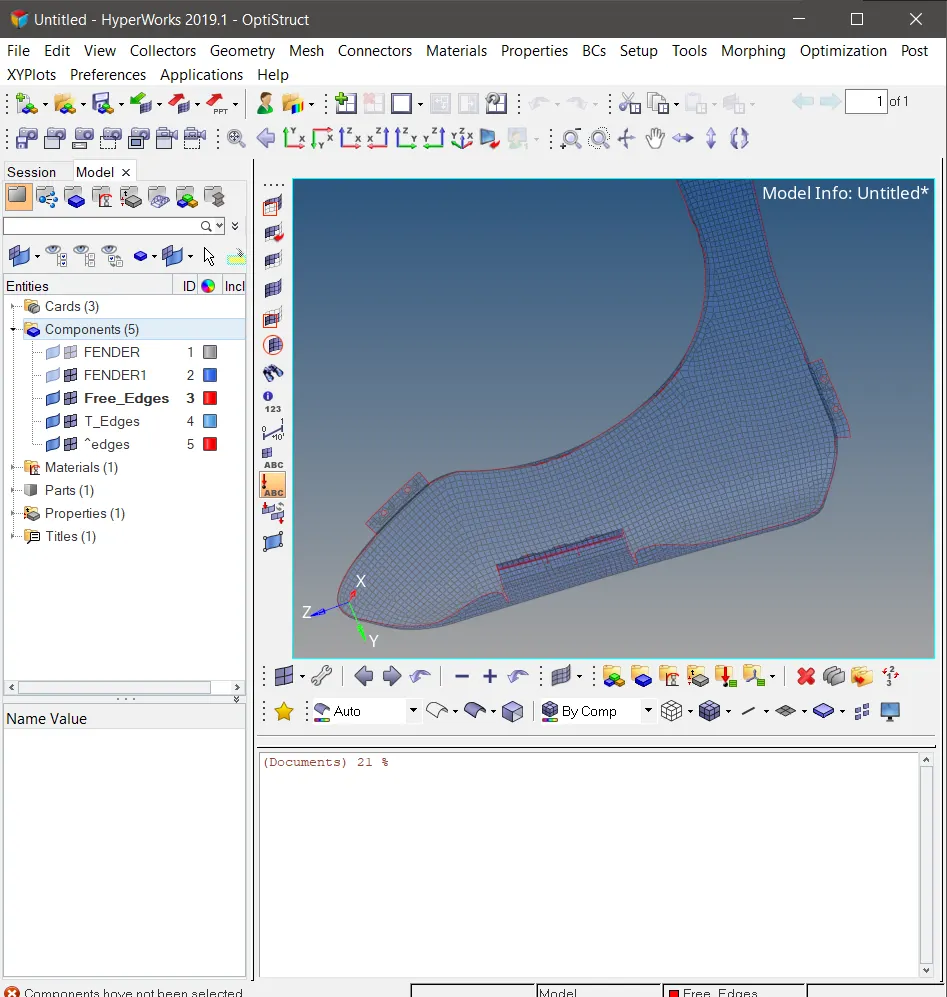
Fig 1 This will happens and the error message comes when we doon't set the Null case and call in the free edges code twice
Assigning the code to a Tk widget with the buttons to execute the functions.
What we need to do is to create two procedures with the both the above codes and assign it to the button and the call in the procedure in command area of respective buttons.
set a .window
catch { destroy $a }
toplevel $a -class Toplevel
wm title $a "Free Edges"
wm geometry $a 300x300+20+20 ;update
wm resizable $a 0 0
wm deiconify $a

proc free_edges {} {
# display set to transparent mode
*setdisplayattributes 4 1

# Preview Equivalence
*createmark elements 1 "displayed"
*equivalence elements 1 0.01 0 0 0

# Save Preview Equivalence Nodes
*createmark elements 1 "displayed"
*equivalence elements 1 0.01 3 0 0

# Retrieving the equivlence nodes
*createmark nodes 1
*nodemarkaddtempmark 1

# Find Edges
*createmark elements 1 "displayed"
if { [hm_entityinfo exist comps Free_Edges ] == 0 } { *findedges1 elements 1 0 0 0 30 }

# Renaming Component
if { [hm_entityinfo exist comps Free_Edges ] == 0 } { *setvalue component name=^edges name=Free_Edges }

#T_Edges
*createmark elements 1 "displayed"
if { [hm_entityinfo exist comps T_Edges ] == 0 } {*findedges1 elements 1 1 0 0 30 }

# Renaming Component
if { [hm_entityinfo exist comps T_Edges ] == 0 } { *setvalue comps name=^edges name=T_Edges }

#Changing Color of Free_Edges

*createmark components 1 "Free_Edges"
*setvalue comps mark=1 color=3
*createmark components 1 "Free_Edges"
*clearmark components 1

#Changing Color of T_Edges

*createmark components 1 "T_Edges"
*setvalue comps mark=1 color=30
*createmark components 1 "T_Edges"
*clearmark components 1

#Changing to Solid Rep

*setcomponentdisplayattributes "T_Edges" 2 1
*setcomponentdisplayattributes "Free_Edges" 2 1
}


proc free_edges_off {} {
*createmark components 1  "Free_Edges" "T_Edges"
*deletemark comps 1
*setdisplayattributes 2 0
}


button $a.01 -text "Display ON" -command {free_edges} ; place $a.01 -x 50 -y 150
button $a.02 -text "Display OFF" -command {free_edges_off} ; place $a.02 -x 175 -y 150
This will create two buttons in the window name FREE EDGES and upon clicking the button named display On which will display the free edges with the other elements in transparent mode and upon clicking the display OFF the free dges will be removed and the display will be set back to the normal.
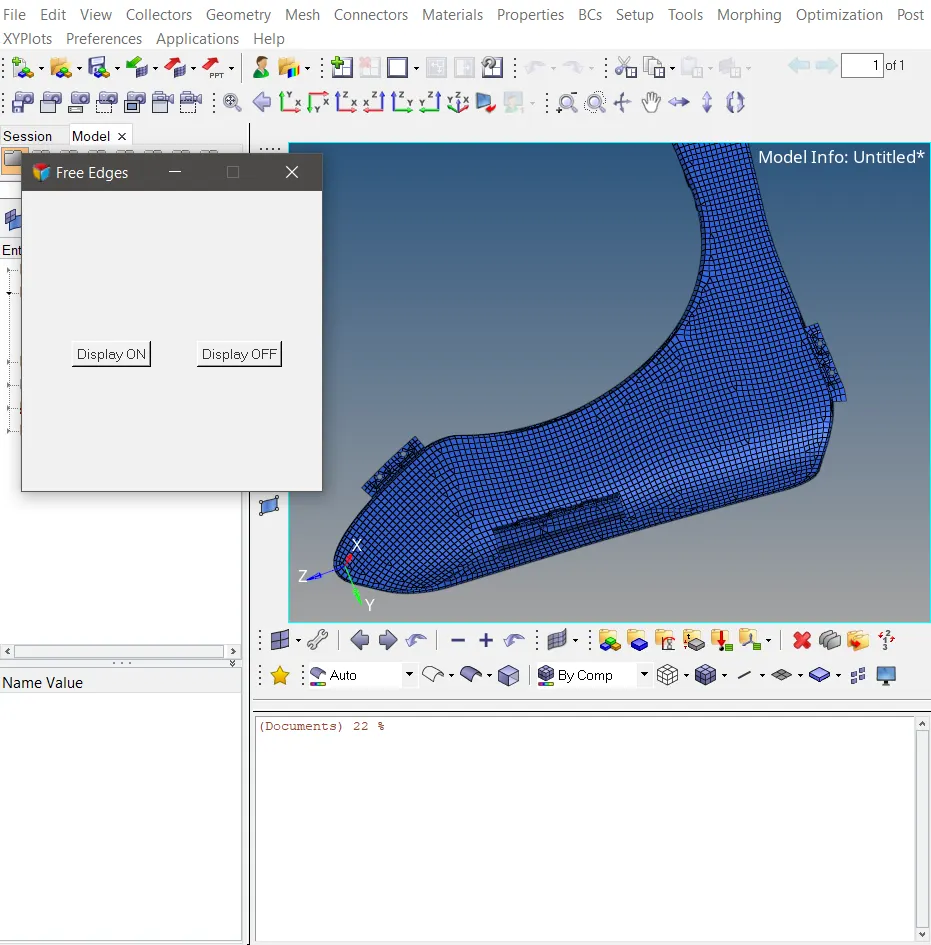
Fig 2 Displaying the Tk widget in the Hypermesh
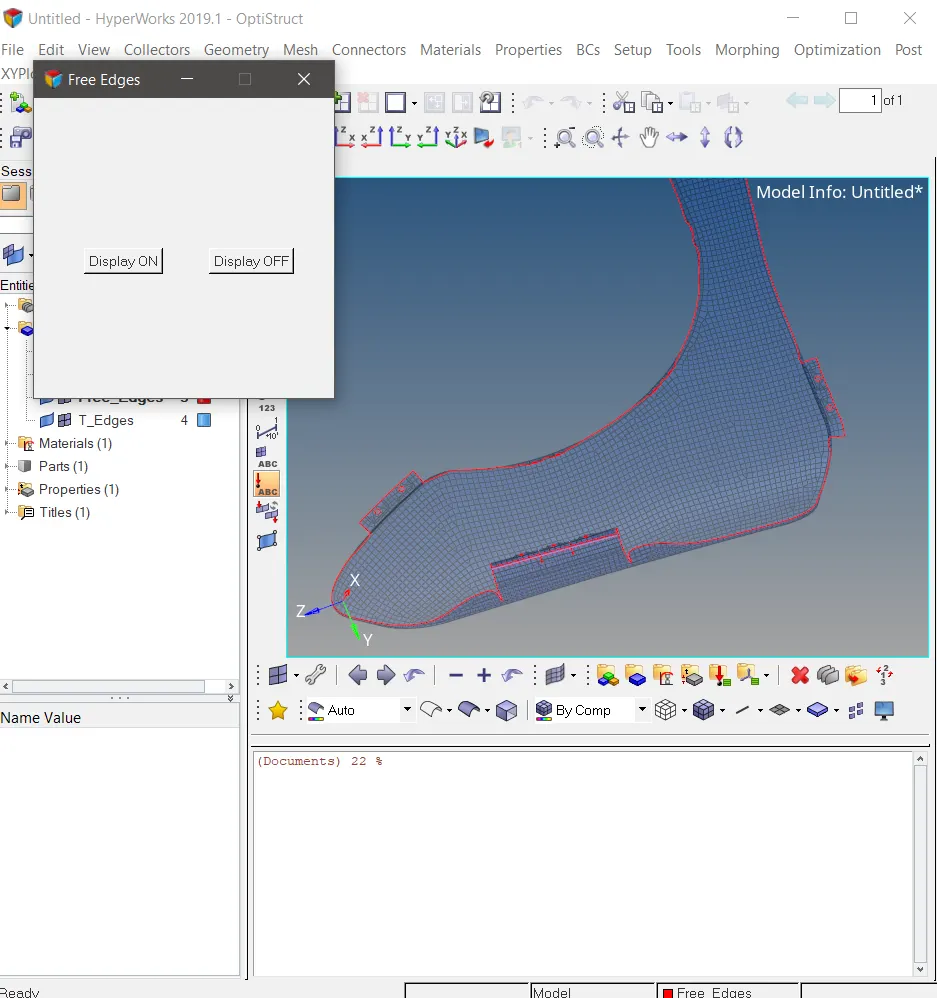
Fig 3 After the Display On button click
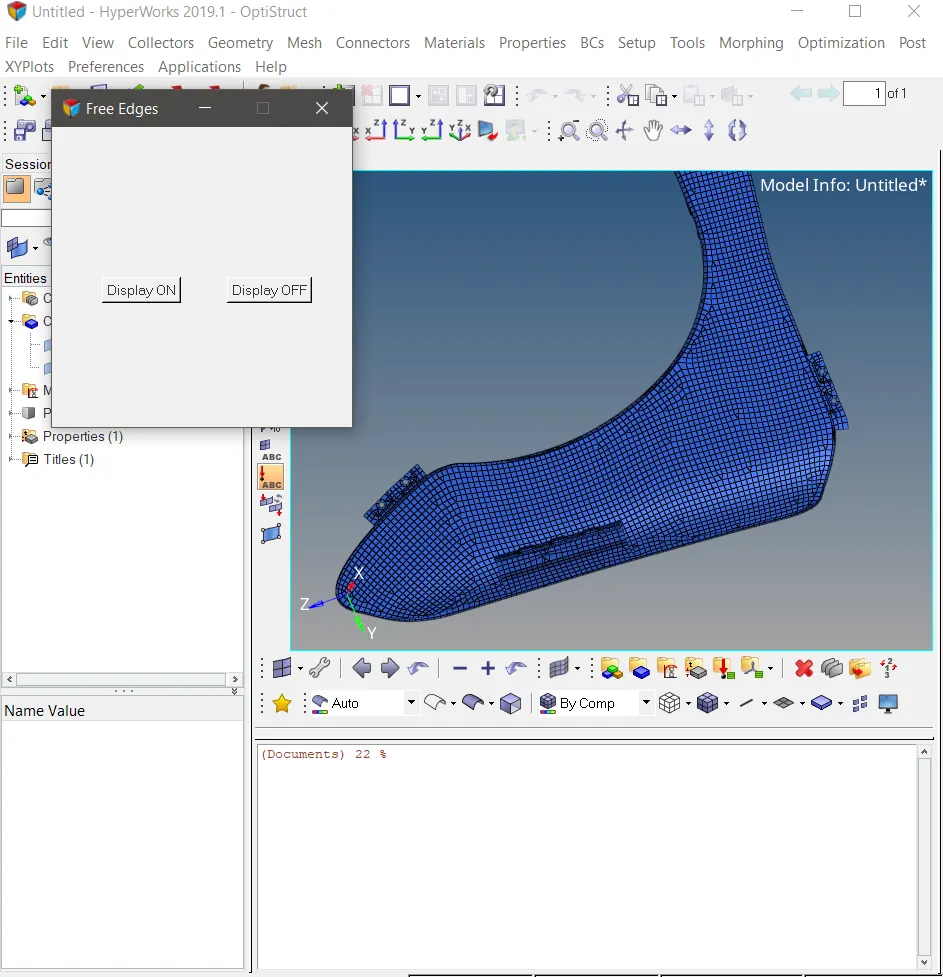
Fig 4 After the display OFF button click
Conclusion
Normal display of the free dges in the HM is not that much great and it is vry teduious job to switch on the free edges and fix the problematic areas and then again in case of doubts and ned to look to other areas againb we ned to do Shift+F3 and switch on the free Edges and this process needs to be carried out until the job is done. So this can be made easier with the code. So that the meshed component delivery can be made easier and faster. And that with tyhe button clicks or with the usr friendly widget button containing window.