CREATING T-EDGE AND FREE EDGES USING TCL/TK
CREATING T-EDGE AND FREE EDGES USING TCL/TK
OBJECTIVE:
To create a TCL command which produces free and T-edge of components and creates temp nodes at “free nodes” within 0.01mm tolerances.
PROCEDURE:
FREE EDGE AND T-EDGE:
- Every element that displays on-screen are marked and edges are created using the command “findedges1”.
- A temp component named “^edges” is created on the entity editor.
- This component name changed and color added.
- To create T-edges, the same procedure followed, and the command changed for t edge.
- Then component color and name changed as per given norms.
FREE NODE:
- To create free nodes, an equivalence option is used.
- The free nodes are identified using this command and saved for future uses.
- The temp nodes are created at the locations of free nodes by command *nodecleartempmark.
DISPLAY:
- All displayed components display mode is changed by the command “setdisplayattributes”.
- For T-edge and Free edge components attributes change with “hidden line with mesh”.
RESET EDGES:
- Temp nodes are deleted.
- T-Edges and Free edges components marked and deleted.
- Components display reset to “hidden line with mesh”.
BUTTONS:
- A widget is created with 2 buttons, one will show edges and node, others will reset to the current view.
TCL COMMAND USED:
*nodemarkaddtempmark - Add temp nodes on marked place.
*nodecleartempmark. - Clear all temp nodes.
findedges1 id A -Create edge for free edges or T edges (A-0-Free edge, A-1-T-Edge)
setdisplayattributes - Set display mode for all components.
setcomponentdisplayattributes - Set display mode for selected components
*setvalue - Editing components name, id, color etc.,
*equivalence -Find free nodes within given tolerances.
set new .window - Create a window with file path.
catch {destroy $new} - Delete window if appears previously.
toplevel $new -class TopClass - Make current active window.
TCL COMMAND:
proc Edge_Show {} {*setdisplayattributes 4 0
#PROCEDURE:
proc check {k} {
*createmark comp 1 "all"
set name [hm_getmark comp 1]
foreach i $name {
set name [hm_getcollectorname comp $i]
set value [string compare $name $k]
if {$value == 0} {puts $i;*createmark comp 1 $i;*deletemark comp 1}}}
#CREATE FREE AND T EDGE
check ^edges
check Free_Edges
check T_Edges
*createmark elems 1 "displayed"
set elemspresent [hm_getmark elems 1]
if {$elemspresent>0} {
*findedges elems 1 0 0 0 30
*setvalue comp name=^edges name=Free_Edges
*setvalue comps name=Free_Edges color=#FFFF00
*setcomponentdisplayattributes Free_Edges 2 0
*createmark elems 1 "displayed"
*findedges elems 1 1 0 0 0
*setvalue comp name=^edges name=T_Edges
*setvalue comps name=T_Edges color=#8DB3E2
*setcomponentdisplayattributes T_Edges 2 0}
#EQUIVALENCE NODES DISPLAY
*nodecleartempmark
*createmark elems 1 "displayed"
set val5 [hm_getmark elems 1]
if {$val5>0} {
*equivalence elems 1 0.1 3 0 0
*createmark nodes 1 "retrieve"
*nodemarkaddtempmark 1}
*createmark surface 1 "displayed"
set sur [hm_getmark surface 1]
if {$sur>0} {*maskmark surface 1}
}
proc Retrive {} {
*setdisplayattributes 2 0
*nodecleartempmark
*createmark comp 1 "T_Edges" "Free_Edges"
set val1 [hm_getmark comp 1]
if {$val1>0} {*deletemark comp 1}
*unmaskall2
}
#WIDGET
set new .window
catch {destroy $new}
toplevel $new -class TopClass
#WIDGET NAME
wm title $new "WIDGET"
wm geometry $new 300x130+200+200
#BUTTONS
button $new.00 -text "CREATE EDGE ANDnPREVIEW EQUIVALENCE" -command {Edge_Show};place $new.00 -x 50 -y 10 -height 50 -width 200
button $new.01 -text "RESET" -command {Retrive};place $new.01 -x 50 -y 70 -height 50 -width 200
SAMPLE IMAGES:
WIDGET:
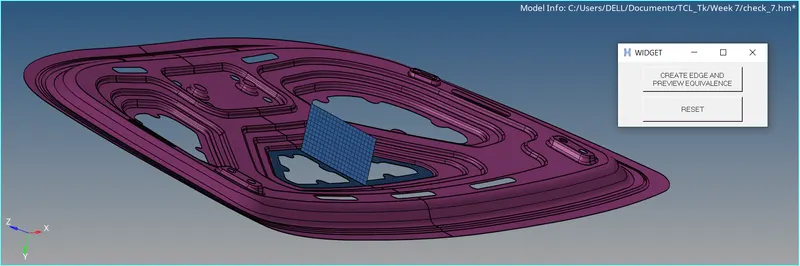
EDGE PRESENTATION:
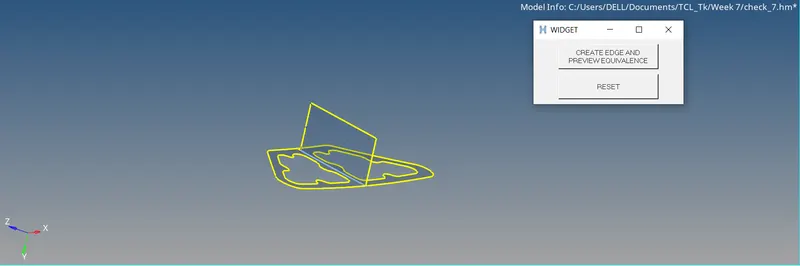
RESET:
RESULT:
TCL command is executed on hypermesh and edges are viewed in different color coding. Free nodes are displayed using temp nodes.