SOLVING SECOND DIFFERENTIAL ORDER EQUATION USING PYTHON
SOLVING SECOND DIFFERENTIAL ORDER EQUATION USING PYTHON
AIM:
To solve the second-order equation for a pendulum and animates its motion with respect to time in python.
OBJECTIVE:
The second-order equation is nothing but a higher rank of the polynomial equation is 2. There are many second-order equations are in practice. A pendulum is one of the examples for it. Here a second-order equation is created and solved in python, creates plots for each position of a pendulum and animated using Magick.
PROBLEM STATEMENT:
To write a program in Python that will solve Second order differential equations and plot results of pendulum motion for every second. Equation,
`(dθ^2)/dt^2 +b/m ( dθ)/dt+g/l sinθ=0`
L=1 meter, m=1 kg, b=0.05,g=9.81 m/s2.
Simulate the motion between 0-20 sec, for angular displacement=0,angular velocity=3 rad/sec at time t=0.
SOLUTION PROCEDURE:
1.The first step to reducing second-order equation:
The given equation is simplified in order to solve it,
`θ=θ_1`
`(dθ_1)/dt=θ_2`
Substitute this in an equation and we get
`(dθ_2)/dt=-(b/m)(θ_2 )-(g/l)sin(θ_1)`
2.ODEINT:
Odeint is an ordinary differential equation solver in python. Syntax:
Y=odeint (model, y0, t)
Model: Function name the returns derivative values at requested y and t values as dydt=model(y,t).
y0=Initial conditions of the differential states.
T=Time points at which the solution should be reported.
This solver solves equation by integrating for a given time interval and produce values of displacement and velocity.
3.ANIMATION:
The values of displacement are converted into angles using trigonometry. Using these angles string positions calculated. The circle animation is created by plotting 360 markers for 0 to 360 degrees.
4.PROGRAM:
- The program solves SDE and produce values for displacement and velocity with respect to time.
- Pendulum animation created for each value of displacement.
- This value plotted and figure saved in a folder.
- The program confirms that user have Magick by user input [Y/N]
- If Yes, the program creates animation in the “mp4” file in the same folder.
- If No, Program skip animation and plot graphs for Displacement and Velocity with respect to time.
import math									#Import math function
import numpy as np  						#Import numpy for Array
import matplotlib.pyplot as plt 			#Import for plot
from scipy.integrate import odeint   	   #odeint for intergration
import os                            	   #Operate Command

#Initial condition
Theta=[0,3] 								# Displacement and Velocity
Time=np.linspace(0,20,500)					#Time values created using linspace
pi=math.pi 									#pi value as pi
b=0.05										#Damping co-efficent
m=1											#Mass of pendulum
g=9.81                              	    #Gravity accelatration
l=1 										#Length of string

def model(Theta,Time,b,m,g,l):  	        #Initialize new function
	T1=Theta[0]								#T1 as displacement initial value
	T2=Theta[1]								#T2 as velocity initial value
	dT_dt=T2                 				#dTheta_dT=Theta 1
	dT2_dt=((-b/m)*T2)-((g/l)*math.sin(T1)) #Formula explained in theory
	T=[dT_dt,dT2_dt]						#Create array as T
	return(T)								#Return function value as T


Y=odeint(model,Theta,Time,args=(b,m,g,l)) 	#Intergation

Displacement=Y[:,0]							#Obtain Displacement value
Velocity=Y[:,1]								#Obtain Velocity value
A=len(Displacement)							#Length of Displacement


Folder_Name="Pendulum"						#Folder name string
os.mkdir(Folder_Name)						#Create folder named Pendulum
print("Plots are saving in folder 'Pendulum'nplease wait")
#Create animation of string
for i in range(0,A):					  	# for loop for A
	plt.cla()
	Name=(Folder_Name+'\Fig%5d.png'%i)		#Plot name string
	value_1=Displacement[i]/l
	Angle=math.asin(value_1)				#Angle for displacement
	X2=l*math.sin(Angle)  					#X value for string position
	Y2=l*math.cos(Angle)					#Y  value for string position
#Create animation circle for pendulum
	Value_X=np.linspace(0,2*pi,360) 		#Degree values 0 to 360
	#Initialize null matrix
	Cir_X=[]
	Cir_Y=[]
	#for loop for 360 degrees
	for j in Value_X:
		X_Temp=(math.sin(j))*0.15   		#Circle X value (radius = 0.15)
		Cir_X.append(-X2+X_Temp)			#Append X value with adding end of string position
		Y_Temp=(math.cos(j))*0.15    		#Circle Y value (radius = 0.15)
		Cir_Y.append(-Y2+Y_Temp)			#Append Y value with adding end of string position


	plt.plot(Cir_X,Cir_Y,'*')					#plot circle
	plt.plot([0,-X2],[0,-Y2])				#plot string
	#X and Y limits
	plt.xlim([-1.5,1.5])
	plt.ylim([-1.5,0])
	#Save figure in selected name and selected folder
	plt.savefig(Name)

plt.cla()									#Clear plot
plt.plot(Time,Y[:,0],label=r'${dtheta_1}/{dt}=theta2$')						                                    #plot displacement
plt.plot(Time,Y[:,1],label=r'${dtheta_2}/{dt}=({-b/m})({theta_2})-({g/l})(sin({theta_1})$')						#plot velocity
plt.legend(loc='best')
plt.xlabel('Time [s]')
#Create video using magick
num=input("Do you have Magick[Y/N]:")                                        #If user have magick animation will be created ih their system
if num=='y':
	print("Working on Animation")
	os.system('cmd /c "cd "'+Folder_Name+'"&&Magick *.png Pendulum.mp4"')
	print("'Pendulum' Animation completed")
if num=='Y':
	os.system('cmd /c "cd "'+Folder_Name+'"&&Magick *.png Pendulum.mp4"')

plt.show()
5.PLOTS:
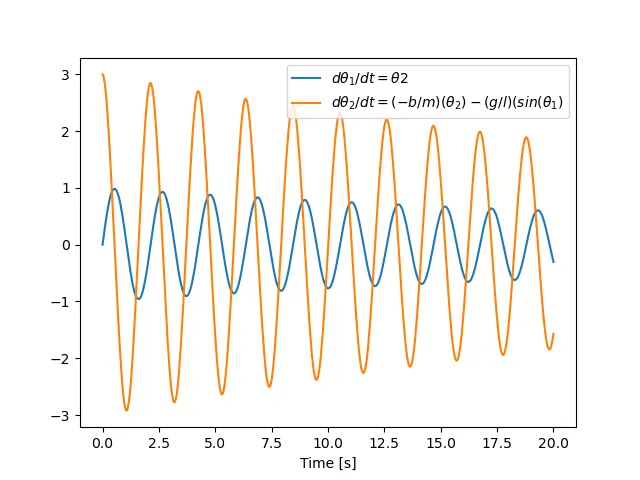
6.MAGICK:
Magick is an external application used to create animation. In this program “os.system(cmd /k “command”’) is used to create animation.
DISCUSSION & RESULT:
Here second order differential equation is solved using python, and result animated using Magick. Using this equation pendulum animation created which reflects the pendulum position with respect to time.
YOUTUBE LINK: https://youtu.be/oT7LPNfiYsA