Week 6 Project 1- MATLAB Module to calculate Forces and Displacements for a 3D Frame Structure(Linear analysis)
1) Develop a matlab function to accept Node information : Node numbers , Node coordinates and information on nodes to perform analysis on a 3D planar frame structure
Ans :-
Programme for above problem -
 function [node_xy] = Getnodecoordinates(~)
prompt='Enter a vctor containing NOde Informations';
disp('Input in [node no.1,node_x1,node_y1,node_z1;...node no.1,node_xn,node_yn,node_zn]');
node_xy=input(prompt);
end
Explanation of code -
function - to create function for getting node coordinates info.
prompt - to display the text in prompt and waits for the user to input a value.
disp - to display the value of variables without printing the variable name.
end - to end the function.
2) Based on the matlab module developed in problem 1 process the node informations to calculate the degree of freedoms for each node assigned
Ans :-
Programme for above problem -
 function [node_coord,dof]=Getnodeinfo(~)
node_xyz=Getnodecoordinates();
node_no=node_xyz(:,1);
no_of_nodes=size(node_xyz(:,1),1);
dof=zeros(no_of_nodes,3);
for i=1:no_of_nodes
    node_coord(i,:)=[node_xyz(i,2),node_xyz(i,3)];
    dof(i,:)=(3*(node_no(n)-1)^2)+(1:3);
end
end
Explanation of code -
function - to create function for getting node info.
Getnodecoordinates - to use function in another function.
size - to knew the size of matrix.
zeros - to create zero matrix.
for - to loop over no of nodes to get dof.
end - to end the function.
3) Develop a matlab module to accept information on elements in the structure and their connectivity info and receive the section and material properties as inputs
Ans :-
Programme for above problem -
 function [node_coord,element_no,element_node,length_element,element_geometry,element_dof]=Getelementinfo()
[node_coord,dof]=Getnodeinfo();
prompt='Input Element connectivity data';
disp('Enter vector in this format [Element No,node_i,node_j,b,h]');
elements=input(prompt);
element_no=elements(:,1);
element_node=[elements(:,2),elements(:,3)];
length_element=sqrt((node_coord(element_node(:,2),1)-node_coord(element_node(:,1),1)).^2+(node_coord(element_node(:,2),2)-node_coord(element_node(:,1),2)).^2);
element_geometry=[elements(:,4),elements(:,5)];
element_dof=[dof(element_node(:,1),:),dof(element_node(:,2),:)];
disp(length_element);
end
Explanation of code -
function - to create function for getting elements info.
Getnodeinfo() - to use function in another function.
prompt - to display the text in prompt and waits for the user to input a value.
disp - to display the value of variables without printing the variable name.
end - to end the function.
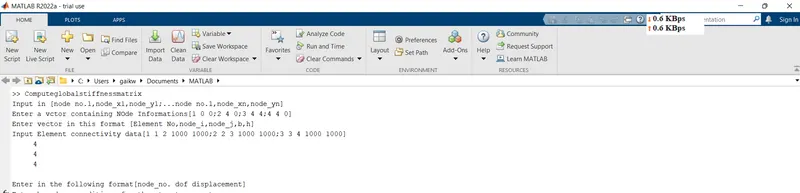
4) Based on matlab module developed in problem 3 process the element informations and based on their connectivity calculate element degrees of freedom for each element
Ans :-
5) Develop a matlab module to receive boundary conditions and degrees of freedom specified for the structure
Ans :-
Programme for above problem -
 function [boundary_conditions]=Getboundaryconditions()
prompt='Enter boundary conditions for the structure system';
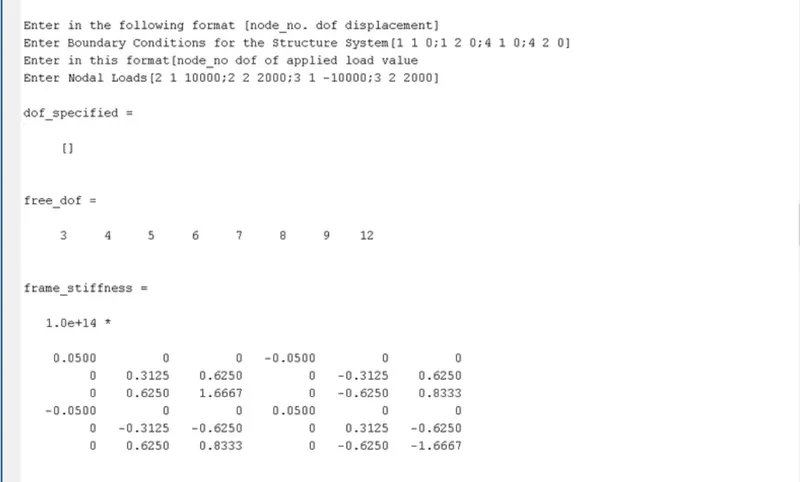
disp('Enter in the following format[node_no. dof displacement]');
boundary_conditions=input(prompt);
end
Explanation of code -
function - to create function for getting boundary conditions info with given inputs.
prompt - to display the text in prompt and waits for the user to input a value.
disp - to display the value of variables without printing the variable name.
end - to end the function.
6) Develop a matlab module to receive the load vector information acting on the structure
Ans :-
Programme for above problem -
 function [node_loads]=Getnodalloads()
prompt='Enter nodal loads';
disp('Enter in this format[node_no dof of applied load load value]');
node_loads=input(prompt);
end
Explanation of code -
function - to create function for getting nodal loads info.
prompt - to display the text in prompt and waits for the user to input a value.
disp - to display the value of variables without printing the variable name.
end - to end the function.
7) Based on stiffness method develop a matlab module to compute stiffness matrix for
the structure in global coordinates (Hint : Calculate stiffness matrix for each element , Transform the element stiffness
matrix in their global coordinates and assemble the element stiffness matrix based on the element degrees of freedom for the structure)
Ans :-
Programme for above problem -
 function [k_element]= Frame_Stiffness_Matrix(node_xy,A,I,length_element)
E = 2*10^11;
frame_stiffness=zeros(6,6);
k11 = A*E/length_element;
k22 = 12*E*I/(length_element)^3;
k23 = 6*E*I/(length_element)^2;
k33 = 4*E*I/length_element;
k36 = 2*E*I/length_element;

frame_stiffness(:,:) = [k11 0 0 -k11 0 0;0 k22 k23 0 -k22 k23;0 k23 k33 0 -k23 k36;-k11 0 0 k11 0 0;0 -k22 -k23 0 k22 -k23;0 k23 k36 0 -k23 -k33]

lamda_x=(node_xy(2,1)-node_xy(1,1))/length_element;
lamda_y=(node_xy(2,2)-node_xy(1,2))/length_element;
T_rot=[lamda_x -lamda_y 0;lamda_y lamda_x 0;0 0 1];
T=[T_rot zeros(3);zeros(3) T_rot]
k_element=T'*frame_stiffness*T
end
Explanations of the codes -
function - to create function for frame stiffness matrix.
zeros - to create zero matrix.
frame_stiffness - to calculate stiffness matrix.
T - transformation matrix calculation.
end - to end the function
8) Using the stiffness matrix developed in problem 7 compute the forces and displacements by implementing the concept of nested functions
Ans :-
Programme for above problem -
function [Global_Stiffness_Matrix]=Computeglobalstiffnessmatrix()

[node_coord,element_no,element_node,length_element,element_geometry,element_dof]=Getelementinfo();

boundary_conditions=Getboundaryconditions();

node_loads=Getnodalloads();
no_elements=size(element_no,1);
no_nodes=size(node_coord,1);

Global_Stiffness_Matrix=zeros(3*no_nodes,3*no_nodes);
displacement_matrix=zeros(3*no_nodes,1);
force_matrix=zeros(3*no_nodes,1);

%boundary condition
all_dof=1:3*no_nodes;
dof_specified=[];
for i=1:no_nodes
    n_dof=3*(boundary_conditions(i,1)-1)+boundary_conditions(i,2)
    dof_specified=[dof_specified n_dof];
    displacement_matrix(n_dof)=boundary_conditions(i,3);
end
free_dof=all_dof;
free_dof(dof_specified)=[];

%compute nodal loads
for j=1:size(node_loads,1)
    force_matrix(3*(node_loads(j,1)-1)+node_loads(j,2))=node_loads(j,3);
end

%gloabal stiffness matrix
for k=1:no_elements
    ele_nodes=elements_node(k,:);
    node_xy=node_coord(ele_nodes,:);
    A=element_geometry(k,1)*element_geometry(k,2);
    I=element_geometry(k,1)*element_geometry(k,2).^3/12;
    length=length_element(k);
    k_element=Frame_Stiffness_Matrix(node_xy,A,I,length_element);
    eldofs=element_dof(k,:);
    Global_Stiffness_Matrix(eldofs,eldofs)=Global_Stiffness_Matrix(eldofs,eldofs)+k_element;
end

displacement_matrix(free_dof)=Global_Stiffness_Matrix(free_dof,free_dof)\(force_matrix(free_dof)-Global_Stiffness_Matrix(free_dof,dof_specified)*displacement_matrix(dof_specified));
force_matrix(dof_specified)=Global_Stiffness_Matrix(dof_specified,:)*displacement_matrix;
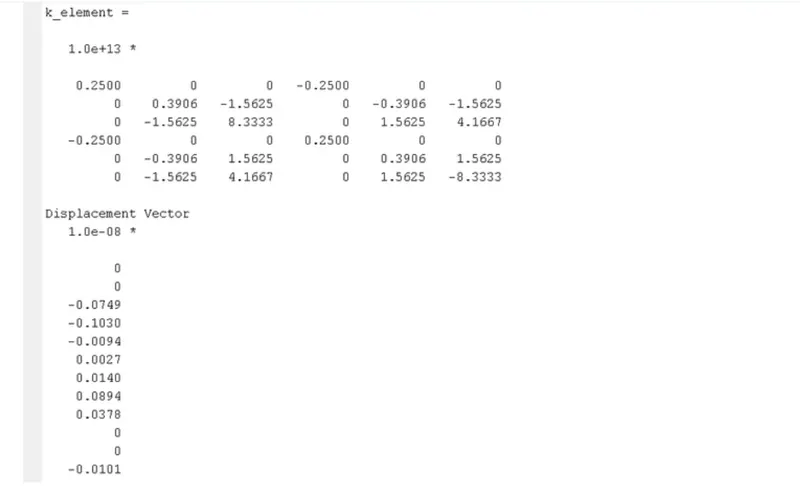
disp('Displacement Vector');
disp(displacement_matrix);
disp('Force Vector');
disp(force_matrix);
end
Explanations of codes -
function - to create function with given inputs.
Getelementinfo - to take element data from the function.
Getboundaryconditions - to take boundary conditions from the fucntion.
Gernodalloads - to take nodal loads from the given function.
size - to identify number of elements and nodes
zeros - to create zeros matirx .
for - to create loop data with respect to given input.
end - to end the loop.
disp - to display the results.
end - to end the function.
9) Solve the following problem using the matlab module developed in 1-8 to compute forces and displacements. Verify the matlab answers with the answers of previous challenge
Ans :-