Week 6 - Data analysis
WEEK 6 CHALLENGE - DATA ANALYSIS
Aim:
The aim of this assignment is to perform file parsing on the given thermodynamic data file.
Objective:
- To perform a compatibility check on the thermodynamic data file that will be used for the file parsing process.
- To output a plot between any two given parameters in the thermodynamic data file and save the plot with a file name that is based on the parameters.
- To calculate the area under the graph for the parameters of pressure and volume.
- To calculate the power output of the engine and specific fuel consumption of the engine when the speed is 1500 rpm and fuel consumption is 20mg per stroke cycle.
Problem Statement:
How to perform file parsing on the given thermodynamic file in Python to accomplish the objectives listed above?
Procedure:
Firstly, download thermodynamic file using the given link and save the file in the same directory where the python scripts are saved. Open a new python script and import the basic modules listed below:
- math
- matplotlib
- numpy
To perform the compatibility check, use the 'input' function in order to receive user input when the code is being run. This function can ask the user to enter the name of the thermodynamic data file along with the file extension. Next, use an "if" statement so that the code performs two different things based on the file name that was asked to be entered. If the file name is "engine_data.out", proceed with the file parsing. Use the else statement, to print a statement that asks to input a valid file name e.g." File unrecognised. Please provide a valid CONVERGE data file".
Within the "if" statement, if the file name is valid, create a set of empty arrays for every parameter that is listed in the thermodynamic file. In addition, create two more empty arrays for the units of the variables, and for the parameter itself. Also, create a variable that tracks the line count of the data file.
CODE:
import math
import matplotlib.pyplot as plt
import numpy as np
file_name = input('Enter File Name:')
if file_name == ('engine_data.out'):
crank = []
pressure = []
max_pressure = []
min_pressure = []
mean_temp = []
max_temp = []
min_temp = []
volume = []
mass = []
density = []
int_hr = []
hr_rate = []
cp = []
cv = []
gamma = []
kin_visc = []
dyn_visc = []
ct= 1
parameter = []
units = []
for line in open("engine_data.out"):
ct = ct+1
if '#' in line:
if ct == 4:
parameter.append(line.split())
if ct== 5:
units.append(line.split())
if "#" not in line:
crank.append(float(line.split()[0]))
pressure.append(float(line.split()[1]))
max_pressure.append(float(line.split()[2]))
min_pressure.append(float(line.split()[3]))
mean_temp.append(float(line.split()[4]))
max_temp.append(float(line.split()[5]))
min_temp.append(float(line.split()[6]))
volume.append(float(line.split()[7]))
mass.append(float(line.split()[8]))
density.append(float(line.split()[9]))
int_hr.append(float(line.split()[10]))
hr_rate.append(float(line.split()[11]))
cp.append(float(line.split()[12]))
cv.append(float(line.split()[13]))
gamma.append(float(line.split()[14]))
kin_visc.append(float(line.split()[15]))
dyn_visc.append(float(line.split()[16]))
# Array for Parameters and their respective units
parameter_select = [crank, pressure, max_pressure, min_pressure, mean_temp, max_temp, min_temp, volume, mass, density, int_hr, hr_rate, cp, cv, gamma, kin_visc, dyn_visc]
# UI for Program
print("--------------------------------Analysing & Plotting of the Thermodynamic Data of an IC engine------------------------")
print('1. Crank Angle')
print('2. Pressure ')
print('3. Maximum Pressure')
print('4. Minimum Pressure')
print('5. Mean Temperature')
print('6. Max Temperature')
print('7. Min Temperature')
print('8. Volume')
print('9. Mass')
print('10. Density')
print('11. Integrated HR')
print('12. HR Rate')
print('13. Cp')
print('14. Cv')
print('15. Gamma')
print('16. Kinematic Viscosity')
print('17. Dynamic Viscosity')
print('Select any of the two parameters to analyse and plot the relationship between')
x = int(input('Enter the x_axis parameter = '))
y = int(input('Enter the y_axis parameter = '))
# Data Plotting
for i in range(0, len(parameter)):
for j in range(0, len(units)):
plt.plot(parameter_select[x], parameter_select[y], linewidth = 3)
plt.xlabel(parameter[0][x] + units[0][x])
plt.ylabel(parameter[0][y] + units[0][y])
plt.title('Plot of ' + parameter[0][x] + " Vs. " + parameter[0][y])
plt.savefig(parameter[0][x] + " Vs. " + parameter[0][y] + '.png')
# Engine Performance Calculation
fuel_consump= float(input('Enter the fuel consumption of the engine in Micro gram/Stroke:'))
rpm = float(input('Enter the engine speed in rpm:'))
work_done = np.trapz(parameter_select[2], parameter_select[8])
work_done = work_done * pow(10,6)
print('Work Done by the Engine is:' + str(work_done) + 'J')
pow_out = (work_done*(rpm/60))/1000
print("Power output of Engine is:" + str(pow_out) + 'kW')
rps = rpm/60
total_strokes = 4*rps
fuel_consump = fuel_consump * total_strokes
sfc = (fuel_consump * 0.0036)/pow_out
print('The Specific Fuel Consumption of the Engine is:' + str(sfc) + 'g/kW.hr')
else:
print('File unrecognised. Please provide a valid CONVERGE data file.')
PROCEDURE:
- Import Libraries: The code starts by importing necessary libraries such as math, matplotlib.pyplot, and numpy.
- Input File Handling: It prompts the user to enter the file name. If the entered file name matches "engine_data.out", it proceeds to read data from the file.
- Data Parsing: It reads each line from the file, splitting the lines and storing the data into separate lists based on the type of parameter (e.g., crank angle, pressure, temperature, etc.).
- UI for Program: It displays a list of parameters available for analysis and plotting.
- User Input: It prompts the user to select two parameters (one for the x-axis and one for the y-axis) for plotting.
- Data Plotting: It plots the selected parameters using Matplotlib, with labels and titles based on the selected parameters.
- Engine Performance Calculation: It prompts the user to input fuel consumption and engine speed. Then, it calculates the work done by the engine using the trapezoidal rule (np.trapz() function), power output, and specific fuel consumption.
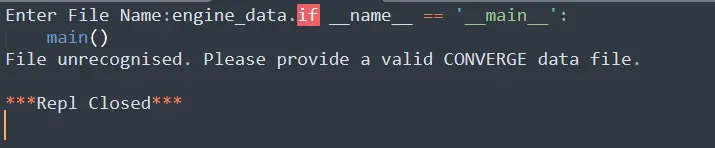
- Error Handling: If the entered file name does not match "engine_data.out", it displays a message indicating that the file is unrecognized.
- Output: It prints the calculated engine performance metrics.
POWER OUTPUT CALCULATIONS:
To calculate the power output, use the formula given below:
Pout= (Wd * N)/(60*1000)
where,
Pout- Output power of the engine (kW)
Wd - Work done by the engine (J)
N- Speed of the engine (rpm)
PROCESS:
- Convert engine speed from RPM to revolutions per second by dividing by 60.
- Calculate total strokes per second by multiplying revolutions per second by 4 for a 4-stroke engine.
- Multiply fuel consumption per stroke by total strokes per second to get fuel consumption per second.
- Calculate specific fuel consumption by multiplying fuel consumption per second by 0.0036 and dividing by power output.
Output:
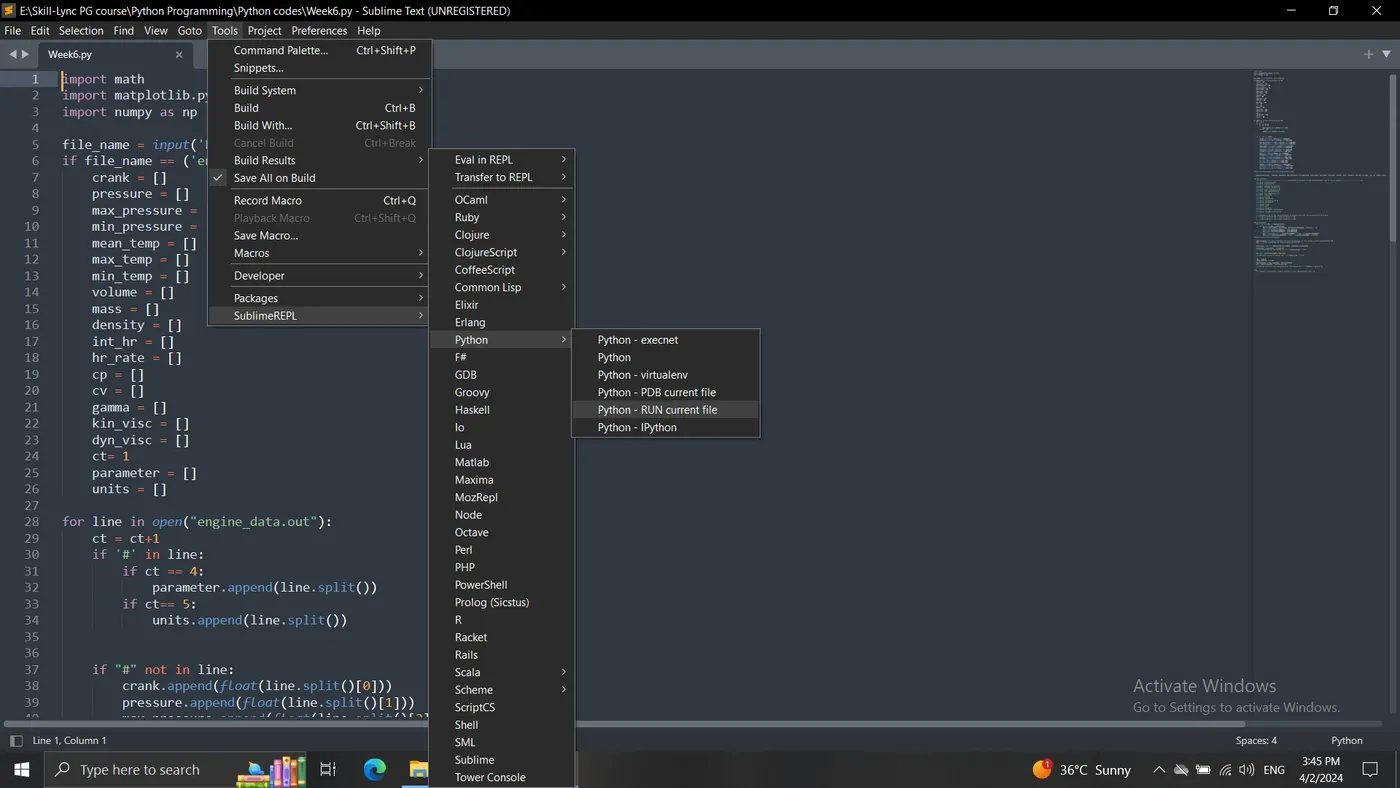
Note: The code will only run and take user inputs if the "SublimeREPL" package is installed to Sublime Text. Once installed, navigate to "Tools > SublimeREPL > Python > Python - RUN current file".
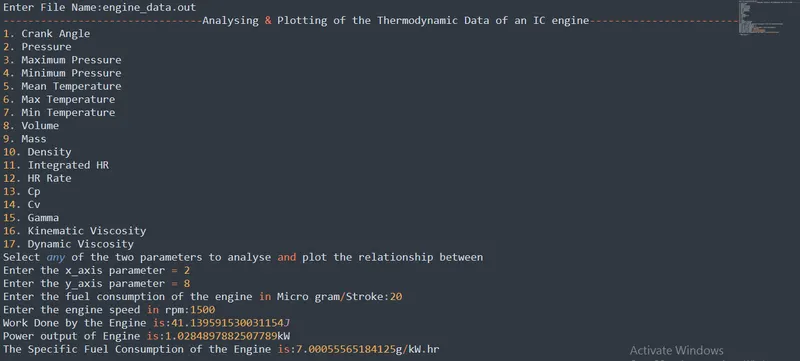
The screenshot below shows the output that is obtained when the code is run and the correct file name is used for the file parsing. In addition, the engine performance calculation results are also shown.
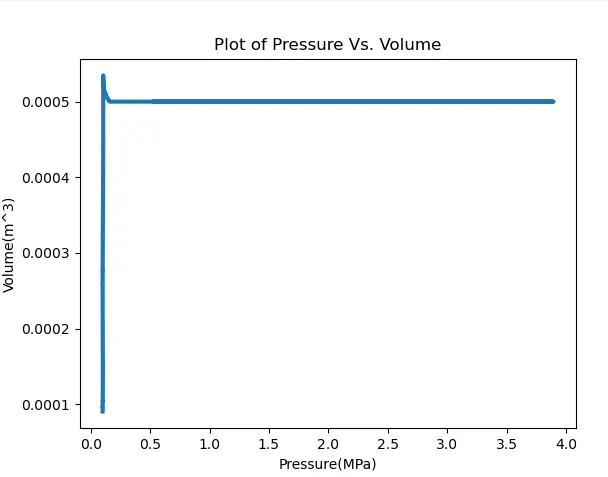
The PV diagram is shown in the screenshot below:
If the incorrect file name is entered, the following error will appear:
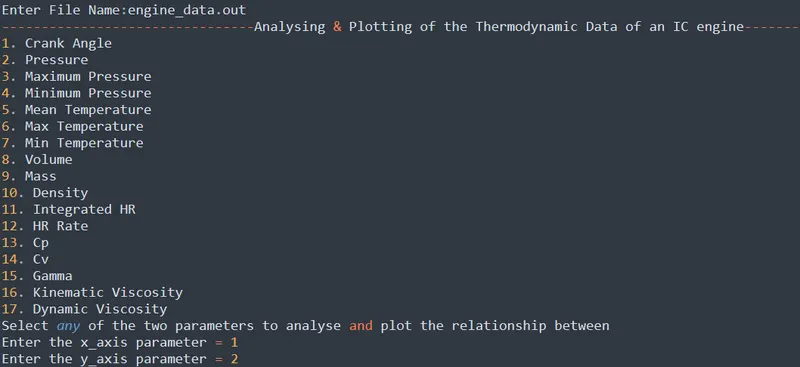
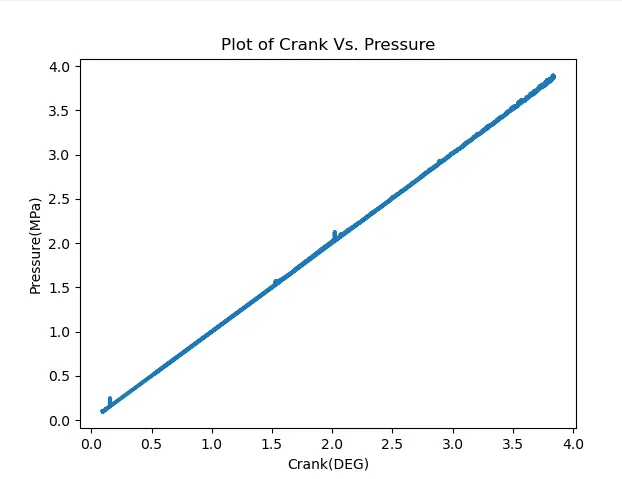
An example of when the parameters of crank angle and pressure are selected, are shown in the screenshots below:
Conclusion:
In conclusion, file parsing of the provided thermodynamic data file was performed in python. In addition, a plot between any two selected parameters can be generated and saved. Also, the necessary engine performance calculations were performed to obtain the following results:
The work done by the engine is: 41.14 Joules
The power output of the engine is: 1.03kW
The specific fuel consumption of the engine is: 7.00g/kW-hour