Week 5 - Genetic Algorithm
●Objective:
• To write a code in MATLAB to optimise the stalagmite function and find the global maxima of the function.
• To clearly expalin the concept of genetic algorithm and also explain the syntax for ga in MATLAB in your report.
• To Plot graphs for all 3 studies and for F maximum vs no. of iterations.
●Theory:
•Optimization:
It is a process of decision making and helps to find out the accurate results among given data sets.
This process helps to improve the productivity fatcors, such as strength, efficiency, reliability etc.
•Application Of Optimization:
Optimization is largely used in Mechanics, Economics and Finance, Machine Learning, Artificial intelligence, Controls Engineering.
●Optimization Alogorithms:
•Population Algorithms:
It is an algorithm that maintains an entire set of candidate solutions and each solution corresponds to a unique point in the search space of the problem, known as Population based alogrithm.
•Some of the notable population based algorithm are as follows:
1. Genetic Alogrithm
2. Differential Evolution
3. Particle Swarm Optimization
1.Genetic Algorithms:
It is one of the optimsation processes based on the principles of Genetics and Natural Selection. GA is used to find optimal or near optimal solutions.
Working stages of Genetic Alogorithm:
a) Start
b) Initialization of Population
c)Evaluation of the function with fitness approach, this process include slection, mutation, crossover.
d)Finding the Optimum solution
e)terminate algorithm
●Global maxima:
A global maximum, is also known as an absolute maximum, the largest overall value of a set, function, etc., over its entire range. It is impossible to construct an algorithm that will find a global maximum for an arbitrary function.
GA Syntax:
x = ga (fun,nvars,A,b,Aeq,beq,lb,ub,nolcon,options)
where,
fun = objective functions
nvar = no. of variables
A,b = Linear inequality constraints (A= Real matrix ; b = Real vector)
Aeq,beq = Linear equality constraints (A= Real matrix ; b = Real vector)
lb,ub = lower bounds and upper bounds.
nonlcon = nonlinear constraints
options = optimization option
● Stalagmite Function:
It is an mathematical function used for the optimisation and helps to find out the maximum value for a given function. The shape of the function looks like structures found in the cave floor. It is often studied with "stalactite function" which behaves in the oppose manner.
● Coding for stalagmite Function:(Code 1)

function[f] = stalagmite(inputs)
x = inputs(1);
y = inputs(2);
f1x = (sin((5.1*pi*x)+0.5)).^6;
f1y = (sin((5.1*pi*y)+0.5)).^6;
f2x = exp(-4*log(2)*(((x-0.0667).^2/0.64)));
f2y = exp(-4*log(2)*(((y-0.667).^2/0.64)));
f = -(f1x*f1y*f2x*f2y);
end

● Coding to find out the Global Maxima:(Code 2)

clear all
close all
clc
% Defining the input space

x = linspace (0,0.6,150);
y = linspace (0,0.6,150);

%Creating a 2D mesh
[xx,yy] = meshgrid (x,y);

% times the GA will run
num_case = 50;

%assingning values to inputs
for i = 1:length(xx)
    for j = 1:length(yy)
       inputs(1) = xx(i,j);
       inputs(2) = yy(i,j);
        f(i,j) = stalagmite (inputs);
    end
end


%unbounded GA study, Case 1

for k = 1:num_case
    [inputs,fopt(k)] = ga(@stalagmite,2);
    xopt(k) = inputs(1);
    yopt(k) = inputs(2);
end
tic
figure(1)
subplot(2,1,1)
hold on
surfc(xx,yy,-f)
shading interp
plot3(xopt,yopt,-fopt,'color','b','marker','o','markersize',5,'markerfacecolor','r')
title('unbounded inputs')
subplot(2,1,2)
plot(-fopt,'color','b','linewidth',1)
xlabel('iterations')
ylabel('function maximum')
study1_time = toc

%Bounded GA study case 2

tic
for z = 1:num_case
    [inputs,fopt(z)] = ga(@stalagmite,2,[],[],[],[],[0;0],[0.6;0.6]);
    %difines a set of of lbn and ub on the designated variable
    xopt(z) = inputs(1);
    yopt(z) = inputs(2);
end
study2_time = toc
figure(2)
subplot(2,1,1)
hold on
surfc(xx,yy,-f)
shading interp
plot3(xopt,yopt,-fopt,'color','b', 'marker', 'o', 'markersize', 5, 'markerfacecolor', 'r');
title('bounded inputs')
subplot(2,1,2)
plot(-fopt,'color','b','linewidth',1)
xlabel('iterations')
ylabel('function maximum')

%Bounded with population case3

options = optimoptions('ga','PopulationSize',270);
tic
for z = 1:num_case
    [inputs,fopt(z)] = ga(@stalagmite,2,[],[],[],[],[0;0],[0.6;0.6],[],[],options);
    % takes the values of options and solve ga in required population
    xopt(z) = inputs(1);
    yopt(z) = inputs(2);
end
study3_time = toc
figure(3)
subplot(2,1,1)
hold on
surfc(xx,yy,-f)
shading interp
plot3(xopt,yopt,-fopt,'color','b', 'marker', 'o', 'markersize', 5, 'markerfacecolor', 'r');
title('bounded inputs increased population size')
subplot(2,1,2)
plot(-fopt,'color','b','linewidth',1)
xlabel('iterations')
ylabel('function maximum')
●Outputs:
Figure 1 : UNBOUNDED GA STUDY
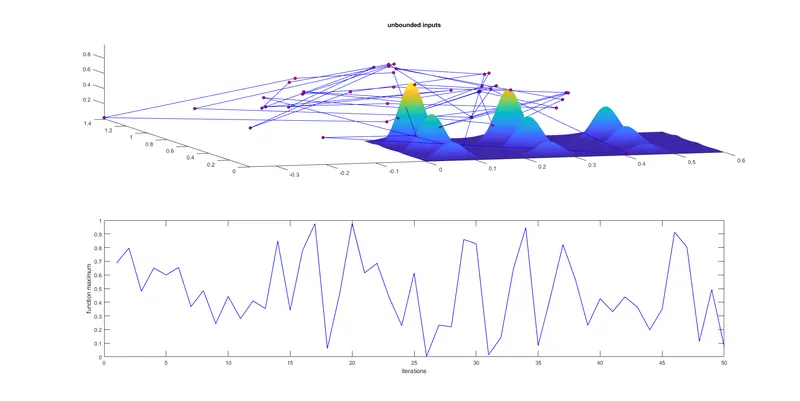
• Here in Fig 1. the lower and upper bounds in GA syntax are not defined, therefore there is a high probability of getting inaccurate results. The outputs tends to be unstable.
Figure 2: BOUNDED GA STUDY
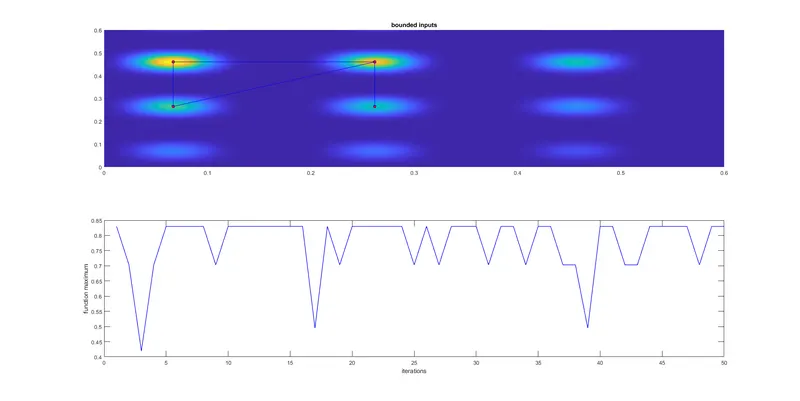 • Here in the GA syntax the lower and upper bounds are defined which results in better optimisation. As the bounds are defined, therefore the solver tends to converge and will be close to accuracy.
Figure 3: BOUNDED CASE WITH POPULATION SIZE
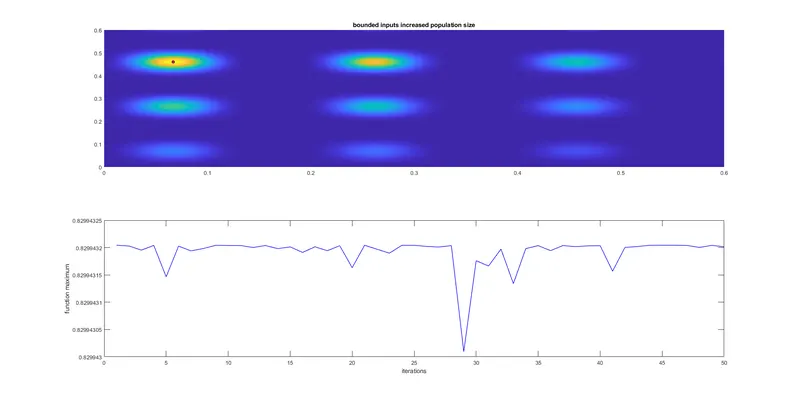
• Here in the GA syntax the lower and upper bounds are defined and also the Population Size has increased to 270.
● Code Explanation:
CODE 1
Scripting the Objective Function
The four eqaution in code 1, describes the stalagmite function. Stalagmite Function creates the contour of peaks for defined input variable with suitable change. This function is one of the 'Test Function' whuch is used to validate the performance characteristics of the optimization algorithms.
CODE 2
Evaluating the Objective Function
To set the range of x & y axes in between 0 to 0.6 with a division of 150, 'linspace' command is used. Then a 2d mesh or array is created by the command 'meshgrid(x,y)'. The command 'num_case' states the no of times the GA will run, here it is 50, so the GA willrun foe 50 times.
Now the foor loop is created to evaluate the objective function. Using a for loop will be helpful to cover the 2D input( both x & y). For every point in xy plane stalagmite function will be called to calculate the 'f' value.
For the study case 1, the for loop is created to evaluate the global maxima. 'fopt' is used for the optimum value of the function. '@' denotes the anonymous function , '2' denotes the number of variable. here the points are unbounded.
For the study case 2, here the difference is from the previous one is provieded with a certain range from 0 to 0.6 for both x & y. As there are no codition are there, therefore linear and non linear contraints are mentioned with a vaccumed third bracket [].
For the study case 3, here in the GA syntax the lower & upper bounds are defined and also the population size is increased to 270. The command 'optimoption' is used to define the population size and also helps to chnage inside parameters.
The command 'study_time = toc .... tic' is used to monitor the running time of the function. In other word it can be said that it is a stopwatch read the elapsed time started by the function. Now, the command 'subplot' is used to devide the current figure into an m-by-n grid and creates an axes for a subplot in the position specified by p. Next, 'surfc' , this command used to creates a contour plot under the three-dimensional shaded surface. 'shading interp' , this command is used to have a clear and precise view of the graph. Within the plot command 'marker', 'markersize', 5, 'markerfacecolor', 'r', these commands are used for the bullet point, which works as a identification mark on graphs, and the size, color of the marker. 'title ' command is used to name the title on the graph. 'xlebel' and 'ylebel' these commands are used to lebel the x and y axis on graph. 'hold on' this command is used to hold the previous figure, along with the upcoming figures.