Week 4-1D Element Creation Challenge
Week 4-1D Element Creation Challenge
Objective:
To make mesh and create a 1D element and assigning the cross section for given model
Procedure:
For using midsurface option make midsurface for given model. After that make 2 different component for using tool in orgnize.
then mesh the model using auto mesh with element size of 5mm. before that make washer cut in quick edit.
then make 1D element for the model.
in 1D element make 1D cross section with help of hyperbeam option.+
In hyperbeam option select to standard section in that make rod to box, beam to I section and bar to X section create that cross section.
For location A make RBE2 element for both Bracket 1 and Bracket 2. then connect both bracket with rod element and assign BOX cross section.
For location B make RBE3 element for both Bracket 1 and Bracket 2. then connect both bracket with beam element and assign I cross section.
For location c make RBE3 element for both Bracket 1 and Bracket 2. then connect both bracket with bar element and assign X cross section.
For location D and E make RBE2 element for both Bracket 1 and Bracket 2. then connect both bracket with and assign mass in cmass1 @10
For F location make spring element and assign CELAS 2 for both.
Images:
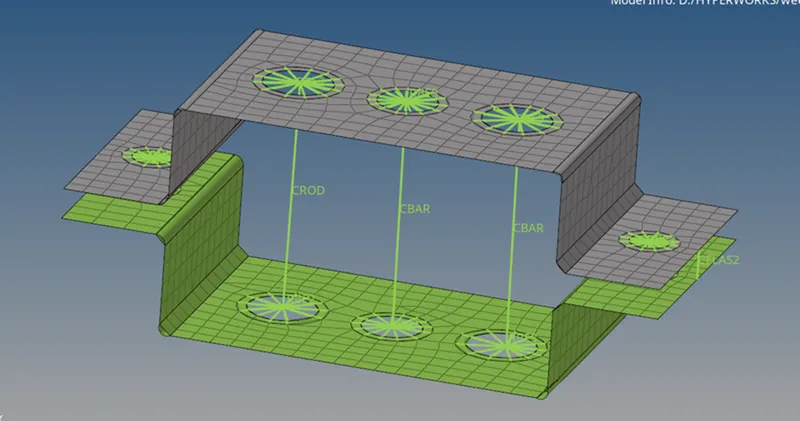
Results:
The given model did as given condition.