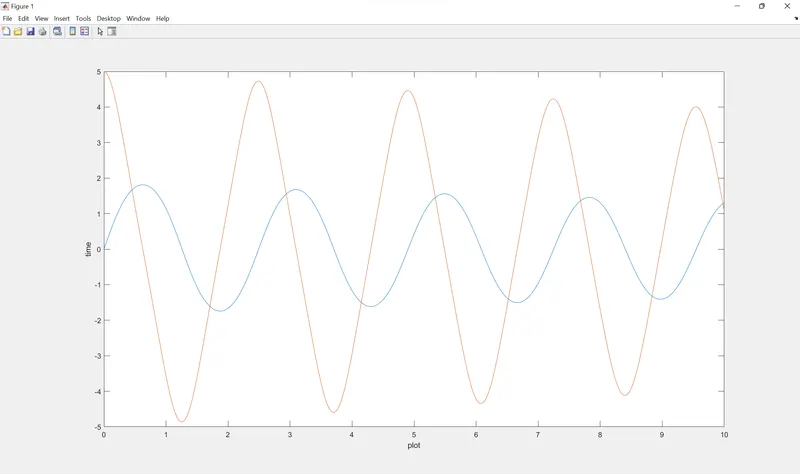
AIM: To write a MATLAB program to solve an ordinary differential equation (ODE) and also calculate the motion of the pendulum with Animation Video.
Introduction:
A second order ordinary differential equation is an ordinary differential equation in which any derivatives with respect to the independent variable have order no greater than 2.
Ordinary differential equations helps us to solve the many engineering systems. Such as harmonic motions, vibrarions, damping,etc.
Second-order linear differential equations are used to model many systems in engineering.
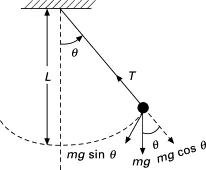
A simple pendulum consists of a mass ‘m’ hanging from a string of length ‘l’ and fixed at a pivot point . When displaced to an initial angle ’θ’ and released, the pendulum will swing back and forth with periodic motion.
The equation is given by: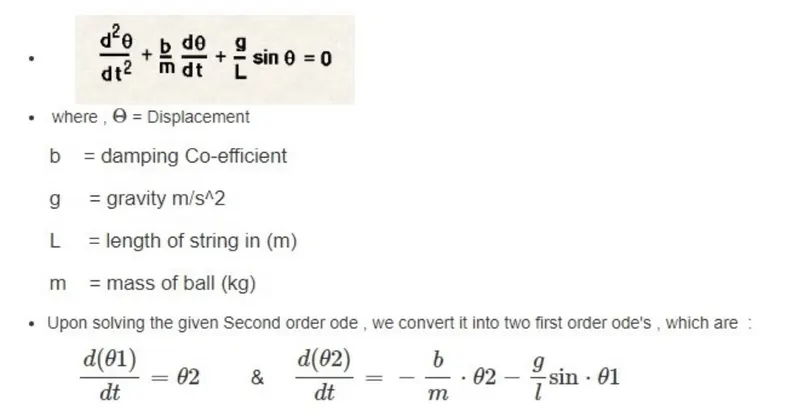
MATLAB PROGRAM:
%Second Order ODE of a Simple Pendulum and its Animation
clear all
close all
clc
%Inputs
b = 0.05; % Damping coefficient
g = 9.81; % Acceleration due to gravity in m/s2
l = 1; % Length of the pendulum in m
m = 1; % Mass of the pendulum bob in kg
% Initial condition
theta_0 = [0;5];
%Time span
t_span = linspace(0,10,600);
% Solving ODE
[t,results] = ode45(@(t,theta) ode_func(t,theta,b,g,l,m),t_span,theta_0);
plot(t,results(:,1))
hold on
plot(t,results(:,2))
xlabel('plot')
ylabel('time')
% Iteration using for loop to create animation of simple pendulum
ct=1;
theta_1 = results(:,1);
for i= 1:length(results(:,1))
% initial co-ordinates
x_start= 0;
y_start= 0;
theta_2 = theta_1(i);
% final co-ordinates
x_end = 1*sin(theta_2);
y_end = -1*cos(theta_2);
% ploting for animation
figure(2)
% base of pendulum
plot([-1,1],[0,0], 'linewidth',4,'color','b')
hold on
% string of pendulum
line([x_start x_end],[y_start y_end],'linewidth',5,'color','r')
hold on
% bob of pendulum
plot(x_end,y_end,'marker','o','markersize', 30,'markerfacecolor','y')
axis([-2 2 -2 2])
pause(0.02)
hold off
M(ct)=getframe(gcf);
ct=ct+1;
end
% creating movie from captured frames
movie(M)
videofile = VideoWriter('simple_pendulum.avi','uncompressed AVI');
open(videofile);
writeVideo(videofile,M);
close(videofile);
ODE Function MATLAB PROGRAM:
function [dtheta_dt]= ode_func(t, theta, b,g,l,m)
theta1 = theta(1);
theta2 = theta(2);
dtheta1_dt = theta2;
dtheta2_dt = -(b/m)*theta2 - (g/l)*sin(theta1);
dtheta_dt = [dtheta1_dt; dtheta2_dt];
end