Week 4.1 - Genetic Algorithm
To find the maxima for the given inpus.
To find the maxima we need to know what is stalagmite and how stalagmite is crated using genetic algorithm in matlab.
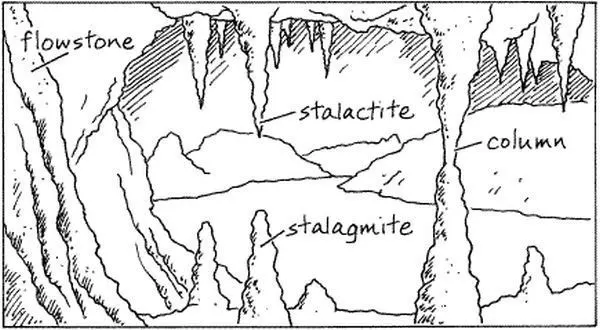
what is stalagmite ?
Stalagmite is a type of rock formation that rises from the floor of a cave due to the accumulation of material deposited on the floor from ceiling drippings.
What is a stalagmite function ?
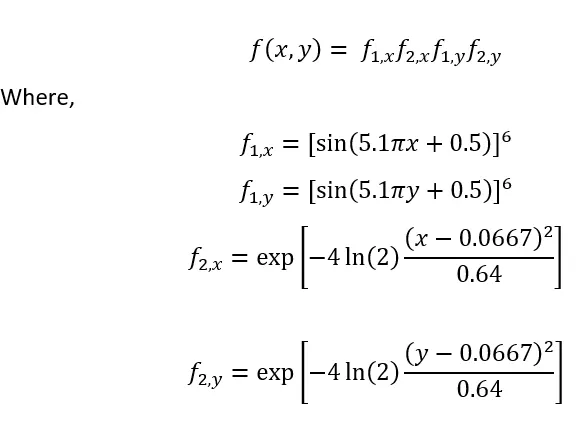
A stalagmite function generally refers to the function with which we are generating values over a stalagmite kind of surface for finding out the local and global maxima and minima of that particular given function.
What is genetic algorithm in matlab?
A genetic algorithm (GA) is a method for solving both constrained and unconstrained optimization problems based on a natural selection process that mimics biological evolution. The algorithm repeatedly modifies a population of individual solutions.
syntax for ga
x = ga(fun,nvars)x = ga(fun,nvars,A,b)x = ga(fun,nvars,A,b,Aeq,beq)x = ga(fun,nvars,A,b,Aeq,beq,lb,ub)x = ga(fun,nvars,A,b,Aeq,beq,lb,ub,nonlcon)x = ga(fun,nvars,A,b,Aeq,beq,lb,ub,nonlcon,options)x = ga(fun,nvars,A,b,Aeq,beq,lb,ub,nonlcon,intcon)x = ga(fun,nvars,A,b,Aeq,beq,lb,ub,nonlcon,intcon,options)x = ga(problem)[x,fval] = ga(___)[x,fval,exitflag,output] = ga(___)[x,fval,exitflag,output,population,scores] = ga(___)function [f] = stalagmite(input_ga)
x = input_ga(1);
y = input_ga(2);
f1 = (sin(5.1*pi*x+0.5)).^6;
f2 = exp(-4*log(2)*((x-0.0667)^2/0.64));
f3 = (sin(5.1*pi*y+0.5)).^6;
f4 = exp(-4*log(2)*((y-0.0667).^2/0.64));
f = -(f1*f2*f3*f4);
endcreating the main code for the function by developing various case time studies
clear all
close all
clc

%input arrays
x = linspace(0,0.6,150);
y = linspace(0,0.6,150);

%creating array : using meshgrid
[xx,yy] = meshgrid(x, y);

%creating arrays using loop function
for i = 1:length(xx)
    for j = 1:length(yy)
    input_ga(1) = xx(i,j);
    input_ga(2) = yy(i,j);
    f(i,j) = stalagmite(input_ga);
    end
end

surfc(xx,yy,f)
shading interp

[inputs , fval] = ga(@stalagmite,2);
x1 = inputs(1);
y1 = inputs(1);


% main code for case time study

clear all
close all
clc

%input : data to find global maxima

x = linspace(0,0.6,150);
y = linspace(0,0.6,150);
range = 30;

%creating array : using meshgrid
[xx , yy] = meshgrid(x,y);

% calling stalagmite function
for i = 1:length(xx)
    for j = 1:length(yy)
    input_ga(1) = xx(i,j);
    input_ga(2) = yy(i,j);
    f(i,j) = stalagmite(input_ga);
    end
end

tic %(used to calculate the time loop to complete compiling)
for i=1:range

    [inputs ,fval(i)] = ga(@stalagmite,2);
    x1(i) = inputs(1);
    y1(i) = inputs(2);

end
case_1 = toc; %( calculates the compiling time of loop)

figure(1)
subplot(2,1,1)
surfc(xx,yy,-f)

xlabel('x')
ylabel('y')

% (shading interp is used to make the plot look uniform and to hide the grid lines from the plot)
shading interp
hold on

plot3(x1,y1,-fval,'Marker','o','Markersize',5,'Markerfacecolor','r')
title('inputs')
hold on

subplot(2,1,2)
plot(-fval)
xlabel('iterations')
ylabel('function minimus')

% syntax for ga

%[x,fval] = ga(___)
%[x,fval] = ga(fun,2,A,b,Aeq,beq,lb,ub,nonlcon,intcon,options)

% case study 2 : finding ga for limited no of iterations with boundaries
tic
for i=1:range

    [inputs ,fval(i)] = ga(@stalagmite,2,[],[],[],[],[0;0],[0.6;0.6]);
    x2(i) = inputs(1);
    y2(i) = inputs(2);

end
case_2 = toc;

%plotting case 2
figure(2)

subplot(2,1,1)
% sub plot is used to get plots in the same figure tab

surfc(xx,yy,-f)
xlabel('x')
ylabel('y')

shading interp
hold on

% plotting the values of higher inputs abouve the limit
plot3(x2,y2,-fval,'Marker','o','Markersize',5,'Markerfacecolor','r')
title('unbounded inputs')
hold on

subplot(2,1,2)
plot(-fval)

xlabel('iterations')
ylabel('no of maximum function')

% case study 3 : finfing ga for limited no of iterations with specific boundaries and specified population

% method to initialize stopping period for ga
options = optimoptions('ga');
options = optimoptions(options,'populationsize',100);

tic
for i=1:range

    [inputs ,fval(i)] = ga(@stalagmite,2,[],[],[],[],[0;0],[0.6;0.6],[],[],options);
    x3(i) = inputs(1);
    y3(i) = inputs(2);

end
case_3 = toc;

%plotting case 3
figure(3)
subplot(2,1,1)
surfc(xx,yy,-f)
xlabel('x')
ylabel('y')

shading interp
hold on

plot3(x3,y3,-fval,'Marker','o','Markersize',5,'Markerfacecolor','r')
title('minimum inputs')
hold on

subplot(2,1,2)
plot(-fval)

xlabel('iterations')
ylabel('no of maximum function')

% case study 4 : : giving the maximum boundary values for the ga function to verify the stopping period.

options = optimoptions('ga');
options = optimoptions(options,'populationsize',400);

tic
for i=1:range

    [inputs ,fval(i)] = ga(@stalagmite,2,[],[],[],[],[0;0],[0.6;0.6],[],[],options);
    x4(i) = inputs(1);
    y4(i) = inputs(2);

end
case_4 = toc;

%plotting case 4

figure(4)
subplot(2,1,1)
surfc(xx,yy,-f)
xlabel('x')
ylabel('y')

shading interp
hold on

plot3(x4,y4,-fval,'Marker','o','Markersize',5,'Markerfacecolor','r')
title('limitted maximum inputs')
hold on

subplot(2,1,2)
plot(-fval)

xlabel('iterations')
ylabel('no of maximum function')

% displaying the values of x and y for the maximum value of functions
display(inputs)

inputs =

    0.0668    0.0668
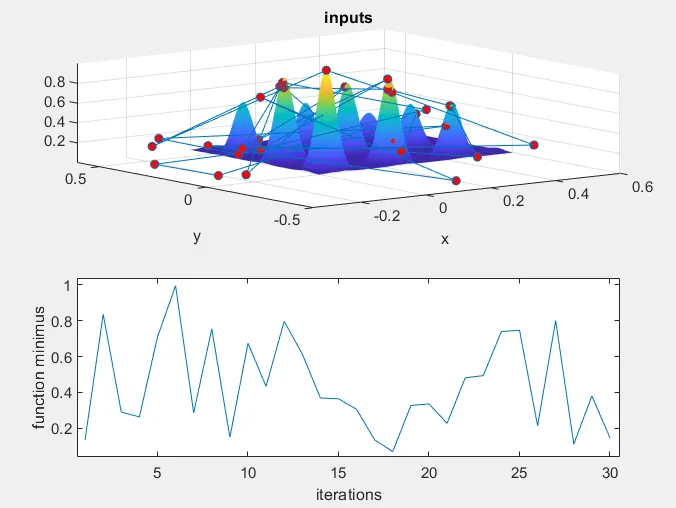
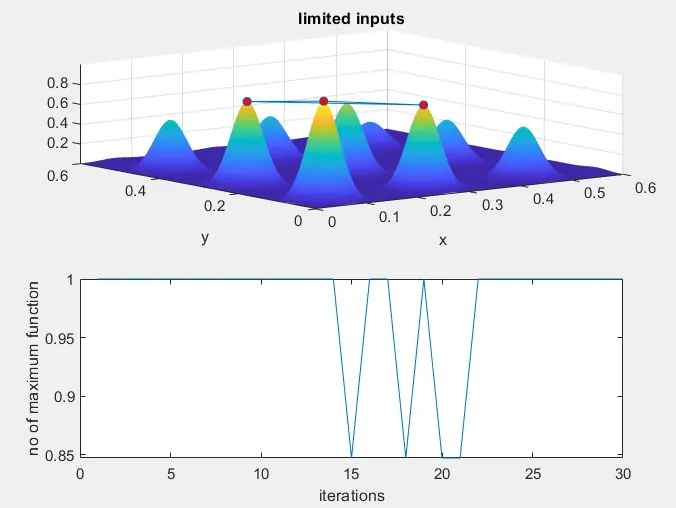
output plots and stalagmite formation using ga:
1) for unbounded inputs
2) for bounded inputs
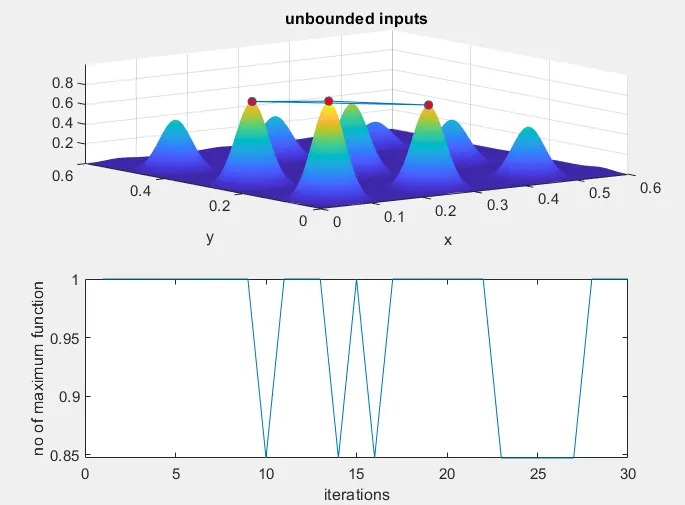
3) for maximun boundary input
Errors:
1) missed using 3d plot command and with the help of executive support, studied what is 3d plotr and why is 3d plot used and rectified.
2) error defining the same imput vectors, which is then rectified.