Week 3 - Solving second order ODEs
Title = Simulate the pendulum motion using Matlab.
Aim = Write a program in Matlab\Octave that will simulate the pendulum motion.
Code =
%a function program which will be used in the main program
%ODE

function [dtheta_dt] = ode_func(t,theta,b,g,l,m)

theta1 = theta(1)
theta2 = theta(2)
dtheta1_dt = theta2
dtheta2_dt = -(b/m)*theta2 - (g/l)*sin(theta1)
dtheta_dt = [dtheta1_dt; dtheta2_dt]
end
This code is used in the main function where the original programming is done. In this function the actual formula is stimulated and used in other code with the initial values as input
Code2 =
%objective : solving second order DE

clear all
close all
clc

b = 0.05 %damping coefficient
g = 9.81 %gravitational constant
l = 1 %length (m)
m = 0.1 %mass of the body(kg)

%Initial conitions

theta_0 = [0;5] %angular acceleration is 0 and angular velocity is 5

%time span

t_span = linspace(0,20,150) %pendulum oscillates between 0 to 20 secs

%solving ode

[t,results] = ode45(@(t,theta) ode_func(t,theta,b,g,l,m), t_span, theta_0);

%plotting

figure(1)
hold on
plot(t,results(:,1))
plot(t,results(:,2))
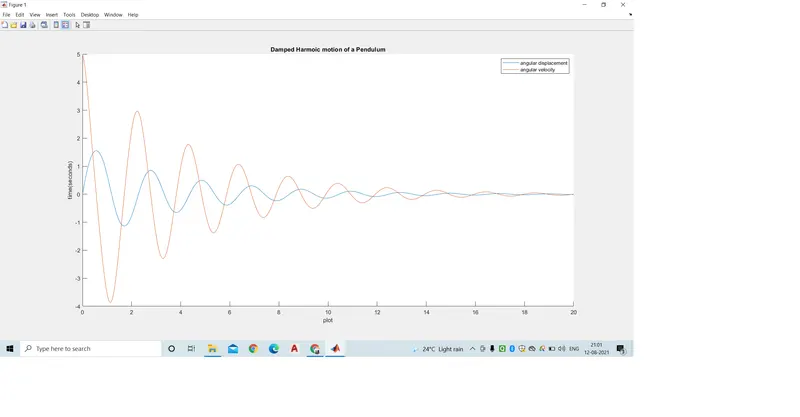
title('Damped Harmoic motion of a Pendulum')
legend('angular displacement','angular velocity')
xlabel('plot')
ylabel('time(seconds)')

%for loop
%before starting the loop, a counter value was defined

ct = 1
for i = 1:length(results(:,1))
    x_start = 0
    y_start = 0
    x_end = l*sin(results(i,1))
    y_end = -l*cos(results(i,1))

    %plotting the animatiiom
    figure(2)
    plot([-1 1], [0 0], 'linewidth', 5)
    hold on
    plot([x_start x_end],[y_start y_end], 'linewidth',3)
    hold on

    plot(x_end, y_end , 'o' , 'markersize' , 20 , 'markerfacecolor', 'y')
    title('Animation of transient behaviour of pendulum')
    axis([-1.5 1.5 -1.5 1])
    pause(0.3)
    hold off

    M(ct) = getframe(gcf)
    ct = ct + 1
end

%Animation of the Pendulum

movie(M)
videofile = VideoWriter('Pendulum animation.avi' , 'uncompressed AVI')
open(videofile)
writeVideo(videofile , M)
close(videofile)
This is the main Program where all the Input variables and the ploting is explained.first the graph and then the animation of the pendulum is done using videowriter.
Results =
Video Link = https://youtu.be/2b5tf6BJm1c
Conclusion = Hence the animation for the Motion Of Pendulum was created.