Week 3 - Solving second order ODEs
Aim:
To solve the Ordinary Diferential Equation(ODE) and use the calculated values to animate the harmonic motion of the simple pendulum
Formula:
d^2(theta)/dt2+b/m(d(theta)/dt)+g/l(sin(theta))=0
Coding procedure:
The funtion code is assigned to solve the second order differential equation and they are split into seprate terms
function [dtheta_dt] = ode_func(t,theta,b,g,l,m)

theta1 = theta(1)
theta2 = theta(2)

dtheta1_dt = theta2;
dtheta2_dt = -(b/m)*theta2-(g/l)*sin(theta1);
dtheta_dt = [dtheta1_dt; dtheta2_dt];
end
the function is a group of statements that together perfom the task in matlab and are asinged in seperate files and the name should be same as the function in the main code program
the main code program:
close all
clear all
clc

 b = 0.05;
 g = 9.81;
 l = 1;
 m =0.1;

 %initial conditions
 theta_0 = [0;5];

 %time points
 t_span = linspace(0,10,700);

 %solve ODE
 [t,results] = ode45(@(t,theta)ode_func(t, theta, b,g,l,m),t_span,theta_0);

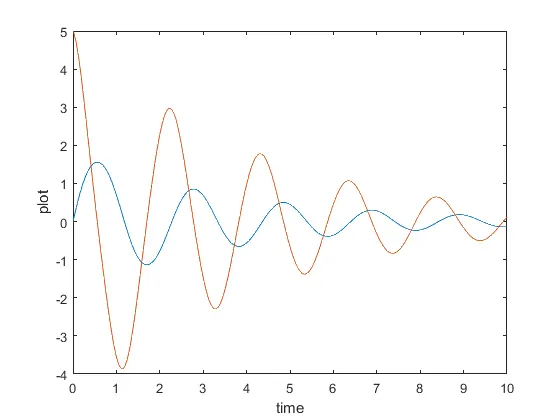
 plot(t,results(:,1))
 hold on
 plot(t,results(:,2))
 ylabel('plot')
 xlabel('time')

%for loop

ct = 1;
for i = l:length(results(:,1))
    x_start = 0;
    y_start = 0;

    x_end = l*sin(results(i,1));
    y_end = -l*cos(results(i,1));


%ploting animation
figure(2)
plot([-1,1],[0,0],'linewidth',3)
hold on
plot([x_start,x_end],[y_start,y_end],'linewidth',3)
hold on
plot(x_end,y_end,'o','markersize',30,'markerfacecolor','c')
axis([-2 1.5 -1.5 1])
pause(0.03)
hold off
M(ct) = getframe(gcf);
ct = ct+1;

end

movie(M)
videofile = VideoWriter('Pendulum_motion.avi','Uncompressed avi');
open(videofile)
writeVideo(videofile,M)
close(videofile)
The basic codes such are clear all, close all,clc are used to clear the data in workspace ,clear the figures and graphs , clear the command window respectively
The inputs and the initial conditions and time points are assigned
b = 0.05; (damping co-efficient)
g = 9.81;(density)
l = 1;(length of the spring)
m =0.1;(mass of the bob)
theta_0 = [0;5];
t_span = linspace(0,10,700);
the function ode45 is used to solve the second order differential equations
and the for loop is assigned and the start and end points of the axis are set coressponding to the string size set according to the pendulum
a pause command is also used in order to pause the time frame of the motion of the pendulum
Results:
The angular velocity and the angular displacements are plotted
Animated Video:
The animation video of the harmonic motion of the simple pendulum is given below,