Solving second order ODEs
Solving Second order ODE using Matlab
Aim- To write a program in Matlab that will simulate the pendulam motion
Objective-
- First we have write a program that we solve second order ODE.
- To write a program that will simulate the pendulam motion.
- To plot a graph For Displacement v/s time animate the motion .
Equation-
`frac{d^2theta}{dt^2}+frac{b}{m}*frac{d theta}{dt}+frac{g}{l}*sintheta=0`
Where,
b=damping coefficent
m=mass of the ball (kg)
g=gravity`frac{m}{s^2}`
L=length of the pendulam in m
Theroy-
A simple pendulam consist of mass hanging string of length and fixed pivot point.When displaced to an initial angle and released,the pendulam will swing back and forth with periodic motion.
Code Explain-
- Programming language used in matlab
- starting the command use in editor
- providing the input varible(L=1 meter,m=1kg,b=0.05,g=9.81m/s)
- Providing value theta & linspace command for time span=0-10 for 250 value.
- solving the ode by use of predefined function and ODE formula.
- Now use 'for' command
- Assuming value for x0,y0=0
- provide equation for the x1,y1 as
x1=l*sin(theta0);y1=l*cos(theta0);
- plot all the coordinate value and provide axis no.
- using pause command to make the plot look real.
- increment the ct value by+1 each time it execute.
- All fig. assigned to variable M, one at time usingct
- Ending the 'for' loop.
- Using the movie command is to combine all fig.saved in the M file to make an animation.
- At the end saving the movie/animation in .avi format.
Matlab Code-
%program for solving second order ODE and obtain the animation file for simple pendulam
clear all
close all
clc

%input parameter
l= 1;
m=1;
b=0.05;
g=9.81;

%initial condition
theta_0=[0;3];

%time plot
t_span=linspace(0,10,250);

%solving ode
[t,results]=ode45(@(t,theta)ode_function(t,theta,l,m,b,g),t_span,theta_0);

%plotting
figure(1);
plot(t,results(:,1))
hold on;
plot(t,results(:,2))
xlabel('Time');
ylabel('Plot');
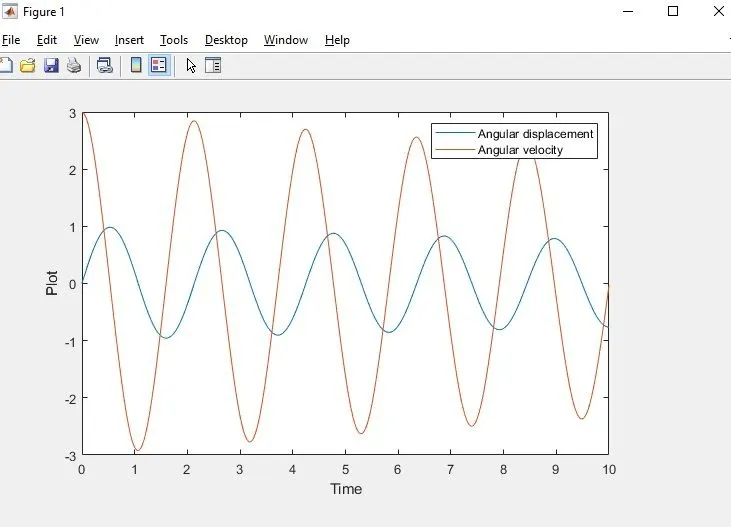
legend('Angular displacement','Angular velocity');

%using for loop
ct=1;


for i=1:length(results(:,1))
    theta0=results(i,1);
    x0=0;
    y0=0;

    x1=l*sin(theta0);
    y1=-l*cos(theta0);

    figure(2);
    %plotting
    plot([-1,1],[0,0],'linewidth',10,'color','black');
    line([x0,x1],[y0,y1],'linewidth',3,'color','r');
    hold on
    plot(x1,y1,'o','markersize',20,'color','r','MarkerFaceColor','b');
    hold off
    axis([-2 2 -2 2]);
    pause(0.01);
    M(ct)=getframe(gcf);
    ct=ct+1;
end

%making of the movie/animation
movie(M)
videofile=VideoWriter('simple_pendulam.avi','Uncompressed avi');
video.FrameRate=60;
open(videofile)
writeVideo(videofile,M)
close(videofile)
Function Code-
function [dtheta_dt]= ode_function(t,theta,l,m,b,g)

theta1=theta(1)
theta2=theta(2)
dtheta1_dt=theta2;
dtheta2_dt=-(b/m)*theta2-(g/1)*sin(theta1);
dtheta_dt= [dtheta1_dt;dtheta2_dt];

end
Command Window Execution and Error-
- Use the semicolon results in no output in command window.
- No Error were detected during the exicution.
Results-
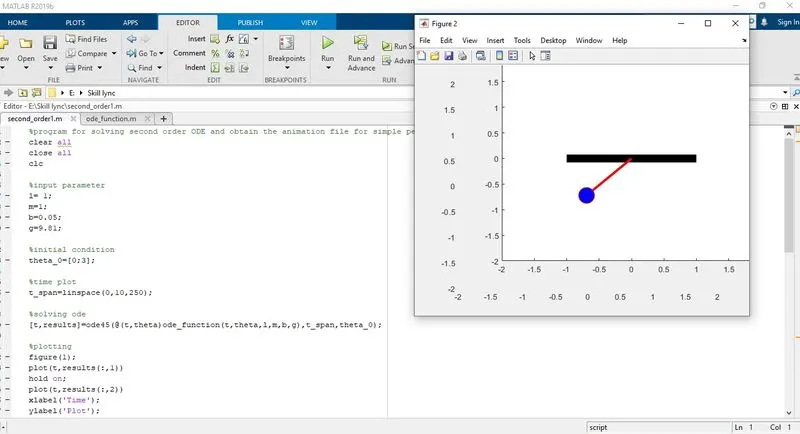
Thus we have created a simulation of simple pendulam using matlab code and solved second order ODE for it also generate graph of displacement and velocity w.r.t time.
Link Below to show the simulation of simple pendulam.
https://drive.google.com/file/d/1uxeaw9AU4rxw5530q8pTTIJVheVL0B-v/view?usp=sharing