Week 3 - Solving second order ODEs
ASSIGNMENT 4
Solving second order ODEs
OBJECTIVE:
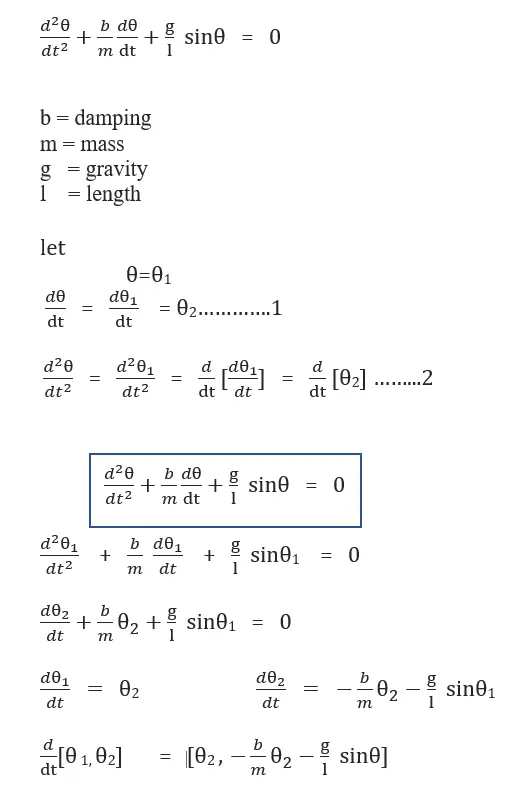
The objective of Assignment 4, is to write a program that solves the following ODE.
This ODE represents the equation of motion of a simple pendulum with damping and to simulate the pendulum motion, by using Python program,subline as text editor and imagemagick.
PROBLEM STATEMENT:
In this assignment we have to simulate the pendulum motion.. And the files should be saved in a separte folder otherwise, if not the animation will not takes place.
The png files are in a zigzag form in the command promt, we have to arrange them in a right format based on the time.
Assigning of theta angle should be noted carefully.
SOFTWARE USED:
Python3.6 (64bit), subline text3 as text editor.
THEORY:
The below example shows, how to simulate the motion of a simple pendulum using python programme. Solving the second order differential equation and Derivind the equation of motion of the pendulum and finally creating the animation of a simple pendulum by using image magick.
second order differential equation:
pendulum equation of motion:
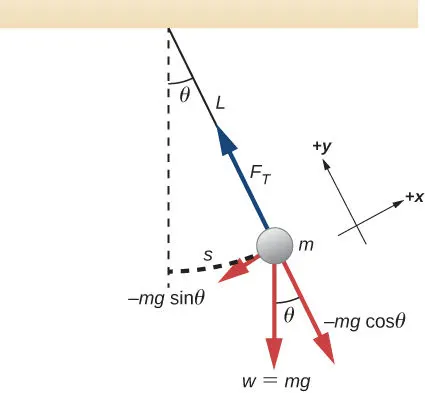
The pendulum is a simple mechanical system that follows a differential equation. The pendulum is initially at rest in a vertical position. When the pendulum is displaced by an angle θ and released, the force of gravity pulls it back towards its resting position. Its momentum causes it to overshoot and come to an angle −θ (if there are no frictional forces), and so on. The restoring force along the motion of the pendulum due to gravity is −mgsinθ. Thus, according to Newton's second law, the mass times the acceleration must equal −mgsinθ. Let X0,Y0 will be the one end of the pendulum which is fixed and another end will be the X1,Y1 which is connected to the bob, and X1Y1 position have to be calculated.
X0 = 0
Y0 = 0
X1 = ?
Y1 = ?
Sinθ = X1/L
X1 = L*Sinθ.......1
cosθ = Y1/L
Y1 = L*COSθ.........2
PROCEDURE: to simulate the pendulum equation of motion,
1. Open subline text editor.
2. Open a new file and save it as ----.py
3. Write the comment that what is the program is about, which the line is never executed. And write the comment first followed by #(pound) or double quotation codes in starting and as well as at the end of comments. then
import numpy as np
from scipy.integrate import odeint
import matplotlib.pyplot as plt
import math
import matplotlib.markers as mk
4. Define the model which is a function, that represents the ODE system, in which the two ordinary differential equation is defined. [displacement, velocity]
5. Define the damping coefficient, gravity, length of pendulum, mass as follows.
b = 0.05
g = 9.81
l = 1
m = 1
6. Define the initial condition [displacement , velocity] displacement=0, velocity=3
initial condition
theta_0 = [0,3]
7. Define the time points and the no. of values, here we are defining the time intervals between 0-20 and producing 150 values for the animation.
time points
t = np.linspace(0,20,150)
8. Solve the second order differential equation by using odeint command, which is a command in the scipy module.
without importing scipy module this command will not work.
9. Then plot the results by using limit of x and y as well as use the legends.
plt.plot(t,theta[:,0],'-',label=r'$\frac{d\theta_1}{dt}=\theta2$')
plt.plot(t,theta[:,1],'--',label=r'$\frac{d\theta2}{dt} = -\frac{b}{m}\theta_2-\frac{g}{L}sin\theta_1$')
plt.ylabel('plot')
plt.xlabel('time')
plt.legend(loc='best')
plt.show()
10. Define the positions of the pendulum by defining the string starting pint as x0,y0 and x1,y1 values which is calculated in the theory part. Also define the line width as well.
x1=0;y1=0
x2=l*math.sin(i)
y2=-l*math.cos(i)
file='test%05d.png'%ct
plt.figure()
plt.plot([-1.5,1.5],[0,0],linewidth=8)
plt.plot([x1,x2],[y1,y2],linewidth=3)
plt.plot(x2,y2,'o',markersize=15)
plt.xlim([-1.5,1.5])
plt.ylim([-1.5,1.5])
plt.savefig(file)
ct=ct+1
PROGRAM SCREEN SHOT
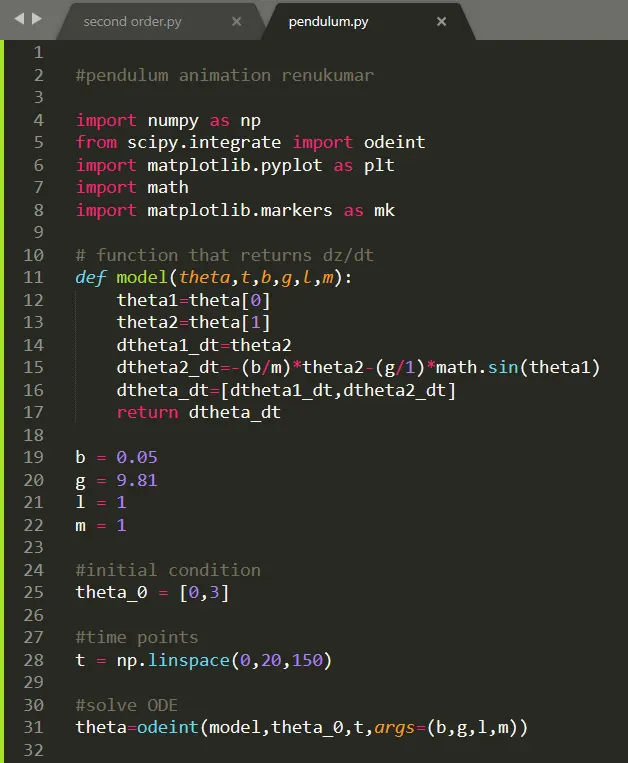
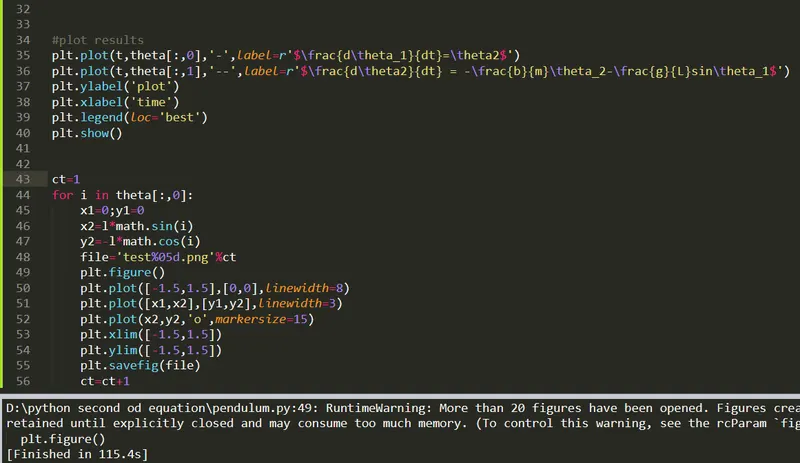
FIG PROGRAM
# second order differential equaion and pendulum animation renukumar

import numpy as np
from scipy.integrate import odeint
import matplotlib.pyplot as plt
import math
import matplotlib.markers as mk

# function that returns dz/dt
def model(theta,t,b,g,l,m):
	theta1=theta[0]
	theta2=theta[1]
	dtheta1_dt=theta2
	dtheta2_dt=-(b/m)*theta2-(g/1)*math.sin(theta1)
	dtheta_dt=[dtheta1_dt,dtheta2_dt]
	return dtheta_dt

b = 0.05
g = 9.81
l = 1
m = 1

#initial condition
theta_0 = [0,3]

#time points
t = np.linspace(0,20,150)

#solve ODE
theta=odeint(model,theta_0,t,args=(b,g,l,m))


#plot results
plt.plot(t,theta[:,0],'-',label=r'$\frac{d\theta_1}{dt}=\theta2$')
plt.plot(t,theta[:,1],'--',label=r'$\frac{d\theta2}{dt} = -\frac{b}{m}\theta_2-\frac{g}{L}sin\theta_1$')
plt.ylabel('plot')
plt.xlabel('time')
plt.legend(loc='best')
plt.show()


ct=1
for i in theta[:,0]:
	x1=0;y1=0
	x2=l*math.sin(i)
	y2=-l*math.cos(i)
	file='test%05d.png'%ct
	plt.figure()
	plt.plot([-1.5,1.5],[0,0],linewidth=8)
	plt.plot([x1,x2],[y1,y2],linewidth=3)
	plt.plot(x2,y2,'o',markersize=15)
	plt.xlim([-1.5,1.5])
	plt.ylim([-1.5,1.5])
	plt.savefig(file)
	ct=ct+1
GRAPH:
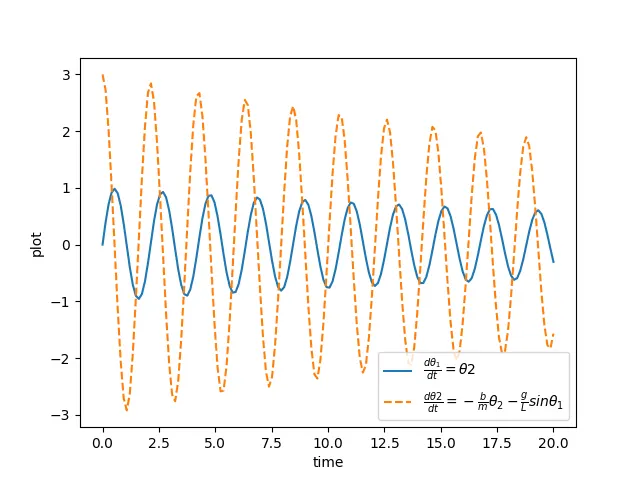
PROCEDURE TO CREATE THE AIMATION:
Microsoft Windows [Version 10.0.18362.1139]
(c) 2019 Microsoft Corporation. All rights reserved.
C:\Users\Meenasri Kalisetty>cd C:\NEW RENU ANIMATION PENDULUM
C:\NEW RENU ANIMATION PENDULUM>dir
Volume in drive C is OS
Volume Serial Number is 4AC9-1ADB
Directory of C:\NEW RENU ANIMATION PENDULUM
28-12-2020 13:12 <DIR> .
28-12-2020 13:12 <DIR> ..
28-12-2020 13:09 9,725 test00001.png
28-12-2020 13:09 11,490 test00002.png
28-12-2020 13:09 11,848 test00003.png
28-12-2020 13:09 11,871 test00004.png
28-12-2020 13:09 11,825 test00005.png
28-12-2020 13:09 11,882 test00006.png
28-12-2020 13:09 11,818 test00007.png
28-12-2020 13:09 11,449 test00008.png
28-12-2020 13:09 10,366 test00009.png
28-12-2020 13:09 11,444 test00010.png
28-12-2020 13:09 10,716 test00011.png
28-12-2020 13:09 11,568 test00012.png
28-12-2020 13:09 11,538 test00013.png
28-12-2020 13:09 11,602 test00014.png
28-12-2020 13:09 11,668 test00015.png
28-12-2020 13:09 11,340 test00016.png
28-12-2020 13:09 10,409 test00017.png
28-12-2020 13:09 11,517 test00018.png
28-12-2020 13:09 11,695 test00019.png
28-12-2020 13:09 11,887 test00020.png
28-12-2020 13:09 11,862 test00021.png
28-12-2020 13:09 11,879 test00022.png
28-12-2020 13:09 11,763 test00023.png
28-12-2020 13:09 11,324 test00024.png
28-12-2020 13:09 10,568 test00025.png
28-12-2020 13:09 11,493 test00026.png
28-12-2020 13:09 11,715 test00027.png
28-12-2020 13:09 11,448 test00028.png
28-12-2020 13:09 11,564 test00029.png
28-12-2020 13:09 11,654 test00030.png
28-12-2020 13:09 11,601 test00031.png
28-12-2020 13:09 11,105 test00032.png
28-12-2020 13:09 10,879 test00033.png
28-12-2020 13:09 11,317 test00034.png
28-12-2020 13:09 11,831 test00035.png
28-12-2020 13:09 11,876 test00036.png
28-12-2020 13:09 11,823 test00037.png
28-12-2020 13:09 11,847 test00038.png
28-12-2020 13:09 11,677 test00039.png
28-12-2020 13:09 10,978 test00040.png
28-12-2020 13:09 10,931 test00041.png
28-12-2020 13:09 11,578 test00042.png
28-12-2020 13:09 11,652 test00043.png
28-12-2020 13:09 11,631 test00044.png
28-12-2020 13:09 11,635 test00045.png
28-12-2020 13:09 11,437 test00046.png
28-12-2020 13:09 11,509 test00047.png
28-12-2020 13:09 10,614 test00048.png
28-12-2020 13:09 11,152 test00049.png
28-12-2020 13:09 11,660 test00050.png
28-12-2020 13:09 11,836 test00051.png
28-12-2020 13:09 11,847 test00052.png
28-12-2020 13:09 11,857 test00053.png
28-12-2020 13:09 11,704 test00054.png
28-12-2020 13:09 11,473 test00055.png
28-12-2020 13:09 10,526 test00056.png
28-12-2020 13:09 11,258 test00057.png
28-12-2020 13:09 11,635 test00058.png
28-12-2020 13:10 11,688 test00059.png
28-12-2020 13:10 11,633 test00060.png
28-12-2020 13:10 11,656 test00061.png
28-12-2020 13:10 11,662 test00062.png
28-12-2020 13:10 11,183 test00063.png
28-12-2020 13:10 10,466 test00064.png
28-12-2020 13:10 11,397 test00065.png
28-12-2020 13:10 11,710 test00066.png
28-12-2020 13:10 11,533 test00067.png
28-12-2020 13:10 11,854 test00068.png
28-12-2020 13:10 11,830 test00069.png
28-12-2020 13:10 11,670 test00070.png
28-12-2020 13:10 11,164 test00071.png
28-12-2020 13:10 10,622 test00072.png
28-12-2020 13:10 11,439 test00073.png
28-12-2020 13:10 11,694 test00074.png
28-12-2020 13:10 11,600 test00075.png
28-12-2020 13:10 11,684 test00076.png
28-12-2020 13:10 11,612 test00077.png
28-12-2020 13:10 11,488 test00078.png
28-12-2020 13:10 10,733 test00079.png
28-12-2020 13:10 10,932 test00080.png
28-12-2020 13:10 11,571 test00081.png
28-12-2020 13:10 11,650 test00082.png
28-12-2020 13:10 11,860 test00083.png
28-12-2020 13:10 11,522 test00084.png
28-12-2020 13:10 11,728 test00085.png
28-12-2020 13:10 11,037 test00086.png
28-12-2020 13:10 10,624 test00087.png
28-12-2020 13:10 11,160 test00088.png
28-12-2020 13:10 11,119 test00089.png
28-12-2020 13:10 11,701 test00090.png
28-12-2020 13:10 11,579 test00091.png
28-12-2020 13:10 11,692 test00092.png
28-12-2020 13:10 11,612 test00093.png
28-12-2020 13:10 11,225 test00094.png
28-12-2020 13:10 10,414 test00095.png
28-12-2020 13:10 11,307 test00096.png
28-12-2020 13:10 11,697 test00097.png
28-12-2020 13:10 11,811 test00098.png
28-12-2020 13:10 11,822 test00099.png
28-12-2020 13:10 11,743 test00100.png
28-12-2020 13:10 11,565 test00101.png
28-12-2020 13:10 11,004 test00102.png
28-12-2020 13:10 10,620 test00103.png
28-12-2020 13:10 11,377 test00104.png
28-12-2020 13:10 10,618 test00105.png
28-12-2020 13:10 11,692 test00106.png
28-12-2020 13:10 11,706 test00107.png
28-12-2020 13:10 11,621 test00108.png
28-12-2020 13:10 11,371 test00109.png
28-12-2020 13:10 10,614 test00110.png
28-12-2020 13:10 11,039 test00111.png
28-12-2020 13:10 11,520 test00112.png
28-12-2020 13:10 11,742 test00113.png
28-12-2020 13:10 11,810 test00114.png
28-12-2020 13:10 11,458 test00115.png
28-12-2020 13:10 11,678 test00116.png
28-12-2020 13:10 11,308 test00117.png
28-12-2020 13:10 10,472 test00118.png
28-12-2020 13:10 11,176 test00119.png
28-12-2020 13:10 11,518 test00120.png
28-12-2020 13:10 11,683 test00121.png
28-12-2020 13:10 11,684 test00122.png
28-12-2020 13:10 11,675 test00123.png
28-12-2020 13:10 11,507 test00124.png
28-12-2020 13:10 10,984 test00125.png
28-12-2020 13:10 10,643 test00126.png
28-12-2020 13:10 11,336 test00127.png
28-12-2020 13:10 11,682 test00128.png
28-12-2020 13:10 11,742 test00129.png
28-12-2020 13:10 11,731 test00130.png
28-12-2020 13:10 11,686 test00131.png
28-12-2020 13:10 11,431 test00132.png
28-12-2020 13:10 10,681 test00133.png
28-12-2020 13:10 10,881 test00134.png
28-12-2020 13:10 11,437 test00135.png
28-12-2020 13:10 11,338 test00136.png
28-12-2020 13:10 11,702 test00137.png
28-12-2020 13:10 11,517 test00138.png
28-12-2020 13:10 11,504 test00139.png
28-12-2020 13:10 11,197 test00140.png
28-12-2020 13:10 10,455 test00141.png
28-12-2020 13:10 11,179 test00142.png
28-12-2020 13:11 11,532 test00143.png
28-12-2020 13:11 11,514 test00144.png
28-12-2020 13:11 11,766 test00145.png
28-12-2020 13:11 11,703 test00146.png
28-12-2020 13:11 11,485 test00147.png
28-12-2020 13:11 10,997 test00148.png
28-12-2020 13:11 10,629 test00149.png
28-12-2020 13:11 11,290 test00150.png
150 File(s) 1,710,421 bytes
2 Dir(s) 52,108,357,632 bytes free
C:\NEW RENU ANIMATION PENDULUM>magick *.png output.gif
Result:
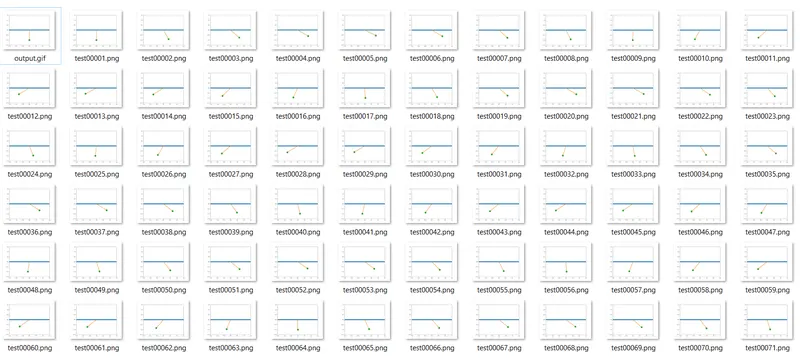
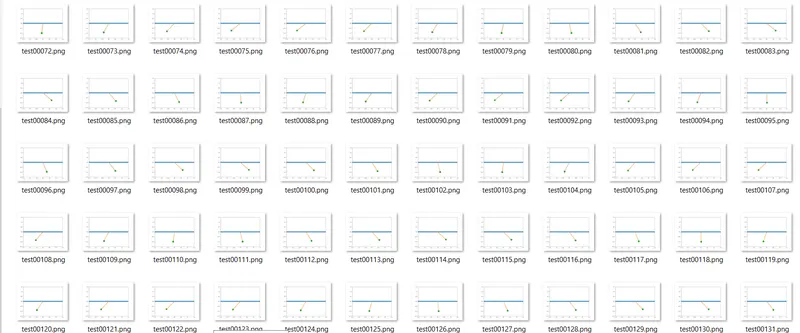

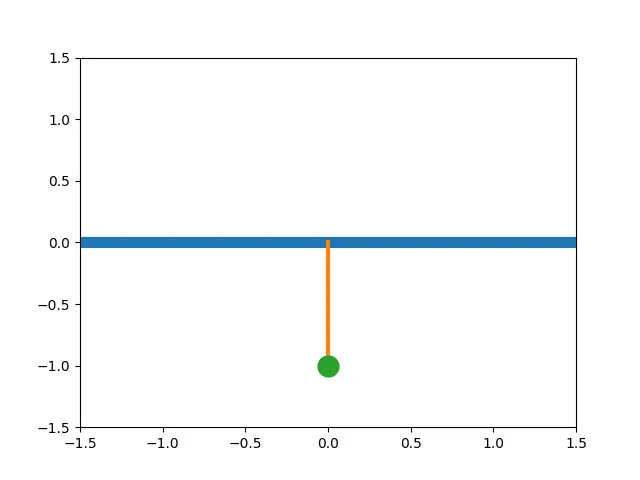
FIG: ANIMATION
DISCUSSION:
The above animation shows the motion of a simple pendulum with respect to time. The second order differential equation is converted to the first order differential equation and the respected values are defined and the position of the pendulum are also calculated and the motion of the pendulum is animated.
Difficulties faced:
Difficulties faced in syntax error that a bracket is not closed in the odeint command and an error is shown in the another line.
Difficulties in creating an animation that the png which are generated in the system are in a zig zag form when it has invited in the command promt. dir /od can helps the png's to form an asending order in the coomand promt but it is also not worked. Finally the way of saving the png is modified and saved. Where the errror get solved.
LINK: https://drive.google.com/drive/folders/1q5nbx24cfwQPVT1rcV8nxkWRhFJJtxa5?usp=sharing
UTUBE LINK: https://youtu.be/yxAvSkWoDSg