Week 3 - Solving second order ODEs
AIM : To create an image that represents position of pendulum and to animate it using ODE in matlab
SIMPLE PENDULUM : A simple pendulum is nothing but a mass suspended at one end freely from a fixed rigid end. Usually inextensible strings are used to suspend the mass.
SOLVING ODE :
Let
theta = theta 1 --(1)
dtheta/dt = dtheta1/dt = theta2 --(2)
d^2theta/dt^2 = d^2theta1/dt^2 = d/dt(dtheta1/dt)
d^2theta/dt^2 = d^2theta1/dt^2 = dtheta2/dt --(3) -- by (2)
On considering the following equation and substituting (1),
theta is replaced by theta 1 in the following equation.
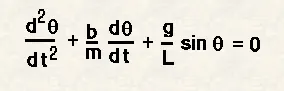
Solving it further by substituting (2) & (3) we get
dtheta^2/dt = -(b/m)(theta2) - (g/l)(sin(theta1) --(4)
where
g = gravity in m/s2
L = length of the pendulum in m
m = mass of the ball in kg
b = damping coefficient.
PROCEDURE :
Firstly clear all,close all and clc commands are used to clean the screen
Inputs are assinged for b,g,lm,.
Time scale t_span is taken as an array.
Next ode is solved using , [t,results] = ode45(@(t,theta) ode_func(t,theta,b,g,l,m),t_span,theta_0) ,where ode_func definition is made.
For loop and movie(M) commands are used in simulating the pendulum functions.
clear all
close all
clc

b=0.05;
g=9.81;
l=1;
m=1;


% initial condition
theta_0 = [0;3];

% time points
t_span = linspace(0,20,500);

% solve ODE
[t,results] = ode45(@(t,theta) ode_func(t,theta,b,g,l,m),t_span,theta_0);

plot(t,results(:,1))
hold on
plot(t,results(:,2))
ylabel('Plot')
xlabel('time')

%pendulum simulation
figure
ct=1;
for i=1:length(results(:,1))
    x0 = 0;
    y0 = 0;
    x1 = 1*sin(results(i,1));
    y1 = -1*cos(results(i,1));
    plot([-0.5,0.5],[0,0],'linewidth',3,'color','r');
    line([x0 x1],[y0 y1],'linewidth',3,'color','b');
    hold on
    plot(x1,y1,'o','markers',30,'markerfacecolor','g');
    axis([-1.5 1.5 -1.5 0.5]);
    pause(0.02)
    grid on
    hold off
    M(ct) = getframe(gcf);
    ct = ct+1;
end

% animation
movie(M)
videofile=VideoWriter('pendulumode.avi','uncompressed AVI')
open(videofile)
writeVideo(videofile,M)
close(videofile)
function [dtheta_dt] = ode_func(t,theta,b,g,l,m)
theta1=theta(1)
theta2=theta(2)
dtheta1_dt=theta2;
dtheta2_dt=-(b/m)*theta2-(g/l)*sin(theta1);
dtheta_dt=[dtheta1_dt;dtheta2_dt]; 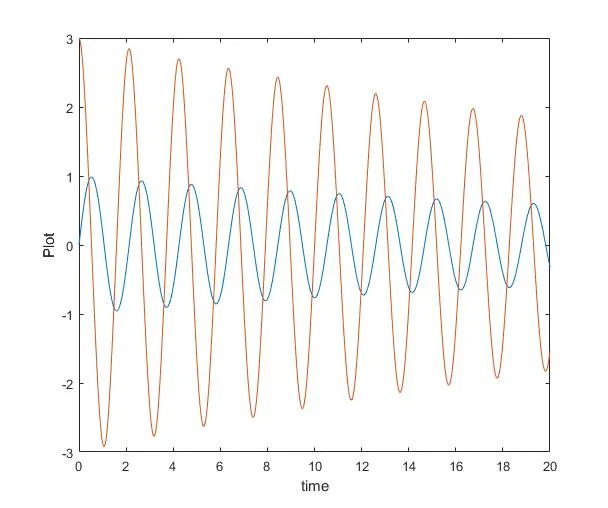
(FIG 1 time vs angular velocity and displacement)
CONCLUSION : A simple pendulum was animated using ode and other corresponding commands.