Week 3 - Solving second order ODEs
You tube link:
https://youtu.be/ZS8YAjoHEXw
https://youtu.be/ZS8YAjoHEXwfunction[dtheta_dt] = ode_func(t,theta,b,g,l,m)
theta1 = theta(1);
theta2 = theta(2)
dtheta1_dt = theta2;
dtheta2_dt = -(b/m)*theta2-(g/l)*sin(theta1);
dtheta_dt = [dtheta1_dt;dtheta2_dt];
end%inputs
b = 0.05;
g = 9.81;
l = 1;
m = 0.1;
% inital condition
theta_0 = [0;5];
%time points
t_span = linspace(0,10,500);
% solve ODE
[t,results] = ode45(@(t,theta)ode_func(t,theta,b,g,l,m),t_span,theta_0);
plot(t,results(:,1))
hold on
plot(t,results(:,2))
xlabel('plot')
ylabel('time')
x0 = 0;
y0 = 0;
x1 = -2;
y1 = 0;
x2 = 2;
y2 = 0;
ct = 1;
for i = 1:length(t)
x = 1*sin(results(i))
y = -1*cos(results(i))
plot([x1,x0,x2],[y1,y0,y2],'linewidth',8)
hold on
plot([x0,x],[y0 y],'linewidth',2)
hold on
plot(x,y,'o','markersize',15,'markerfacecolor','b')
axis([-3 3 -3 0])
hold off
pause(0.1)
d(ct)=getframe(gcf);
ct = ct+1;
end
movie(d)
videofile=VideoWriter("Simple_pendulam.avi","Uncompressed AVI");
open(videofile)
writeVideo(videofile,d)
close(videofile)AIM:
In engineering, ODE is used to describe the transient behaviour of a system. is a simple pendulam.
EQUATIONS:
`d^2theta/dt^2+b/m d theta/dt+g/lsin theta=0`
b = damping
g =. gravity
m = mass
l = length
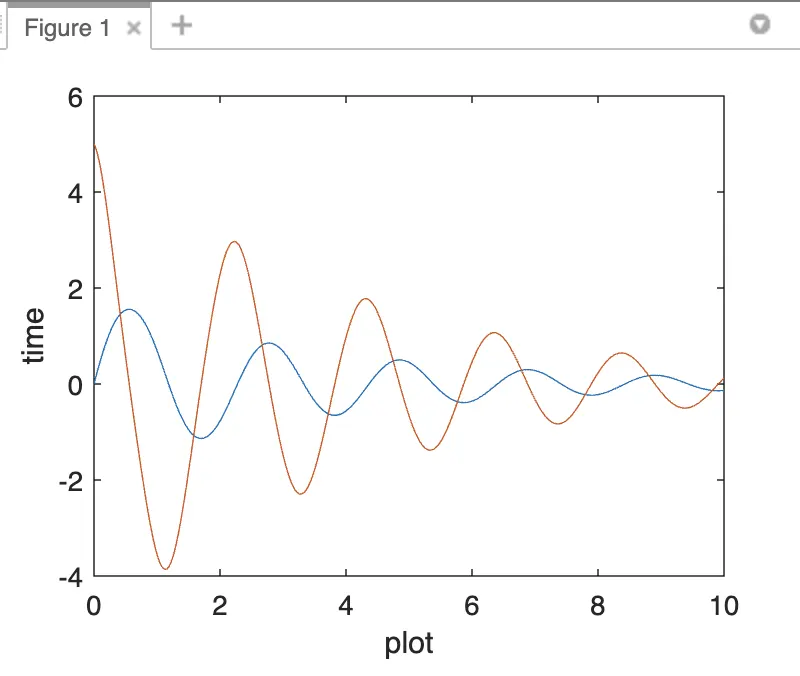
PLOTS:
FUNCTIONS:
in this the first to creat the function module of the content of the program
of the name of "ode_func" the inputs is t, theta,b, g, l and m values to calculate the given equation.
CREAT A PLOTS:
Inputs the variable of the b,g,l and m starting the initial condition of theta value then time points
and solve ode
In this case the "ODE 45" is the inbuilt key function of the matlab.
Then use the plot comment to plot the program.
SIMPLE PENDULAM:
To input the x0,y0,x1,y1,x2andy2 and then open for loop of the program
to plot the input values of the simple pendulam of the "getframe" of the gcf
Then finally to get a videofile of the ossilation of the pendulam of damping to use the "movie" and "videofile" and "videowriter" and close the videofile.
To get a simple pendulam ossilation.
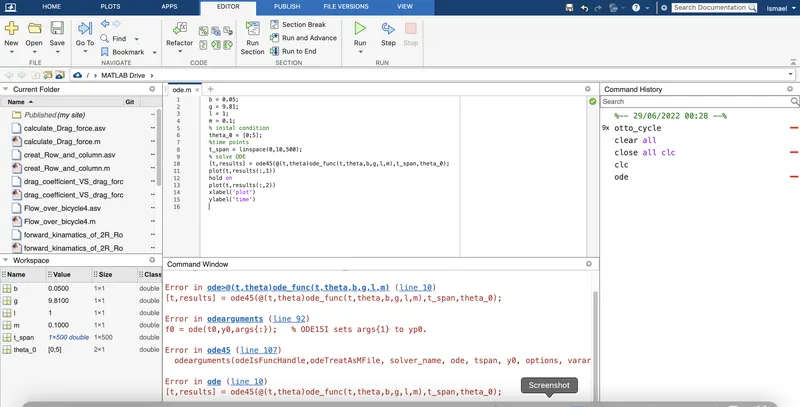
ERRORS:
I am not to wrote the full program of the file throuth the error and the and not yet the function window and the ode function .
I did the error overcomes the to input the ode function window to done the error.
CONCLUTION:
To be create a simple pendulam of the using 2nd order ode function.