Week 3 - Solving second order ODEs
L= length of the pendulum
g= gravity(9.81m/s^2)
m= mass of the ball in kg
b= damping coefficient
since , the given function is in second order differential equation we will convert it in to first order to solve ODE
LET,
θ=θ1
dθ1/dt=θ2
dθ^2/dt^2=dθ2/dt
INPUT
L=1
m =1kg
b=0.05
g=9.81m/s^2
time span =0-20sec
angular displacement= 0
angular velocity =3rad/sec2 at time t=0
CODE
close all
clear all
clc

b = 0.05;
g = 9.81;
l = 1;
m = 1;

%initial condition
theta_0 = [0;3];

%time points

t_span = linspace(0,20,500);

%solve ODE

[t,results] = ode45(@(t,theta) ode_func(t, theta,b,g,l,m),t_span,theta_0);

%plotting
figure(1)
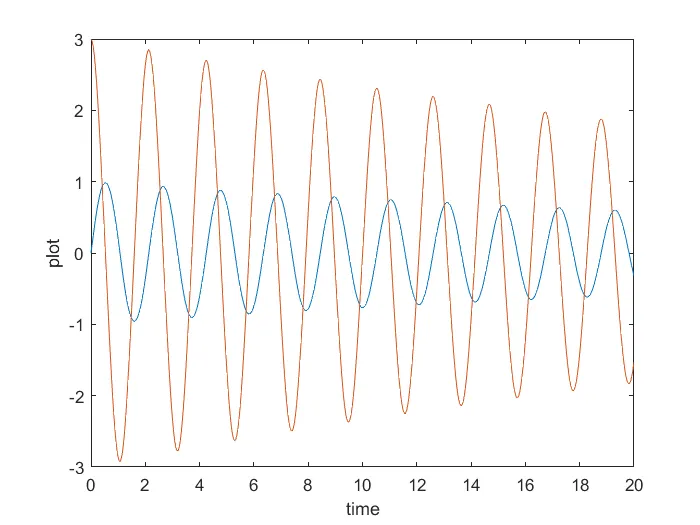
plot(t,results(:,1))
hold on
plot(t,results(:,2))
ylabel('plot')
xlabel('time')

%create animation of simple pendulum
ct = 1;
figure(2)
%theta_1 = results(:,1);
for i = 1:length(results(:,1))

    %initial co-ordinates
    x_start = 0;
    y_start = 0;
    %theta_2 = theta_1(i);

    %final cordinates
    x_end = 1*sin(results(i,1));
    y_end  = -1*cos(results(i,1));

    %plotting for animation

    %base of pendulum
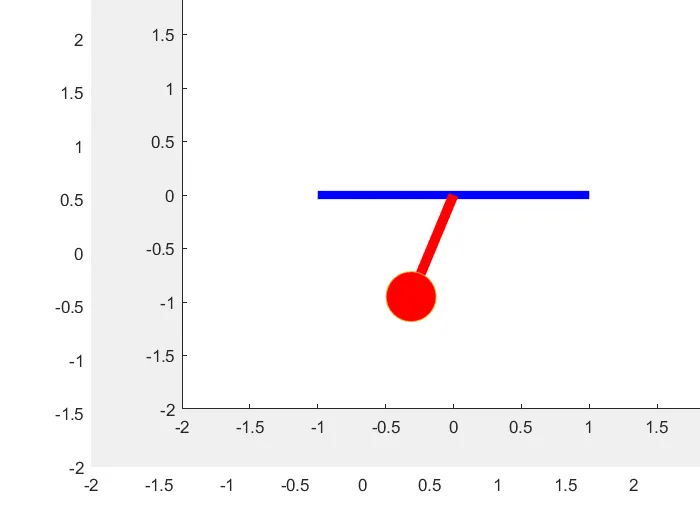
    plot([-1,1],[0,0], 'linewidth',5,'color','blue')
    hold on

    %string of pendulum
    plot([x_start x_end],[y_start y_end],'linewidth',6,'color','r')
    hold on
    %bob of pendulum
    plot(x_end,y_end,'marker','o','markersize',30,'markerfacecolor','r')
    axis([-2 2 -2 2])
    pause(0.003)
    hold off
    M(ct) = getframe(gcf)
    ct=ct+1
end


%creating movie
movie(M)
videofile = VideoWriter('simple_pendulum.avi','uncompressed AVI');
open(videofile)
writeVideo(videofile,M)
close(videofile)
FOR FUNCTION CODE
function[dtheta_dt] = ode_func(t, theta,b,g,l,m)

theta1 = theta(1);
theta2 = theta(2);
dtheta1_dt = theta2;
dtheta2_dt = -(b/m)*theta2- (g/l)*sin(theta1);
dtheta_dt = [dtheta1_dt ; dtheta2_dt];
end
steps using while creating program
1.THE program is written to solve ode in which matlab inbuilt function (ode45) is used with contant theta ,t and another function is used which is defined seperately in function program
2. in the next step the result of solved ODE is plotted w.r.t. time using plot command
3.now iteration of co ordinates is fed using for loop to create animation
4. then plot command is used to plot pendulum string and bob
5. in the next step, the move command is used to create animated video of the oscillating pendulum.
error occur during program 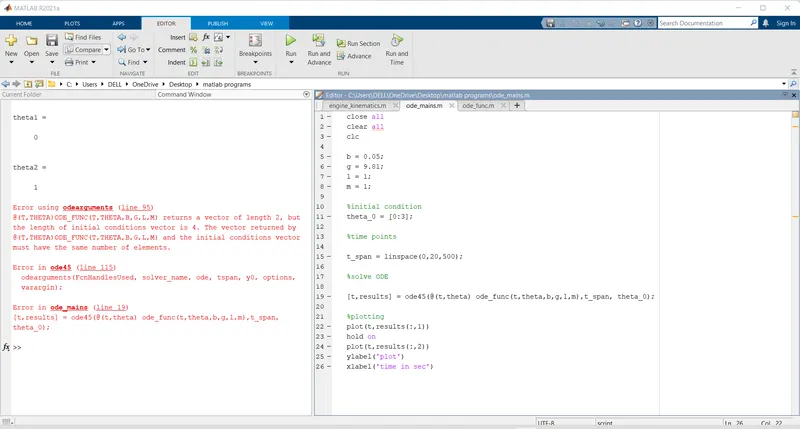
i use colon insted of semicolon
OUTPUT
You tube link for animation video
https://youtu.be/0JLumIgzYW0