Week 3 - Solving second order ODEs
- Aim:
To solve the second order ode function using matlab which create animation of motion of pendulum.
- Objective:
To write a program that solves the following ODE represent the equation of motion of a simple pendulum with damping.
- Introduction:
The pendulum is a body or mass suspended from a fixed point so that it can swing back and forth under the influence of gravity. Pendulums are used to regulate the movement of clocks because the interval of time for each complete oscillation, called the period, is constant. The period depends on the length of the pendulum and also to a slight degree on the amplitude, the width of the pendulum's swing.
Theory:
ODE represent the equation of motion of a simple pendulum with damping is given below,
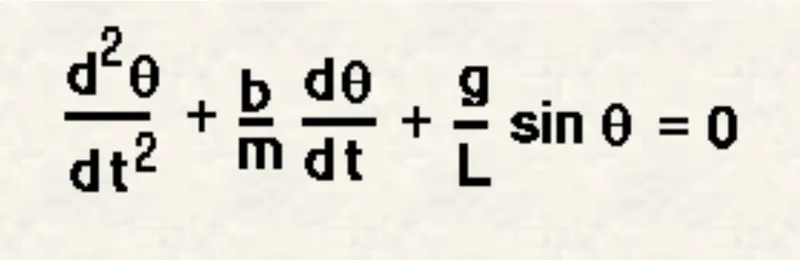
In the above equation,
b= damping coefficient.
g= gravity (m/s^2).
m= mass of ball (kg).
l= length of the string (m).
Parameters of simple pendulum:
b=0.05,
g=9.81,
m=1,
l=1,
for time period= 0-20 sec,
angular displacement= 0 angular velocity= 3 rad/s^2.
- Program:
program for function:
function [dtheta_dt]=ode_function(t,theta,b,g,l,m)
theta1=theta(1);
theta2=theta(2);
dtheta1_dt=theta2;
dtheta2_dt= -(b/m)*theta2-(g/l)*sind(theta1);
dtheta_dt=[dtheta1_dt;dtheta2_dt];
end
Program:
clear all
close all
clc

%input
b=0.05;
g=9.81;
l=1;
m=1;
r=g/l;
k=b/(m*l);

% initial condition
theta_0=[0;3];

% time
t_span=linspace(0,20,100);

% solve ode
[t,X]=ode45(@(t,theta) ode_function(t,theta,b,g,l,m),t_span, theta_0);

figure(1)
%plot for displacement and velocity vs time
plot(t,X(:,1))
grid on;
hold on;
plot(t,X(:,2))
ylabel('plot')
xlabel('time')

figure(2)
%plot for displacement vs velocity
plot(X(:,1),X(:,2))
ylabel('displacement')
xlabel('velocity')

%animation

    ct=1;
for i=1:length(t)
    X1=l*sind(X(i,1));
    Y1=-l*cosd(X(i,1));
    X0=0;
    Y0=0;

     figure(3)
     plot([-1 1],[0 0],'linewidth',3,'Color','b');
     axis([-1.5 1.5 -1.5 1.5]);
     line([X0 X1],[Y0 Y1],'linewidth',2,'color','g');
     hold on;
     plot (X0, Y0,'O','markersize', 3, 'markerfacecolor','y');
     plot (X1,Y1,'O','markersize', 20, 'markerfacecolor','r');
     title('Damping of simple Pendulum');
     legend('Support rod', 'length of pendulum', 'Fixed point', 'Ball of pendulum');
grid on;
hold off;

M(ct)=getframe(gcf);
ct=ct+1;

end

movie(M);
videofile=VideoWriter('simple_pendulum.avi','Uncompressed AVI');
open(videofile);
writeVideo(videofile,M);
close(videofile);
- Explaination:
1. In this function program the second ODE simplified to first order ODE by introducing the term theta1 and theta2
2. Then theta1 and theta2 is differentiated and the dtheta_dt given the value of displacement and velocity.
3. We input the required parameter to solve ODE like damping coefficient, length of string, mass of ball, gravity, etc.
4. And then we input the intial condition and time interval of simple pendulum.
5. ODE45 command used to solve second ODE.
[t,X]=ode45(@(t theta) ode_function(t, theta,b,g,l,m,),t_span, theta_0)
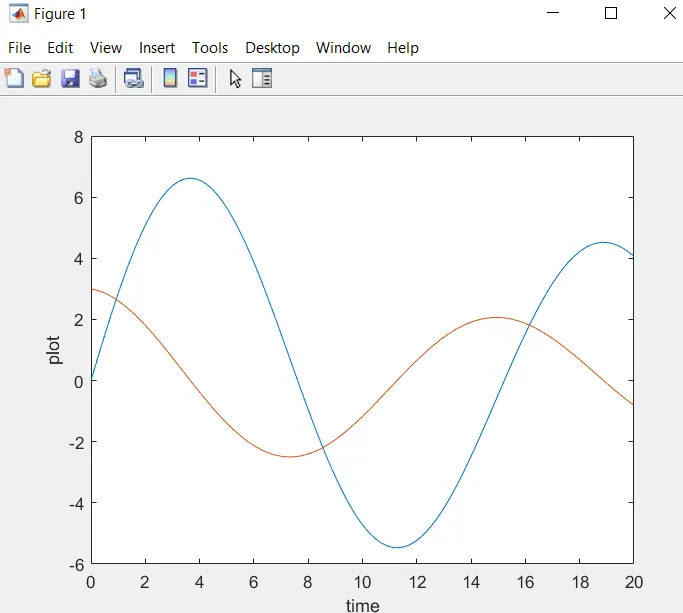
6.With help of plot command we plot graph of displacement and velocity vs time.
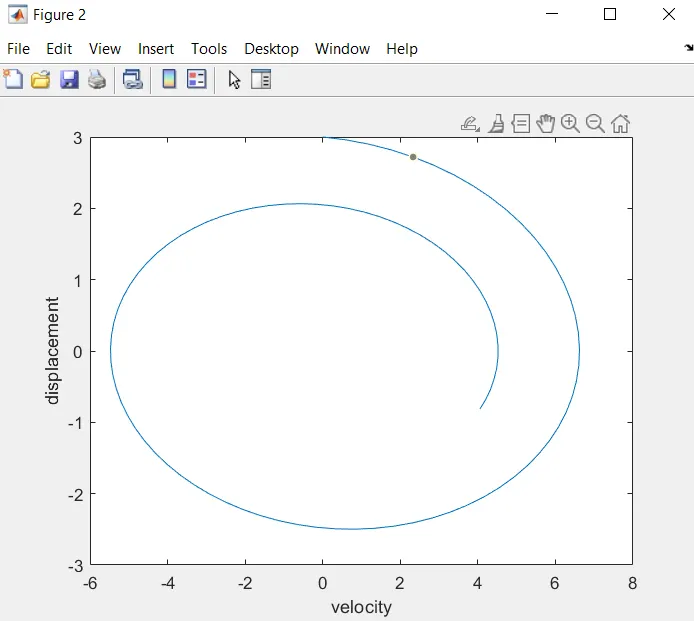
7. then also plot displacement vs velocity graph.
8. For animation of simple pendulum we find the position of string
X0=0, Y0=0
X1=l*sin(X(i 1)), Y1= -l*cos(X(i 1))
9. Using for loop we change the values of time and counter also add.
ct=1;
for i=1:length(t)
10.Using plot command simple pendulum is created.
plot([-1 1],[e e], 'linewidth', 3, 'Color', 'b'); axis([-1.5 1.5 -1.5 1.5])
line([xe x1], [Ye Y1], 'linewidth',2, 'color','g')
plot (xe, ve, 'o', 'markersize', 3, 'markerfacecolor', 'y')
plot (X1,Y1, '0', 'markersize', 20, 'markerfacecolor', 'r')
title('Damping of simple Pendulum'); legend('Support rod', 'length of pendulum', 'Fixed point', 'Ball of pendulum')
11. Using movie command we create animation of simple pendulum.
- Output:
displacement and velocity vs time graph
Displacement vs Velocity graph
- Conclusion:
Animation of the simple pendulum is uploaded on google drive link is given below,
https://drive.google.com/file/d/1yv6-I0Voz8dv6oE0ndYExlWDbMh-Q3co/view?usp=sharing