Week 3 - Solving second order ODEs
AIM : To calculate second order differential equations using Matlab Coding and to plot velocity vs displacement w.r.t time and make animation video of pendulum motion.
OBJECTIVE :
- To write a program to calculate an second order equations for pendulum motion.
- To write a program to plot a velocity vs displacement of pendulum w.r.t.time.
- To find motion of pendulum and create animated video w.r.t. velocity.
THEORY :
Air Standard Cycle:
A pendulum is a body suspended from a fixed support so that it swings freely back and forth under the influence of gravity. When a pendulum is displaced sideways from its resting, equilibrium position, it is subject to a restoring force due to gravity that will accelerate it back toward the equilibrium position. When released, the restoring force acting on the pendulum's mass causes it to oscillate about the equilibrium position, swinging it back and forth. The mathematics of pendulums are in general quite complicated. Simplifying assumptions can be made, which in the case of a simple pendulum allow the equations of motion to be solved analytically for small-angle oscillations. This ODE represents the equation of motion of a simple pendulum with damping
%program for plotting graph and creating animation of pendulum motion w.r.t.velocity.

clear all
close all
clc

%inputs
b = 0.05;
g = 9.81;
l = 1;
m = 1;

%intial conditions
theta_0 = [0;2];

%time points
t_span = linspace(0,10,1000);

%solve ODE
[t,results] = ode45(@(t,theta) s_ode_f(t, theta, b,g,l,m),t_span, theta_0);

%1 plotting velocity vs displacement graph
plot(t,results(:,1))
hold on
grid on
plot(t,results(:,2))
ylabel('Plot')
xlabel('time')

%2 plotting for animation of pendulum motion
fig =1;
for i = 1:length(t_span)

%initial position of the pendulum

x0 = 0;
y0 = 0;

%final position

x1 = 1*sin(results(i,1));

y1 = -1*cos(results(i,1));

%plotting

figure(2)
%base line

plot([-1,1],[0,0], 'linewidth',6, 'color' , 'k');

% pendulum line

line([x0 x1], [y0 y1], 'linewidth',4, 'color' , 'b');

hold on;

%pendulum ball

plot (x1, y1, 'marker', 'o', 'markerSize', 25, 'markerfacecolor','g');

grid on

axis ([-2 2 -2 2]);

pause(0.00000000001);

hold off;
M(fig)= getframe(gcf);

fig = fig+1;
end

%program for coverting animation graph to video file
movie(M)
videofile= VideoWriter('s_ode.avi','Uncompressed AVI')
open(videofile)
writeVideo(videofile,M)
close(videofile)
%funtion code for main code.
function [dtheta_dt] = s_ode_f(t,theta,b,g,l,m)
theta1 = theta(1)
theta2 = theta(2)
dtheta1_dt = theta2;
dtheta2_dt = -(b/m)*theta2 - (g/l)*sin(theta1);
dtheta_dt = [dtheta1_dt; dtheta2_dt];
endCODE EXPLAINATION :
1) To solve the second order differential equation function is required which accepts the values of t, theta, b, g, m, t_span, theta_0, so function code with filename(s_ode_f) is declared for further calculation of ode. Due to this code are divided into two parts.i.e., main code and function code. In the end the terms dthetha1_dt, dtheta2_dt are made to an array of single variable.
2) The program main code in the starting with the input variable be like b,g,l,m.
3) Equation is converted in to first order ode velocity, displacement, in the below graph of this equation are shown i.e., velocity VS displacement.
4) To obtain result, the ode which requires values for time therefore the time points are generated using linspace command which generates 1000 values between 0 to 10). In the above line ode45 is a default solver in matlab and it accepts the values ode t,theta as in inputs ode_func is our function which we have written earlier. t_span is the time span and theta_0 is the initial condition consisting velocity & displacement values as an array.
RESULTS :
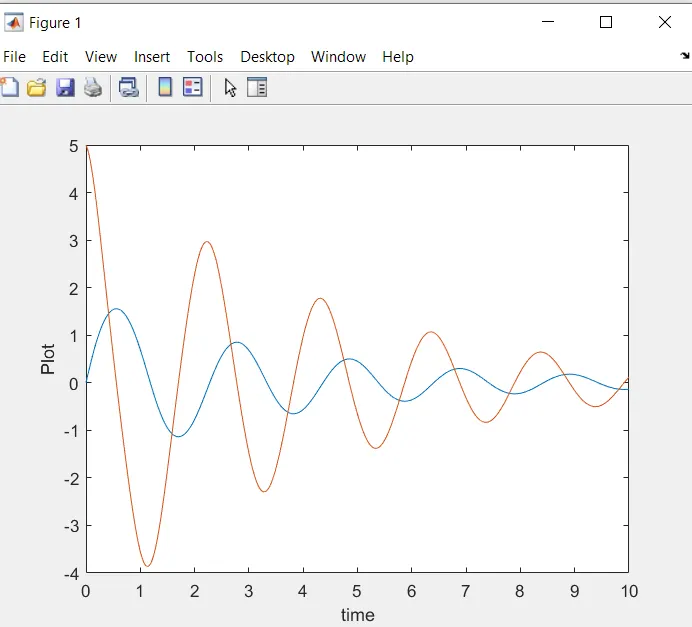
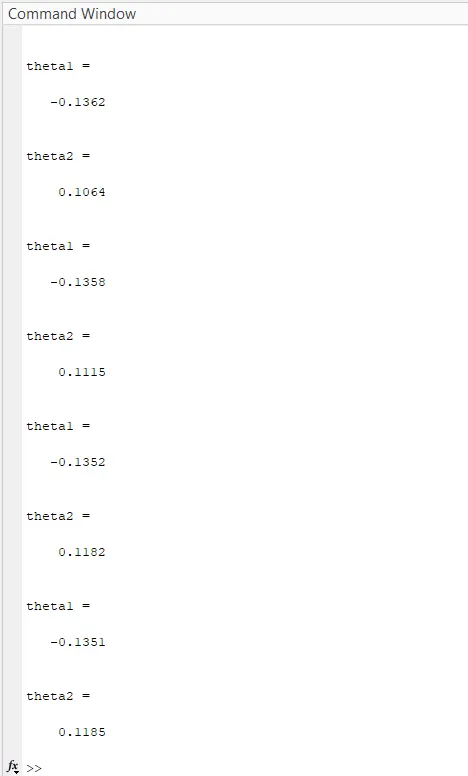
CONCLUSION : The second order differential equation is successfully calculate the values of final outputs and give proper velocity vs displacement graph, find motion of pendulum as shown in animated video link.
ANIMATED VIDEO LINK:-