Week 3 - Solving second order ODEs
AIM-
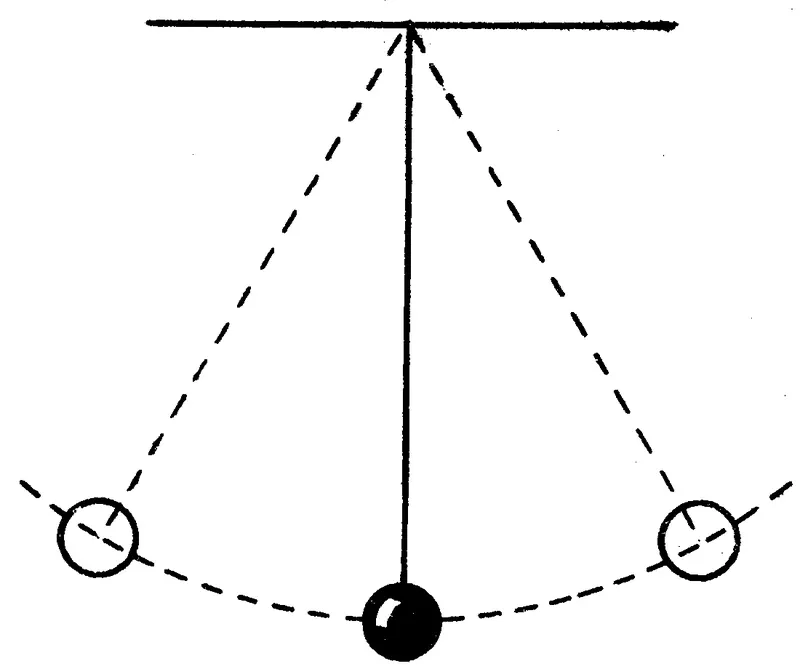
*To create an animation of simple pendulum by using second order differential equation by using ode solver function
* For simulation the second order equation of the simple pendulum is:
*To create a plot between angular velocity and displacement of simple pendulum by using ode45
CONCEPT-
*for a simple pendulum with a damping factor , the equation of simple pendulum is

Where
b = damping coefficient (N-m/s)
m= Mass of the bob (kg)
g= Gravitational acceleration (m/s)
- The above equation is having a differential power of order 2. The use ode45 solver which is developed on the basis of RK method which uses the simple differential equation to solve the higher order differential equation
OBJECTIVE
- By using ode45 solver which is an inbuilt solver in the MATLAB. The ode45 solver should require simple differential equation to solve any kind of higher order differential equation
- By taking constant we can solve the higher order diffential equation.
FUNCTION CODE
function [dtheta_dt]= ode_func(t,theta,b,g,l,m)
theta1=theta(1);
theta2=theta(2);
dtheta1_dt=theta2;
dtheta2_dt=-(b/m)*theta2-(g/l)*sin(theta1);
dtheta_dt = [dtheta1_dt; dtheta2_dt];
end
- In tis function program, the second =order ode is simplified to the first order ode by introducing the term thetaa1 & theta2.
- Then theta1 & theta2 is differentiated and the dtheta_dt given a column matrix
MAIN PROGRAM
clear all
close all
clc

b=0.05;
g=9.81;
l=1;
m=1;

%initial condition
theta_0=[0;3];

%time points
t_span = linspace(0,20,500);

% solve ODE
[t,results] = ode45(@(t,theta) ode_func(t,theta,b,g,l,m),t_span,theta_0);

%plotting
figure(1)
plot(t,results(:,1))
hold on
plot(t,results(:,2))
ylabel('velocity(red) & displacement (blue)')
xlabel('time')

%Animation
ct=1;
for i=1:length(results(:,1))
    x0=0;
    y0=0;
    x1=l*sin(results(i,1));
    y1=-l*cos(results(i,1));

    figure(2)
    plot([-1 1],[0 0],'linewidth',5,'color','[0 0.3 0]')
    hold on
    plot([x0 x1],[y0 y1],'-o','markersize',10,'markerfacecolor','r','markeredgecolor','r','linewidth',4)
    hold on
    plot(x1,y1,'marker','.','markersize',40)

    axis([-2 2 -2 2])

    M(ct) = getframe(gcf);
    hold off
    ct=ct+1;
end


%movie & videofile
movie(M)
v_f = VideoWriter('Pendulum_challenge1.avi','Uncompressed AVI');
open(v_f)
writeVideo(v_f,M)
close(v_f)
- clear all, close all , clc are used to clear the workspace to clear the graph that exists and clear the command window
- there are fix parameter for the program like
length =1
mass= 1 kg
damping coefficient b=0.05
acceleration due to gravity g= 9.81 m/s2
time period =0-20sec
angular displacement =0 , angular velocity =3rad/sec
- t_span is a command used in the ode45 solver which specifies the time span of the iteration that are going to solve the ordinary differential equation.
- Ode45 is a function in MATLAB that solves ordinary or partial differential equation using a numerical method. In this problem the highest order is 2. We have to take two constant values so that the equation is changes to simple differential equation.
- The ode45 has a syntax in which we need to specify which should be ‘t’ and ‘y’ and the output may be of (t,y,args) and a timespan
- Syntax of a ode45 solver is
[t,results] = ode45(@(t,theta) ode_func(t,theta,b,g,l,m),t_span,theta_0)
- Figure 1 is going to tell how the damping is done for the pendulum. The angular velocity and displacement will come to rest at end of the function.
- Plotting the values for the angular velocity and the displacement by using using plot command
- Label the X & Y through label command
- To animate the motion of simple pendulum, loop is used to create the specified set of points to keep the bob at different locations.
- At each and every point of thr bob the ct command which is used to count each and every position and stored the data
- After that to make a movie ‘M’ is used to create a flim of the stored data of the motion of the pendulum
- videoWriter command is used so that the name of the file and type of data is stored in it
- Writevideo command is used to create the video animation by using M file
- Close command is used to close the video file
ERROR
Error 1-- using the captical C in the clear all due to which error ocured that’s why have to used small c
Error 2—in the for loop for the animation when value of y1 was in positive due to which I got the pendulum but in the upward direction which was wrong that’s why y1 valuse should be in Negative
Error 3—while using the ‘MarkerFaceColor’ I was not aware of the capital letter of the command letter of the command to be specified
OUTPUT
- A plot is drawn between the angular accerlation and displacement of the motion of simple pendulum
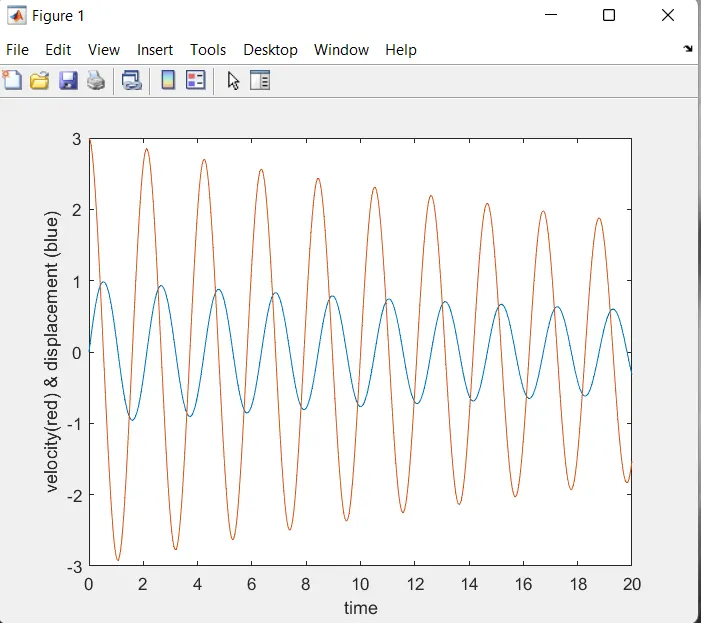
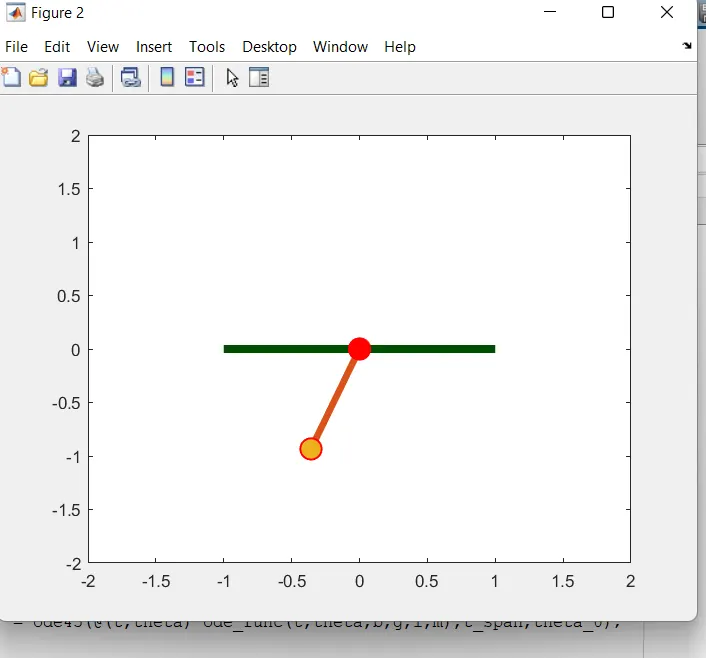
- At the end of the t_span both the displacement and angular velocity becomes zero and motion of simple pendulum becomes zero which become rest
CONCLUSION
- We have animated the simple pendulum using the ode45 solver where the second order is reduced to a simple differential equation where it is easy to solve the given equation
The animation which is been created through the program has been uploaded in the YOUTUBE link is pasted below .