Week 3 - Solving second order ODEs
To write a program in Matlab that will simulate the pendulum motion with explaination of code.
clear all
clc
close all
% To write a program in Matlab that will simulate the pendulum motion with explaination of code.
% Inputs
% Damping co-efficient(b)
b = 0.05;
% Mass(m) in kg.
m = 1;
% length of pendulum(l) in meters.
l = 1;
% Acceleration due to gravity(g) in m/s2.
g = 9.81;
% Motion between 0-20 sec
t_span = linspace(0,20,200);
% For angular displacement=0,angular velocity=3 rad/sec at time t=0.
theta0 = [0;3];
% Now function to solve the Second order differential equation to simulate the pendulum motion.
[t,results] = ode45(@(t,theta) ode_func(t, theta, l, b, g, m),t_span, theta0);
plot(t,results(:,1),'linewidth',2)
hold on
plot(t,results(:,2),'linewidth',2)
ylabel('Plot')
xlabel('Time')
%let us create Animation of motion of the pendulum
thetam = results(:,1)
x0 = 0;
y0 = 0;
ct = 1;
for i= 1:length(thetam)
    T_SPAN = thetam(i);
    x1 = l*sin(T_SPAN);
    y1 = -l*cos(T_SPAN);
    figure(2)

    plot([-1,1],[0,0],'linewidth',7,'color','g');
    hold on
    plot([x0 x1],[y0 y1])
    plot(x0,y0,'o','markersize',3);
   plot(x1,y1,'o','markersize',20,MarkerFaceColor= 'black');
   axis([-2 2 -2 2]);

   pause(0.03)
   hold off
   M(ct) = getframe(gcf);
   ct = ct+1;
end
movie(M)
videofile = VideoWriter('Pendulummotion.avi','Uncompressed AVI')
open(videofile)
writeVideo(videofile,M)
close(videofile)
Output Graphs
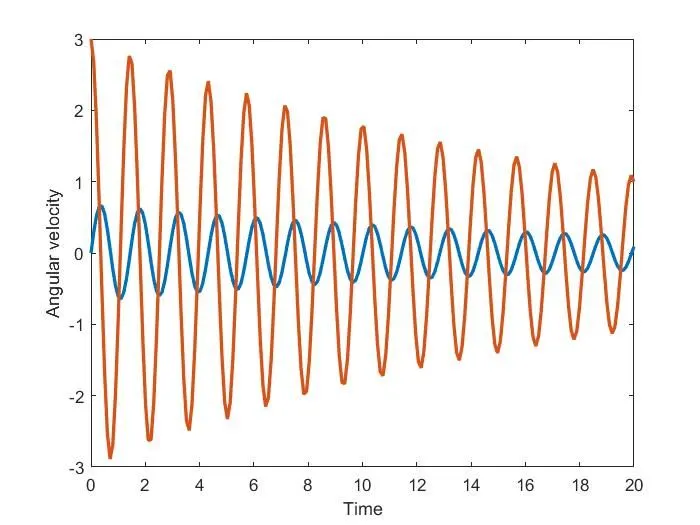
Animation of motion of the pendulum
Please find the given below link to view the Pendulum motion.
https://youtu.be/p95qXBjw1Pg
https://drive.google.com/file/d/1koEA-n9b5WQpVNanPV_x_DqarCbXADr9/view?usp=sharing
Step wise explanation of your code.
- Using the Ode45 command to solve the second order differential equation
- Ode45(@(t,theta) ode_func(t, theta, l, b, g, m),t_span, theta0) where we are using ode_func as a pre defined second order function.
- Now we will plot the angular velocity with time
- At last we have generated the Animation movie of the pendulum.
- firstly, define the starting point or fix point of pendulum as (0,0), then give the second co-ordinate of pendulum as cosine and sine component multiply by length.
- Create the wall line by giving the co-ordinates [-1,1],[0,0] with line-width.
- Now plot all the lines and and bob with marker command and generate the movie command.
Errors faced while programming
- Use the appropriate Figure No. while plotting line.
- Use hold on command at right position, else you will get multiple motion of pendulum simultaneously.
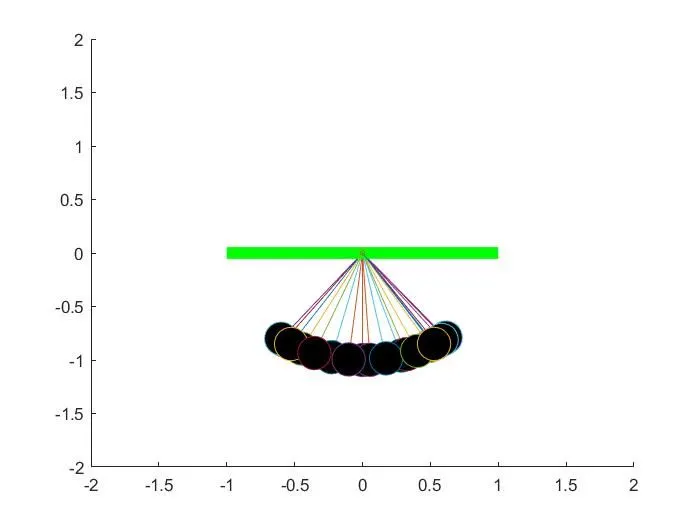
Resolution of those errors
- Make sure to use figure(2) while plotting the lines, else it will create the animation of pendulum with graph.
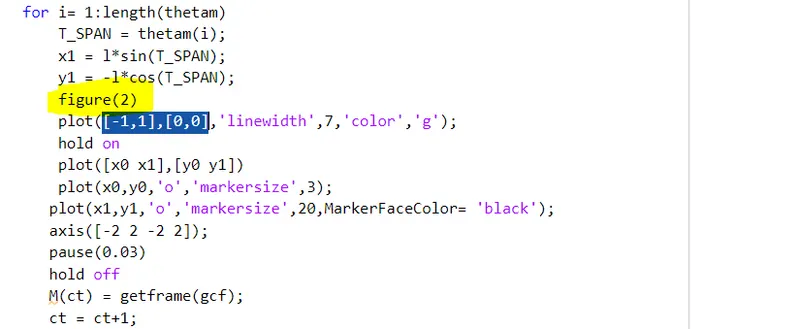
- Use hold on command just before while plotting the pendulum length and bob, else you will get multiple motion of pendulum simultaneously.