Week 3 - Solving second order ODEs
program on the simple pendulam
taken the inputs as given in the question
ball= ,length = ,gravity=,mass =
to identify the moement of the pendulam we required time and we required at each intervel so we used the linspace command
accleration and velocity can be found by the differentation using the time
acceration will be acheivied by the second order dervation of displacement that is angular accelaeration
displacement can be found by the movement of pendulam with respect to 'theta'
to determine the acceration and velocity,we use the sub program as the 'function'
in this program we determine the second order derviation and first order derivation for the program
with this
in the main program we use the result from the sub program by derviating the command ode45
this command help us to achieve the devation of the program and the function values ,insital and end values and time peirod
by using this we are able to form the colume matrix of the equation
later the plot the graph for the results and total colume matrix
later ploted the graph for the displacement and the colume matrix
to animated the simple pendulam
we use the for loop and the angle of deviation in time insital position are taken as the 0 ,0 cordinates
later by using the for loop i=1:length(t) command
the movement in the y axis are consider as the x1=l*sin(theta)
similiary, in x axis consider as the y1=l*cos(theta)
ploted the graph using the limits to the x x axis and the y axis and
and the movement of the line is given
to make the ball we use the maker as osymber
to continue in the loop we make the counter =1 before the loop
and before the end of the loop as ct+1
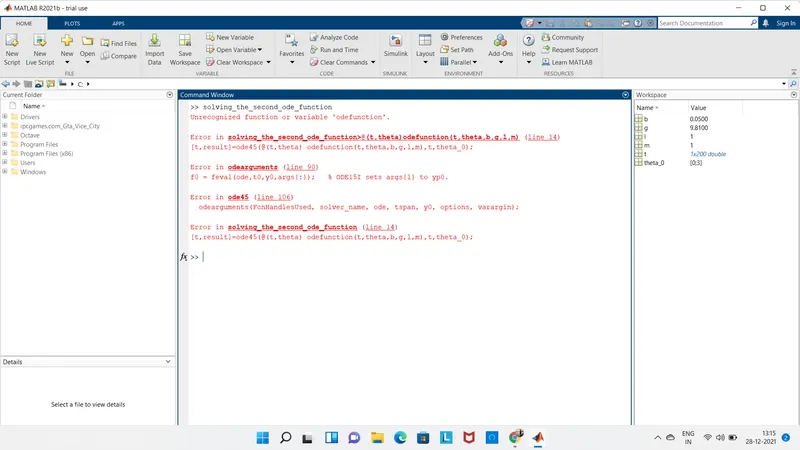
ERROR FOUND:
while doing the program the using of the ode45 was making a lot of troble
using the sub function is unable to recreate in the main function
using the animation of the program was bit found difficuit in finding the limits
marker command also found difficuit to use
ERROR OVERCOME
to get the concept on the ode45 i onceagain used the classes
to over come the sub program i used the invaid command as the program it was shown in the coomand promt
the animation of the program again i refered the robatic arm how to use the commands for the program
video link is provided below https://youtu.be/O5P3dG69SJM